Blog
Locking down the third-party scripts your analytics SDK loads
Locking down the third-party scripts your analytics SDK loads

Sai kumar Battinoju
Lead Integrations Engineer
10 min read
November 10, 2026
Third-party code has had a rough few months. On October 29, a performance-monitoring script on Polymarket's site was replaced with malicious code after the script provider's DNS was hijacked, and Polymarket is now repaying traders about $3.9 million. From August to October, worm-style attacks also pushed malicious versions of trusted npm packages, with one wave reaching more than 400 packages. Both times, code from a source people trusted changed, and every site that loaded it ran the new version with full access to the page.
After looking at what's happening in browser side scripts, we wanted the scripts that run through RudderStack to be the ones we tested, byte for byte. When a security team reviews a customer data SDK, they usually approve its domain and move on. The scripts that SDK loads afterwards tend to get less attention, and we cover those in this post.
Where third-party code gets in
Every website loads code from several sources, and each one is a source you are trusting. With RudderStack, that includes the SDK you install and, when you use device mode destinations, the scripts that each tool's provider publishes for its own tool.
There are two ways to install the JavaScript SDK. With the npm package, our code is bundled into your app and served from your own domain. To the browser it is first-party code, and you control exactly which version ships. With the CDN snippet, you trust one RudderStack domain and the version it serves.
Cloud mode vs. device mode. RudderStack can deliver events to a tool like Amplitude in two ways. In cloud mode, the SDK sends events to RudderStack, and our servers forward them to Amplitude, so nothing from Amplitude runs on your page. In device mode, the SDK loads Amplitude's own JavaScript SDK into your page and hands events to it in the browser. Teams pick device mode when a tool has to run in the browser, such as session replay, heatmaps or in-app messages.
For each device mode integration, the SDK runs a thin wrapper that loads the tool's own browser SDK (Amplitude, GA4, Mixpanel and others) and forwards your events to it. We support more than 80 web device mode integrations today. Each one pulls a script from a domain its provider controls.
Each tool publishes its scripts in very different ways:
- Exact versions, such as
/2.42.1/. The content should never change. - Evergreen URLs, such as
/latestor/v2. The content changes whenever the provider ships. - Account-specific URLs that embed your project or account ID, often with no version at all.
An evergreen URL means any change on the provider's side, including a malicious one, reaches your site on the next page load. This is mostly a web problem. On mobile, the app owner adds each third-party SDK to the project at build time and pins its version there, so nothing is fetched at runtime.
With an evergreen URL, your site runs whatever the provider published most recently, and nobody on your side reviewed it. We wanted the script on your page to be the one we tested, and to stay that way.
What we shipped
Three changes work together. Exact versions fix which release your site runs, integrity checks prove the bytes haven't changed, and strict mode keeps out anything we can't verify.
Exact versions, on by default
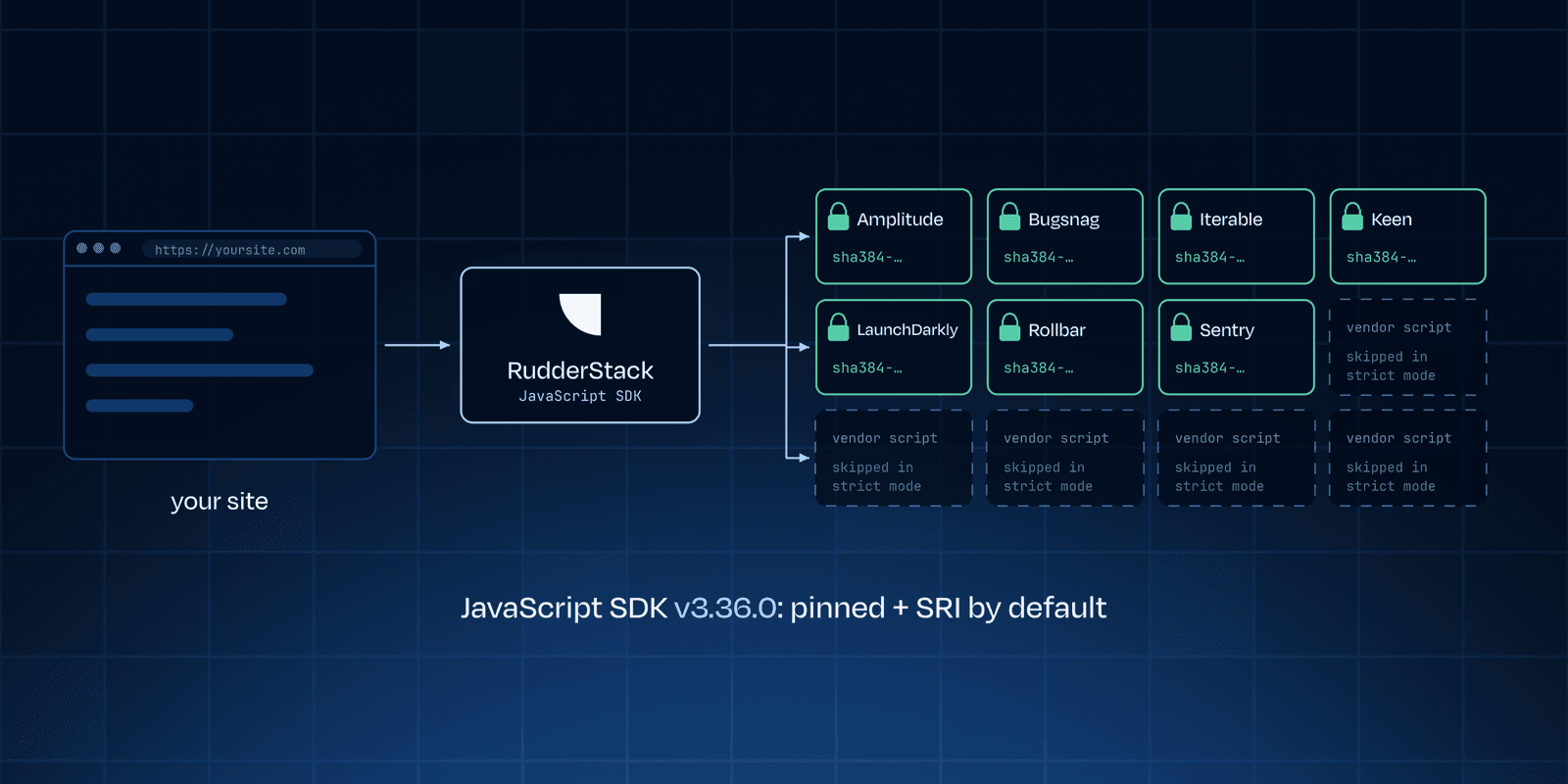
11 of 83 safeguarded today (7 pinned with SRI + 4 with no third-party script) now load an exact third-party release instead of a moving one: Bugsnag, Iterable, Keen and LaunchDarkly get new pins, and Amplitude, Rollbar and Sentry keep the exact versions they already used. Your site runs the release we tested, whatever the provider ships later.
We pin an integration only when all of this holds:
- An exact-version URL exists on the same host the integration already loads from, so you need no new Content Security Policy entries.
- The host's CORS headers allow the browser to run an integrity check.
- The pin covers every third-party script the integration puts on the page.
- Every existing feature of the integration keeps working.
Subresource Integrity (SRI) checks
A pinned URL still points at a server the provider controls. So for each pinned file, confirm the bytes match and store its SHA-384 hash in the integration code. CI re-checks the stored hashes against the live files. The SDK adds the hash as the script tag's integrity attribute, and the browser refuses to run the script if the downloaded bytes differ. A blocked script affects only that one destination; the SDK and your other destinations keep running.
Strict mode, opt-in
For integrations we cannot pin, the default is unchanged: they load from the provider's usual URL. Strict mode turns that off. It is one global load option:
JAVASCRIPT
Under strict mode, an integration that cannot be pinned is stopped before its third-party script is ever added to the page. The SDK logs Skipped <name>: its vendor script cannot be pinned (strict mode). and moves on. The option name and log message still say "vendor"; they refer to these same third-party scripts.
Behavior by integration type
- Pinned with SRI (Amplitude, Bugsnag, Iterable, Keen, LaunchDarkly, Rollbar, Sentry): default: exact version + SRI; strict mode: exact version + SRI.
- No third-party script (Lotame, Ninetailed, Optimizely, Shynet): default: loads; strict mode: loads.
- When you set a script URL (GA4, GA4 V2 and Google Ads SDK base URL, Appcues native SDK URL, Rockerbox custom domain, Mixpanel custom library URL): default: loads from your URL; strict mode: loads from your URL. Without a custom URL, these follow the last item: they load as usual by default and are skipped in strict mode.
- Third-party script that cannot be pinned: default: provider's usual URL, unchanged; strict mode: skipped.
Strict mode does not apply to custom integrations you add with addCustomIntegration, because you control that code.
Keeping pins up to date
With pinning, a provider's new release reaches your site only after we validate it and ship it in our integration, so we work to keep that delay short.
Pins ship inside our integration bundles, which follow your core SDK version by default. If you load the SDK from a URL that tracks releases, new pins reach your site on the next page load. If you pin the SDK to an exact version, you get them when you upgrade.
On our side, CI verifies every stored hash, and an existing workflow tracks major upgrades of the third-party scripts. Next, we are automating patch and minor bumps: the system opens the pull request, end-to-end tests validate it, and the on-call engineer reviews and merges it.
We deliberately kept the public setting to one switch. Only some providers publish pinnable releases today, so per-destination version choices would add a lot to configure for little gain. We will revisit that as coverage grows.
The setup we recommend
The tightest posture loads the least code from domains you do not control. Our SDK hardening guide already covers most of this, and strict mode now adds a hardened option for teams that need device mode.
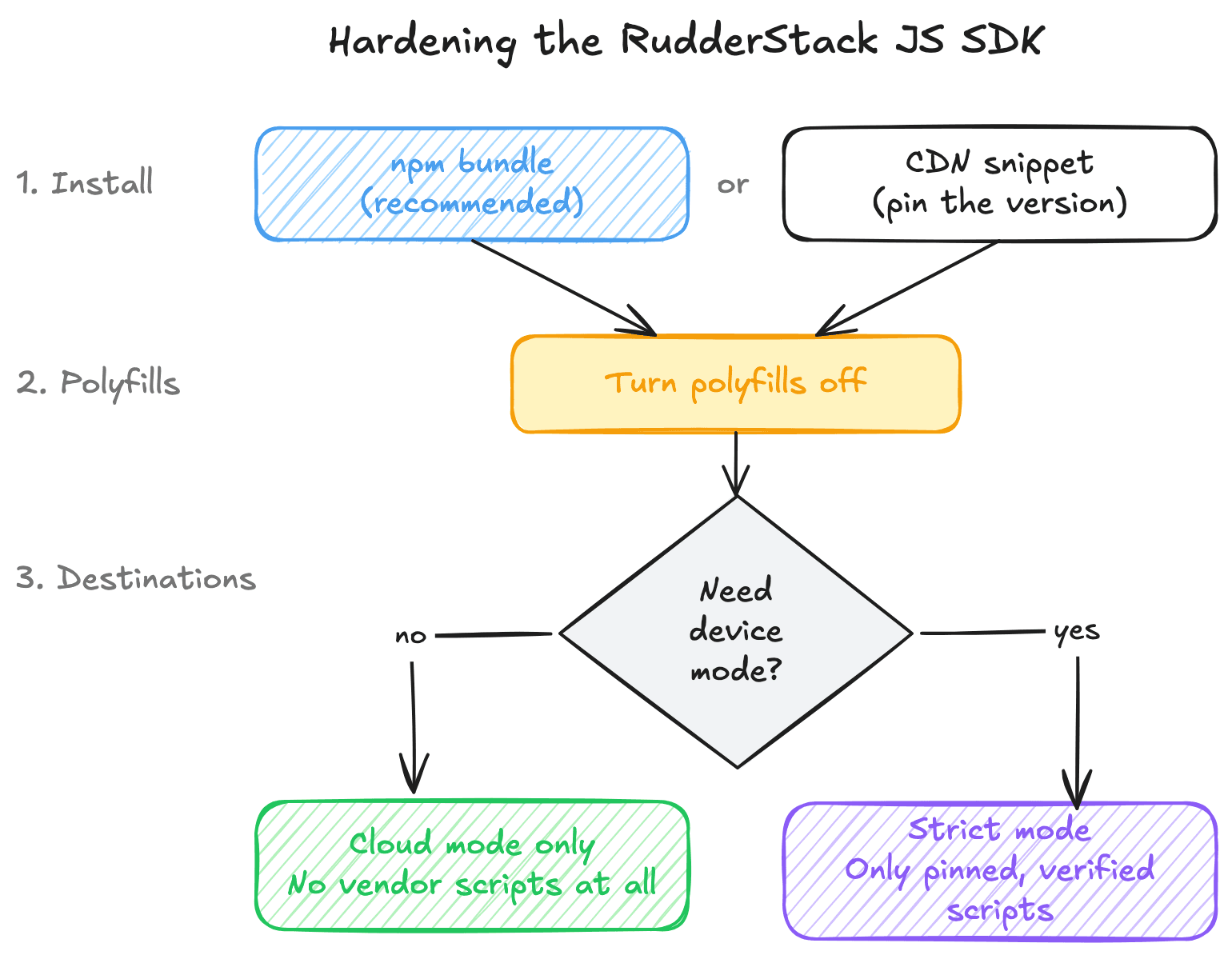
Every setup starts with the same two steps, then forks on whether you need device mode.
- Install from npm with the bundled export. Import from
@rudderstack/analytics-js/bundled. The plugins ship inside your bundle, so the SDK downloads none at runtime. You can also self-host the plugin and integration files, or serve the SDK from your own domain. - Turn off polyfills. Set
polyfillIfRequired: falseso the SDK never adds a polyfill script from a third-party domain.
Then choose one path:
- No device mode (most hardened): mock the source config. Pass a
getSourceConfigfunction that returns your source with an empty destinations list. The SDK makes no config request and loads no third-party scripts. Cloud mode destinations still receive every event, because RudderStack routes them on the server. The hardening guide has the full config. - Need device mode: turn on strict mode. Keep the real source config, because the SDK needs it to load device mode destinations. Set
vendorSdkVersionPolicy: 'strict', and the SDK loads only the third-party scripts it can pin and verify.
The device mode path looks like this:
JAVASCRIPT
On the CDN snippet? Pin sdkVersion to an exact release in the snippet. The SDK derives the plugin and integration paths from its own URL, so that one change pins them too, unless you override destSDKBaseURL or pluginsSDKBaseURL. A pinned SDK does not update itself, so watch the releases and upgrade often.
What this does not cover yet
We pin every integration where the provider makes it possible and we can cover everything it loads. That list will grow.
- What a hash proves: SRI confirms you are running the file we tested. It does not prove the third-party code is safe.
- What SRI covers: Code that a third-party script loads later, remote settings and iframes sit outside the check. Some integrations load further code this way, so we pin them only once we can cover everything they load. That is our next phase.
- Scripts that cannot be pinned: A few providers build a script per customer account, and others serve one unversioned URL that changes in place. That holds however you install those tags, with or without a customer data platform. Strict mode lets you exclude them instead of trusting them.
- Scripts you host yourself: If you point an integration at your own copy of a third-party script, we load it as given. Next, we plan to let you add an SRI hash for that URL in the dashboard.
Get started
Exact versions and SRI checks are on by default in the latest JavaScript SDK (v3.36.0 or later), so upgrading is enough to get them. Strict mode is one load option. Both follow the controls in the OWASP Third Party JavaScript Management Cheat Sheet, and the SDK source is on GitHub.
For the full setup, including the cloud-mode-only config and the hardened CDN snippet, see Harden the JavaScript SDK.
Thanks to Sai Kumar Battinoju and the SDK team, who designed and shipped this.
Published:
November 10, 2026



Get started today
Start driving better business outcomes with your customer data in less than a week
Book a demo
Explore use cases with an expert and see RudderStack in action.
Implement RudderStack
Start collecting and enabling real-time customer data everywhere it's needed.
Drive better outcomes
Supercharge your analytics, product, growth, and AI teams.