Blog
Data models explained: Types, use cases, and examples
Data models explained: Types, use cases, and examples

Brooks Patterson
Head of Product Marketing
12 min read
August 1, 2026

A data model is a structured blueprint that defines how data is organized, stored, and accessed within a system, specifying its entities, attributes, relationships, and the rules that govern data integrity.
Without that structure, data is just noise. You can accumulate enormous volumes of information and still find it unusable when there is no framework defining how elements connect and interact. Data models transform scattered details into a coherent, reliable system, one that enables consistent interpretation across teams, accurate reporting, and confident decision-making from a single source of truth.
Main takeaways
- Data models provide structured blueprints for organizing, storing, and accessing data, ensuring consistency and integrity across modern data infrastructures
- There are multiple types of data models, including conceptual, logical, physical, relational, dimensional, object-oriented, hierarchical, and document/NoSQL, each suited to different use cases and technical requirements
- Effective data modeling bridges business needs and technical implementation, supporting everything from e-commerce optimization to regulatory compliance in financial services and healthcare
- Building robust data models requires ongoing collaboration with stakeholders, clear documentation, and strategies for performance, scalability, schema evolution, and integration across systems
- Leveraging tools like RudderStack enables high-quality data flows, real-time validation, and seamless integration, helping organizations maximize the value of their data models
What are data models?
A data model is a structured blueprint that defines how data is organized, stored, and accessed within a database system. Data models help you visualize the relationships between different data elements and establish rules for data integrity. They are essential for effective database design and data management.
When you define a data model, you create a framework that shows what data you collect, how it connects, and what rules govern it. This makes it easier to build reliable databases and applications that use your data correctly.
Key components include:
- Entities: Objects like customers, products, or orders
- Attributes: Properties describing each entity (name, price, date)
- Relationships: Connections between entities (customers place orders)
- Constraints: Rules ensuring data quality and consistency
Data models serve as communication tools between business stakeholders and technical teams. They help translate business requirements into technical specifications for database implementation.
Data model building blocks
Every data model, regardless of type, defines three core things: what data exists, how it relates, and what rules apply to maintain integrity. The four building blocks are:
- Entities: the objects being tracked (customers, products, orders)
- Attributes: the properties of each entity (name, price, date)
- Relationships: the connections between entities
- Constraints: the rules that enforce data quality and consistency
What are the key aspects of data models?
Understanding what makes a good data model helps you create more effective database structures.
Data models provide structure by organizing information in a consistent, logical way. This structure varies by model type: relational models use tables with rows and columns, while hierarchical models use tree-like structures.
Relationships in data models show how different entities connect. These include one-to-one relationships (an employee has one employee ID), one-to-many (a customer places many orders), and many-to-many (products belong to multiple categories).
Data models work at different abstraction levels to serve various purposes. Conceptual models provide high-level business views, logical models add more detail without specifying technology, and physical models include technical implementation details.
The purpose of data modelling is to bridge the gap between business needs and technical implementation. Well-designed models help prevent misunderstandings and ensure systems deliver the right information.
Why do data models matter for modern data infrastructure?
Data models are the foundation of reliable, efficient data systems. Data modeling acts as a crucial blueprint that bridges business requirements and usable infrastructure. They help you avoid common problems like data duplication, inconsistent information, and difficult-to-maintain databases.
With proper data models, you can:
- Ensure data consistency across different systems
- Improve query performance through optimized structures
- Enforce data quality rules automatically
- Support compliance with data regulations
- Make it easier to adapt to changing business needs
Good data modeling practices help organizations manage increasingly complex information flows. They enable you to connect data across cloud services, analytics tools, and operational systems, while also supporting scalability, interoperability, and governance.
Well-designed models provide a single source of truth that underpins advanced analytics, AI workloads, agentic pipelines, and real-time decision-making. When data quality and structure are inconsistent, analytics projects frequently underdeliver on expected returns; well-designed data models help close that gap.
Keep your data models clean with real-time validation
RudderStack's Data Quality Toolkit enforces schema consistency, validates data at ingestion, and prevents downstream quality issues, helping your models stay accurate and efficient.
What are the main types of data models?
1. Conceptual data models
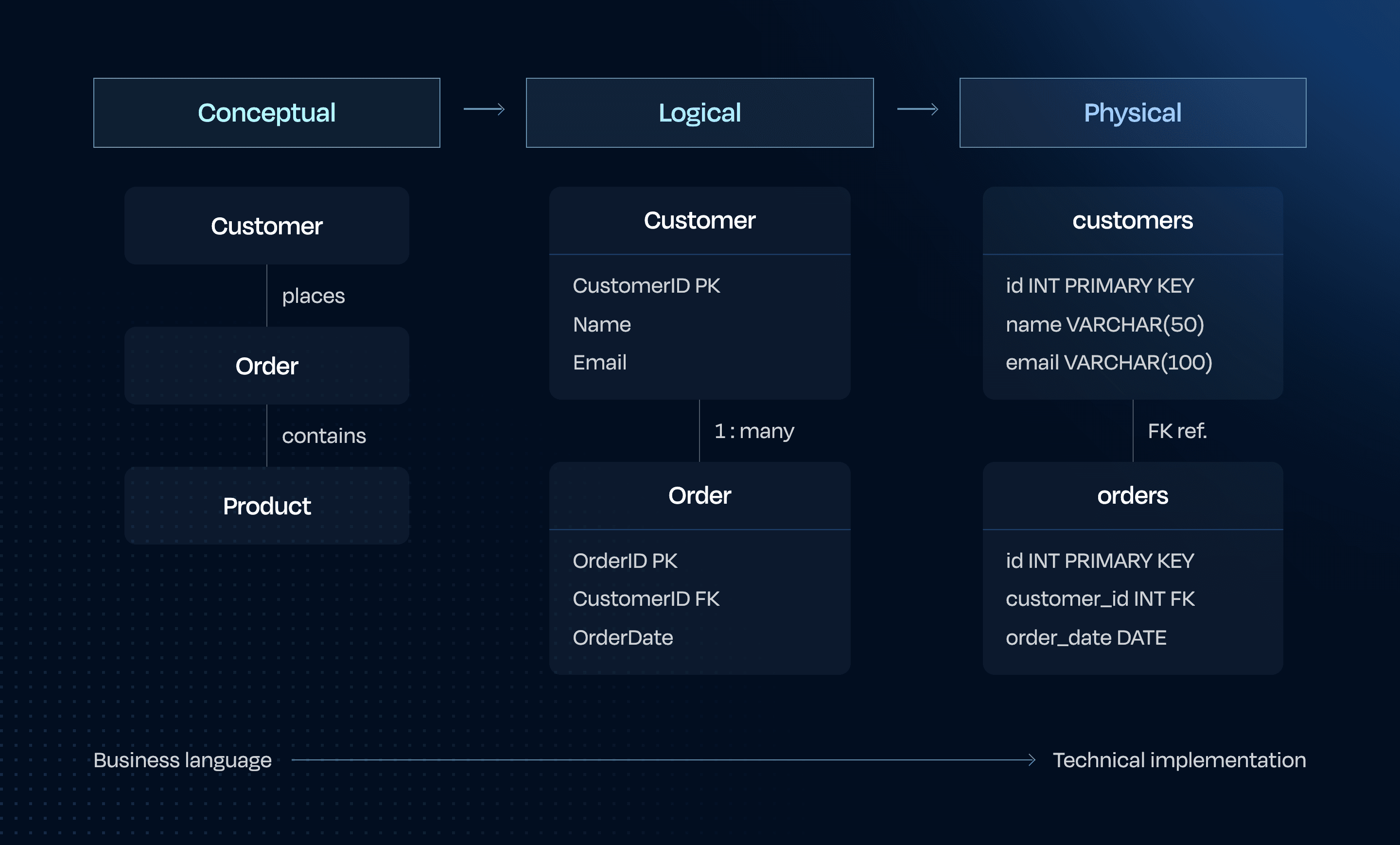
Conceptual models provide a high-level view of what data exists and how it relates, without technical details. They help business stakeholders understand the scope and structure of data. The concise breakdown of conceptual, logical, and physical data models (among many others) clarifies how each serves different stages of understanding and implementation.
These models identify main entities (like Customer, Product, Order) and their relationships. They serve as the first step in database modeling, helping teams align on what data matters to the business.
Example: An e-commerce conceptual model might show Customer, Order, Product, and Payment entities with simple connecting lines showing their relationships.
2. Logical data models
Logical data models add more detail to conceptual models but remain technology-neutral. They define specific attributes, primary keys, and relationship types.
These models often use entity-relationship diagrams (ERDs) to visualize the structure. They bridge business requirements and technical implementation, making them crucial for database design.
Example: The logical model for an e-commerce system would define Customer attributes (ID, Name, Email), Order attributes (OrderID, Date, Status), and specify that one customer can have many orders.
3. Physical data models
Physical data models translate logical models into specific database implementations. They include table names, column data types, indexes, and other technical details.
These models are used by database administrators and developers to create actual database structures. They focus on performance, storage, and efficiency.
Example: In a SQL Server implementation, the Customer table might use INT for CustomerID, VARCHAR(50) for Name, and create indexes on frequently queried fields.
4. Relational data models
Relational models organize data into tables (relations) with rows and columns. They use primary and foreign keys to establish relationships between tables.
This is the most common type of data model, used in systems like MySQL, PostgreSQL, and Oracle. Relational models excel at maintaining data integrity and supporting complex queries.
Example: In database management systems like MySQL or PostgreSQL, you will find Customer tables linked to Order tables through CustomerID foreign keys.
5. Dimensional data models
A dimensional data model organizes data specifically for analytics and reporting workloads. Where relational models are designed for transactional systems that insert, update, and delete records with strict data integrity, dimensional models prioritize query performance and the kind of aggregation and filtering that data and business teams run against a data warehouse.
The core structure separates facts from dimensions. A fact table holds quantitative measurements alongside foreign keys pointing outward to surrounding dimension tables. Dimension tables hold the descriptive context that gives those facts meaning: The customer who made a purchase, the product that was sold, the date the transaction occurred, the region where it was fulfilled.
Star schema is the most widely used implementation. The fact table sits at the center, with dimension tables radiating outward. Because dimension tables are intentionally denormalized, each one contains all relevant attributes in a single flat table. A Date dimension might include columns for day, week, month, quarter, fiscal period, and whether the date falls on a holiday. This design costs storage but simplifies queries and improves analytical performance considerably.
Snowflake schema extends the star by normalizing dimension tables into sub-hierarchies. A Product dimension might connect to a separate Product Category table and a Brand table. This reduces redundancy and storage requirements but introduces additional joins, which can affect query speed. Teams typically choose snowflake schema when dimension hierarchies are complex, frequently updated, or when storage costs are a material constraint.
Both patterns are central to the dimensional modeling methodology formalized by Ralph Kimball, whose Data Warehouse Toolkit remains the standard reference for data warehouse design. Kimball organizes a warehouse around measurable business processes rather than source system structures. A sales process gets its own fact table and dimensions; a marketing campaign process gets another; inventory management a third. Each is designed to answer specific business questions directly, without requiring complex joins across a normalized schema.
Example: An e-commerce data warehouse might include a fact_orders table with one row per order line, joined to dim_customer, dim_product, dim_date, and dim_store. A query for monthly revenue by product category needs only a single join and a group-by, without touching the operational database.
Dimensional models are best suited to analytics, business intelligence, and reporting use cases. For systems that require frequent writes and transactional integrity, relational models remain the appropriate choice.
6. Object-oriented data models
Object-oriented models represent data as objects with attributes and methods. They align closely with object-oriented programming languages like Java or Python.
These models encapsulate both data and behavior, making them useful for applications where code and data structures need to align. They often use object-relational mapping (ORM) to work with relational databases.
Example: A Customer object might contain attributes like name and address, plus methods like calculateLoyaltyPoints() or updateProfile().
7. Hierarchical and network models
These are older types of data models, but still relevant in specific contexts:
- Hierarchical models organize data in tree-like structures with parent-child relationships where each child has only one parent. They are used in XML documents, LDAP directories, and mainframe systems like IBM's IMS. While limited in flexibility, they excel at representing naturally hierarchical information with fast top-down access paths.
- Network models extend hierarchical models to allow many-to-many relationships through explicit pointer systems. Standardized by the CODASYL committee in the 1960s, they represent data as records connected by links called "sets," enabling more complex relationships than hierarchical models while maintaining efficient navigation between related records.
Example: A file system is a hierarchical model where folders contain subfolders and files in a tree structure. Similarly, organizational charts with reporting relationships and XML documents with nested elements demonstrate practical hierarchical model implementations.
Network models appear in geographic systems where locations connect to multiple adjacent points and bill-of-materials systems tracking component relationships.
8. Document and NoSQL models
Document models store data in flexible, semi-structured documents (often JSON or XML). They are part of the NoSQL family and excel at handling varied, changing data structures.
These models are popular for web applications, content management, and situations where schema flexibility is important. They sacrifice some constraints for scalability and flexibility.
Example: A customer profile in MongoDB might store basic info, preferences, and purchase history all in one document with nested arrays and objects.
Data modeling approaches: When to use each type
Different business needs require different modeling approaches. Transactional systems often benefit from normalized relational models, while analytics workloads may perform better with denormalized or dimensional models.
Model type | Best for | Common tools |
|---|---|---|
Relational | Transactional systems, compliance, financial records | MySQL, PostgreSQL, Oracle |
Dimensional | Analytics, BI, data warehousing, reporting | dbt, Looker, Redshift, BigQuery, Snowflake |
Document/NoSQL | Variable schemas, web apps, event streams, user profiles | MongoDB, DynamoDB, Firestore |
Object-oriented | Applications | ObjectDB, Versant |
Hierarchical | Tree-structured data: XML, LDAP, organizational charts | IBM IMS, XML databases |
Conceptual/Logical | Design and planning phases, stakeholder alignment | Lucidchart, draw.io, ERwin |
How do you build an effective data model?
Creating a data model involves several key steps that help you translate business requirements into functional database structures.
1. Identify business requirements
Start by understanding what information the business needs to track and how it will be used. Interview stakeholders, review existing documentation, and identify key questions the data must answer.
Key questions to ask:
- What entities are important to track?
- What information do you need about each entity?
- How do these entities relate to each other?
- What business rules apply to this data?
2. Define key entities and relationships
List all important entities (objects) and determine how they connect. For each entity, identify attributes (properties) that need to be tracked.
Map out relationships between entities, specifying whether they are one-to-one, one-to-many, or many-to-many. This creates the foundation of your data model.
3. Validate the model with stakeholders
Review your data model with business and technical stakeholders to ensure it meets requirements. Create clear data model diagrams that stakeholders can understand and provide feedback on.
Adjust the model based on feedback and validate that it supports all required queries, reports, and processes. This step helps catch misunderstandings early.
4. Optimize and evolve over time
Refine your model for performance, scalability, and changing business needs. Consider normalization levels, indexing strategies, and query patterns.
Document your data model thoroughly and establish processes for managing changes. Data model design should evolve as business requirements change.
What are common real-world use cases for data models?
Data models support critical business functions across industries. Here are some common applications:
E-commerce optimization
In e-commerce, data models help organize product catalogs, customer information, and order processing. They enable personalized recommendations and inventory management.
Key applications:
- Product catalog organization with categories, attributes, and pricing
- Customer profiles with preferences and purchase history
- Order processing with status tracking and fulfillment
Financial services and compliance
Banks and financial institutions use data models to track transactions, manage accounts, and ensure regulatory compliance. They help maintain data accuracy for critical financial operations.
Key applications:
- Transaction recording and account management
- Risk assessment and fraud detection
- Regulatory reporting and audit trails
Healthcare and patient management
Healthcare organizations use data models to manage patient records, treatment plans, and billing information. They help ensure data privacy while supporting quality care.
Key applications:
- Patient records with medical history and treatment plans
- Provider management and scheduling
- Insurance claims and billing processes
What are the most common data modeling challenges?
Creating effective data models involves navigating several common challenges, including:
Schema evolution: As business needs change, your data model must adapt. Plan for flexibility and establish processes for managing schema changes without disrupting operations.
Performance optimization: Balance normalization (reducing redundancy) with query performance. Highly normalized models are theoretically clean but may require complex joins that slow down queries.
Data integration: Different systems often use different data models. Creating consistent models across systems requires careful mapping and transformation.
Scalability concerns: As data volumes grow, models that worked well with small datasets may face performance issues. Consider future growth when designing your model.
RudderStack helps overcome these challenges by collecting data in ways that adapt to your evolving models, validating events in real time to preserve accuracy, and integrating seamlessly with your existing infrastructure to keep pipelines consistent and reliable.
See how RudderStack fits into your data stack
As the agentic CDP for the AI era, RudderStack ensures that high-quality data flows into your carefully designed data models. RudderStack helps maintain data integrity through schema validation, identity resolution, and privacy controls.
By combining solid data modeling practices with RudderStack's reliable data collection and delivery capabilities, you can build a robust foundation for analytics, personalization, and operational use cases.
FAQs about data models
The main types of data models are conceptual (high-level business view), logical (detailed but technology-neutral), physical (database-specific implementation), relational (tables with rows, columns, and keys), object-oriented (data as objects with attributes and methods), hierarchical/network (tree and pointer-based structures), and document/NoSQL (flexible, semi-structured formats like JSON).
A data model is a structured representation that defines how data is organized, stored, and accessed in a database system, showing entities, attributes, relationships, and rules governing the data.
Models in data are formalized frameworks that describe data structure, relationships, and constraints, serving as blueprints for database design and ensuring consistent data management.
An example of data modelling is creating an e-commerce database structure that defines customer profiles, product catalogs, and order processing with clear relationships between these elements.
A data model defines the overall structure, relationships, and rules governing data at a conceptual or logical level. A data schema is the physical implementation of that model in a specific database system, specifying table names, column types, and constraints.
Use a relational model when your data has consistent structure, clear relationships, and requires strong integrity guarantees — typical for transactional systems, financial records, and compliance use cases. Use a NoSQL or document model when your data structure is variable, you need horizontal scalability, or you're working with semi-structured content like user profiles or event streams.
Well-designed data models ensure AI and ML systems receive clean, consistently structured inputs. They define the entities and relationships that feed feature stores, training pipelines, and real-time inference endpoints — making model accuracy directly dependent on data model quality upstream.
Published:
August 1, 2026


Get started today
Start driving better business outcomes with your customer data in less than a week
Book a demo
Explore use cases with an expert and see RudderStack in action.
Implement RudderStack
Start collecting and enabling real-time customer data everywhere it's needed.
Drive better outcomes
Supercharge your analytics, product, growth, and AI teams.