# Custom Activation Destination: General Availability

<p>The <a href="https://www.rudderstack.com/docs/destinations/reverse-etl-destinations/custom-activation/" >Custom Activation</a> destination is now <strong>Generally Available</strong>. You can sync audience membership to any HTTPS endpoint — an internal API, a regional ad platform, or a partner system — without a native integration for that platform. You can now connect it to a <a href="https://www.rudderstack.com/docs/sources/reverse-etl/" >Reverse ETL source</a> or sync an audience you built in <a href="https://www.rudderstack.com/docs/audiences/audience-builder/" >Audience Builder</a>.</p>
<p>See the <a href="https://www.rudderstack.com/docs/destinations/reverse-etl-destinations/custom-activation/" >Custom Activation Destination</a> documentation for setup, request templates, and limitations.</p>
<!-- end-chunk -->
<!-- begin-chunk -->
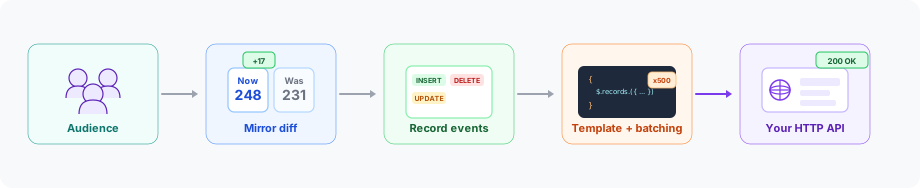
<h2 id="why-a-custom-activation-destination">Why a custom activation destination?</h2><p>Native audience destinations cover the major ad platforms. You still need a way to activate warehouse segments against internal APIs, regional platforms, and partner systems that accept audience lists over HTTP. Custom Activation lets you define that delivery: HTTP method, endpoint path, batch size, and a JSON body for each membership change.</p>
<p>The same destination accepts membership from a Reverse ETL source or, when Audiences is enabled, from an audience you build in Audience Builder.</p>

<figure class="image--main  mx-auto d-block "  >
    <a 
         href="/docs/images/audiences/destinations/custom-audience/custom-audience-pipeline.svg"
        
        >
        <img src="/docs/images/audiences/destinations/custom-audience/custom-audience-pipeline.svg" 
         alt="Custom Activation pipeline: audience membership flows through mirror diff, record events, template batching, and HTTP delivery"  
         
         
        decoding="async" loading="lazy" class="img-shortcode"/>
    </a>
    
</figure>

<!-- end-chunk -->
<!-- begin-chunk -->
<h2 id="key-features">Key features</h2><ul>
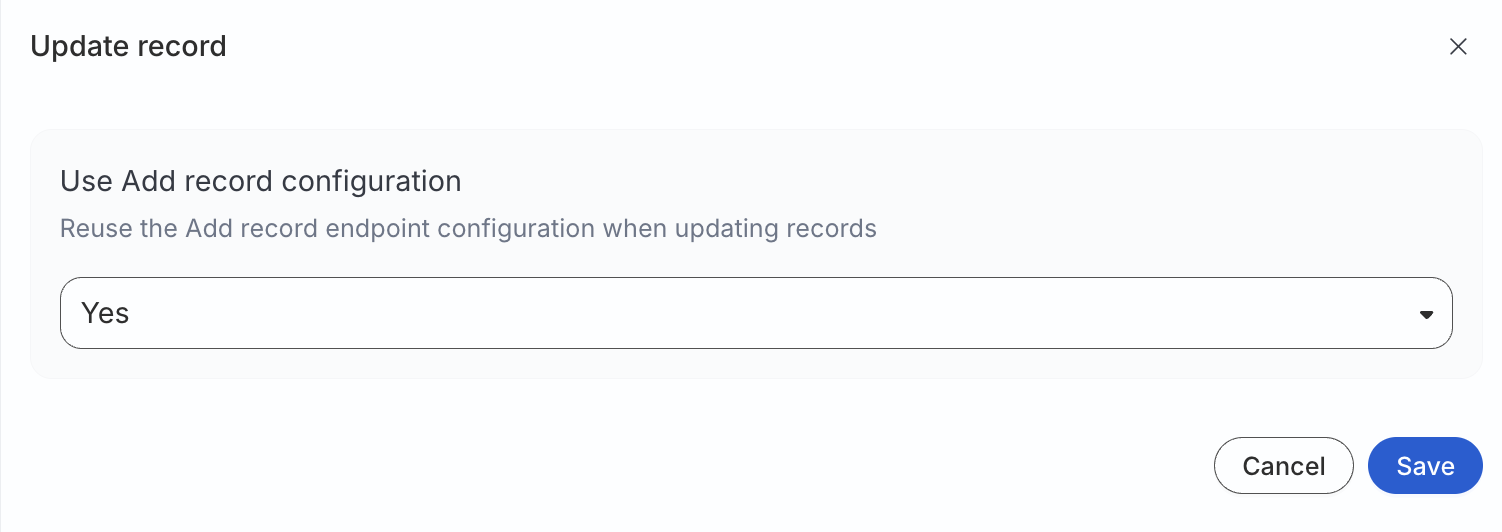
<li><strong>Per-action endpoints</strong>: Configure add, update, and remove separately. You can reuse the add configuration for updates.</li>
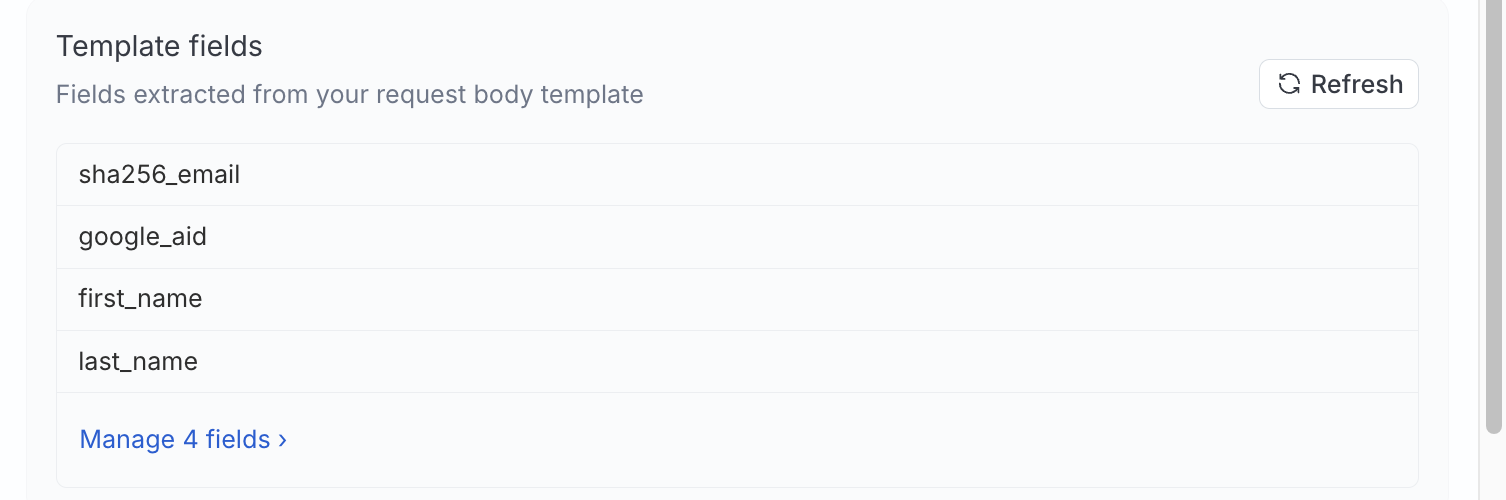
<li><strong>Request body templates</strong>: Build the JSON payload your API expects from batched records and connection metadata, including the audience ID.</li>
<li><strong>Configurable batching</strong>: Send up to 5,000 records in each request, per action.</li>
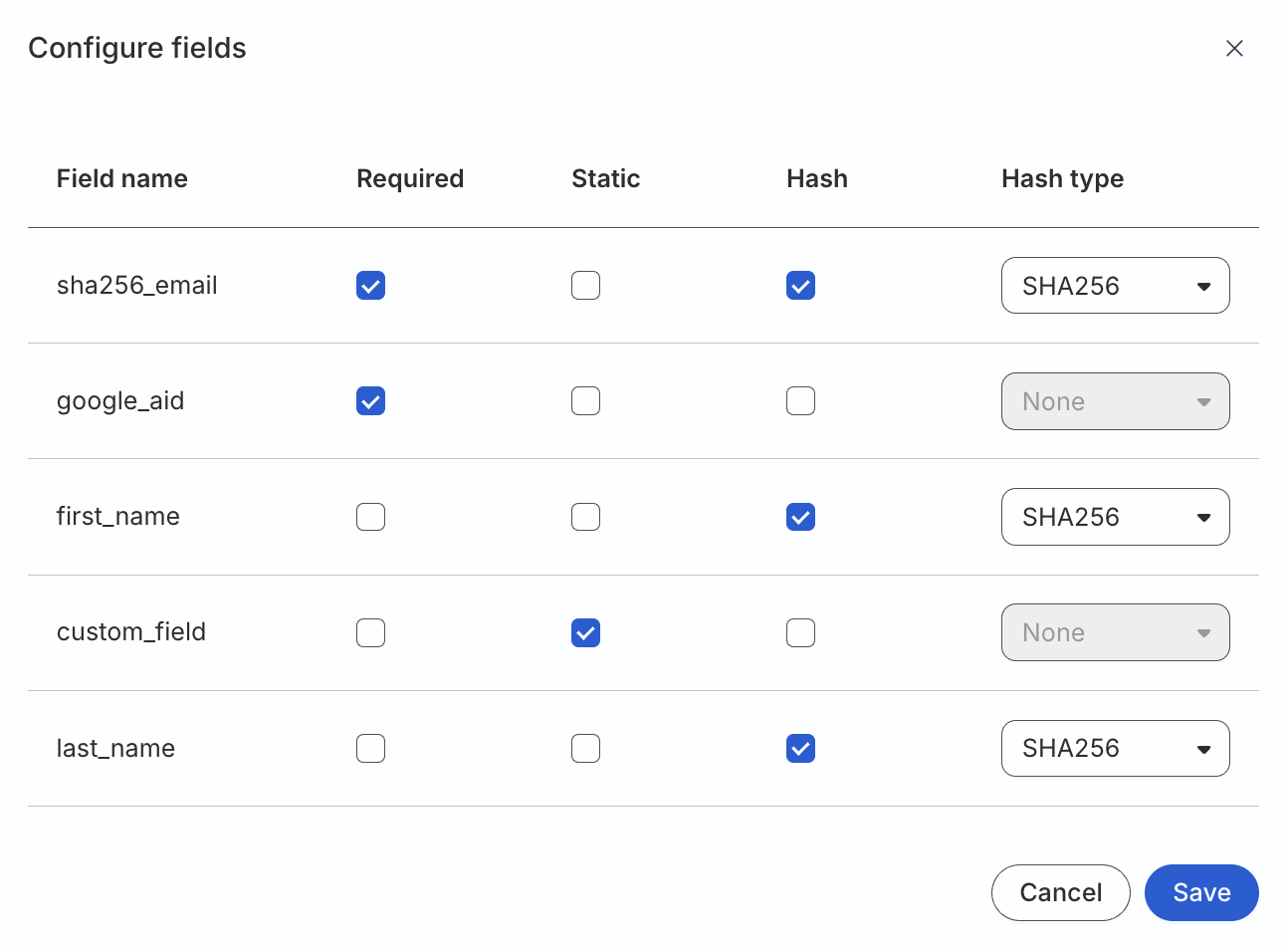
<li><strong>Field-level hashing</strong>: Apply SHA256, SHA512, or MD5 to individual fields when your API expects hashed identifiers.</li>
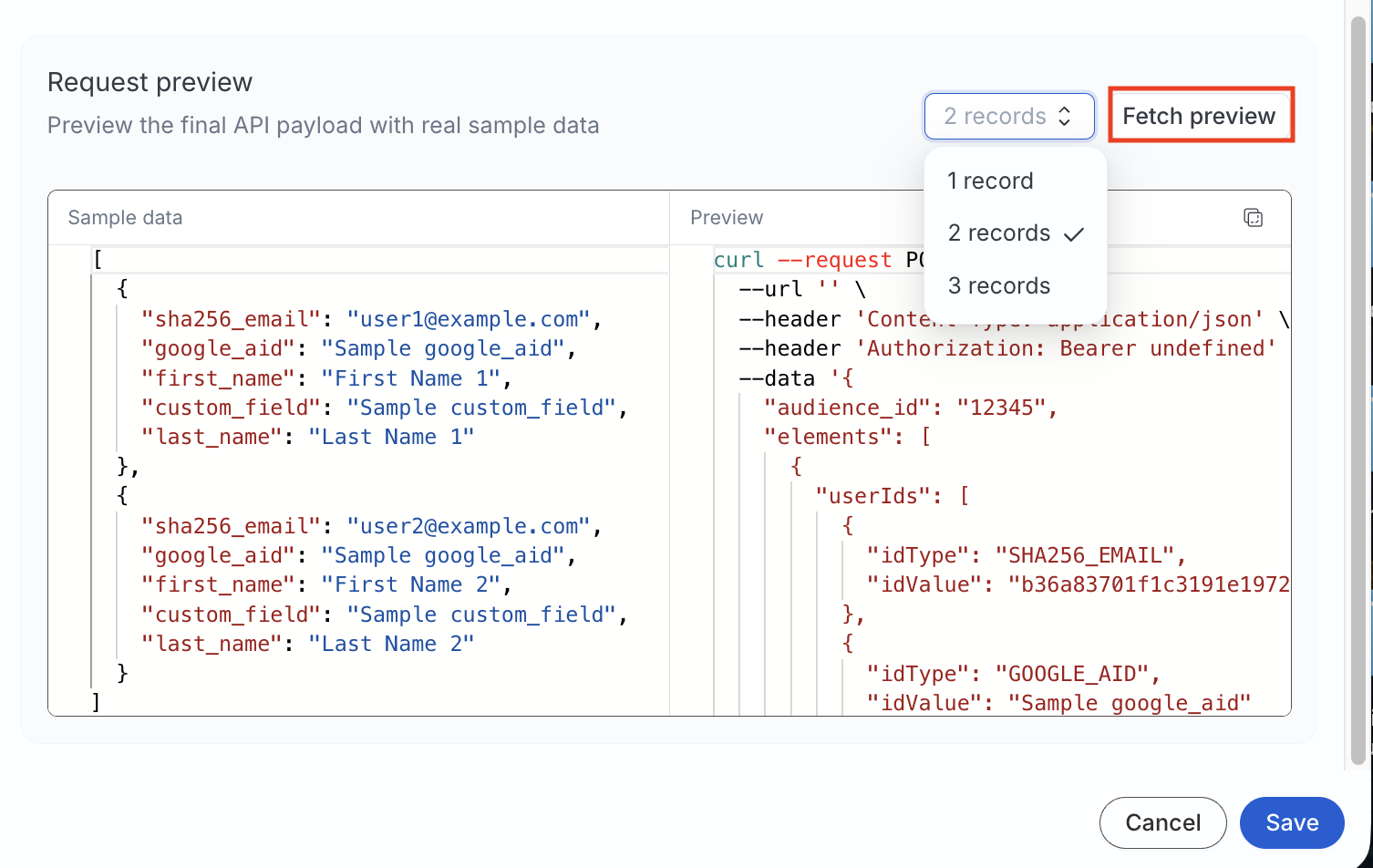
<li><strong>Request preview</strong>: Inspect a sample method, URL, headers, and JSON body before any data is sent.</li>
<li><strong>Mirror sync</strong>: The first run sends the full membership. Later runs send only inserts, updates, and deletes.</li>
<li><strong>Audience Builder syncs</strong> (<strong>Private Beta</strong>): When Audiences is enabled, connect a saved audience from its <strong>Syncs</strong> tab and map audience columns to your template fields.</li>
</ul>

<html lang="en">
<blockquote class="info">
  <div class="tip-quote">
    
    <div class="tip-text">Custom Activation supports API key, Bearer token, Basic Auth, or no authentication. OAuth 2.0 support is coming next — if your destination requires OAuth, contact your RudderStack account team so we can prioritize your use case.</div>
  </div>
</blockquote>

</html>
<!-- end-chunk -->
<!-- begin-chunk -->
<h2 id="get-started">Get started</h2><p>Create the audience list on your platform before you connect it. This destination does not create audiences for you.</p>
<!-- end-chunk -->
<!-- begin-chunk -->
<h3 id="connect-a-reverse-etl-source">Connect a Reverse ETL source</h3><ol>
<li>Open a Reverse ETL source and click <strong>Add destination</strong> &gt; <strong>Create new destination</strong>.</li>
<li>Select <strong>Custom Activation</strong>, then set the base URL, authentication, and endpoints for add, update, and remove.</li>
<li>Write a JSON request body template and set hashing on any fields that need it.</li>
<li>Enter the audience name and ID, then map warehouse columns to the template fields.</li>
<li>Run a mirror sync.</li>
</ol>
<p>See <a href="https://www.rudderstack.com/docs/destinations/reverse-etl-destinations/custom-activation/connect-retl-source/" >Connect Reverse ETL Source to Custom Activation</a> for templates, field mapping, and hashing.</p>
<!-- end-chunk -->
<!-- begin-chunk -->
<h3 id="sync-an-audience">Sync an audience</h3><p>Audiences must be enabled for your workspace. The feature is in <strong>Private Beta</strong>.</p>
<ol>
<li>Build an audience in <a href="https://www.rudderstack.com/docs/audiences/audience-builder/create-audience/" >Audience Builder</a>.</li>
<li>Open the audience&rsquo;s <strong>Syncs</strong> tab and click <strong>Add sync</strong>.</li>
<li>Select <strong>Custom Activation</strong>, enter the audience name and ID on your platform, and map audience columns to the template fields.</li>
</ol>
<p>See <a href="https://www.rudderstack.com/docs/audiences/syncs/custom-activation/sync-audiences/" >How to Sync Audiences to Custom Activation</a> for mapping, hashing, and activation.</p>
<!-- end-chunk -->
<!-- begin-chunk -->
<h2 id="resources">Resources</h2><ul>
<li><a href="https://www.rudderstack.com/docs/destinations/reverse-etl-destinations/custom-activation/" >Custom Activation Destination</a>: How delivery works, use cases, and limitations</li>
<li><a href="https://www.rudderstack.com/docs/destinations/reverse-etl-destinations/custom-activation/connect-retl-source/" >Connect Reverse ETL Source to Custom Activation</a>: Endpoints, templates, mapping, and troubleshooting</li>
<li><a href="https://www.rudderstack.com/docs/audiences/overview/" >Audiences Overview</a>: How Audiences, the data graph, and Audience Builder fit together</li>
<li><a href="https://www.rudderstack.com/docs/audiences/syncs/custom-activation/sync-audiences/" >How to Sync Audiences to Custom Activation</a>: Sync a saved audience to this destination</li>
</ul>
<!-- end-chunk -->
<!-- begin-chunk -->
<h2 id="screenshots">Screenshots</h2><p><strong>Configuration settings</strong></p>

<figure class="image--main "  >
    <a 
         href="/docs/images/audiences/destinations/custom-audience/use-add-record-configuration.webp"
        
        >
        <img src="/docs/images/audiences/destinations/custom-audience/use-add-record-configuration.webp" 
         alt="Use Add record configuration setting for the update action"  
         
         
        decoding="async" loading="lazy" class="img-shortcode"/>
    </a>
    
</figure>

<figure class="image--main "  >
    <a 
         href="/docs/images/audiences/destinations/custom-audience/template-fields.webp"
        
        >
        <img src="/docs/images/audiences/destinations/custom-audience/template-fields.webp" 
         alt="Template fields listed after the request body template is saved"  
         
         
        decoding="async" loading="lazy" class="img-shortcode"/>
    </a>
    
</figure>

<figure class="image--main "  >
    <a 
         href="/docs/images/audiences/destinations/custom-audience/configure-fields.webp"
        
        >
        <img src="/docs/images/audiences/destinations/custom-audience/configure-fields.webp" 
         alt="Configure template fields, including required, static, and hash settings"  
         
         
        decoding="async" loading="lazy" class="img-shortcode"/>
    </a>
    
</figure>

<p><strong>Preview a sample request before any data is sent</strong></p>

<figure class="image--main "  >
    <a 
         href="/docs/images/audiences/destinations/custom-audience/fetch-preview.webp"
        
        >
        <img src="/docs/images/audiences/destinations/custom-audience/fetch-preview.webp" 
         alt="Fetch preview showing the resolved method, URL, headers, and JSON body"  
         
         
        decoding="async" loading="lazy" class="img-shortcode"/>
    </a>
    
</figure>