Audiences Overview
Private Beta- enterprise
4 minute read
The Audiences feature is in Private Beta, where we work with early users and customers to test new features and get feedback before making them generally available.
Reach out to Customer Success if you are interested in enabling this feature for your workspace.
Audiences lets marketers build targeted customer segments directly from warehouse data and activate them downstream — without writing any SQL.
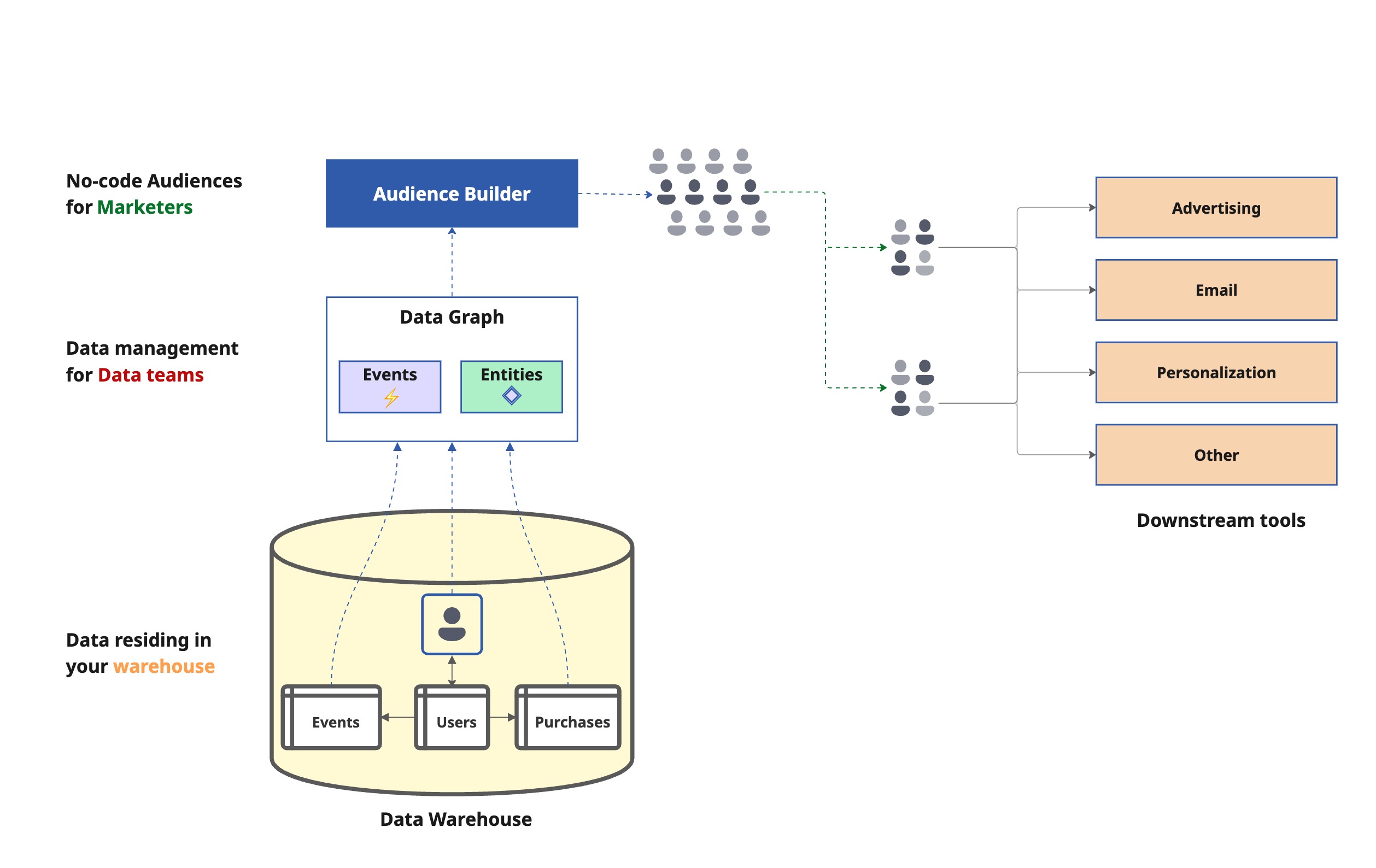
How audiences work
Audiences are built on top of a data graph, which translates your warehouse data into a business-friendly format that marketers can use to build audiences.

1. Set up a data graph
Your Data team connects relevant warehouse tables to the Data Graph, maps them as business entities (for example, Users, Purchases, Accounts), defines relationships between them, and marks timestamped tables as event models.
Click here to view a sample data graph for an ecommerce store
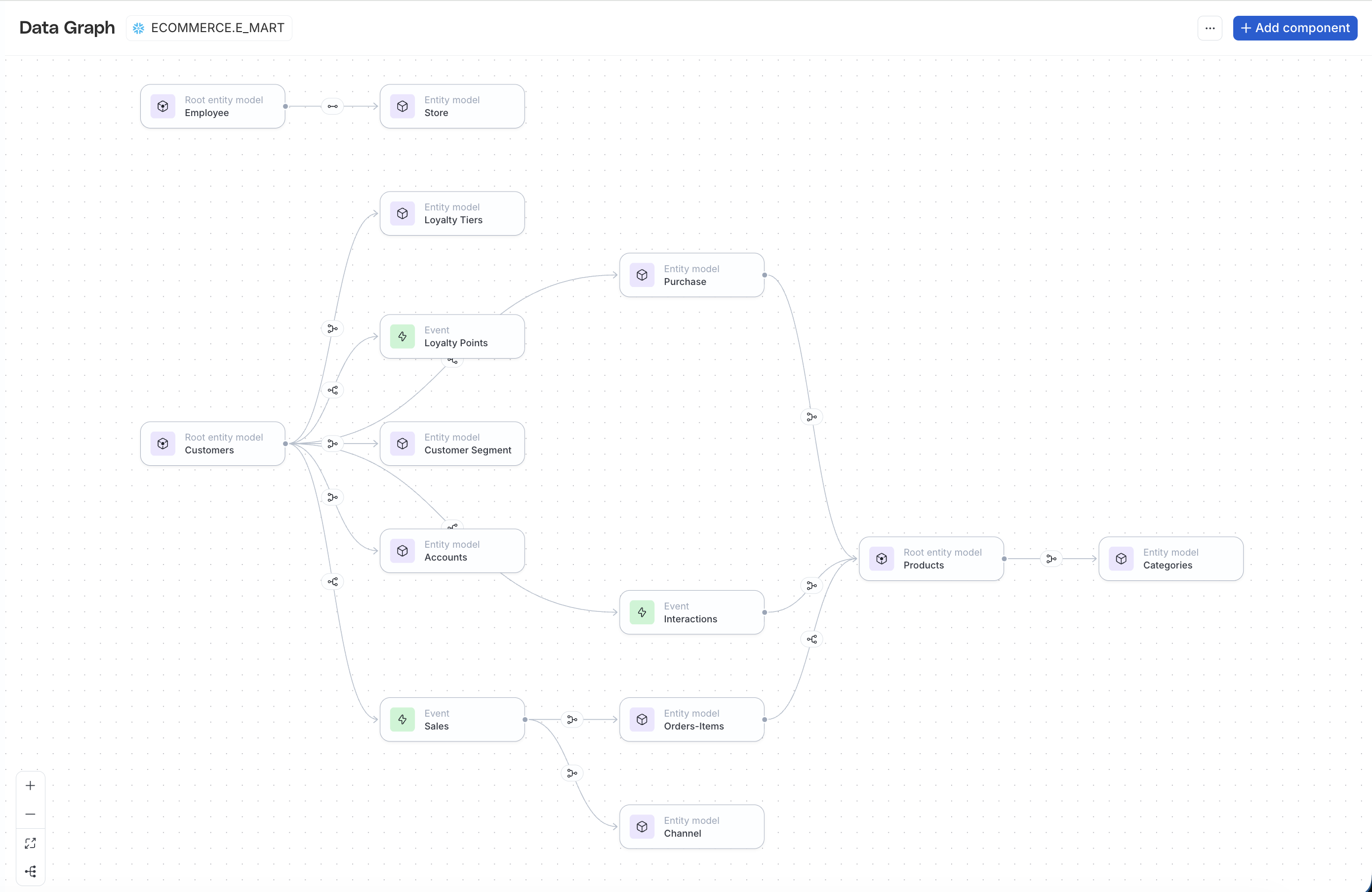
2. Build audiences
Once a data graph is created, Marketers can use the visual Audience Builder to build audiences — by setting segment conditions, and filtering on properties, related records, behavioral events, and users that are part of other audiences.
Click here to view a sample audience named High Value Customers that are not a part of the loyalty program
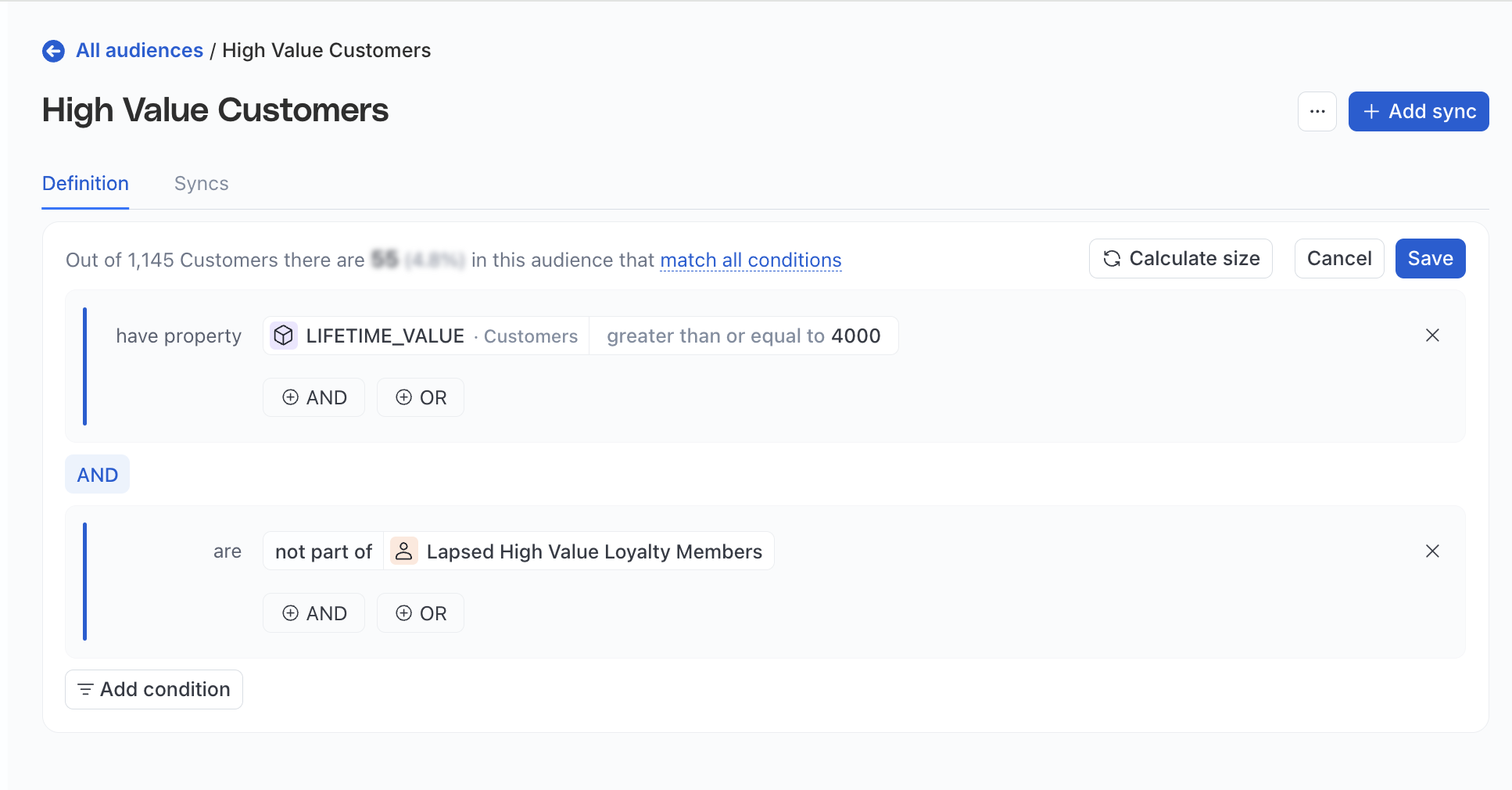
3. Sync to destinations
Once an audience is saved, marketers can connect it to one or more downstream destinations. Each destination can have its own sync schedule, field mapping, and refresh cadence. Audience membership recalculates at sync time against the latest warehouse data.
Why use audiences?
Without Audiences, building a targeted segment — for example, Customers who spent over $1,000, purchased 3+ times in the last 90 days, and viewed the pricing page this month — means filing a ticket with the data team, waiting for a custom SQL query, and repeating the cycle for every tweak or new destination.
Audiences lets marketers self-serve within boundaries the data team defines once in the Data Graph.
Who can use audiences
- Growth marketers and campaign managers: Build and iterate on audience segments in minutes instead of filing tickets and waiting days. Combine user attributes, purchase history, and behavioral events, then sync to multiple ad platforms on independent schedules.
- Data team: Define entities and relationships once in the Data Graph. Marketers self-serve within those governed boundaries — no more ad-hoc SQL requests for every segment change.
- Marketing leadership: Reduce time-to-campaign, improve targeting precision with multi-table segments, and free the teams from repetitive audience work.
Key features
Multi-condition combinations: Combine multiple conditions in a single audience definition without writing any SQL.
Behavioral event filtering: Filter on timestamped event data with time windows. For example:
- In the last 30 days
- Between two dates
- After a specific date
Audience inclusion/exclusion: Include or exclude users who are also a part of other audiences. Changes to a referenced audience propagate automatically at next sync.
Comparison operators: Use comparison operators to create aggregate conditions.
Multi-destination syncing: Sync a single audience to Meta, Google, LinkedIn, and TikTok, each with its own schedule, field mapping, and refresh cadence.
Scale and management: Search, filter, sort, and tag audiences for teams managing hundreds of segments.
Common use cases
- High-value customer retargeting: Target customers with high lifetime value who purchased recently and sync the audience to Meta and Google Ads for retargeting campaigns. Adjust thresholds and iterate without involving the data team.
- Churn prevention: Identify high-value customers with no purchases in a specific time window, exclude anyone recently contacted, and push the segment to an ad platform for a win-back campaign.
- Behavioral segmentation: Build segments based on specific user actions, like Viewed the pricing page 5+ times in the last 30 days but hasn’t purchased.
- Suppression and compliance lists: Create a reusable Recently Contacted audience once and reference it as an exclusion in every outbound campaign audience. Updates to the suppression list propagate automatically.
- Multi-table segmentation: Segment users based on attributes across related tables. For example, find customers who purchased at flagship stores by following the Customers → Sales → Stores path and filtering on
store_type = "Flagship".
Get started
To build an audience, you need:
- A Data Graph with at least one data source (for example, Users, Customers, or Accounts). Ask your data team to set this up before starting.
- A supported destination
See the following guides for more information:
| Guide | Description |
|---|---|
| Data Graph Overview | The entity mapping layer that powers audiences |
| How to create a Data Graph using visual builder | Create a data graph in the RudderStack dashboard |
| Create a Data Graph using Rudder CLI | Create a data graph as YAML using the Rudder CLI — implement version control and collaboration with Git |
| Audience Builder | Overview of the Audience Builder and its core concepts |
| How to Create an Audience from a Data Graph | Create and manage audiences by leveraging the data graph |
| Syncs | How to connect an audience to a destination and activate it on a schedule |
Supported destinations
You can connect an audience to the following destinations:
