# Sync Audiences to Gainsight PX Audience


<blockquote class="announcement">
  <div class="tip-quote">
    
    <div class="tip-text">The Gainsight PX Audience destination is in <strong>Private Beta</strong> and is enabled per workspace. Reach out to <a href="mailto:support@rudderstack.com" >Customer Success</a> if you are interested in enabling it for your workspace.</div>
  </div>
</blockquote>

<p>This guide lists the steps to configure Gainsight PX Audience as a destination in RudderStack and sync the created audiences to it.</p>

<html lang="en">
<blockquote class="info">
  <div class="tip-quote">
    
    <div class="tip-text"><strong>Gainsight PX Audience</strong> is separate from the Event Stream <a href="https://www.rudderstack.com/docs/destinations/streaming-destinations/gainsight-px/" >Gainsight PX</a> destination. Membership is written as a Boolean custom attribute on each existing Gainsight PX user.</div>
  </div>
</blockquote>

</html>
<!-- TODO: Add screenshots of the Gainsight PX Audience sync form once the destination is available in the dashboard. -->
<!-- end-chunk -->
<!-- begin-chunk -->
<h2 id="prerequisites">Prerequisites</h2><ul>
<li>In Gainsight PX, create a <strong>Boolean</strong> custom user attribute under <strong>Administration</strong> &gt; <strong>Attributes</strong> &gt; <strong>User</strong>, and note its API name. RudderStack can&rsquo;t create it for you.</li>
<li>Create a Gainsight PX REST API key under <strong>Administration</strong> &gt; <strong>REST API</strong> with <strong>Read</strong> and <strong>Write</strong> permission.</li>
<li>Find your data center from your Gainsight PX URL: <code>app</code> → <code>US</code>, <code>app-eu</code> → <code>EU</code>, <code>app-us2</code> → <code>US2</code>.</li>
<li>Ask your data team which audience column holds the Gainsight PX user ID (<code>identifyId</code>). Only users that already exist in Gainsight PX are updated.</li>
</ul>
<p>See <a href="https://www.rudderstack.com/docs/destinations/reverse-etl-destinations/gainsight-px-audience/#prerequisites" >Prerequisites</a> for details.</p>
<!-- end-chunk -->
<!-- begin-chunk -->
<h2 id="setup">Setup</h2><ol>
<li>Set up an audience in RudderStack using the <a href="https://www.rudderstack.com/docs/audiences/audience-builder/create-audience/" >Audience Builder</a>.</li>
<li>Go to the <strong>Syncs</strong> tab of the audience page and click <strong>Add sync</strong>. Then, select <strong>Gainsight PX Audience</strong>.</li>
<li>Click <strong>New destination</strong> — you can also select an already-configured destination here.</li>
<li>Specify a unique name to identify this destination in RudderStack.</li>
<li>In the <strong>Gainsight PX account</strong> section, click <strong>Select</strong> to choose an existing account. To add a new account, click <strong>Add account</strong>, and specify the following settings:</li>
</ol>
<table>
  <thead>
      <tr>
          <th>Setting</th>
          <th><div>Description</div></th>
      </tr>
  </thead>
  <tbody>
      <tr>
          <td>Account name</td>
          <td>Specify a unique account name.</td>
      </tr>
      <tr>
          <td>REST API key</td>
          <td>Enter your Gainsight PX REST API key with <strong>Read</strong> and <strong>Write</strong> permission.</td>
      </tr>
      <tr>
          <td>Data center</td>
          <td>Select the data center of your Gainsight PX subscription: <code>US</code>, <code>EU</code>, or <code>US2</code>.</td>
      </tr>
  </tbody>
</table>
<ol start="6">
<li>Proceed to configure the mapping settings.</li>
</ol>
<!-- end-chunk -->
<!-- begin-chunk -->
<h2 id="configure-sync">Configure sync</h2><p>This section lists the settings to correctly configure your audience syncs to the Gainsight PX Audience destination.</p>

<blockquote class="warning">
  <div class="tip-quote">
    
    <div class="tip-text">Members who are not yet Gainsight PX users are reported as failed rows until they exist in Gainsight PX; no users are created.</div>
  </div>
</blockquote>
<!-- end-chunk -->
<!-- begin-chunk -->
<h3 id="attribute-api-name">Attribute API name</h3><p>Enter the API name of the Boolean custom user attribute in Gainsight PX that stores membership for this sync (for example, <code>rs_trial_power_users</code>).</p>
<ul>
<li>Edit the suggested name (<code>rs_</code> followed by the audience name) to match the attribute you created in Gainsight PX.</li>
<li>API names are case-sensitive. Allowed characters: letters, numbers, and underscores only; maximum <strong>200</strong> characters.</li>
<li>You can&rsquo;t change the attribute after the sync is created. To use a different attribute, create a new sync.</li>
</ul>

<blockquote class="success">
  <div class="tip-quote">
    
    <div class="tip-text">
      Reuse one Gainsight PX account across many syncs. Give each sync a <strong>different</strong> attribute so membership flags don&rsquo;t overwrite each other.
    </div>
  </div>
</blockquote>
<!-- end-chunk -->
<!-- begin-chunk -->
<h3 id="sync-mode">Sync mode</h3><p>Only <a href="https://www.rudderstack.com/docs/data-pipelines/reverse-etl/developer-guides/sync-modes/#mirror-mode" >Mirror mode</a> is supported for this integration.</p>
<!-- end-chunk -->
<!-- begin-chunk -->
<h3 id="map-user-identifier">Map user identifier</h3><p>Map one audience column to the Gainsight PX user ID, <strong><code>identifyId</code></strong>. Only this identifier is supported, and values must match Gainsight PX exactly, including case.</p>
<p>When you create the sync, RudderStack checks that the API key works and that the attribute exists, is enabled, is a custom attribute, and is of type Boolean. If a check fails, the form shows the reason — see <a href="https://www.rudderstack.com/docs/destinations/reverse-etl-destinations/gainsight-px-audience/#troubleshooting" >Troubleshooting</a>.</p>
<!-- end-chunk -->
<!-- begin-chunk -->
<h2 id="sync-settings">Sync settings</h2>

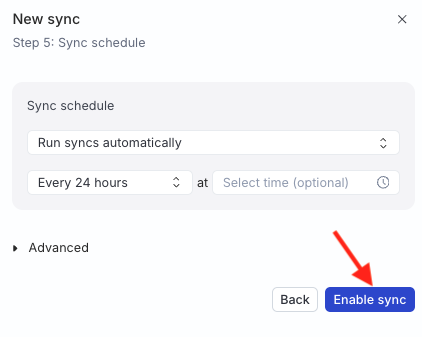
<p>Two options are available to schedule your audience syncs:</p>
<ul>
<li><strong>Run syncs automatically</strong> based on a specified frequency (every 5 minutes, 10 minutes, 15 minutes, 30 minutes, 1 hour, 3 hours, 6 hours, 12 hours, or 24 hours) and a specific time (in UTC).</li>
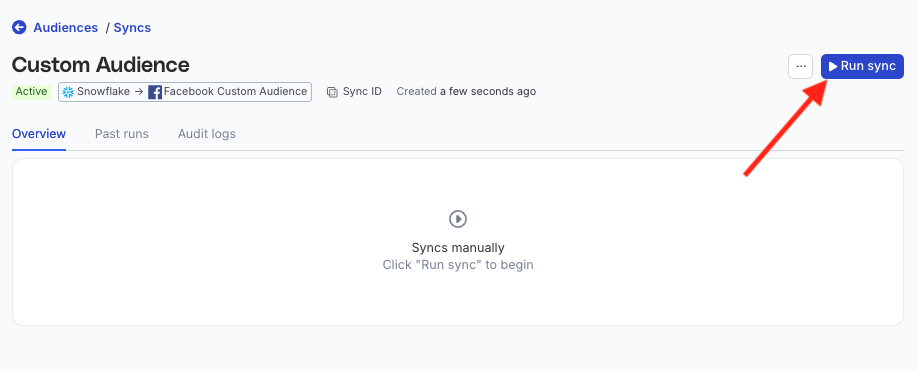
<li><strong>Run syncs manually</strong> — trigger a sync from the sync details page. You will need to run the sync each time.</li>
</ul>

<figure class="image--main "  >
    <a 
         href="/docs/images/audiences/destinations/fb-custom-audience/run-sync.webp"
        
        >
        <img src="/docs/images/audiences/destinations/fb-custom-audience/run-sync.webp" 


        decoding="async" loading="lazy" class="img-shortcode"/>
    </a>
    
</figure>

<!-- end-chunk -->
<!-- begin-chunk -->
<h4 id="sync-observability-settings">Sync observability settings</h4>

<table>
  <thead>
      <tr>
          <th>Setting</th>
          <th>Description</th>
      </tr>
  </thead>
  <tbody>
      <tr>
          <td>Retain sync logs</td>
          <td>This setting is toggled on by default and instructs RudderStack to store the sync logs in your warehouse. You can also configure the below settings: <br /><br /><table><tr><th width="20%">Setting</th><th width="80%">Description</th></tr><tr><td>Sync log retention</td><td>Specify the retention period of the <a href="https://www.rudderstack.com/docs/data-pipelines/reverse-etl/developer-guides/sync-observability/#sync-logs" >sync logs</a> in your warehouse. <br /><br />If you set it to 1, then RudderStack deletes any sync log older than a day (in UTC time). </td></tr><tr><td>Snapshot table retention</td><td>Specify the number of <a href="https://www.rudderstack.com/docs/data-pipelines/reverse-etl/developer-guides/sync-observability/#snapshot-table-schema" >snapshot tables</a> to retain. </td></tr></table></td>
      </tr>
      <tr>
          <td>Retry failed records</td>
          <td>This setting is toggled on by default and causes RudderStack to continually <a href="https://www.rudderstack.com/docs/data-pipelines/reverse-etl/developer-guides/sync-observability/#retry-failed-records" >retry sending the failed records</a>.</td>
      </tr>
      <tr>
          <td>Retain and show failures</td>
          <td>This setting is toggled off by default. Turn it on to have RudderStack write the error recorded for every failed record to a <a href="https://www.rudderstack.com/docs/data-pipelines/reverse-etl/developer-guides/rudderstack-schema/#failed-records-table" >failed records table</a> in your warehouse and show it in the sync&rsquo;s <a href="https://www.rudderstack.com/docs/data-pipelines/reverse-etl/developer-guides/sync-observability/#failed-records" >failed records view</a>. It applies from the next sync and can take up to a minute to reach your data plane. <br /><br /><table><tr><th width="20%">Setting</th><th width="80%">Description</th></tr><tr><td>Failure retention</td><td>Number of days RudderStack keeps each sync&rsquo;s failed records in your warehouse. The default is 30 and the minimum is 7.</td></tr></table></td>
      </tr>
  </tbody>
</table>

<blockquote class="warning">
  <div class="tip-quote">
    
    <div class="tip-text">Storing sync logs, snapshot tables, and failed records may incur additional warehouse costs.</div>
  </div>
</blockquote>
<!-- end-chunk -->
<!-- begin-chunk -->
<h2 id="enable-sync">Enable sync</h2>

<p>Once the setup is complete, enable the sync.</p>

<figure class="image--main "  >
    <a 
         href="/docs/images/audiences/destinations/tiktok/enable-sync.webp"
        
        >
        <img src="/docs/images/audiences/destinations/tiktok/enable-sync.webp" 


        decoding="async" loading="lazy" class="img-shortcode"/>
    </a>
    
</figure>
<!-- end-chunk -->
<!-- begin-chunk -->
<h2 id="how-membership-is-written-to-gainsight-px">How membership is written to Gainsight PX</h2><table>
  <thead>
      <tr>
          <th>Action</th>
          <th><div>Attribute value</div></th>
      </tr>
  </thead>
  <tbody>
      <tr>
          <td>User joins the audience</td>
          <td><code>true</code></td>
      </tr>
      <tr>
          <td>User leaves the audience</td>
          <td><code>false</code> 
<blockquote class="warning">
  <div class="tip-quote">
    
    <div class="tip-text">The attribute stays on the user; only its value becomes <code>false</code>.</div>
  </div>
</blockquote></td>
      </tr>
  </tbody>
</table>
<p>Each user is updated with a separate Gainsight PX request, so large audiences count against your subscription&rsquo;s API limits. See <a href="https://www.rudderstack.com/docs/destinations/reverse-etl-destinations/gainsight-px-audience/#limitations" >Limitations</a>.</p>

<blockquote class="warning">
  <div class="tip-quote">
    
    <div class="tip-text"><strong>Run full sync</strong> sets the attribute to <code>true</code> for everyone currently in the audience. Anyone who left the audience before that run keeps <code>true</code> in Gainsight PX: a full sync doesn&rsquo;t set it to <code>false</code>, and only re-entering and then leaving the audience changes it.</div>
  </div>
</blockquote>
<!-- end-chunk -->
<!-- begin-chunk -->
<h2 id="faq">FAQ</h2><!-- end-chunk -->
<!-- begin-chunk -->
<h4 id="why-do-some-members-show-as-failed-records">Why do some members show as failed records?</h4><p>They don&rsquo;t exist in Gainsight PX yet, or the column mapped to <code>identifyId</code> doesn&rsquo;t hold the Gainsight PX user ID. No users are created, so these records are aborted. With <strong>Retry failed records</strong> on (the default), they are sent again on every run and succeed once the user exists in Gainsight PX.</p>
<!-- end-chunk -->
<!-- begin-chunk -->
<h4 id="how-is-this-different-from-the-gainsight-px-event-stream-destination">How is this different from the Gainsight PX Event Stream destination?</h4><p>Use <a href="https://www.rudderstack.com/docs/destinations/streaming-destinations/gainsight-px/" >Gainsight PX</a> for streaming events and user properties. Use <strong>Gainsight PX Audience</strong> only for audience membership as a Boolean custom attribute.</p>
<!-- end-chunk -->
<!-- begin-chunk -->
<h4 id="what-happens-if-i-delete-the-sync">What happens if I delete the sync?</h4><p>No call is made to Gainsight PX. The attribute keeps its last values, and stays in Gainsight PX until you delete it there.</p>
<br />