RudderStack Schema Reference
6 minute read
On every Reverse ETL sync, RudderStack writes tables into a dedicated schema in your warehouse so you can audit what was extracted, what changed, and what failed. Create this schema before you set up a Reverse ETL source — see the permissions section of your warehouse source documentation.
| Warehouse | Schema name |
|---|---|
| Snowflake | _RUDDERSTACK |
| BigQuery | rudderstack_ |
| Other warehouses | _rudderstack |
Do not rename this schema.
What gets written depends on the sync mode and whether you enable a cursor column. Configure how long tables and logs are retained in Sync Observability Settings.
Table families
| Table naming pattern | Created when | Contents |
|---|---|---|
SNAPSHOT_<connectionId>_<syncRunId> | Mirror, or Upsert without a cursor column | Full set of in-scope rows for that sync in source schema, plus RUDDER_OPERATION_TYPE (insert, update, delete, or unchanged) |
FAILED_KEYS_<connectionId>_<syncRunId> | Mirror, Upsert | Primary-key columns of failed records (for example CONTEXT_TRAITS_EMAIL and _RUDDER_ID), plus RUDDER_OPERATION and RUDDER_INVALID |
AGGR_FAIL_KEYS_<connectionId>_<syncRunId> | Mirror, Upsert | _RUDDER_ID and numeric CODE (HTTP status). Join to FAILED_KEYS_* on _RUDDER_ID |
REJ_<connectionId>_<syncRunId> | Any mode, when Retain and show failures is enabled | One row per failed record with its error code and the full error message (see Failed records table) |
CURSOR_<connectionId>_<syncRunId> | Upsert with a cursor column | One row: CHECKPOINT = high-watermark of the cursor column |
SYNC_DATA_<connectionId>_<syncRunId> | Any mode | Rows RudderStack processed in that sync, keyed by _RUDDER_ID. For Upsert with a cursor column, delta rows since the last checkpoint (first sync = full load). Includes RUDDER_OPERATION_TYPE, RUDDER_SNAPSHOT_ID, and RUDDER_SNAPSHOT_RUN_AT |
SYNC_LOG | Any mode, when sync logs are enabled | Per-record, per-sync log across connections (see Sync log table) |
Older workspaces may also show legacy names such asSNAPSHOT_<hash>_<epoch>,SYNC_DATA_<hash>, orFAILED_RECORDS_<hash>. The current convention is<TABLE_TYPE>_<connectionId>_<syncRunId>.
Table name format
Example: SNAPSHOT_2WRS3TRTNKIGHHLDKHXIJTWLU7C_D0F3FOFMJ6M0GOGO5HHG
| Segment | Meaning | Where to find it |
|---|---|---|
SNAPSHOT | Table type | — |
2WRS3TRTNKIGHHLDKHXIJTWLU7C | Connection ID | Settings tab of the Reverse ETL connection |
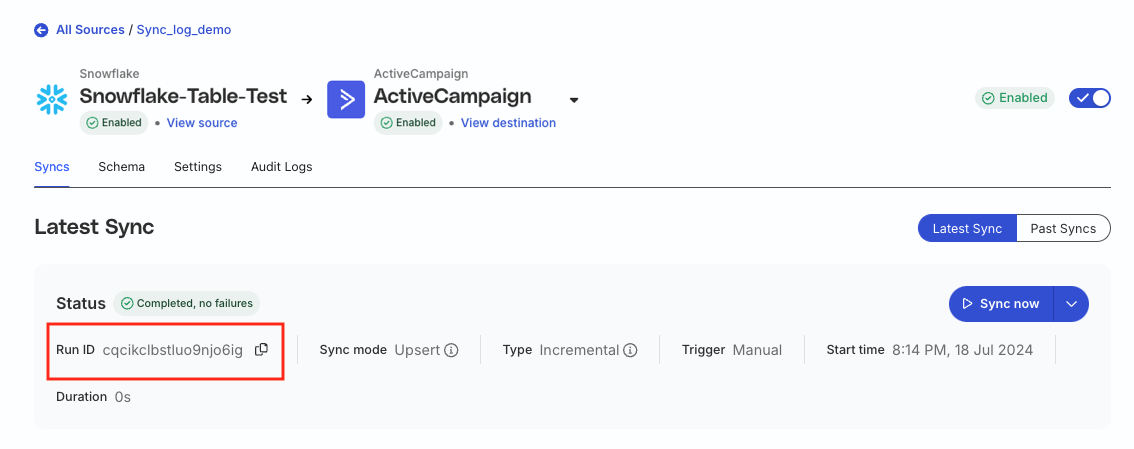
D0F3FOFMJ6M0GOGO5HHG | Sync run ID | Specific sync in the Syncs view |
Behavior by sync mode
| Mode | Warehouse tables | Point-in-time history |
|---|---|---|
| Mirror | SNAPSHOT_*, FAILED_KEYS_*, AGGR_FAIL_KEYS_*, SYNC_DATA_* | Full in-scope population per retained sync |
| Upsert (no cursor column) | Same as Mirror | Full in-scope population per retained sync |
| Upsert with cursor column | CURSOR_*, SYNC_DATA_* (no SNAPSHOT_*) | Delta rows only — not a full population snapshot |
Cursor/incremental mode and snapshot tables are mutually exclusive. If you need to reconstruct the full population at a past sync, use Mirror or Upsert without a cursor column, and raise snapshot retention as needed.
Retention
Two independent settings on each connection (Settings > sync observability):
| Setting | Unit | Default (typical) | Effect |
|---|---|---|---|
| Snapshot table retention | Number of syncs | 5 | Keeps the N most recent successful snapshots per connection; older SNAPSHOT_* / FAILED_KEYS_* tables are dropped |
| Sync log retention | Days | 30 | Deletes SYNC_LOG rows older than N days |
| Failure retention | Days | 30 (minimum 7) | Drops REJ_* tables for syncs older than N days. Shown when Retain and show failures is enabled |
Point-in-time lookback is bounded by these settings. Raising retention extends your audit window and increases warehouse storage and table count in the schema.
Source data vs destination payload
SNAPSHOT_* and SYNC_DATA_* capture rows as extracted from the source warehouse — before transformation or mapping applied on the way to the destination. They show what RudderStack decided to send, in the source schema. They do not show the exact post-transformation payload delivered to the destination.
Failure tables
| Table | What you get | What you don’t get |
|---|---|---|
FAILED_KEYS_* | Keys of failed records | Error code or message |
AGGR_FAIL_KEYS_* | Numeric HTTP status (for example 400) per _RUDDER_ID | Human-readable destination error |
SYNC_LOG.error_reason | Same class of status detail when logs are enabled | Full per-record destination message |
REJ_* | Error code and the exact error message recorded for every failed record, with its primary key and operation | Source row values (join to SYNC_DATA_* on _RUDDER_ID) |
By default, detailed destination errors (for example, “invalid email”) appear as sampled examples in the RudderStack dashboard — one sample per error type per sync. Turn on Retain and show failures to store the full error message for every failed record in REJ_* and view it in the dashboard.
Sync log table
When you enable sync logs, RudderStack writes a single SYNC_LOG table. Column names may appear uppercased depending on your warehouse.
| Column | Description |
|---|---|
connection_id | Connection ID for the sync run |
sync_run_id | Unique identifier for the sync run |
primary_key | Value of the primary key column selected for the sync |
operation | Operation on the row: insert, update, or delete |
status | succeeded or failed |
error_reason | Failure detail when status is failed (typically a numeric HTTP status code, not a full destination message) |
sync_started_at | Sync start time in UTC |
sync_finished_at | Sync finish time in UTC |
Storing sync logs in your warehouse incurs additional costs.
Snapshot table
For Mirror and Upsert (no cursor), each sync writes a SNAPSHOT_<connection_id>_<sync_run_id> table. It contains in-scope source rows (excluding invalid rows such as duplicate or null primary keys) and the change type for each row.
| Column | Description |
|---|---|
rudder_operation_type | insert, update, delete, or unchanged relative to the last synced data |
| Mapped source columns | Columns selected in the sync mappings |
Storing snapshot tables in your warehouse incurs additional costs.
Failed records table
When Retain and show failures is enabled, RudderStack writes a REJ_<connectionId>_<syncRunId> table for each sync that runs after you enabled it. It contains one row per failed record. Column names may appear uppercased depending on your warehouse.
| Column | Description |
|---|---|
_RUDDER_ID | Numeric record ID that RudderStack assigns during the sync. Join key to the run’s SYNC_DATA_* table for the record’s source values. |
PRIMARY_KEY | Value of the primary key column selected for the sync, stored as text. NULL if the record is no longer in the run’s SYNC_DATA_* table. |
OPERATION | The operation RudderStack attempted: insert, update, or delete. NULL if the record is no longer in the run’s SYNC_DATA_* table. |
ERROR_CODE | The error code, typically the HTTP status the destination returned. 410 is RudderStack’s own code for a record it stopped retrying. NULL when the record never reached the destination. |
ERROR_MESSAGE | The exact error RudderStack recorded: the destination’s response if it replied, or RudderStack’s own reason if it gave up on the record. |
FAILED_AT | When the failure was recorded. |
RudderStack drops each REJ_* table once its sync is older than the failure retention window.
Example queries
Replace placeholders with your connection ID, sync run IDs, primary key column, and column name. Schema name may be _rudderstack, _RUDDERSTACK, or rudderstack_ depending on your warehouse.
Trace a primary key across syncs
SELECT *
FROM _rudderstack.sync_log
WHERE primary_key = '<primary_key>'
  AND connection_id = '<connection_id>';
Join failed sync log rows to a snapshot
SELECT *
FROM _rudderstack.sync_log sl
LEFT JOIN _rudderstack.snapshot_<connection_id>_<sync_run_id> sn
  ON sl.primary_key = sn.<primary_key>
WHERE sl.sync_run_id = '<sync_run_id>'
  AND sl.status = 'failed';
Find rows whose value changed between two snapshots
Use this when you need contacts (or other records) that had a given value in an earlier sync but not in a later one — for example, to remediate downstream data after a bad source query.
SELECT earlier.<primary_key>, earlier.<column_name>
FROM _rudderstack.snapshot_<connection_id>_<earlier_sync_run_id> earlier
WHERE earlier.<column_name> = '<value>'
  AND NOT EXISTS (
    SELECT 1
    FROM _rudderstack.snapshot_<connection_id>_<later_sync_run_id> later
    WHERE later.<primary_key> = earlier.<primary_key>
      AND later.<column_name> = earlier.<column_name>
  );
List the failed records of a sync with their errors
SELECT primary_key, operation, error_code, error_message, failed_at
FROM _rudderstack.rej_<connection_id>_<sync_run_id>
ORDER BY error_code, primary_key;
Join failed records to their source rows
SELECT r.primary_key, r.error_code, r.error_message, s.*
FROM _rudderstack.rej_<connection_id>_<sync_run_id> r
JOIN _rudderstack.sync_data_<connection_id>_<sync_run_id> s
  ON s._rudder_id = r._rudder_id;
Empty failure tables
RudderStack creates FAILED_KEYS_* and AGGR_FAIL_KEYS_* for each applicable sync even when no records fail. Empty tables are expected. Retention cleanup removes older ones according to your snapshot table retention setting.
