Reverse ETL Sync Modes
4 minute read
The Reverse ETL sources support three sync modes that define how RudderStack syncs data to the destinations.
Specify sync mode
You can configure the sync mode in the Data Mapping settings while connecting your Reverse ETL source to a destination.
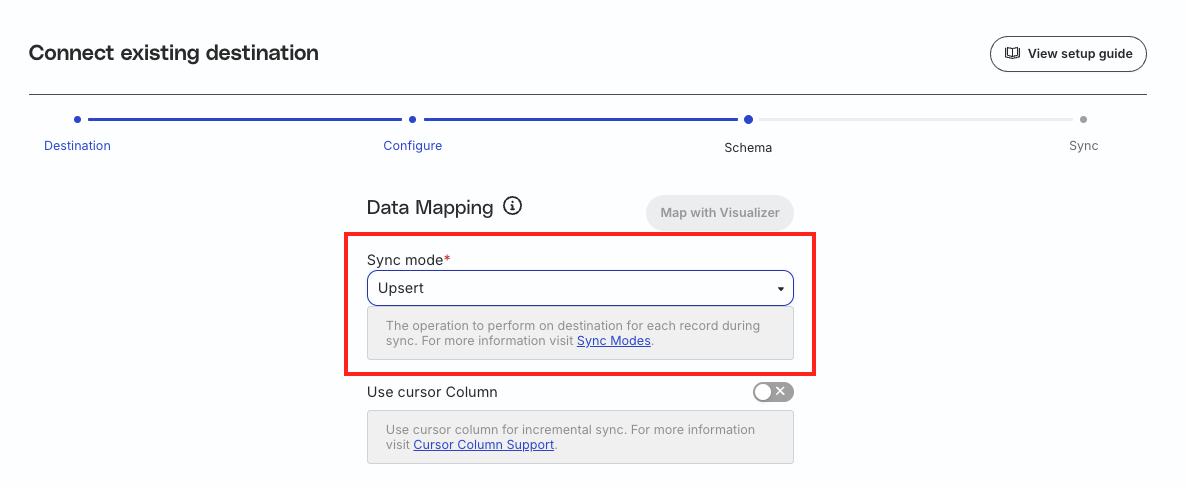
Supported sources
The following Reverse ETL sources support the sync modes listed above:
Upsert mode
In this mode, RudderStack inserts only the new records and updates to the existing records while syncing data to the destination.
RudderStack supports upsert mode for all destinations except the destinations that only support mirror mode.
See Sync behavior for more information on how RudderStack syncs records after you update the source-destination mappings.
Mirror mode
In this mode, RudderStack ‘mirrors’ the source by keeping the destination data the same as the source data. It performs insertion, updates, and deletion of records while syncing data to the destination.
RudderStack does not supporttrackevent type for this mode.
RudderStack supports mirror mode for the following destinations:

Bloomreach Catalog

Amazon Audience

Bing Ads Audience
Bing Ads Offline Conversions
Bloomreach Catalog

Criteo Audience

Customer.io Audience

Facebook Custom Audience

Google Ads Remarketing Lists (Customer Match)

LaunchDarkly Segments

Linkedin Audience

Marketo Static Lists

SFTP

Snapchat Custom Audience

The Trade Desk Audience

TikTok Audiences

X Audience
See Sync behavior for more information on how RudderStack syncs records after you update the source-destination mappings.
Full sync mode
In this mode, RudderStack syncs all the records to the destination irrespective of whether they were updated or not. For example, if you have 10,000 records and only 2000 records were updated, RudderStack will still sync all the 10,000 records to the destination.
Using the full sync mode will lead to a higher event usage as all the source records are sent to the destination in each sync.
Note that RudderStack supports the full sync mode for all destinations except the destinations that only support mirror mode.
Sync behavior
This section describes how RudderStack syncs data to the destinations in the below scenarios:
First sync
When you sync data from the Reverse ETL sources for the first time, RudderStack performs a full sync by default, irrespective of the sync mode.
For the subsequent syncs, RudderStack will:
- Incrementally sync any new records since the last sync, in case of Upsert and Mirror modes.
- Continue to sync all the records to the destination in case of Full sync mode.
You can also force a full data sync at any point using the Reset History and Full Sync functionality.

After updating mappings
This section is applicable only for Upsert and Mirror modes, as RudderStack syncs all the data to the destination in Full sync mode regardless of whether mappings are updated or not.
RudderStack determines whether to run a full sync depending on whether a source-destination field mapping is added/updated or removed.
- If a mapping is removed: RudderStack does not run a full sync. It continues to sync records incrementally as per the specified sync mode.
- If a mapping is added or updated: RudderStack runs a full sync.
Example
Consider the following source-destination mappings:
| Warehouse column | Destination field |
|---|---|
email | email_id |
first_name | fn |
last_name | ln |
If you remove the mapping for last_name (mapped to ln field in the destination), then RudderStack continues to sync the source records to the destination as per the specified sync mode. It ignores the records for the last_name column as the mapping was removed.
Now if you add a new mapping (highlighted in bold) as follows:
| Warehouse column | Destination field |
|---|---|
email | email_id |
first_name | fn |
last_name | ln |
address | address |
In this case, RudderStack runs a full sync as it has to update all the records as per the new mapping.
FAQ
What happens to the records that have not been successfully sent to the destination in the previous sync?
In case of an unsuccessful delivery, RudderStack retries sending the events in the next sync.
