# How to Sync Audiences to Custom Activation

<p>This guide walks you through the process of syncing a saved audience to your Custom Activation destination.</p>
<p>To set up the Custom Activation destination in RudderStack, see <a href="https://www.rudderstack.com/docs/audiences/syncs/custom-activation/setup-guide/" >Custom Activation Setup Guide</a>.</p>
<!-- end-chunk -->
<!-- begin-chunk -->
<h2 id="prerequisites">Prerequisites</h2><p><strong>On your audience platform</strong></p>
<ul>
<li>A target audience list created on your platform — note its <strong>Audience ID</strong></li>
</ul>
<p><strong>In RudderStack</strong></p>
<ul>
<li>Set up an <a href="https://www.rudderstack.com/docs/audiences/audience-builder/create-audience/" >Audience</a></li>
<li>Set up a <a href="https://www.rudderstack.com/docs/audiences/syncs/custom-activation/setup-guide/" >Custom Activation destination</a></li>
</ul>
<!-- end-chunk -->
<!-- begin-chunk -->
<h2 id="add-sync">Add sync</h2><ol>
<li>Open the audience&rsquo;s <strong>Syncs</strong> tab and click <strong>Add sync</strong>.</li>
<li>Select <strong>Custom Activation</strong>, then select the required <strong>Custom Activation</strong> destination.</li>
<li>Configure the following settings to specify the target audience and map your warehouse data:</li>
</ol>
<!-- end-chunk -->
<!-- begin-chunk -->
<h3 id="specify-target-audience">Specify target audience</h3>
<blockquote class="warning">
  <div class="tip-quote">
    
    <div class="tip-text">Create the audience on your platform before entering these values. RudderStack <strong>does not create</strong> audiences at the destination for this integration.</div>
  </div>
</blockquote>
<table>
<thead>
<tr>
<th>Setting</th>
<th><div>Description</div></th>
</tr>
</thead>
<tbody>
<tr>
<td>Audience name</td>
<td>Specify the name of the audience to sync data to</td>
</tr>
<tr>
<td>Audience ID</td>
<td>Specify the ID of the list on your platform</td>
</tr>
</tbody>
</table>
<!-- end-chunk -->
<!-- begin-chunk -->
<h3 id="sync-mode">Sync mode</h3><p>RudderStack supports only <a href="https://www.rudderstack.com/docs/data-pipelines/reverse-etl/developer-guides/sync-modes/#mirror-mode" >Mirror mode</a> for this integration.</p>
<p>On the first run, the full membership is sent to the platform. Later runs send only inserts, updates, and deletes.</p>
<!-- end-chunk -->
<!-- begin-chunk -->
<h3 id="map-identifiers">Map identifiers</h3><p>Map warehouse columns to each <a href="https://www.rudderstack.com/docs/audiences/syncs/custom-activation/setup-guide/#request-body-template" >template field</a> defined in the Custom Activation destination.</p>
<p>You can map two types of fields:</p>
<ul>
<li><strong>Warehouse fields</strong>: Dropdown of warehouse columns</li>
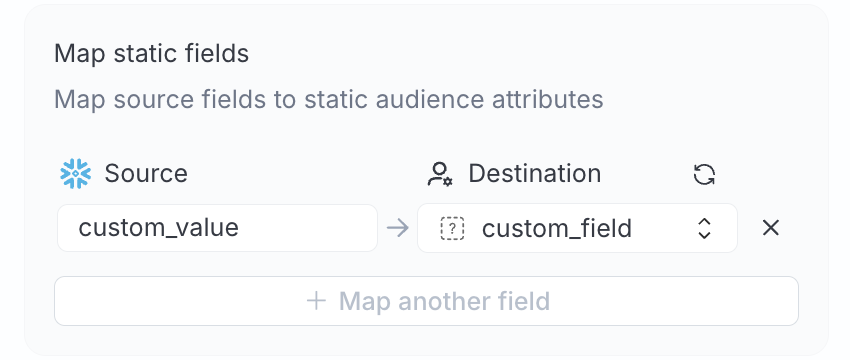
<li><strong>Static fields</strong>: Specify literal values for fields configured as <strong>Static</strong> in the <a href="https://www.rudderstack.com/docs/audiences/syncs/custom-activation/setup-guide/#template-fields" >destination settings</a></li>
</ul>

<figure class="image--main "  >
    <a 
         href="/docs/images/audiences/destinations/custom-audience/map-static-fields.webp"
        
        >
        <img src="/docs/images/audiences/destinations/custom-audience/map-static-fields.webp" 
         alt="Map static fields"  
         
         
        decoding="async" loading="lazy" class="img-shortcode"/>
    </a>
    
</figure>

<p>Required destination fields appear with an asterisk (*) during mapping.</p>
<!-- end-chunk -->
<!-- begin-chunk -->
<h3 id="advanced-settings">Advanced settings</h3><table>
<thead>
<tr>
<th>Setting</th>
<th>Description</th>
</tr>
</thead>
<tbody>
<tr>
<td>Automatically hash PII data</td>
<td>When set to <strong>Yes</strong>, RudderStack applies each field&rsquo;s configured hash algorithm to unhashed warehouse data. <br /><br />When set to <strong>No</strong>, data is treated as already hashed and hashing is skipped — even if a field has a <a href="https://www.rudderstack.com/docs/audiences/syncs/custom-activation/setup-guide/#template-fields" >hash type</a> configured. <br /><br />See <a href="#data-hashing" >Data hashing</a> for more information.</td>
</tr>
</tbody>
</table>
<!-- end-chunk -->
<!-- begin-chunk -->
<h2 id="sync-settings">Sync settings</h2>

<p>Two options are available to schedule your audience syncs:</p>
<ul>
<li><strong>Run syncs automatically</strong> based on a specified frequency (every 5 minutes, 10 minutes, 15 minutes, 30 minutes, 1 hour, 3 hours, 6 hours, 12 hours, or 24 hours) and a specific time (in UTC).</li>
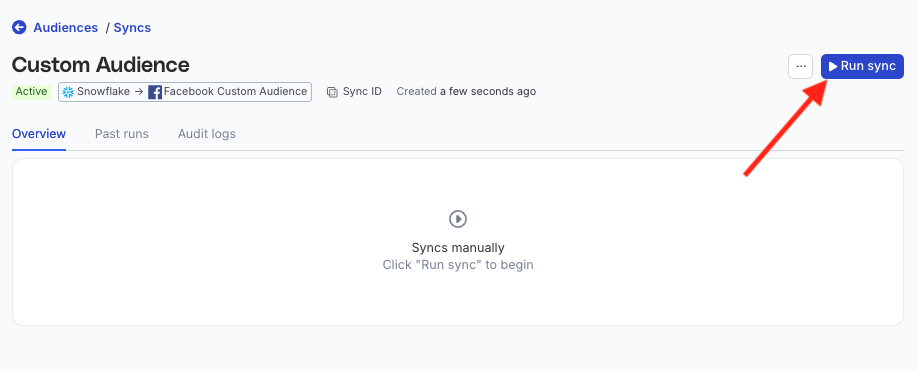
<li><strong>Run syncs manually</strong> — trigger a sync from the sync details page. You will need to run the sync each time.</li>
</ul>

<figure class="image--main "  >
    <a 
         href="/docs/images/audiences/destinations/fb-custom-audience/run-sync.webp"
        
        >
        <img src="/docs/images/audiences/destinations/fb-custom-audience/run-sync.webp" 


        decoding="async" loading="lazy" class="img-shortcode"/>
    </a>
    
</figure>

<!-- end-chunk -->
<!-- begin-chunk -->
<h4 id="sync-observability-settings">Sync observability settings</h4>

<table>
<thead>
<tr>
<th>Setting</th>
<th>Description</th>
</tr>
</thead>
<tbody>
<tr>
<td>Retain sync logs</td>
<td>This setting is toggled on by default and instructs RudderStack to store the sync logs in your warehouse. You can also configure the below settings: <br /><br /><table><tr><th width="20%">Setting</th><th width="80%">Description</th></tr><tr><td>Sync log retention</td><td>Specify the retention period of the <a href="https://www.rudderstack.com/docs/data-pipelines/reverse-etl/developer-guides/sync-observability/#sync-logs" >sync logs</a> in your warehouse. <br /><br />If you set it to 1, then RudderStack deletes any sync log older than a day (in UTC time). </td></tr><tr><td>Snapshot table retention</td><td>Specify the number of <a href="https://www.rudderstack.com/docs/data-pipelines/reverse-etl/developer-guides/sync-observability/#snapshot-table-schema" >snapshot tables</a> to retain. </td></tr></table></td>
</tr>
<tr>
<td>Retry failed records</td>
<td>This setting is toggled on by default and causes RudderStack to continually <a href="https://www.rudderstack.com/docs/data-pipelines/reverse-etl/developer-guides/sync-observability/#retry-failed-records" >retry sending the failed records</a>.</td>
</tr>
<tr>
<td>Retain and show failures</td>
<td>This setting is toggled off by default. Turn it on to have RudderStack write the error recorded for every failed record to a <a href="https://www.rudderstack.com/docs/data-pipelines/reverse-etl/developer-guides/rudderstack-schema/#failed-records-table" >failed records table</a> in your warehouse and show it in the sync&rsquo;s <a href="https://www.rudderstack.com/docs/data-pipelines/reverse-etl/developer-guides/sync-observability/#failed-records" >failed records view</a>. It applies from the next sync. <br /><br /><table><tr><th width="20%">Setting</th><th width="80%">Description</th></tr><tr><td>Failure retention</td><td>Number of days RudderStack keeps each sync&rsquo;s failed records in your warehouse. The default is 30 and the minimum is 7.</td></tr></table></td>
</tr>
</tbody>
</table>

<blockquote class="warning">
  <div class="tip-quote">
    
    <div class="tip-text">Storing sync logs, snapshot tables, and failed records may incur additional warehouse costs.</div>
  </div>
</blockquote>

<!-- end-chunk -->
<!-- begin-chunk -->
<h2 id="enable-sync">Enable sync</h2>

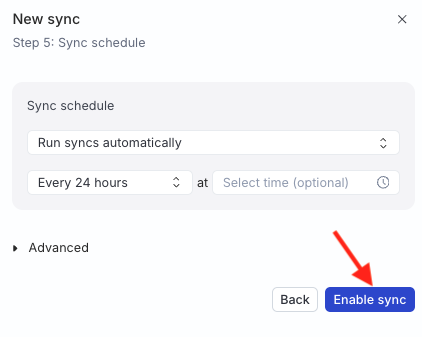
<p>Once the setup is complete, enable the sync.</p>

<figure class="image--main "  >
    <a 
         href="/docs/images/audiences/destinations/tiktok/enable-sync.webp"
        
        >
        <img src="/docs/images/audiences/destinations/tiktok/enable-sync.webp" 


        decoding="async" loading="lazy" class="img-shortcode"/>
    </a>
    
</figure>

<!-- end-chunk -->
<!-- begin-chunk -->
<h2 id="data-hashing">Data hashing</h2><p>The <a href="#advanced-settings" >Automatically hash PII data</a> setting lets you hash your user data before sending it to your API.</p>
<ul>
<li>Configure the setting to <strong>Yes</strong> if your incoming data is not pre-hashed</li>
<li>Configure this setting to <strong>No</strong> if your data is already hashed</li>
</ul>

<blockquote class="warning">
  <div class="tip-quote">
    
    <div class="tip-text"><p>Incorrect configuration of the <strong>Automatically hash PII data</strong> setting will result in failures.</p>
<ul>
<li>If the <strong>Automatically hash PII data</strong> setting is configured to <strong>Yes</strong> and your data is pre-hashed, the event will fail.</li>
<li>If the <strong>Automatically hash PII data</strong> setting is configured to <strong>No</strong> and your data is not pre-hashed, the event will fail.</li>
</ul>
</div>
  </div>
</blockquote>
<p>Such events are rejected with a clear error message, for example:</p>
<div class="rs-code">
  <div class="rs-code__head"><button class="rs-code__copy" type="button">
      
      Copy
    </button>
  </div>
  <div class="highlight"><pre class="chroma"><code class="language-text" data-lang="text">Hashing is disabled but the value for field EMAIL appears to be unhashed. Either enable hashing or send pre-hashed data.</code></pre></div>
</div>
<p>You will also see errors in the <strong>Events</strong> tab for cases that were previously marked as successful but resulted in no matches, helping you identify and fix data quality or configuration issues.</p>
<!-- end-chunk -->
<!-- begin-chunk -->
<h2 id="troubleshooting">Troubleshooting</h2><table>
<thead>
<tr>
<th>Issue</th>
<th><div>Resolution</div></th>
</tr>
</thead>
<tbody>
<tr>
<td><code>400</code> errors for all records</td>
<td>Required fields are unmapped or the warehouse values are empty</td>
</tr>
<tr>
<td>Wrong audience on API side</td>
<td>Verify the <a href="#specify-target-audience" >Audience ID</a> and <code>$$.connection.audienceId</code> while <a href="https://www.rudderstack.com/docs/audiences/syncs/custom-activation/setup-guide/#request-body-template" >configuring the template</a></td>
</tr>
<tr>
<td>Double-hashed identifiers</td>
<td><a href="#advanced-settings" >Automatically hash PII data</a> setting is set to <strong>Yes</strong> while your incoming warehouse data is pre-hashed — set this setting to <strong>No</strong></td>
</tr>
<tr>
<td>Sync fails after destination edit</td>
<td>Update sync mappings if destination field names or required flags have changed.<br /><br />See <a href="https://www.rudderstack.com/docs/audiences/syncs/custom-activation/setup-guide/#template-fields" >Template fields</a> for more information</td>
</tr>
</tbody>
</table>