# Workspace Tokens

<p>This guide covers how to generate, rotate, and manage your workspace token.</p>
<!-- end-chunk -->
<!-- begin-chunk -->
<h2 id="overview">Overview</h2><p>A workspace token uniquely identifies your RudderStack workspace. Your self-hosted data plane uses this token to read its source-destination configuration from the RudderStack-hosted control plane.</p>

<html lang="en">
<blockquote class="info">
  <div class="tip-quote">
    
    <div class="tip-text"><p><strong>Availability and access</strong></p>
<ul>
<li>Workspace tokens are available only in the RudderStack <a href="https://www.rudderstack.com/pricing/" >Free</a> and <a href="https://app.rudderstack.com/signup?type=opensource" >Open Source</a> plans.</li>
<li>Only organization admins can generate and manage workspace tokens.</li>
</ul></div>
  </div>
</blockquote>

</html>
<!-- end-chunk -->
<!-- begin-chunk -->
<h2 id="generate-a-workspace-token">Generate a workspace token</h2><ol>
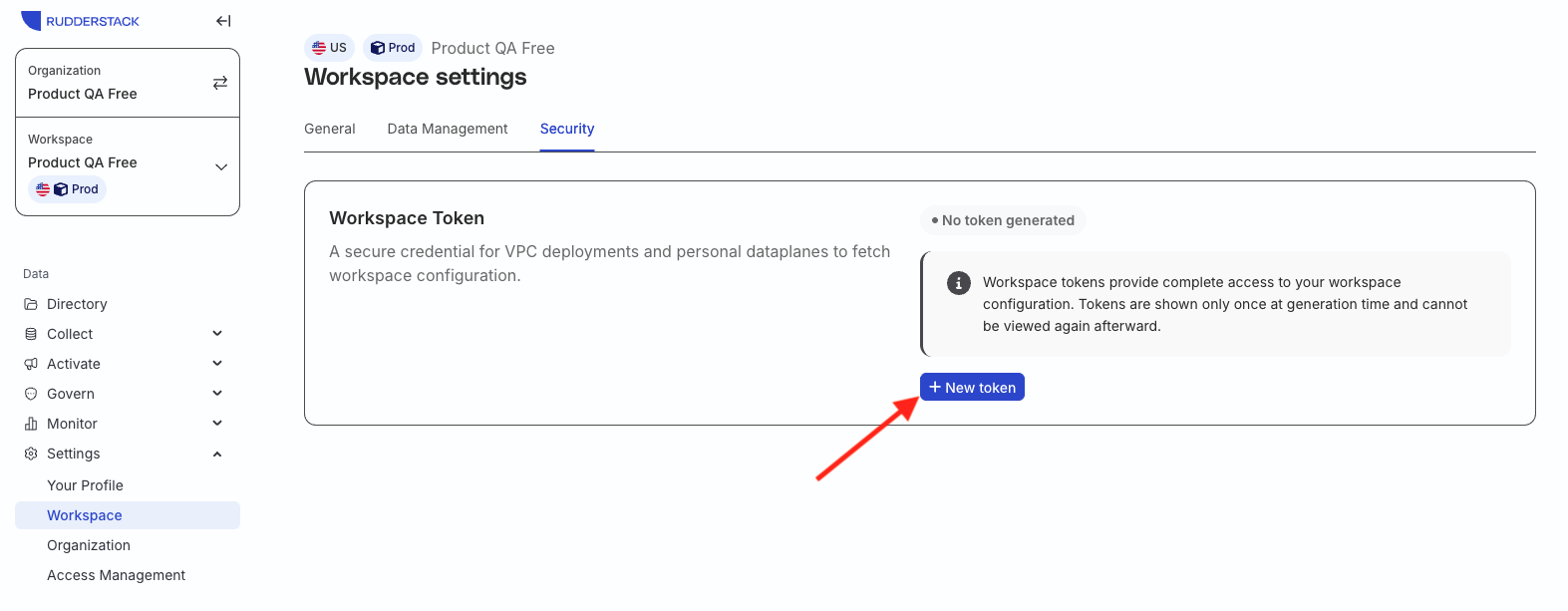
<li>In the RudderStack dashboard, go to <strong>Settings</strong> &gt; <strong>Workspace</strong> &gt; <strong>Security</strong>.</li>
<li>Click <strong>New token</strong>.</li>
</ol>

<figure class="image--main "  >
    <a 
         href="/docs/images/dashboard-guides/workspace-tokens/generate-new-workspace-token.webp"
        
        >
        <img src="/docs/images/dashboard-guides/workspace-tokens/generate-new-workspace-token.webp" 
         alt="Generate workspace token modal"  
         
         
        decoding="async" loading="lazy" class="img-shortcode"/>
    </a>
    
</figure>

<ol start="3">
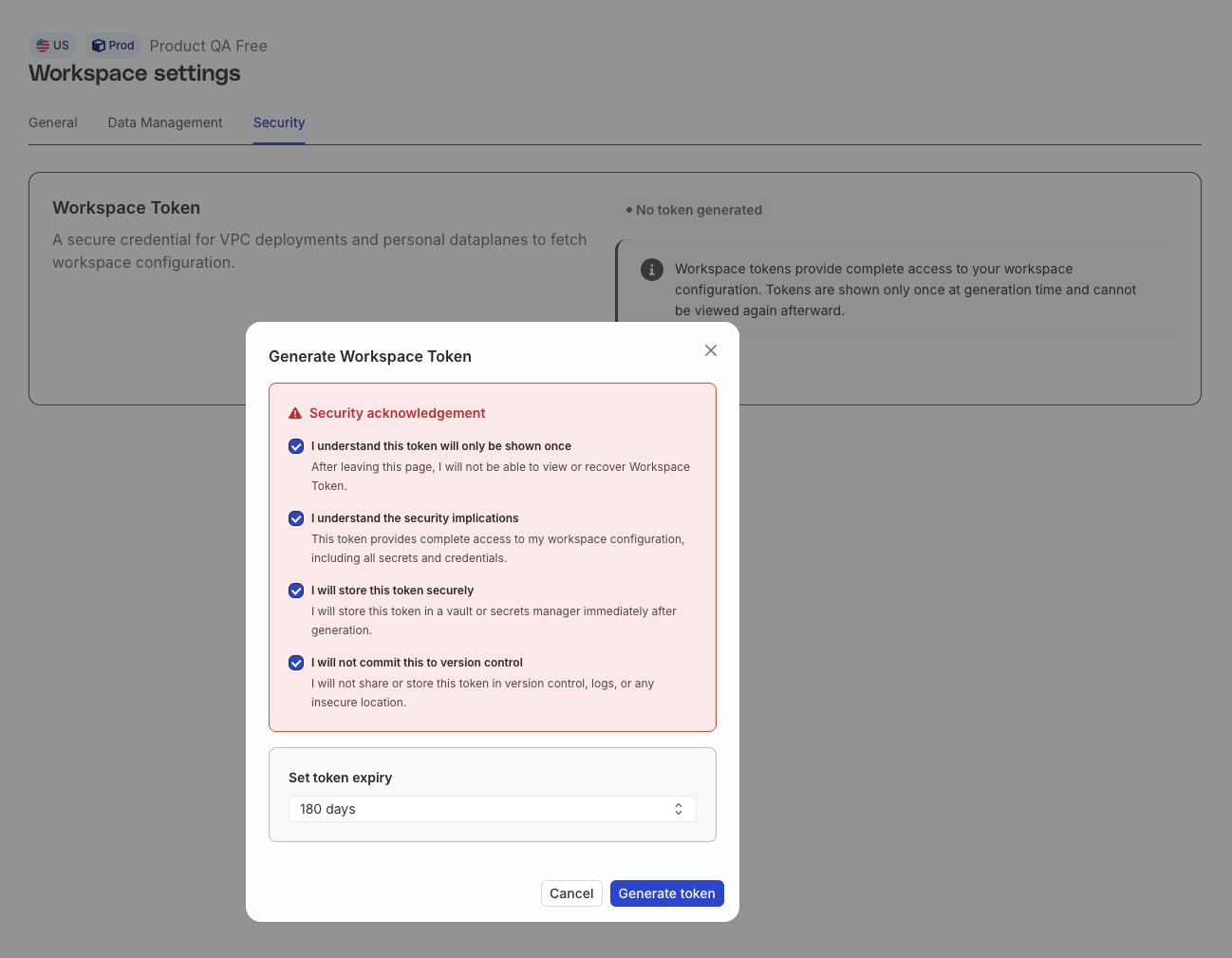
<li>Under <strong>Set token expiry</strong>, select an expiry period: <strong>30 days</strong>, <strong>60 days</strong>, <strong>90 days</strong>, <strong>180 days</strong>, or <strong>Never</strong>. By default, the expiry period is set to <strong>180 days</strong>. Select <strong>Never</strong> only if the token must remain valid until you manually revoke it.</li>
<li>Carefully review the <strong>Security acknowledgement</strong> and select all the checkboxes. The <strong>Generate token</strong> button stays disabled until you do.</li>
</ol>

<blockquote class="warning">
  <div class="tip-quote">
    
    <div class="tip-text">If you selected <strong>Never</strong> as the expiry period, make sure to select the additional never-expiry acknowledgement as well.</div>
  </div>
</blockquote>

<figure class="image--main "  >
    <a 
         href="/docs/images/dashboard-guides/workspace-tokens/set-token-expiry.webp"
        
        >
        <img src="/docs/images/dashboard-guides/workspace-tokens/set-token-expiry.webp" 
         alt="Set token expiry"  
         
         
        decoding="async" loading="lazy" class="img-shortcode"/>
    </a>
    
</figure>

<ol start="5">
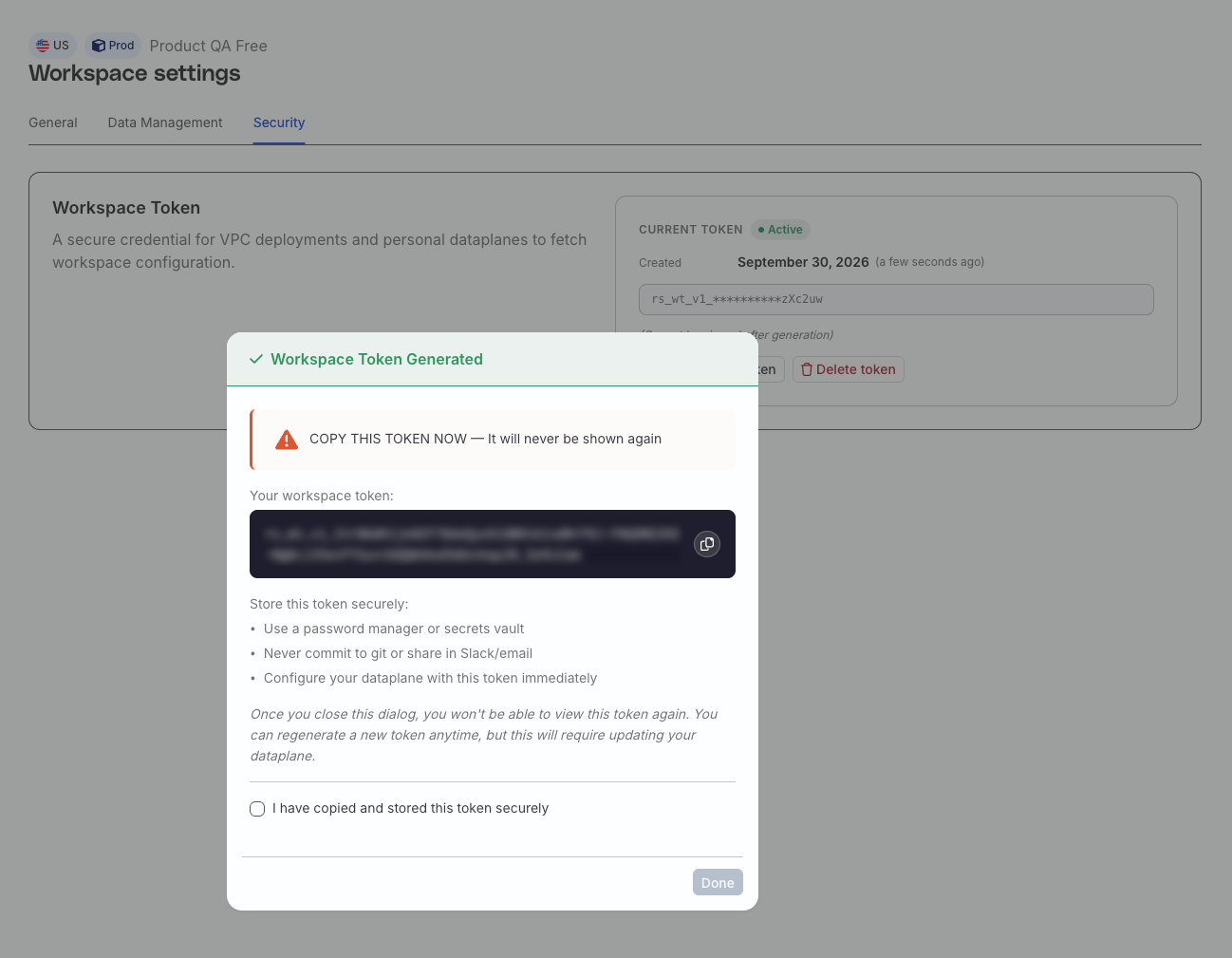
<li>Generate the token and copy its value immediately.</li>
</ol>

<figure class="image--main "  >
    <a 
         href="/docs/images/dashboard-guides/workspace-tokens/copy-workspace-token.webp"
        
        >
        <img src="/docs/images/dashboard-guides/workspace-tokens/copy-workspace-token.webp" 
         alt="Copy workspace token value"  
         
         
        decoding="async" loading="lazy" class="img-shortcode"/>
    </a>
    
</figure>

<!-- end-chunk -->
<!-- begin-chunk -->
<h3 id="save-the-token">Save the token</h3><p>The workspace token appears only once in plain text, immediately after generation. Save it in a secure secrets manager before closing the modal.</p>

<blockquote class="warning">
  <div class="tip-quote">
    
    <div class="tip-text">RudderStack stores only a SHA-512 hash and a display mask after generation, so neither you nor RudderStack Support can retrieve the plaintext value later. If you lose it, you will need to generate a new token.</div>
  </div>
</blockquote>
<p>Note that:</p>
<ul>
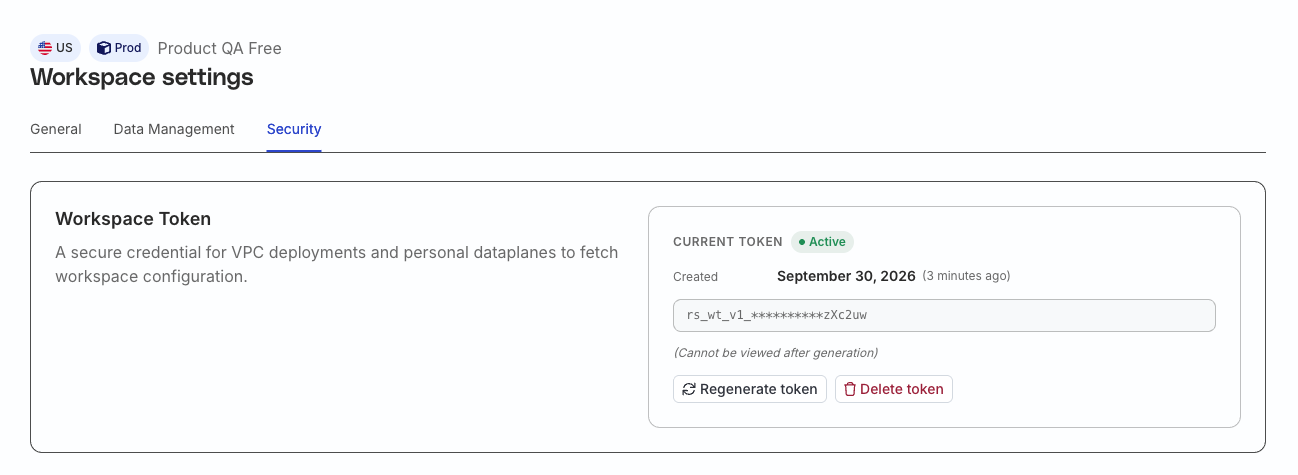
<li>New tokens use the format <code>rs_wt_v1_&lt;base64url&gt;</code>.</li>
<li>After generation, the dashboard displays them as <code>rs_wt_v1_**********&lt;last 6 characters&gt;</code>.</li>
</ul>

<figure class="image--main "  >
    <a 
         href="/docs/images/dashboard-guides/workspace-tokens/workspace-token-after-generation.webp"
        
        >
        <img src="/docs/images/dashboard-guides/workspace-tokens/workspace-token-after-generation.webp" 
         alt="Workspace token after generation"  
         
         
        decoding="async" loading="lazy" class="img-shortcode"/>
    </a>
    
</figure>

<!-- end-chunk -->
<!-- begin-chunk -->
<h2 id="check-token-status">Check token status</h2><p>The pill next to the <strong>Current token</strong> and <strong>Previous token</strong> headers shows the status of your tokens:</p>
<table>
  <thead>
      <tr>
          <th>Status</th>
          <th>Meaning</th>
      </tr>
  </thead>
  <tbody>
      <tr>
          <td>Active</td>
          <td>Valid — more than 30 days remaining or no expiry set</td>
      </tr>
      <tr>
          <td>Expiring Soon</td>
          <td>30 days or fewer until expiry</td>
      </tr>
      <tr>
          <td>Expiring</td>
          <td>Superseded by a newer token and in its grace period — the card shows the time remaining and an <strong>Auto-deletes</strong> date</td>
      </tr>
  </tbody>
</table>

<html lang="en">
<blockquote class="info">
  <div class="tip-quote">
    
    <div class="tip-text"><p><strong>Important considerations</strong></p>
<ul>
<li>Expired tokens are removed from the list. A data plane using an expired token cannot read workspace configuration.</li>
<li>Banners and modals appear when a token is in its grace period or has 30 days or fewer until expiry. Organization admins also receive email 30, 14, 7, and 1 days before expiry, when the token expires, and about 2 hours before a grace period ends.</li>
</ul></div>
  </div>
</blockquote>

</html>
<!-- end-chunk -->
<!-- begin-chunk -->
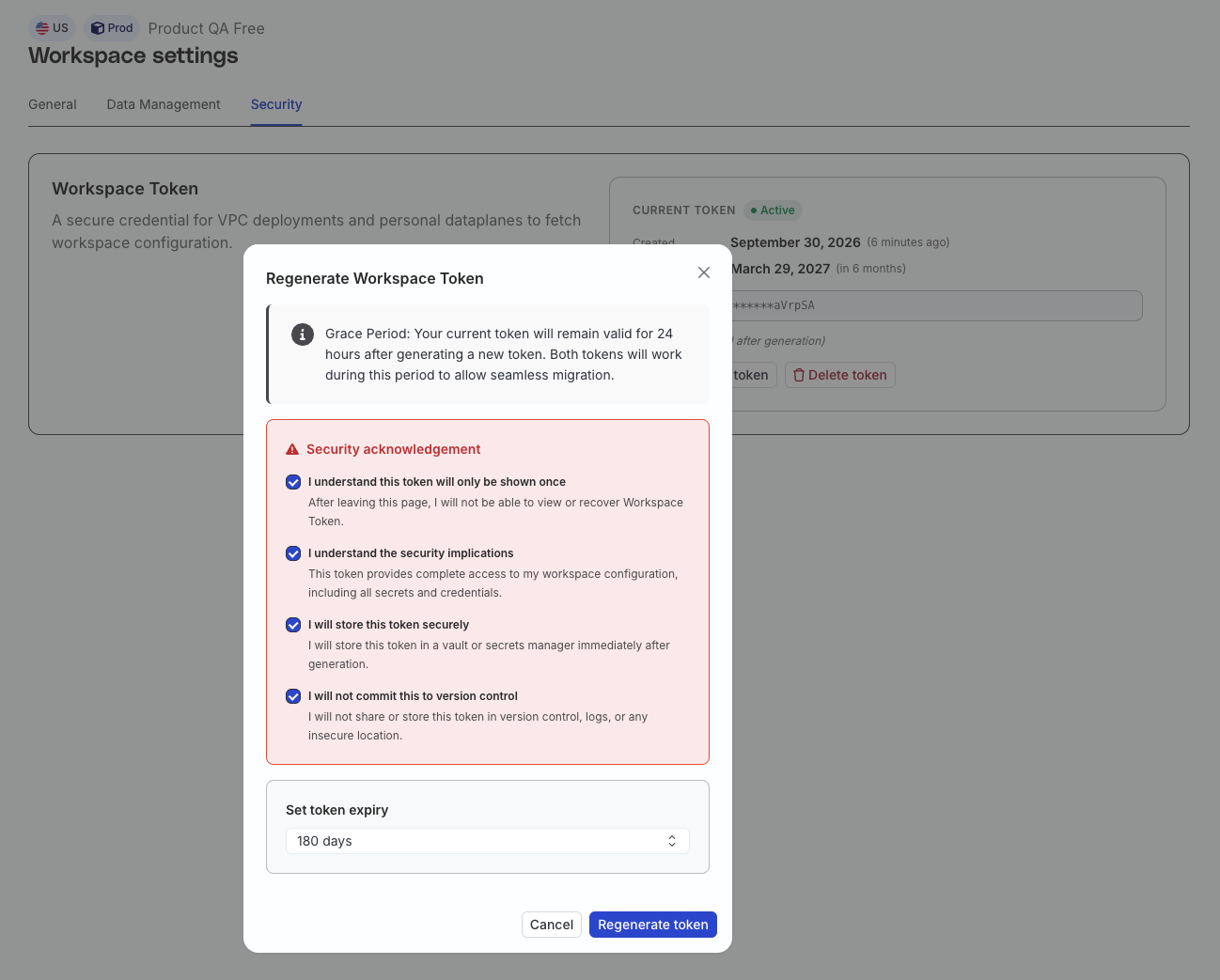
<h2 id="rotate-a-workspace-token">Rotate a workspace token</h2><p>The <strong>Regenerate token</strong> button creates a new token — it doesn&rsquo;t reveal or update an existing workspace token. If the button isn&rsquo;t shown, the workspace is at its <a href="#workspace-token-limits" >token limit</a>.</p>
<p>Creating the new token starts the previous token&rsquo;s grace period of 24 hours. Both the new and previous tokens authenticate during this window, so you can migrate without downtime.</p>

<blockquote class="warning">
  <div class="tip-quote">
    
    <div class="tip-text">Rotation can shorten the previous token&rsquo;s validity. For example, a token with 180 days remaining stops working at the end of its grace period (24 hours) once you generate a new token.</div>
  </div>
</blockquote>
<p>To rotate a token safely:</p>
<ol>
<li>Generate a new token and securely save the show-once value.</li>
<li>Update the token value in your data plane deployment.</li>
<li>Restart the data plane.</li>
<li>Verify that the data plane can read the workspace configuration before the overlap window ends.</li>
</ol>

<figure class="image--main "  >
    <a 
         href="/docs/images/dashboard-guides/workspace-tokens/regenerate-workspace-token.webp"
        
        >
        <img src="/docs/images/dashboard-guides/workspace-tokens/regenerate-workspace-token.webp" 
         alt="Regenerate workspace token"  
         
         
        decoding="async" loading="lazy" class="img-shortcode"/>
    </a>
    
</figure>

<!-- end-chunk -->
<!-- begin-chunk -->
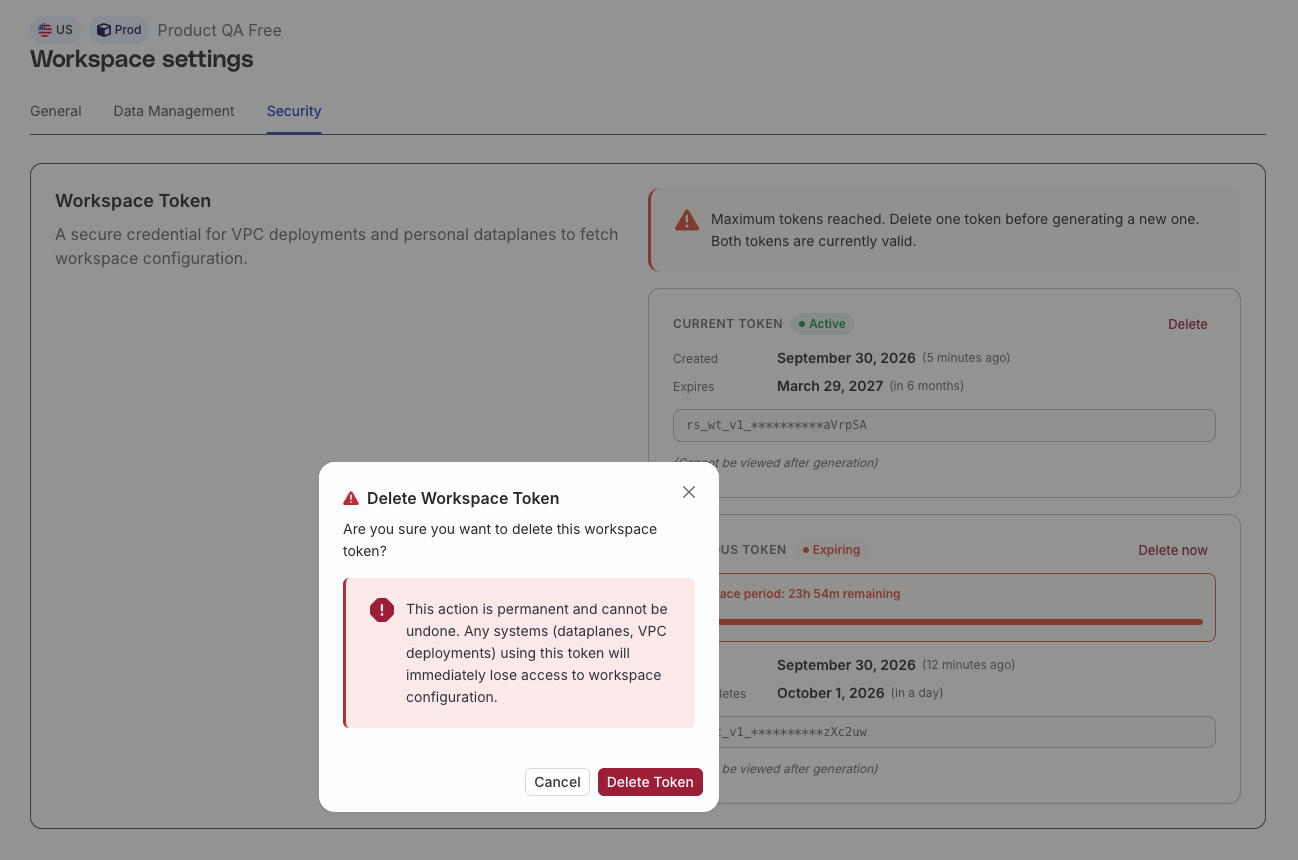
<h2 id="delete-a-workspace-token">Delete a workspace token</h2><p>Delete a token to revoke it immediately. Any data plane still using that token loses access to the workspace configuration, so verify that your deployment uses another valid token first.</p>
<p>Audit logs record token creation and deletion events.</p>

<figure class="image--main "  >
    <a 
         href="/docs/images/dashboard-guides/workspace-tokens/delete-workspace-token.webp"
        
        >
        <img src="/docs/images/dashboard-guides/workspace-tokens/delete-workspace-token.webp" 
         alt="Delete workspace token"  
         
         
        decoding="async" loading="lazy" class="img-shortcode"/>
    </a>
    
</figure>

<!-- end-chunk -->
<!-- begin-chunk -->
<h2 id="workspace-token-limits">Workspace token limits</h2><p>A workspace can have at most two non-expired workspace tokens — expired tokens do not count toward this limit.</p>
<p>When the workspace is at the limit, the <strong>Regenerate token</strong> button disappears and the <strong>Security</strong> tab shows &ldquo;Maximum tokens reached. Delete one token before generating a new one. Both tokens are currently valid.&rdquo;</p>
<p>During a rotation, the previous token still occupies a slot, so you stay at the limit until the grace period ends or you click <strong>Delete now</strong> on the in-grace token card.</p>
<!-- end-chunk -->
<!-- begin-chunk -->
<h2 id="existing-workspace-tokens">Existing workspace tokens</h2><p>Existing (legacy) workspace tokens continue to work without any action.</p>
<p>For better security, RudderStack recommends generating a new token, updating your data plane, and retiring the migrated token by following the <a href="#rotate-a-workspace-token" >rotation steps</a>.</p>
<!-- end-chunk -->
<!-- begin-chunk -->
<h2 id="add-the-token-to-your-data-plane">Add the token to your data plane</h2><p>Add the generated token to your deployment by following the relevant setup guide:</p>
<ul>
<li><a href="https://www.rudderstack.com/docs/get-started/rudderstack-open-source/data-plane-setup/docker/" >Docker Setup</a></li>
<li><a href="https://www.rudderstack.com/docs/get-started/rudderstack-open-source/data-plane-setup/kubernetes/" >Kubernetes Setup</a></li>
<li><a href="https://www.rudderstack.com/docs/get-started/rudderstack-open-source/data-plane-setup/developer-machine-setup/" >Developer Machine Setup</a></li>
</ul>
<!-- end-chunk -->
<!-- begin-chunk -->
<h2 id="workspace-tokens-vs-access-tokens">Workspace tokens vs. access tokens</h2><p>A workspace token authenticates a self-hosted data plane so it can read workspace configuration. Don&rsquo;t use it to call RudderStack APIs.</p>
<ul>
<li>A <a href="https://www.rudderstack.com/docs/access-management/service-access-tokens/" >Service Access Token</a> authenticates applications that access RudderStack APIs at the organization or workspace level.</li>
<li>A <a href="https://www.rudderstack.com/docs/access-management/personal-access-tokens/" >Personal Access Token</a> is tied to an individual user and authenticates that user&rsquo;s API requests.</li>
</ul>