# Custom Types: General Availability

<p><a href="https://www.rudderstack.com/docs/data-governance/data-catalog/properties/#custom-data-types" >Custom Types</a> are now <strong>Generally Available</strong> on the Free, Growth, and Enterprise plans. Previously in Beta for Enterprise workspaces, custom types let you define a validation rule once in a central library and apply it to any number of properties in your Data Catalog.</p>

<blockquote class="announcement">
  <div class="tip-quote">
    
    <div class="tip-text">Custom Types are <strong>Generally Available</strong>. Free workspaces can create up to 2 custom types, Growth workspaces up to 10, and Enterprise workspaces an unlimited number. See <a href="#plan-limits" >Plan limits</a>.</div>
  </div>
</blockquote>

<!-- end-chunk -->
<!-- begin-chunk -->
<h2 id="why-custom-types">Why Custom Types?</h2><p><a href="https://www.rudderstack.com/docs/data-governance/data-catalog/properties/#set-advanced-rules-for-a-property" >Advanced rules</a> apply to one property at a time. If you manage hundreds of properties, you end up copying the same enum, date format, or object shape onto each one, then editing every copy when the rule changes. A custom type holds that rule in one place, so a single edit reaches every property that uses it.</p>
<!-- end-chunk -->
<!-- begin-chunk -->
<h2 id="key-features">Key features</h2><ul>
<li><strong>Reusable rules</strong>: Define a custom type once and select it as the data type of any property. The property inherits every rule on the type.</li>
<li><strong>Complex types</strong>: Build an array of another custom type, such as a list of allowed enum values, or an object custom type with its own required and optional sub-properties.</li>
<li><strong>Dashboard or code</strong>: Create custom types in the dashboard, or define them as YAML and deploy them with <a href="https://www.rudderstack.com/docs/dev-tools/rudder-cli/data-catalog-and-tracking-plans/data-catalog/custom-types/" >Rudder CLI</a>. The <a href="https://www.rudderstack.com/docs/api/data-catalog-api/data-catalog/#create-custom-type" >Data Catalog API</a> endpoints for custom types remain in Private Beta.</li>
<li><strong>Plan-based limits</strong>: Each workspace has a cap on the number of custom types it can create. See <a href="#plan-limits" >Plan limits</a>.</li>
</ul>
<!-- end-chunk -->
<!-- begin-chunk -->
<h2 id="plan-limits">Plan limits</h2><table>
  <thead>
      <tr>
          <th>Plan</th>
          <th>Custom types per workspace</th>
      </tr>
  </thead>
  <tbody>
      <tr>
          <td>Free</td>
          <td>2</td>
      </tr>
      <tr>
          <td>Growth</td>
          <td>10</td>
      </tr>
      <tr>
          <td>Enterprise</td>
          <td>Unlimited</td>
      </tr>
  </tbody>
</table>
<p>When your workspace reaches its limit, you can still edit existing custom types but cannot create new ones. See <a href="https://www.rudderstack.com/pricing/" >RudderStack pricing</a> to compare plans.</p>
<p>If your workspace goes over its limit, for example after a downgrade to a plan with a lower cap:</p>
<ul>
<li>Existing custom types become read-only.</li>
<li>You cannot create new custom types, or create or update properties that use a custom type.</li>
<li>You can still delete custom types to get back under the limit.</li>
</ul>
<p>If you manage custom types with Rudder CLI, <code>rudder-cli apply</code> returns the limit error from the server when your workspace is at or over its limit.</p>
<!-- end-chunk -->
<!-- begin-chunk -->
<h2 id="get-started">Get started</h2><ol>
<li>Go to <strong>Govern</strong> &gt; <strong>Data Catalog</strong>, open the <strong>Properties</strong> tab, then click the <strong>Custom Data Types</strong> tab.</li>
<li>Click <strong>Add custom type</strong>, then set a name, data type, and rules.</li>
<li>Create or edit a property, set its data type to <strong>Custom data type</strong>, and select your custom type.</li>
<li>Add the property to a tracking plan to validate events against it.</li>
</ol>
<p>See <a href="https://www.rudderstack.com/docs/data-governance/data-catalog/properties/#custom-data-types" >Custom Data Types</a> for the full setup guide, including array and object examples.</p>
<!-- end-chunk -->
<!-- begin-chunk -->
<h2 id="resources">Resources</h2><ul>
<li><a href="https://www.rudderstack.com/docs/data-governance/data-catalog/properties/#custom-data-types" >Custom Data Types</a>: Create custom types and use them in properties</li>
<li><a href="https://www.rudderstack.com/docs/dev-tools/rudder-cli/data-catalog-and-tracking-plans/data-catalog/custom-types/" >Use Custom Data Types in Rudder CLI</a>: Define custom types in YAML and deploy them as code</li>
<li><a href="https://www.rudderstack.com/docs/api/data-catalog-api/data-catalog/#create-custom-type" >Data Catalog API</a>: Manage custom types programmatically (Private Beta)</li>
</ul>
<!-- end-chunk -->
<!-- begin-chunk -->
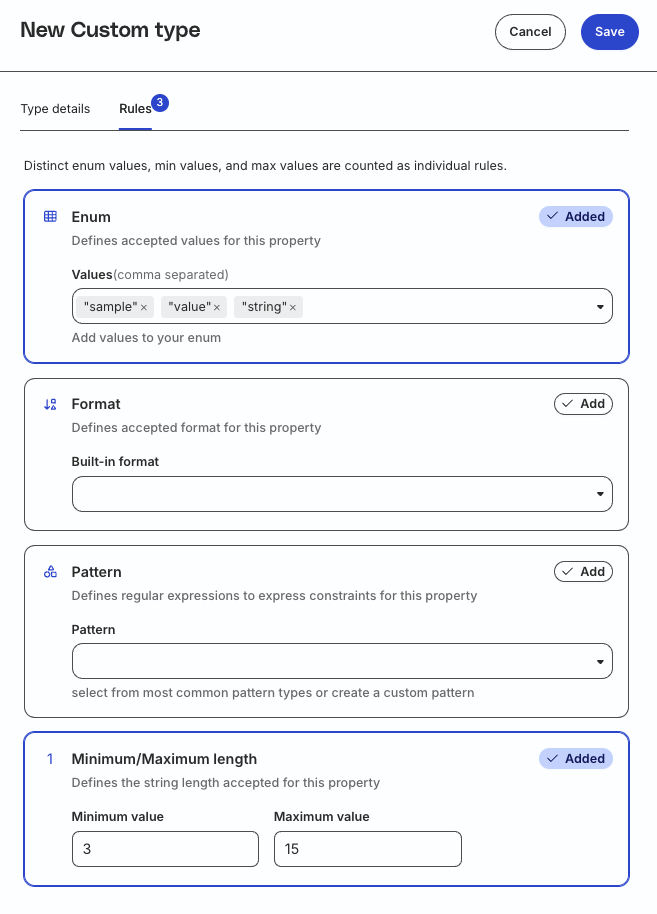
<h2 id="screenshots">Screenshots</h2><p><strong>Rules tab for a new string custom type</strong></p>

<figure class="image--main "  >
    <a 
         href="/docs/images/data-governance/define-custom-type-rules.webp"
        
        >
        <img src="/docs/images/data-governance/define-custom-type-rules.webp" 
         alt="Rules tab of a new custom type with enum and minimum/maximum length rules added"  
         
         
        decoding="async" loading="lazy" class="img-shortcode"/>
    </a>
    
</figure>


