# Pinterest Tag Cloud Mode Integration

<p>RudderStack lets you send your event data to <a href="https://s.pinimg.com/ct/docs/conversions_api/dist/v3.html" >Pinterest Conversions API</a> via <a href="https://www.rudderstack.com/docs/destinations/rudderstack-connection-modes/#cloud-mode" >cloud mode</a>. It sends the event calls in a <a href="https://www.rudderstack.com/docs/api/http-api/#batch" >batch</a>, where each batch can contain upto 1000 events.</p>

<blockquote class="warning">
  <div class="tip-quote">
    
    <div class="tip-text"><ul>
<li>To use Pinterest Tag&rsquo;s cloud mode (Pinterest conversions API), contact <a href="https://help.pinterest.com/en/contact">Pinterest Support</a> to enable the beta access.</li>
<li>Pinterest is migrating to API v5 and will deprecate support for API v3 on June 30, 2023. Hence, it is recommended to <a href="https://www.rudderstack.com/docs/destinations/streaming-destinations/pinterest-ads/setting-up-pinterest-ads/#connection-settings" >configure Pinterest Tag</a> as a destination in RudderStack using API v5.</li>
</ul>
</div>
  </div>
</blockquote>
<p>Find the open source code for this destination in the <a href="https://github.com/rudderlabs/rudder-transformer/tree/main/src/v0/destinations/pinterest_tag" >GitHub repository</a>.</p>
<!-- end-chunk -->
<!-- begin-chunk -->
<h2 id="track">Track</h2><p>The <a href="https://www.rudderstack.com/docs/event-spec/standard-events/track/" ><code>track</code></a> call allows you to capture the users&rsquo; conversion events.</p>
<p>RudderStack maps the <code>track</code> events as specified in the <strong>Map Your Events To Pinterest Events</strong> connection setting in the dashboard.</p>
<p>A sample <code>track</code> call is shown below:</p>
<div class="rs-code">
  <div class="rs-code__head">javascript<button class="rs-code__copy" type="button">
      
      Copy
    </button>
  </div>
  <div class="highlight"><pre class="chroma"><code class="language-javascript" data-lang="javascript">rudderanalytics.track(&#34;Order Completed&#34;, {
  event_id: &#39;eventIDordercompleted&#39;,
  order_id: &#34;transactionId&#34;,
  value: 35.00,
  revenue: 31.98,
  currency: &#39;USD&#39;,
  products: [{
    product_id: &#39;123454387&#39;,
    price: 3.00,
    quantity: 2,
    currency: &#39;USD&#39;,
    position: 1,
    value: 6.00,
  }]
}, {
  traits: {
    email: &#34;alex@example.com&#34;,
    lastname: &#34;Keener&#34;,
    firstname: &#34;Alex&#34;,
    action_source: &#34;offline&#34; // or app_ios / app_android / web
  }
});</code></pre></div>
</div>
<!-- end-chunk -->
<!-- begin-chunk -->
<h3 id="ecommerce-conversion-tracking">Ecommerce conversion tracking</h3>
<blockquote class="warning">
  <div class="tip-quote">
    
    <div class="tip-text">This destination does not strictly adhere to the <a href="https://www.rudderstack.com/docs/event-spec/ecommerce-events-spec/" >RudderStack Ecommerce Event Spec</a>.</div>
  </div>
</blockquote>
<p>You can use the <a href="https://www.rudderstack.com/docs/event-spec/ecommerce-events-spec/" >Ecommerce Events Specification</a> for sending the events while instrumenting your site with the RudderStack SDK.</p>
<p>The following table mentions how the specific RudderStack <code>track</code> Ecommerce events are mapped to standard Pinterest Conversion Events:</p>
<table>
<thead>
<tr>
<th>RudderStack event</th>
<th>Pinterest event</th>
</tr>
</thead>
<tbody>
<tr>
<td>Order Completed</td>
<td><code>checkout</code></td>
</tr>
<tr>
<td>Product Added</td>
<td><code>add_to_cart</code></td>
</tr>
<tr>
<td>Products Searched</td>
<td><code>search</code></td>
</tr>
<tr>
<td>Product List Filtered</td>
<td><code>search</code></td>
</tr>
</tbody>
</table>
<p>You can also track a custom event that you want to include in the conversion reporting. It will be mapped to a custom Pinterest event, for example:</p>
<div class="rs-code">
  <div class="rs-code__head">javascript<button class="rs-code__copy" type="button">
      
      Copy
    </button>
  </div>
  <div class="highlight"><pre class="chroma"><code class="language-javascript" data-lang="javascript">rudderanalytics.track(&#34;custom event&#34;)</code></pre></div>
</div>
<!-- end-chunk -->
<!-- begin-chunk -->
<h3 id="standard-pinterest-events">Standard Pinterest events</h3><p>Pinterest supports the following nine standard events that can be mapped and tracked for reporting. Any event apart from these is treated as a user-defined event.</p>
<ul>
<li><code>checkout</code></li>
<li><code>add_to_cart</code></li>
<li><code>page_visit</code></li>
<li><code>signup</code></li>
<li><code>watch_video</code></li>
<li><code>lead</code></li>
<li><code>search</code></li>
<li><code>view_category</code></li>
<li><code>custom</code></li>
</ul>
<!-- end-chunk -->
<!-- begin-chunk -->
<h2 id="page">Page</h2><p>The <a href="https://www.rudderstack.com/docs/event-spec/standard-events/page/" ><code>page</code></a> call lets you record your website&rsquo;s page views with any additional relevant information about the viewed page.</p>
<ul>
<li><strong><code>view_category</code></strong>: RudderStack sends this event if both the <code>name</code> and <code>category</code> fields are present. The below sample event contains both the fields and is mapped to the Pinterest&rsquo;s <code>view_category</code> event:</li>
</ul>
<div class="rs-code">
  <div class="rs-code__head">javascript<button class="rs-code__copy" type="button">
      
      Copy
    </button>
  </div>
  <div class="highlight"><pre class="chroma"><code class="language-javascript" data-lang="javascript">rudderanalytics.page(&#34;Best Seller&#34;, &#34;Games&#34;, {
  path: &#34;/best-seller/games/1&#34;,
  url: &#34;https://www.estore.com/best-seller/games/1&#34;,
  title: &#34;Best selling games offered by EStore&#34;,
  search: &#34;estore bestseller games&#34;,
  referrer: &#34;https://www.google.com/search?q=estore+bestseller&#34;,
  testDimension: &#34;true&#34;,
})</code></pre></div>
</div>
<ul>
<li><strong><code>page_visit</code></strong>: RudderStack sends this event if only <code>name</code> field is present and drops any additional properties. The below sample event contains only <code>name</code> and is mapped to the Pinterest&rsquo;s <code>page_visit</code> event:</li>
</ul>
<div class="rs-code">
  <div class="rs-code__head">javascript<button class="rs-code__copy" type="button">
      
      Copy
    </button>
  </div>
  <div class="highlight"><pre class="chroma"><code class="language-javascript" data-lang="javascript">rudderanalytics.page(&#34;Best Seller&#34;, {
  path: &#34;/best-seller/1&#34;,
})</code></pre></div>
</div>
<!-- end-chunk -->
<!-- begin-chunk -->
<h2 id="common-field-mappings">Common field mappings</h2><p>The following table lists the mappings specific for Pinterest Conversion API and are relevant for both the <code>track</code> and <code>page</code> calls:</p>
<table>
<thead>
<tr>
<th>RudderStack property</th>
<th>Pinterest Tag property</th>
<th>Description</th>
</tr>
</thead>
<tbody>
<tr>
<td><code>message.event</code> <br/> Required</td>
<td><code>event_name</code></td>
<td>Type of the user event.</td>
</tr>
<tr>
<td><code>context.traits.action_source</code> <br /> <code>properties.action_source</code> <br /> <code>message.channel</code> <br/> Required</td>
<td><code>action_source</code> <br/></td>
<td>Source indicating the occurence of conversion event.</td>
</tr>
<tr>
<td><code>timestamp</code> <br/> Required</td>
<td><code>event_time</code></td>
<td>Unix timestamp (in UTC) in seconds indicating when the user conversion event occurred.</td>
</tr>
<tr>
<td><code>destination.Config.advertiserId</code> <br/> Required</td>
<td><code>advertiser_id</code></td>
<td>Pinterest Advertiser ID.</td>
</tr>
<tr>
<td>Integrations Object <code>messageId</code></td>
<td><code>event_id</code></td>
<td>Deduplication key from the dashboard setting or <code>messageId</code>. The dashboard setting is given higher priority.</td>
</tr>
<tr>
<td><code>pageUrl</code></td>
<td><code>event_source_url</code></td>
<td>URL of the web conversion event.</td>
</tr>
<tr>
<td><code>context.device.adTrackingEnabled</code></td>
<td><code>opt_out</code></td>
<td><ul><li>When <code>action_source</code> is <strong>web</strong> or <strong>offline</strong>, it defines whether the user has opted out of tracking for web conversion events.</li><li>When <code>action_source</code> is <strong>app_android</strong> or <strong>app_ios</strong>, it defines whether the user has enabled <strong>Limit Ad Tracking</strong> on their iOS device or opted out of <strong>Ads Personalization</strong> on their Android device. </li></ul></td>
</tr>
<tr>
<td><code>destination.Config.appId</code></td>
<td><code>app_id</code></td>
<td>App store&rsquo;s App ID.</td>
</tr>
<tr>
<td><code>context.app.name</code> <br /> <code>properties.appName</code></td>
<td><code>app_name</code></td>
<td>Name of the app.</td>
</tr>
<tr>
<td><code>context.app.version</code> <br /> <code>properties.appVersion</code></td>
<td><code>app_version</code></td>
<td>Version of the app.</td>
</tr>
<tr>
<td><code>context.device.manufacturer</code> <br /> <code>properties.manufacturer</code></td>
<td><code>device_brand</code></td>
<td>Brand of the user device.</td>
</tr>
<tr>
<td><code>context.device.model</code> <br /> <code>properties.deviceModel</code></td>
<td><code>device_model</code></td>
<td>Model of the user device.</td>
</tr>
<tr>
<td><code>context.device.type</code> <br /> <code>properties.deviceType</code></td>
<td><code>device_type</code></td>
<td>Type of the user device.</td>
</tr>
<tr>
<td><code>context.os.version</code></td>
<td><code>os_version</code></td>
<td>Version of the device&rsquo;s operating system.</td>
</tr>
<tr>
<td><code>context.locale</code></td>
<td><code>language</code></td>
<td>Two-character ISO-639-1 language code indicating the user&rsquo;s language.</td>
</tr>
<tr>
<td><code>properties.partnerName</code></td>
<td><code>partner_name</code></td>
<td>Third party partner&rsquo;s name responsible for sending the event to Conversions API on behalf of the advertiser. <br/><br/> The naming convention is <code>ss-&lt;partnername&gt;</code> (in lowercase), for example, <code>ss-shopify</code>.</td>
</tr>
<tr>
<td><code>context.network.carrier</code></td>
<td><code>device_carrier</code></td>
<td>User device&rsquo;s mobile carrier.</td>
</tr>
<tr>
<td><code>context.network.wifi</code></td>
<td><code>wifi</code></td>
<td>Whether the event occurred when the user&rsquo;s device was connected to Wi-Fi.</td>
</tr>
</tbody>
</table>

<html lang="en">
<blockquote class="info">
  <div class="tip-quote">
    
    <div class="tip-text">For mobile sources, if <code>context.device.adTrackingEnabled</code> is <code>true</code>, <code>opt_out</code> will be set as <code>false</code> and vice-versa.</div>
  </div>
</blockquote>

</html>
<!-- end-chunk -->
<!-- begin-chunk -->
<h2 id="user-field-mappings">User field mappings</h2><p>The following table lists the mappings for fields carrying the user information for <code>track</code> and <code>page</code> calls:</p>
<table>
<thead>
<tr>
<th>RudderStack property</th>
<th>Pinterest Tag property</th>
<th>Data Type</th>
</tr>
</thead>
<tbody>
<tr>
<td><code>properties.email</code> <br /> <code>context.traits.email</code></td>
<td><code>em</code></td>
<td>Array of strings with SHA-256 encoding</td>
</tr>
<tr>
<td><code>properties.phone</code> <br />  <code>context.traits.phone</code></td>
<td><code>ph</code></td>
<td>Array of strings with SHA-256 encoding</td>
</tr>
<tr>
<td><code>properties.clickId</code></td>
<td><code>click_id</code></td>
<td>String</td>
</tr>
<tr>
<td><code>context.traits.gender</code></td>
<td><code>ge</code></td>
<td>Array of strings with SHA-256 encoding</td>
</tr>
<tr>
<td><code>context.traits.birthday</code></td>
<td><code>db</code> (YYYYMMDD format)</td>
<td>Array of strings with SHA-256 encoding</td>
</tr>
<tr>
<td><code>context.traits.lastName</code></td>
<td><code>ln</code></td>
<td>Array of strings with SHA-256 encoding</td>
</tr>
<tr>
<td><code>context.traits.firstName</code></td>
<td><code>fn</code></td>
<td>Array of strings with SHA-256 encoding</td>
</tr>
<tr>
<td><code>traits.address.city</code> <br /> <code>context.traits.address.city</code></td>
<td><code>ct</code></td>
<td>Array of strings with SHA-256 encoding</td>
</tr>
<tr>
<td><code>traits.address.state</code> <br /> <code>context.traits.address.state</code></td>
<td><code>st</code> (Two-letter code)</td>
<td>Array of strings with SHA-256 encoding</td>
</tr>
<tr>
<td><code>traits.address.zip</code> <br /> <code>context.traits.address.zip</code></td>
<td><code>zp</code></td>
<td>Array of strings with SHA-256 encoding</td>
</tr>
<tr>
<td><code>traits.address.country</code> <br /> <code>context.traits.address.country</code></td>
<td><code>country</code> (Two-character ISO-3166 country code)</td>
<td>Array of strings with SHA-256 encoding</td>
</tr>
<tr>
<td><code>userId</code> <br/> <code>traits.userId</code> <br/> <code>traits.id</code>  <br/> <code>context.traits.userId</code> <br/> <code>context.traits.id</code> <br/> <code>anonymousId</code></td>
<td><code>external_id</code></td>
<td>Array of strings with SHA-256 encoding</td>
</tr>
<tr>
<td><code>context.device.advertisingId</code></td>
<td><code>hashed_maids</code></td>
<td>Array of strings with SHA-256 encoding</td>
</tr>
<tr>
<td><code>context.ip</code> <br /> <code>context.requestIP</code> <br /> <code>properties.ip</code> <br /> <code>properties.clientIpAddress</code></td>
<td><code>client_ip_address</code></td>
<td>String</td>
</tr>
<tr>
<td><code>context.userAgent</code></td>
<td><code>client_user_agent</code></td>
<td>String</td>
</tr>
</tbody>
</table>

<blockquote class="warning">
  <div class="tip-quote">
    
    <div class="tip-text"><p>To send the <code>track</code> or <code>page</code> events successfully, you need to include <strong>at least one</strong> of the following user properties:</p>
<ul>
<li><code>em</code></li>
<li><code>hashed_maids</code></li>
<li>Combination of <code>client_ip_address</code> and <code>client_user_agent</code></li>
</ul>
</div>
  </div>
</blockquote>
<!-- end-chunk -->
<!-- begin-chunk -->
<h2 id="custom-field-mappings">Custom field mappings</h2><p>The following table lists the custom fields mappings for <code>track</code> and <code>page</code> calls:</p>
<table>
<thead>
<tr>
<th>RudderStack property</th>
<th>Pinterest Tag property</th>
<th>Data Type</th>
</tr>
</thead>
<tbody>
<tr>
<td><code>properties.currency</code></td>
<td><code>currency</code></td>
<td>String</td>
</tr>
<tr>
<td><code>properties.value</code> <br /> <code>properties.total</code> <br /><code>properties.revenue</code></td>
<td><code>value</code></td>
<td>String</td>
</tr>
<tr>
<td><code>properties.product_id</code> <br /> <code>properties.product_sku</code> <br /> <code>properties.products[index].product_id</code> <br /> <code>properties.products[index].product_sku</code></td>
<td><code>content_ids</code></td>
<td>Array of strings</td>
</tr>
<tr>
<td><code>properties.price</code> <br /> <code>properties.products[index].price</code></td>
<td><code>contents.[index].item_price</code></td>
<td>Array of strings</td>
</tr>
<tr>
<td><code>properties.quantity</code> <br /> <code>properties.products[index].quantity</code></td>
<td><code>contents.[index].quantity</code></td>
<td>Integer</td>
</tr>
<tr>
<td><code>properties.numOfItems</code> (if not present, sum of quantity)</td>
<td><code>num_items</code></td>
<td>Integer</td>
</tr>
<tr>
<td><code>properties.order_id</code></td>
<td><code>order_id</code></td>
<td>String</td>
</tr>
<tr>
<td><code>properties.query</code></td>
<td><code>search_string</code></td>
<td>String</td>
</tr>
<tr>
<td><code>properties.contentName</code></td>
<td><code>content_name</code></td>
<td>String</td>
</tr>
<tr>
<td><code>properties.contentCategory</code></td>
<td><code>content_category</code></td>
<td>String</td>
</tr>
<tr>
<td><code>properties.np</code></td>
<td><code>np</code></td>
<td>String</td>
</tr>
<tr>
<td><code>properties.product_id</code> <br/> <code>properties.product_sku</code> <br/> <code>properties.products[index].product_id</code> <br/> <code>properties.products[index].sku</code></td>
<td><code>contents.[index].id</code></td>
<td>String</td>
</tr>
<tr>
<td><code>properties.name</code> <br/> <code>properties.products[index].name</code></td>
<td><code>contents.[index].item_name</code></td>
<td>String</td>
</tr>
<tr>
<td><code>properties.category</code> <br/> <code>properties.products.[index].category</code></td>
<td><code>contents.[index].item_category</code></td>
<td>String</td>
</tr>
<tr>
<td><code>properties.brand</code> <br/>  <code>properties.products.[index].brand</code></td>
<td><code>contents.[index].item_brand</code></td>
<td>String</td>
</tr>
</tbody>
</table>
<!-- end-chunk -->
<!-- begin-chunk -->
<h2 id="limited-data-processing-ldp">Limited Data Processing (LDP)</h2><p>Starting January 1, 2023, you can use Pinterest&rsquo;s <a href="https://developers.pinterest.com/docs/conversions/conversion-management/#Understanding%20Limited%20Data%20Processing" >Limited Data Processing (LDP)</a> flag to limit how Pinterest uses certain data to help the advertisers comply with the users&rsquo; privacy settings in accordance with the CCPA (California Consumer Privacy Act).</p>
<p>The following table lists the event properties <strong>required to enable Limited Data Processing</strong> and their mappings with the Pinterest fields:</p>
<table>
<thead>
<tr>
<th>RudderStack property</th>
<th>Pinterest property</th>
<th>Data type</th>
<th>Description</th>
</tr>
</thead>
<tbody>
<tr>
<td><code>properties.optOutType</code></td>
<td><code>custom_data.opt_out_type</code></td>
<td>String</td>
<td>Set this field to <code>LDP</code>.</td>
</tr>
<tr>
<td><code>traits.address.state</code> <br /> <code>context.traits.address.state</code></td>
<td><code>st</code></td>
<td>Array of strings with SHA-256 encoding</td>
<td>Should be a two-letter code</td>
</tr>
<tr>
<td><code>traits.address.country</code> <br /> <code>context.traits.address.country</code></td>
<td><code>country</code></td>
<td>Array of strings with SHA-256 encoding</td>
<td>Should be a two-character ISO-3166 country code</td>
</tr>
</tbody>
</table>
<!-- end-chunk -->
<!-- begin-chunk -->
<h2 id="faq">FAQ</h2><!-- end-chunk -->
<!-- begin-chunk -->
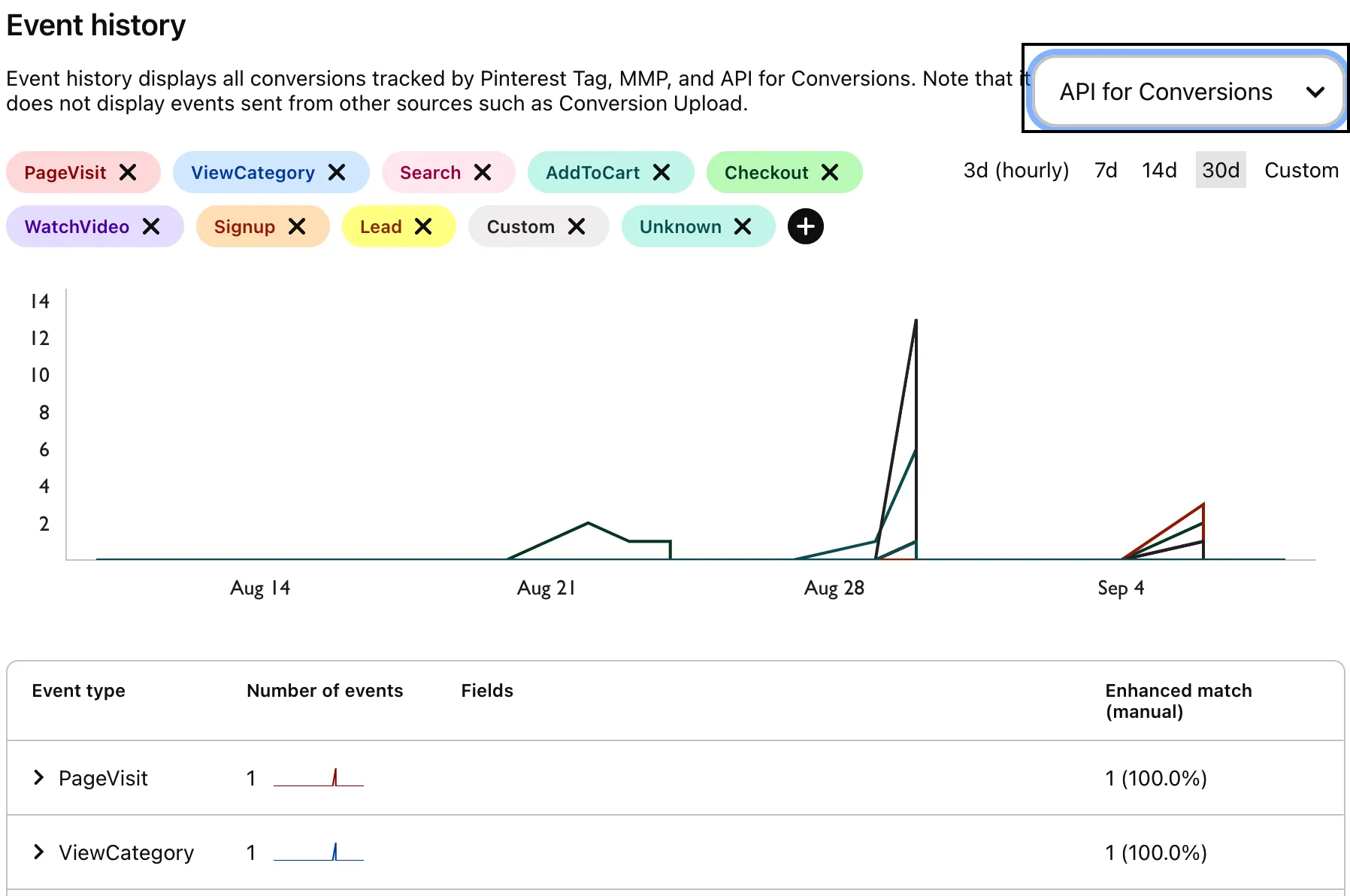
<h4 id="how-can-i-verify-if-my-events-are-being-sent-to-pinterest-conversions-api">How can I verify if my events are being sent to Pinterest Conversions API?</h4><p>Follow these steps to see your events in Pinterest Conversions API:</p>
<ol>
<li>Login to your <a href="https://ads.pinterest.com/" >Pinterest ads manager</a> account.</li>
<li>Click the <strong>Ads</strong> tab and select <strong>Conversions</strong> from the dropdown.</li>
<li>Select <strong>API for conversions</strong> from the dropdown to see your events.</li>
</ol>

<html lang="en">
<blockquote class="info">
  <div class="tip-quote">
    
    <div class="tip-text">To see <strong>API for conversions</strong> option in the dropdown, you need to set up your Pinterest dashboard using the Pinterest Tag. For more information on using the Pinterest Tag, refer to the <a href="https://www.rudderstack.com/docs/destinations/streaming-destinations/pinterest-ads/pinterest-ads-device-mode/" >Pinterest Tag Device Mode</a> documentation.</div>
  </div>
</blockquote>

</html>

<figure class="image--main "  >
    <a 
         href="/docs/images/event-stream-destinations/pinterest-tag-events-cloud.webp"
        
        >
        <img src="/docs/images/event-stream-destinations/pinterest-tag-events-cloud.webp" 


        decoding="async" loading="lazy" class="img-shortcode"/>
    </a>
    
</figure>


