# Custom Audience Destination

<p>RudderStack&rsquo;s <strong>Custom Audience</strong> destination lets you sync warehouse data to any HTTPS endpoint — internal APIs, regional ad platforms, partner systems, or niche marketing tools — without waiting for a native RudderStack integration.</p>
<!-- end-chunk -->
<!-- begin-chunk -->
<h2 id="overview">Overview</h2><p>With the <strong>Custom Audience</strong> destination, you can define how membership changes are delivered to your API by configuring the HTTP method, endpoint path, batch size, and a JSON request body template for each record action. During connection setup, you map warehouse columns to the fields your destination expects.</p>
<p>Some key features of this integration are:</p>
<ul>
<li><strong>Per-action endpoints</strong>: Separate configuration for add, update, and remove operations</li>
<li><strong>Request body templates</strong>: Build the exact JSON payload your API expects, with access to batched records and connection metadata</li>
<li><strong>Configurable batching</strong>: Send up to 5,000 records per request (per action)</li>
<li><strong>Field-level hashing</strong>: Apply SHA256, SHA512, or MD5 per field when your API expects hashed identifiers</li>
<li><strong>Preview before save</strong>: Validate templates and inspect sample requests without delivering data to your API</li>
<li><strong>Mirror sync only</strong>: Membership changes are mirrored to the destination</li>
</ul>
<!-- end-chunk -->
<!-- begin-chunk -->
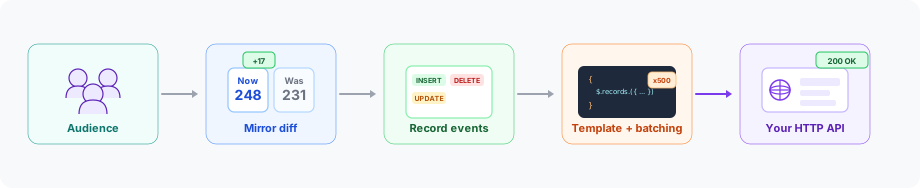
<h2 id="how-it-works">How it works</h2><p>Custom Audience follows the same pipeline as native audience destinations (Facebook, Google Ads, LinkedIn, TikTok):</p>
<ol>
<li>Membership is computed from your warehouse source.</li>
<li>Mirror sync compares the current membership to the previous snapshot and emits <code>record</code> events with an <code>INSERT</code>, <code>UPDATE</code>, or <code>DELETE</code> action.</li>
<li>RudderStack resolves your per-action endpoint and template, applies field hashing (when configured), batches records, and builds HTTP requests.</li>
<li>RudderStack sends those requests to your API — success or failure is determined by the HTTP status code.</li>
</ol>

<figure class="image--main  mx-auto d-block "  >
    <a 
         href="/docs/images/audiences/destinations/custom-audience/custom-audience-pipeline.svg"
        
        >
        <img src="/docs/images/audiences/destinations/custom-audience/custom-audience-pipeline.svg" 
         alt="Custom Audience pipeline: audience membership flows through mirror diff, record events, template batching, and HTTP delivery"  
         
         
        decoding="async" loading="lazy" class="img-shortcode"/>
    </a>
    
</figure>

<!-- end-chunk -->
<!-- begin-chunk -->
<h2 id="use-cases">Use cases</h2><table>
<thead>
<tr>
<th>Scenario</th>
<th><div>Description</div></th>
</tr>
</thead>
<tbody>
<tr>
<td>Internal activation</td>
<td>Sync a high-value segment to a recommendation or personalization API</td>
</tr>
<tr>
<td>Unsupported ad platforms</td>
<td>Reach regional or industry-specific platforms that accept audience lists over HTTP</td>
</tr>
<tr>
<td>Partner data sharing</td>
<td>Send qualified leads to a partner CRM</td>
</tr>
</tbody>
</table>
<!-- end-chunk -->
<!-- begin-chunk -->
<h2 id="limitations">Limitations</h2><table>
<thead>
<tr>
<th>Limitation</th>
<th><div>Details</div></th>
</tr>
</thead>
<tbody>
<tr>
<td>Event Stream sources</td>
<td>Only warehouse-backed sources are supported.</td>
</tr>
<tr>
<td>OAuth authentication</td>
<td>Not supported currently and may be added in a future release. Use API key, Bearer token, Basic Auth, or no auth.</td>
</tr>
<tr>
<td>Non-JSON payloads</td>
<td>Request bodies are JSON only (no XML or form-encoded bodies).</td>
</tr>
<tr>
<td>Audience creation at the destination</td>
<td>Create and manage audience lists on your platform first, then provide the audience ID and name when configuring the connection.</td>
</tr>
<tr>
<td>Automatic data normalization</td>
<td>The transformer does not trim, lowercase, or otherwise normalize values.</td>
</tr>
<tr>
<td>Partial batch success</td>
<td>An HTTP success status marks all records in the request as successful; a failure status marks all as failed. Response bodies are not parsed for per-record outcomes.</td>
</tr>
<tr>
<td>Combined-action APIs</td>
<td>Each action type sends separate HTTP requests. APIs that accept inserts, updates, and deletes in a single payload are not supported.</td>
</tr>
<tr>
<td>Multiple object types per destination</td>
<td>Create a separate destination instance for each object type (for example, user vs. company).</td>
</tr>
<tr>
<td>Changes in field definitions</td>
<td>If you change field definitions in the destination configuration after a sync is created, you must update existing syncs manually. Connection mappings are not updated automatically when destination fields are renamed or removed.</td>
</tr>
</tbody>
</table>
<!-- end-chunk -->
<!-- begin-chunk -->
<h2 id="links">Links</h2><p>You can use the Custom Audience destination in two ways:</p>
<ul>
<li><a href="https://www.rudderstack.com/docs/destinations/reverse-etl-destinations/custom-audience/connect-retl-source/" >Connect a Reverse ETL source to Custom Audience</a></li>
<li><a href="https://www.rudderstack.com/docs/audiences/syncs/custom-audience/sync-audiences/" >Sync from Audience Builder to Custom Audience</a> (<strong>Private Beta</strong>)</li>
</ul>

<blockquote class="announcement">
  <div class="tip-quote">
    
    <div class="tip-text">Syncing from <strong>Audience Builder</strong> to Custom Audience is possible only if Audience Builder is enabled for your workspace.</div>
  </div>
</blockquote>


