Connect Reverse ETL Source to Custom Audience
7 minute read
This guide takes you through the steps to connect a Reverse ETL source to your Custom Audience destination and configure field mappings.
You can connect multiple Reverse ETL sources to the Custom Audience destination.
Setup
- Set up and configure your Reverse ETL source.
- In the Overview tab of the source page, click Add destination > Create new destination. You can also select an already-configured destination here.
- From the list of destinations, select Custom Audience and click Continue.
- Configure the following settings to specify how RudderStack connects to your API:
| Setting | Description |
|---|---|
| Name | A unique name that identifies this destination in your workspace. |
Audience delivery API configuration
| Setting | Description |
|---|---|
| Enter base URL | Specify the root URL for your API (for example, https://api.example.com). All requests are sent to this URL. |
| Specify authentication | Choose how RudderStack authenticates with your API. See Authentication section below for details. |
| Custom headers | This optional setting lets you add extra key-value headers to every request (for example, Content-Type, X-API-Version). |
Authentication
| Method | Description |
|---|---|
| No authentication | None — use this for public endpoints only |
| Basic Auth | Enter a username and password |
| API Key | Specify a header name (for example, X-API-Key) and API key value |
| Bearer Token | Enter a bearer token value |
Endpoint configurations
Configure how RudderStack adds, updates, and removes audience members:
| Setting | When it runs |
|---|---|
| Add record | A user enters the audience |
| Update record | A member’s mapped attributes change.
|
| Remove record | A user leaves the audience |
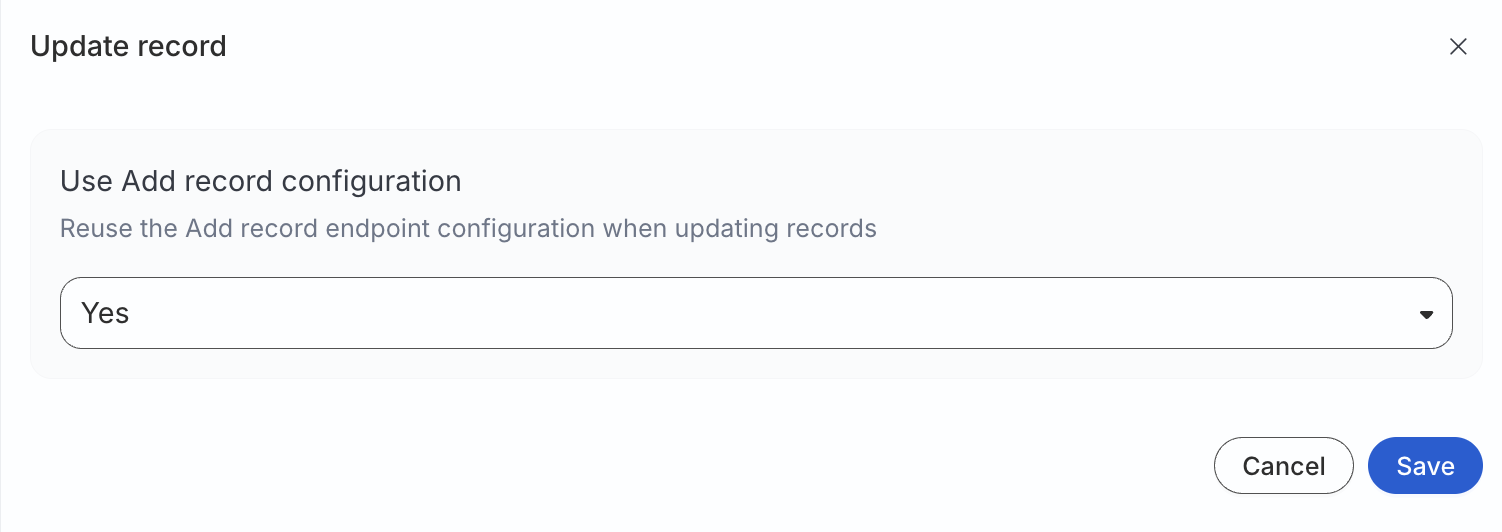
Action-specific settings
Each action’s (add/update/remove record) settings follow the same structure.
HTTP method and endpoint path
| Setting | Description |
|---|---|
| HTTP method | POST, PUT, PATCH, GET, or DELETE for this action. |
| Endpoint path URL | Path appended to the base URL. It supports simple interpolation with connection values, for example /audiences/{{connection.audienceId}}/members. |
The resolved URL is the base URL plus the evaluated endpoint path.
Batch size
| Setting | Description | Default value |
|---|---|---|
| Batch size | Maximum records per HTTP request for this action. Range 1–5000 | 5000 |
Request body template
Define the JSON body sent to your API. The template follows JSONata syntax.
Templates are validated when you save the destination. An invalid syntax is rejected with an error that identifies the action and issue.
A sample request body template is shown below:
{
  "audience_id": $$.connection.audienceId,
  "elements": [$$.records.{
    "userIds": [
      {"idType": "SHA256_EMAIL", "idValue": sha256_email},
      {"idType": "GOOGLE_AID", "idValue": google_aid}
    ],
    "firstName": first_name,
    "lastName": last_name,
    "nested": {
      "org": "static_value"
    }
  }]
}
Global objects available at runtime
| Object | Description |
|---|---|
$$.records | Array of records in the current batch (after field processing and hashing) |
$$.connection | Sync connection metadata, including audienceId |
Allowed operations
- Object and array construction
- Path expressions (
$$.records,$$.connection.audienceId) - Iteration with
{ ... }— for example,$$.records.{ "email": email, "user_id": user_id } - String, number, and boolean literals
Number()casting where needed, for example,$number($$.connection.audienceId)
Template example
A template for generic batched members is shown below:
{
   "audienceId": $$.connection.audienceId,
   "users": [$$.records.{
    "email": email,
     "user_id": user_id
  }]
}
Template fields
After you define a template, RudderStack extracts field names referenced under $$.records and lists them under Template fields. Click Refresh to re-scan the template, or Manage fields to configure each field.
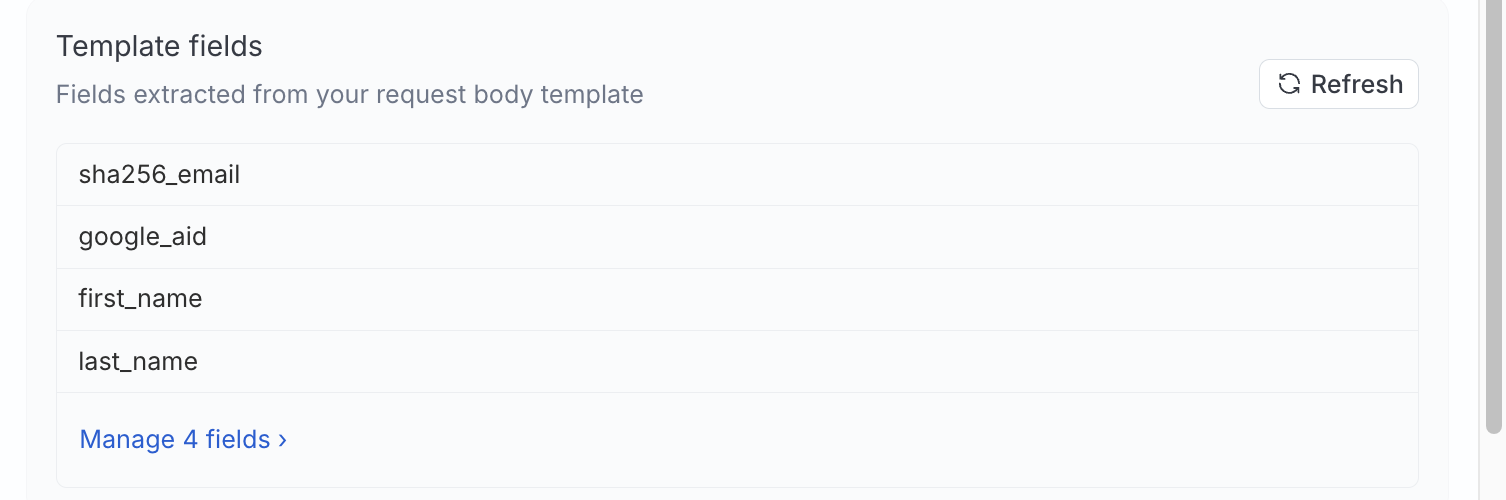
| Field setting | Description |
|---|---|
| Name | Destination-side field name used in the template |
| Required | If enabled, you must map the field to a warehouse column in the Map identifiers section |
| Static | If enabled, the value is a literal you provide in the Map identifiers section |
| Hash | Hash algorithm applied before the template runs. You can choose between None, SHA256, SHA512, or MD5. |
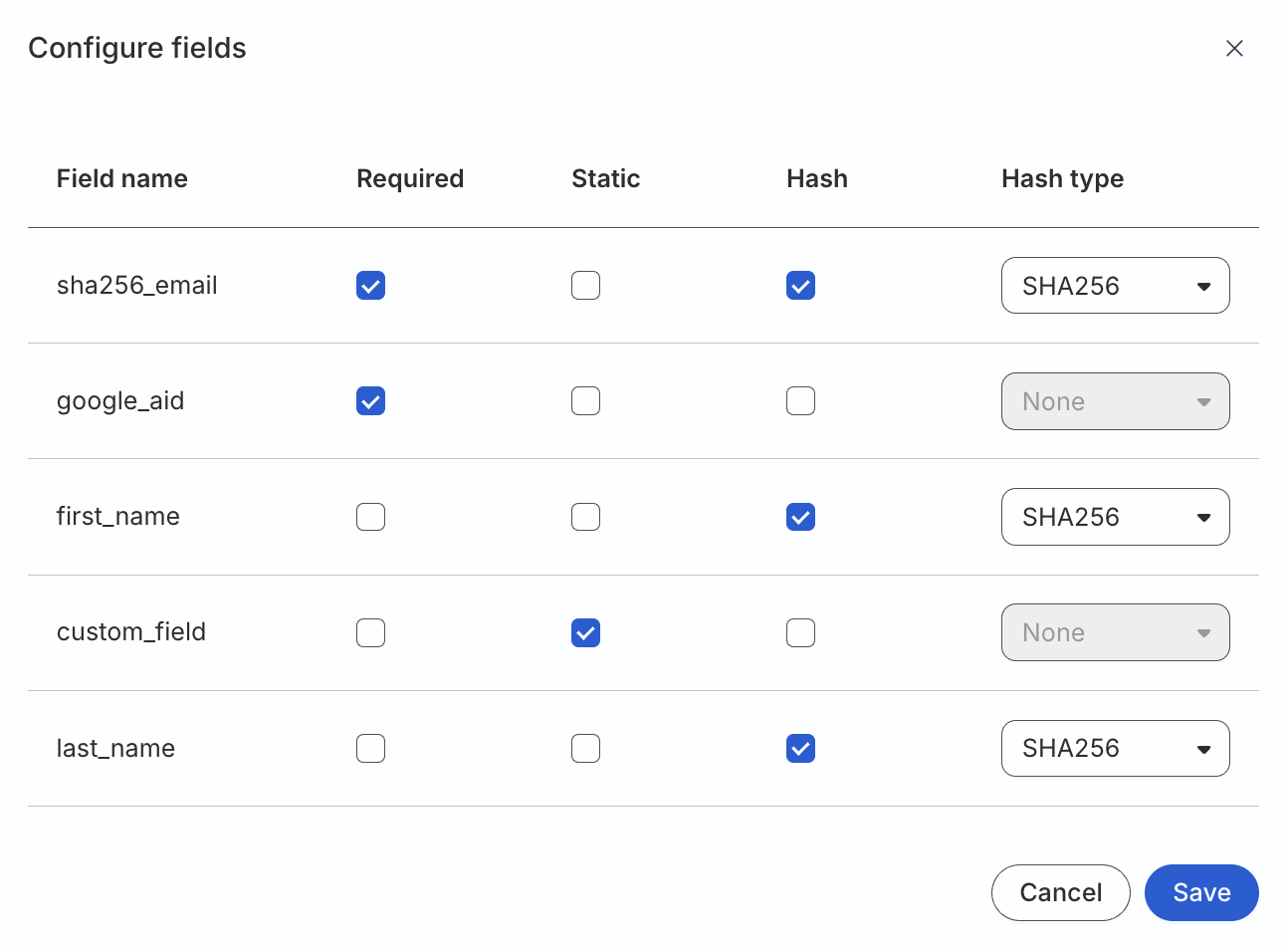
If you rename or remove template fields after syncs exist, make sure to update mappings on each affected sync manually.
See Troubleshooting for more information.
Request preview
Use Fetch preview to build a sample HTTP request from test records.
Preview does not send traffic to your API.
- Choose how many sample records to include (for example, 1 record).
- Edit sample data if needed.
- Click Fetch preview to see the resolved method, URL, headers, and JSON body.
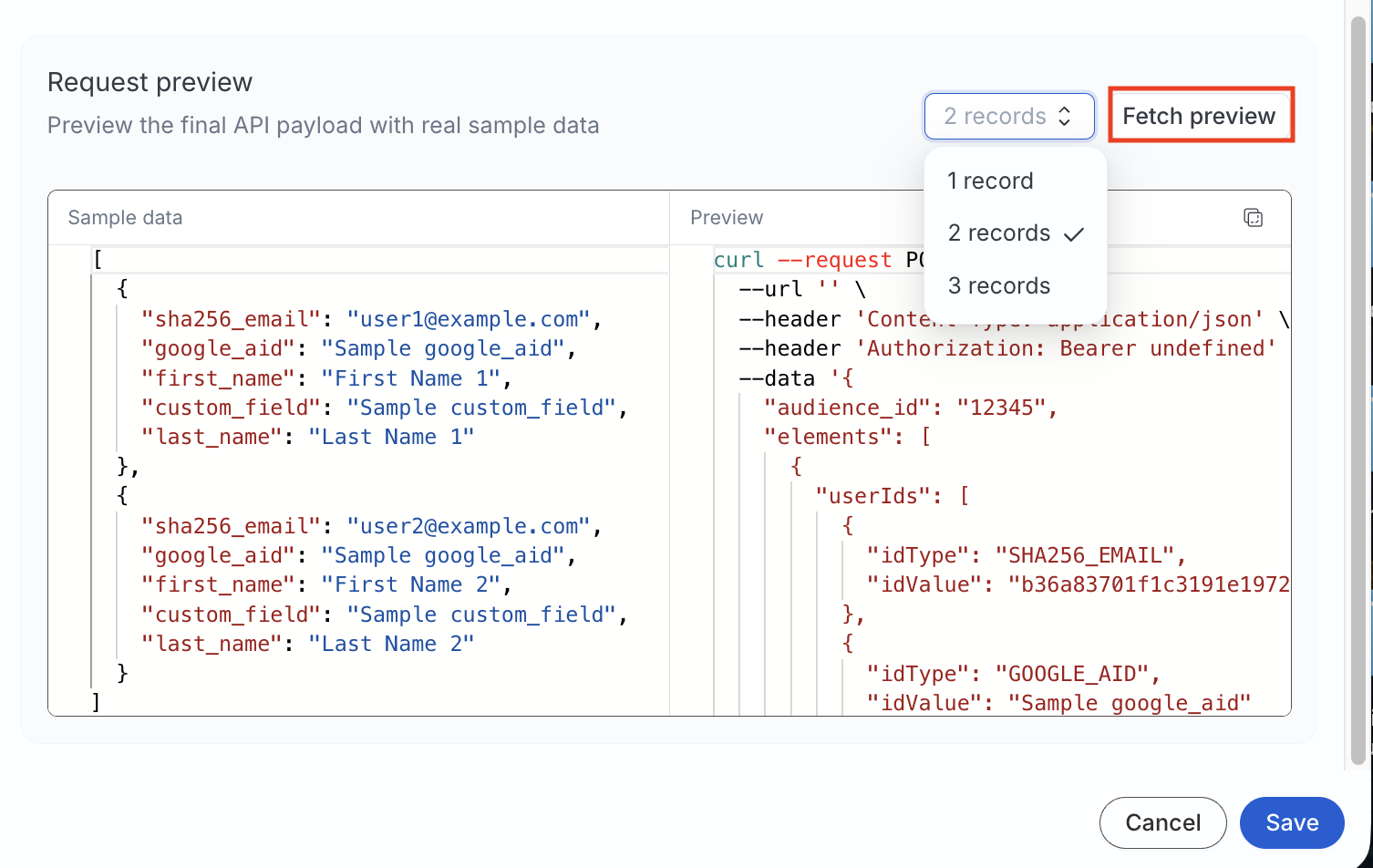
- Proceed to configure the mapping settings.
Mapping settings
This section lists the settings to correctly map data from your Reverse ETL source to the Custom Audience destination.
Specify target audience
Create the audience on your platform before entering these values. RudderStack does not create audiences at the destination for this integration.
| Setting | Description |
|---|---|
| Audience name | Specify the name of the audience to sync data to |
| Audience ID | Specify the ID of the list on your platform |
Sync mode
RudderStack supports only Mirror mode for this integration.
On the first run, the full membership is sent to the platform. Later runs send only inserts, updates, and deletes.
Map identifiers
Map warehouse columns to each template field defined in the Custom Audience destination.
You can map two types of fields:
- Warehouse fields: Dropdown of warehouse columns
- Static fields: Specify literal values for fields configured as Static in the destination settings
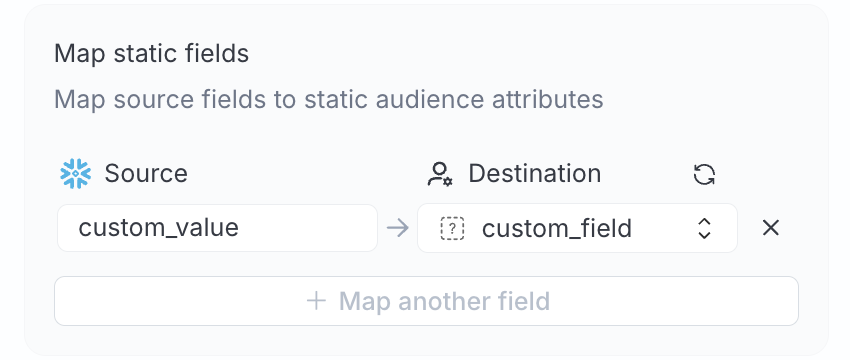
Required destination fields appear with an asterisk (*) during mapping.
Advanced settings
| Setting | Description |
|---|---|
| Automatically hash PII data | When set to Yes, RudderStack applies each field’s configured hash algorithm to unhashed warehouse data. When set to No, data is treated as already hashed and hashing is skipped — even if a field has a hash type configured. See Data hashing for more information. |
Sync settings
RudderStack determines how and when to run a sync based on the sync schedule you set for your Reverse ETL connection.
| Schedule type | Description |
|---|---|
| Basic | Run syncs at a set interval, optionally starting from a specified time (UTC). If a start time is set, syncs run from that time until the end of that day. |
| CRON | Run syncs based on a specified CRON expression (in UTC). |
| Manual | Run syncs manually. |
Sync observability settings
| Setting | Description | ||||||
|---|---|---|---|---|---|---|---|
| Retain sync logs | This setting is toggled on by default and instructs RudderStack to store the sync logs in your warehouse. You can also configure the below settings:
| ||||||
| Retry failed records | This setting is toggled on by default and causes RudderStack to continually retry sending the failed records. | ||||||
| Retain and show failures | This setting is toggled off by default. Turn it on to have RudderStack write the error recorded for every failed record to a failed records table in your warehouse and show it in the sync’s failed records view. It applies from the next sync.
|
Storing sync logs, snapshot tables, and failed records may incur additional warehouse costs.
Data hashing
The Automatically hash PII data setting lets you hash your user data before sending it to your API.
- Configure the setting to Yes if your incoming data is not pre-hashed
- Configure this setting to No if your data is already hashed
Incorrect configuration of the Automatically hash PII data setting will result in failures.
- If the Automatically hash PII data setting is configured to Yes and your data is pre-hashed, the event will fail.
- If the Automatically hash PII data setting is configured to No and your data is not pre-hashed, the event will fail.
Such events are rejected with a clear error message, for example:
Hashing is disabled but the value for field EMAIL appears to be unhashed. Either enable hashing or send pre-hashed data.You will also see errors in the Events tab for cases that were previously marked as successful but resulted in no matches, helping you identify and fix data quality or configuration issues.
Troubleshooting
| Issue | Resolution |
|---|---|
| Template is rejected on save | The syntax is outside the allowlisted operations — the error message names the action and position |
| Unexpected payload shape | Use the Fetch preview with the same sample records and action type (INSERT, UPDATE, or DELETE) to verify the payload shape |
400 errors for all records | Required fields are unmapped or the warehouse values are empty |
| Wrong audience on API side | Verify the Audience ID and $$.connection.audienceId while configuring the template |
| Double-hashed identifiers | Automatically hash PII data setting is set to Yes while your incoming warehouse data is pre-hashed — set this setting to No |
| Sync fails after destination edit | Update sync mappings if destination field names or required flags have changed. See Template fields for more information |
