# Audience Identifier

<p>This guide explains how RudderStack maps audience membership when a destination does not support audiences by default.</p>
<!-- end-chunk -->
<!-- begin-chunk -->
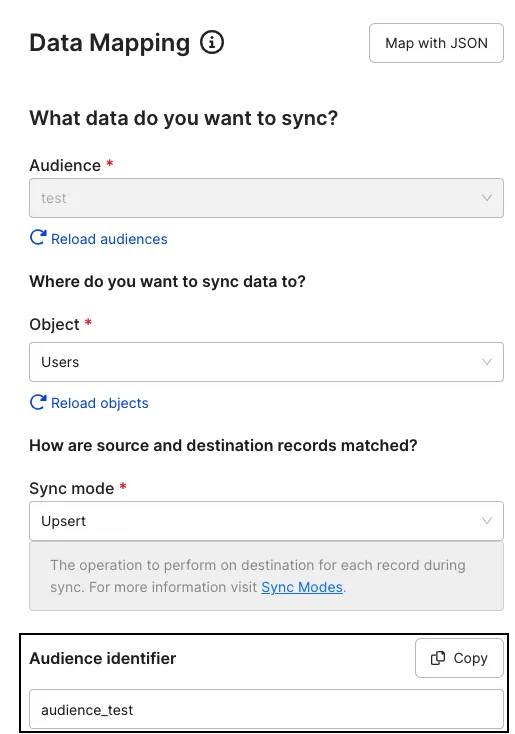
<h2 id="overview">Overview</h2><p>RudderStack requires an audience identifier when mapping your audience to destinations that don&rsquo;t support audiences by default, for example, Salesforce, Customer.io, HubSpot, etc. It picks up this identifier from the <strong>Audience identifier</strong> setting in the dashboard while setting up the data mapping.</p>

<html lang="en">
<blockquote class="info">
  <div class="tip-quote">
    
    <div class="tip-text">You set the audience identifier while <a href="https://www.rudderstack.com/docs/activate/audiences/create-audience/#connect-audience-to-destination" >connecting an audience to a destination</a> and configuring data mappings.</div>
  </div>
</blockquote>

</html>
<!-- end-chunk -->
<!-- begin-chunk -->
<h2 id="important-considerations">Important considerations</h2><ul>
<li>You will see the <strong>Audience identifier</strong> setting while connecting your audience to all the <a href="https://www.rudderstack.com/docs/activate/audiences/supported-destinations/" >supported destinations</a> <strong>except</strong> Facebook Custom Audience and Google Ads Remarketing Lists, which have audience support by default.</li>
<li>The value of <strong>Audience identifier</strong> is pre-populated in the dashboard. However, you can change it as required.</li>
</ul>

<figure class="image--main "  >
    <a 
         href="/docs/images/warehouse-actions-sources/audience-identifier.webp"
        
        >
        <img src="/docs/images/warehouse-actions-sources/audience-identifier.webp" 
         alt="Audience identifier"  
         
         
        decoding="async" loading="lazy" class="img-shortcode"/>
    </a>
    
</figure>

<ul>
<li>RudderStack sets the user traits with the provided <strong>Audience identifier</strong> as the key. It sets the value of the trait to either <code>true</code> or <code>false</code> depending on whether the user is a member of the defined audience.</li>
</ul>

