Automatic Session Tracking in Mobile SDKs
6 minute read
This guide explains the automatic session tracking feature available in the supported mobile SDKs (Android (Java), iOS (Obj-C), React Native, and Flutter).
Overview
The mobile SDKs support automatic session tracking with the following capabilities:
- All mobile SDKs (Android (Java), iOS (Obj-C), React Native, and Flutter) enable automatic session tracking by default. They consider the Application Opened, Application Installed, or Application Updated events as the start of a new session.
- By default, each session remains active for 5 minutes of inactivity (30 minutes for Flutter web platforms). See Session expiration in mobile SDKs for more information.
- The SDKs generate a unique
sessionIdfor each session. They also provide a method to retrieve the current session ID.
This session ID does not reset when an anonymous user is identified with a newuserId.
The SDKs automatically reset sessions in the following scenarios:
- After the specified inactivity period
- When you call the
reset()API - When you identify a user with a new
userId(except for anonymous users, where thereset()API is not called and the existing session is preserved)
To automatically track user sessions:
withTrackLifecycleEventsshould also be set to true in the Android (Java) and iOS SDKs.trackAppLifecycleEventsshould be set to true in the React Native SDK.
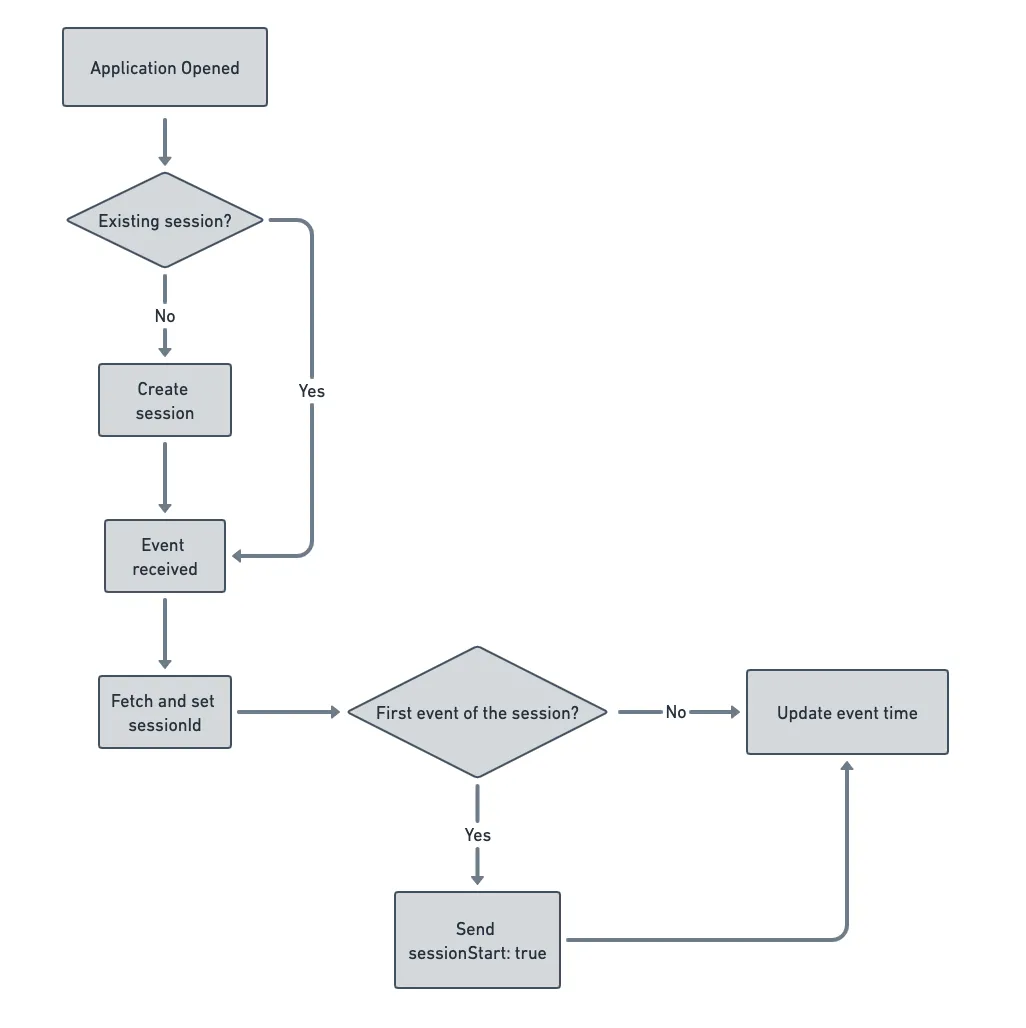
See the Session tracking flow section for a visual workflow of automatic session tracking in the mobile SDKs.
Manage automatic session tracking
By default, the supported mobile SDKs automatically track user sessions. This section explains how to manage automatic session tracking in the different SDKs.
The following snippet highlights the use of the withAutoSessionTracking load option to enable automatic session tracking in the Android (Java) SDK:
val rudderClient =
    RudderClient.getInstance(
        this,
        WRITE_KEY,
        RudderConfig.Builder()
            .withDataPlaneUrl(DATA_PLANE_URL)
            .withAutoSessionTracking(true) // Set to false to disable automatic session tracking
            .withSessionTimeoutMillis(5 * 60 * 1000)
            .build()
    )
The corresponding Java code is as follows:
RudderClient rudderClient = RudderClient.getInstance(
    this,
    WRITE_KEY,
    new RudderConfig.Builder()
        .withDataPlaneUrl(DATA_PLANE_URL)
        .withAutoSessionTracking(true) // Set to false to disable automatic session tracking
        .withSessionTimeoutMillis(5*60*1000)
        .build()
);
You can disable automatic session tracking by setting withAutoSessionTracking to false.
The following snippet highlights the use of the withAutoSessionTracking load option to enable automatic session tracking in the iOS (Obj-C) SDK:
RSConfigBuilder *builder = [[RSConfigBuilder alloc] init];
[builder withDataPlaneUrl:DATA_PLANE_URL];
[builder withAutoSessionTracking:YES];  // Set to NO to disable automatic session tracking
[builder withSessionTimeoutMillis:(5*60*1000)];
[RSClient getInstance:WRITE_KEY config:[builder build]];
The corresponding Swift code is as follows:
let builder: RSConfigBuilder = RSConfigBuilder()
            .withDataPlaneUrl(DATA_PLANE_URL)
            .withAutoSessionTracking(true)  // Set to false to disable automatic session tracking
            .withSessionTimeoutMillis(5*60*1000)
RSClient.getInstance(WRITE_KEY, config: builder.build())
You can disable automatic session tracking by setting withAutoSessionTracking to false.
The following snippet highlights the use of the autoSessionTracking load option to enable automatic session tracking in the iOS SDK v2:
RSConfig *config = [[RSConfig alloc] initWithWriteKey:WRITE_KEY];
[config dataPlaneURL:DATA_PLANE_URL];
[config autoSessionTracking:YES];
[config sessionTimeout:5*60*1000L];
RSClient *client = [RSClient sharedInstance];
[client configureWith:config];
The corresponding Swift code is as follows:
let config: RSConfig = RSConfig(writeKey: WRITE_KEY)
            .dataPlaneURL(DATA_PLANE_URL)
            .autoSessionTracking(true)
            .sessionTimeout(5*60*1000)
RSClient.sharedInstance().configure(with: config)
You can disable automatic session tracking by setting autoSessionTracking to false.
The following snippet highlights the use of the autoSessionTracking load option to enable automatic session tracking in the React Native SDK:
const rudderInitialise = async () => {
  await rudderClient.setup(WRITE_KEY, {
    dataPlaneUrl: DATA_PLANE_URL,
    trackAppLifecycleEvents: true,
    autoSessionTracking: true, // Set to false to disable automatic session tracking
    sessionTimeout: 5 * 60 * 1000,
  });
};
rudderInitialise().catch(console.error);
You can disable automatic session tracking by setting autoSessionTracking to false.
The following snippet highlights the use of the autoSessionTracking load option to enable automatic session for web platforms:
final RudderController rudderClient = RudderController.instance;
WebConfig wc = WebConfig(autoSessionTracking: true, sessionTimeoutInMillis: 10 * 60 * 1000); // setting the session timeout to 10 mins
RudderConfigBuilder builder = RudderConfigBuilder();
builder
   ..withDataPlaneUrl("DATA_PLANE_URL")
   ..withWebConfig(wc);
rudderClient.initialize("WRITE_KEY", config: builder.build());
The following snippet highlights the use of the autoSessionTracking load option to enable automatic session for mobile platforms:
final RudderController rudderClient = RudderController.instance;
MobileConfig mc = MobileConfig(autoSessionTracking: true, sessionTimeoutInMillis: 3 * 60 * 1000); // setting the session time out to 3 mins
RudderConfigBuilder builder = RudderConfigBuilder();
builder
   ..withDataPlaneUrl("DATA_PLANE_URL")
   ..withMobileConfig(mc)
rudderClient.initialize("WRITE_KEY", config: builder.build());
You can disable automatic session tracking by setting autoSessionTracking to false.
Retrieve the session ID
This section explains how to retrieve the current session ID in the different mobile SDKs.
The Android (Java) SDKAndroid (Java) refers to the legacy RudderStack Android SDK. Note that it will be deprecated soon.
For new implementations, use the Android (Kotlin) SDK instead.
provides a getSessionId method to fetch the current session’s sessionId. In case the session ID is unavailable, this method returns a null value.
ThegetsessionId()method is available in the Android (Java) SDK from v1.19.0 onwards.
The following snippet highlights the use of the getSessionId method:
RudderClient.getInstance()?.sessionIdThe iOS (Obj-C) SDK provides an instance variable sessionId to fetch the current session ID. In case the session ID is unavailable, it returns a null value.
ThesessionIdinstance variable is available in the iOS (Obj-C) SDK from v1.20.0 onwards.
The following snippet highlights the use of the sessionId instance variable:
[RSClient sharedInstance].sessionId

// OR

[[RSClient sharedInstance] sessionId]
The corresponding Swift code is as follows:
RSClient.sharedInstance()?.sessionIdThe React Native SDK provides a getSessionId method to fetch the current session’s ID. If the session ID is unavailable, this method returns a null value.
The following snippet highlights the use of the getSessionId method:
const sessionId = await rudderClient.getSessionId();The Flutter SDK provides a getSessionId method to fetch the current session’s sessionId. In case the session ID is unavailable, this method returns a null value.
The following snippet highlights the use of the getSessionId method:
int? sessionId = await rudderClient.getSessionId();Session expiration in mobile SDKs
By default, a session is active until 5 minutes of inactivity have elapsed. For Flutter SDK, this limit is 5 minutes for mobile platforms and 30 minutes for web platforms. However, you can adjust this limit using the following load option in the respective SDKs:
| Load option | RudderStack SDK | Default value |
|---|---|---|
sessionTimeoutMillis | Android (Java) and iOS (Obj-C) | 5 minutes |
sessionTimeout | iOS SDK v2 and React Native | 5 minutes |
sessionTimeoutInMillis | Flutter |
|
If the duration between the last received event and the next Application Opened event is more than the session timeout, RudderStack automatically starts a new session. Otherwise, it continues the previous session.
Calling the reset method clears the current sessionId and generates a new one.
Session tracking flow
The automatic session tracking flow (when enabled) in the mobile SDKs is as follows:
- RudderStack starts the session once it receives the
Application Opened,Application Installed, orApplication Updatedevent. - The SDK then generates a
sessionId.
See the Session Tracking FAQ guide for more information on how RudderStack calculatessessionId.
- The SDK records the user events and the session is active until more than
sessionTimeoutMillis(default 5 minutes) period of inactivity has elapsed since the last received event. See Session expiration in mobile SDKs for more information.
FAQ
See the Session Tracking FAQ guide for answers to some commonly-asked questions on session tracking in the mobile SDKs.
