Learn about the automatic session tracking feature in the mobile SDKs.
The mobile SDKs support automatic session tracking with the following capabilities:
By default, the supported mobile SDKs automatically track user sessions. This section explains how to manage automatic session tracking in the different SDKs.
The following snippet highlights the use of the withAutoSessionTracking load option to enable automatic session tracking in the Android (Java) SDK:
val rudderClient =
    RudderClient.getInstance(
        this,
        WRITE_KEY,
        RudderConfig.Builder()
            .withDataPlaneUrl(DATA_PLANE_URL)
            .withAutoSessionTracking(true) // Set to false to disable automatic session tracking
            .withSessionTimeoutMillis(5 * 60 * 1000)
            .build()
    )
The corresponding Java code is as follows:
RudderClient rudderClient = RudderClient.getInstance(
    this,
    WRITE_KEY,
    new RudderConfig.Builder()
        .withDataPlaneUrl(DATA_PLANE_URL)
        .withAutoSessionTracking(true) // Set to false to disable automatic session tracking
        .withSessionTimeoutMillis(5*60*1000)
        .build()
);
You can disable automatic session tracking by setting withAutoSessionTracking to false.
The following snippet highlights the use of the withAutoSessionTracking load option to enable automatic session tracking in the iOS (Obj-C) SDK:
RSConfigBuilder *builder = [[RSConfigBuilder alloc] init];
[builder withDataPlaneUrl:DATA_PLANE_URL];
[builder withAutoSessionTracking:YES];  // Set to NO to disable automatic session tracking
[builder withSessionTimeoutMillis:(5*60*1000)];
[RSClient getInstance:WRITE_KEY config:[builder build]];
The corresponding Swift code is as follows:
let builder: RSConfigBuilder = RSConfigBuilder()
            .withDataPlaneUrl(DATA_PLANE_URL)
            .withAutoSessionTracking(true)  // Set to false to disable automatic session tracking
            .withSessionTimeoutMillis(5*60*1000)
RSClient.getInstance(WRITE_KEY, config: builder.build())
You can disable automatic session tracking by setting withAutoSessionTracking to false.
The following snippet highlights the use of the autoSessionTracking load option to enable automatic session tracking in the iOS SDK v2:
RSConfig *config = [[RSConfig alloc] initWithWriteKey:WRITE_KEY];
[config dataPlaneURL:DATA_PLANE_URL];
[config autoSessionTracking:YES];
[config sessionTimeout:5*60*1000L];
RSClient *client = [RSClient sharedInstance];
[client configureWith:config];
The corresponding Swift code is as follows:
let config: RSConfig = RSConfig(writeKey: WRITE_KEY)
            .dataPlaneURL(DATA_PLANE_URL)
            .autoSessionTracking(true)
            .sessionTimeout(5*60*1000)
RSClient.sharedInstance().configure(with: config)
You can disable automatic session tracking by setting autoSessionTracking to false.
The following snippet highlights the use of the autoSessionTracking load option to enable automatic session tracking in the React Native SDK:
const rudderInitialise = async () => {
  await rudderClient.setup(WRITE_KEY, {
    dataPlaneUrl: DATA_PLANE_URL,
    trackAppLifecycleEvents: true,
    autoSessionTracking: true, // Set to false to disable automatic session tracking
    sessionTimeout: 5 * 60 * 1000,
  });
};
rudderInitialise().catch(console.error);
You can disable automatic session tracking by setting autoSessionTracking to false.
The following snippet highlights the use of the autoSessionTracking load option to enable automatic session for web platforms:
final RudderController rudderClient = RudderController.instance;
WebConfig wc = WebConfig(autoSessionTracking: true, sessionTimeoutInMillis: 10 * 60 * 1000); // setting the session timeout to 10 mins
RudderConfigBuilder builder = RudderConfigBuilder();
builder
   ..withDataPlaneUrl("DATA_PLANE_URL")
   ..withWebConfig(wc);
rudderClient.initialize("WRITE_KEY", config: builder.build());
The following snippet highlights the use of the autoSessionTracking load option to enable automatic session for mobile platforms:
final RudderController rudderClient = RudderController.instance;
MobileConfig mc = MobileConfig(autoSessionTracking: true, sessionTimeoutInMillis: 3 * 60 * 1000); // setting the session time out to 3 mins
RudderConfigBuilder builder = RudderConfigBuilder();
builder
   ..withDataPlaneUrl("DATA_PLANE_URL")
   ..withMobileConfig(mc)
rudderClient.initialize("WRITE_KEY", config: builder.build());
You can disable automatic session tracking by setting autoSessionTracking to false.
This section explains how to retrieve the current session ID in the different mobile SDKs.
The Android (Java) SDKAndroid (Java) refers to the legacy RudderStack Android SDK. Note that it will be deprecated soon.
For new implementations, use the Android (Kotlin) SDK instead.
provides a getSessionId method to fetch the current session’s sessionId. In case the session ID is unavailable, this method returns a null value.

The getsessionId() method is available in the Android (Java) SDK from v1.19.0 onwards.
The following snippet highlights the use of the getSessionId method:
RudderClient.getInstance()?.sessionId
The iOS (Obj-C) SDK provides an instance variable sessionId to fetch the current session ID. In case the session ID is unavailable, it returns a null value.
The sessionId instance variable is available in the iOS (Obj-C) SDK from v1.20.0 onwards.
The following snippet highlights the use of the sessionId instance variable:
[RSClient sharedInstance].sessionId

// OR

[[RSClient sharedInstance] sessionId]
The corresponding Swift code is as follows:
RSClient.sharedInstance()?.sessionId
Unlike iOS (Obj-C) SDK, the iOS SDK v2 does not support fetching the current session ID.
The React Native SDK provides a getSessionId method to fetch the current session’s ID. If the session ID is unavailable, this method returns a null value.
The following snippet highlights the use of the getSessionId method:
const sessionId = await rudderClient.getSessionId();
The Flutter SDK provides a getSessionId method to fetch the current session’s sessionId. In case the session ID is unavailable, this method returns a null value.
The following snippet highlights the use of the getSessionId method:
int? sessionId = await rudderClient.getSessionId();
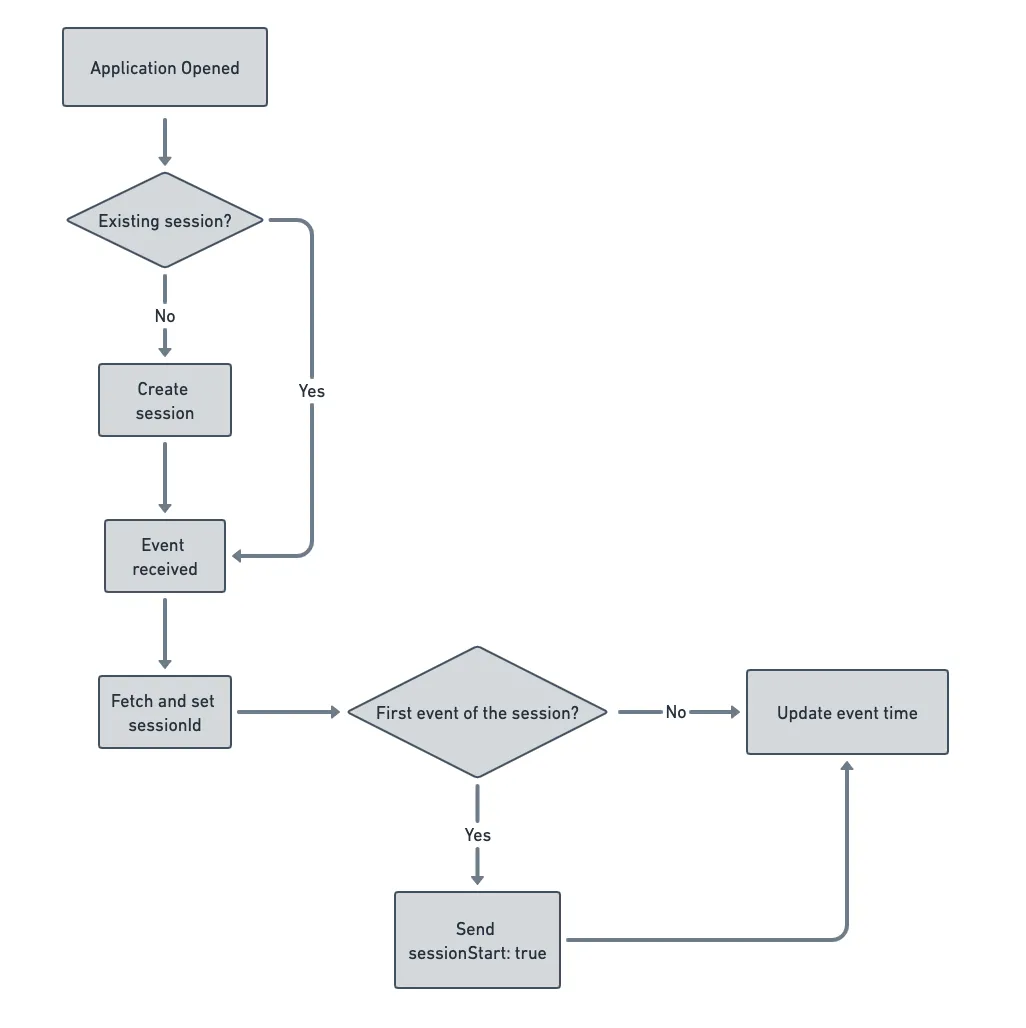
The automatic session tracking flow (when enabled) in the mobile SDKs is as follows: