How to Use Server-side Cookies in JavaScript SDK v3
16 minute read
As the user privacy measures evolve, modern web browsers, particularly Safari, have introduced Intelligent Tracking Prevention (ITP) to limit user tracking through cookies. This poses serious challenges for businesses relying on cookies for authentication, personalization, and analytics. To address these limitations, the JavaScript SDK offers a server-side cookie management solution to ensure data tracking without compromising user privacy.
RudderStack’s server-side cookie management solution allows you to set RudderStack’s cookies on the server, providing full control over attributes like expiration and extending cookie lifespans unaffected by ITP’s restrictions.
Key features
- Extended cookie lifespan: Server-side cookies are not subject to ITP’s client-side cookie restrictions
- Enhanced privacy compliance: Better control over cookie attributes and storage
- Cross-browser compatibility: Consistent behavior across different browsers and platforms
- Improved user experience: Seamless tracking and personalization capabilities
What is ITP?
Intelligent Tracking Prevention (ITP) is a privacy feature introduced in Safari in 2017 to prevent advertisers from tracking users across websites. It restricts third-party cookies and may significantly shorten the lifespan of first-party cookies if they appear to be used for cross-site tracking.
ITP also affects how developers can use cookies for:
- User authentication
- Content personalization
- Analytics and cross-site tracking
- Session management and user experience continuity
The JavaScript SDK traditionally uses client-side cookies. With the introduction of ITP, it also implements server-side cookies to achieve:
- Extended lifespan than the client-managed cookies.
- Consistent and uniform experience across all the browsers.
Enable server-side cookies
Set the useServerSideCookies configuration option to true while loading the JavaScript SDK, as shown:
rudderanalytics.load(WRITE_KEY, DATA_PLANE_URL, {
  useServerSideCookies: true // Default is false
});
Once enabled, the SDK makes network requests to the website’s server to set cookies via the response headers.
To ensure that the cookies are set successfully, you must make the request only to the website’s domain (or parent domain) server. RudderStack supports the following use cases:
| Website | Server | Cookies |
|---|---|---|
| Parent domain website | Parent domain server | Cookies are created for the parent domain. |
| Sub-domain website | Sub-domain server | Cookies are created for the sub-domain. |
| Sub-domain website | Parent domain server | Cookies are created for the parent domain. |
For sub-domain websites to set cookies for the parent domain,
secureandsameSitecookie attributes are set totrueandNonerespectively.Otherwise, the browser will not set the server-side cookies.
A sample request flow is illustrated below:
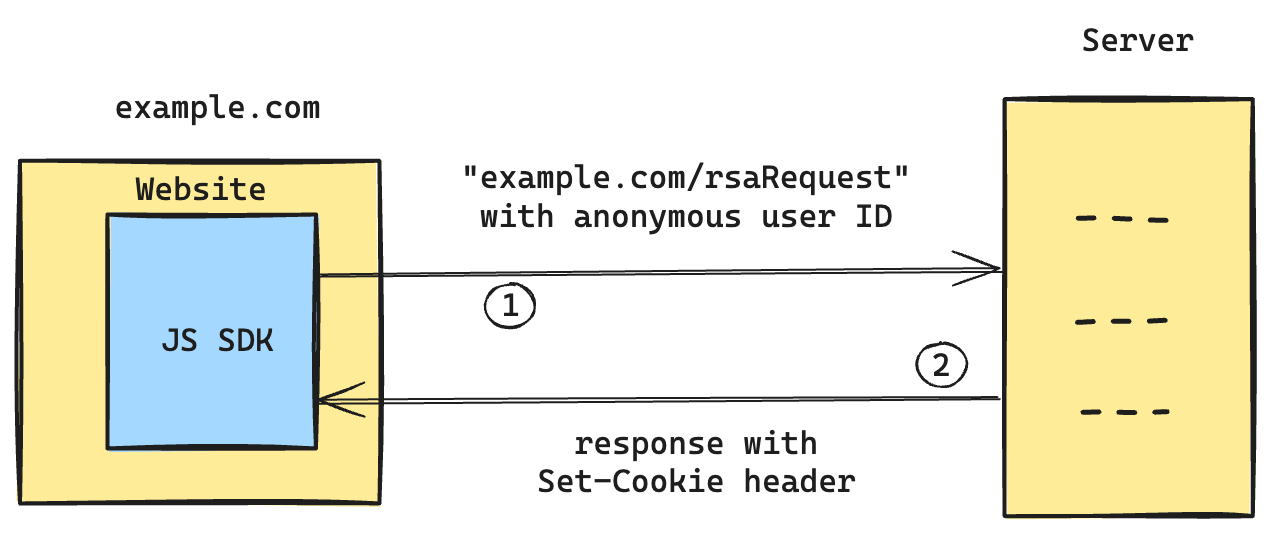
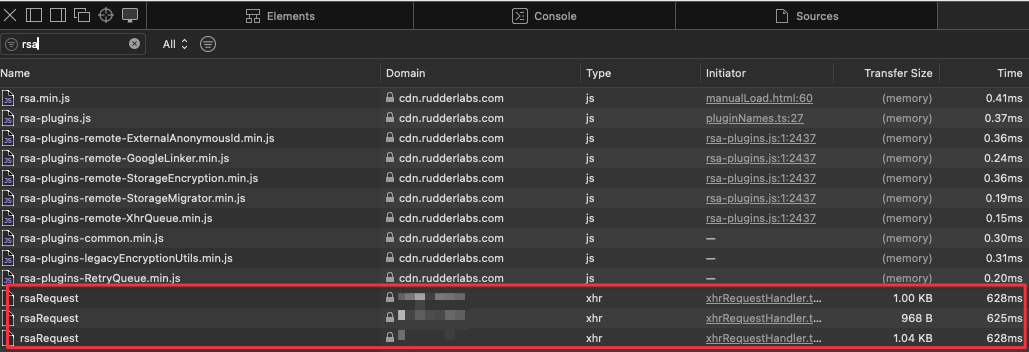
The JavaScript SDK makes explicit POST requests to the server to set cookies via the /rsaRequest endpoint:
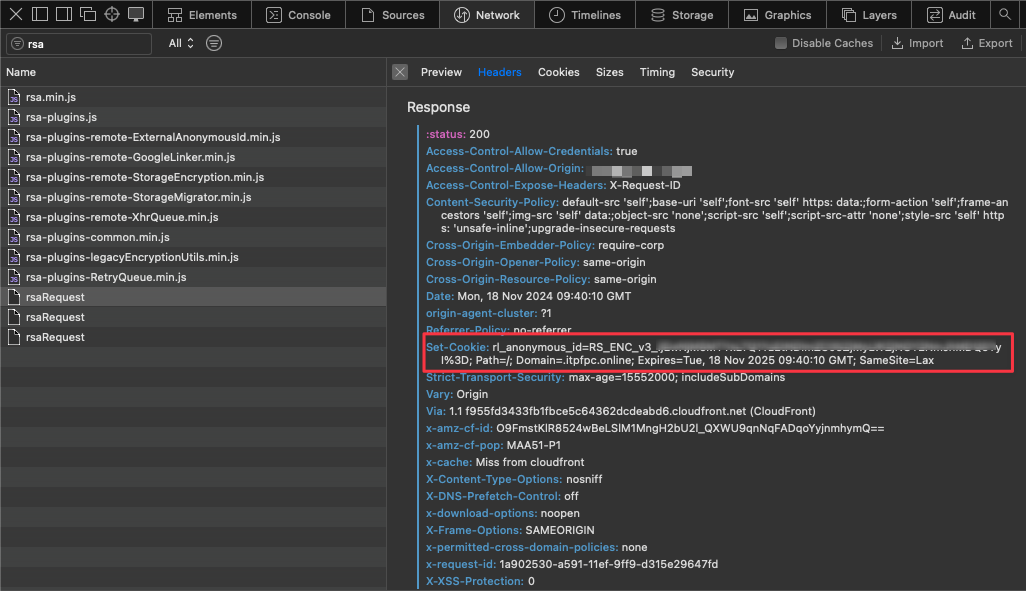
The response includes one Set-Cookie header per cookie in the request, each with an encrypted value. For example, rl_anonymous_id holds the user’s anonymousId value which is persisted through the server-side cookie.
A single
/rsaRequestcan carry multiple cookies. Your handler must append oneSet-Cookieheader for each cookie.Assigning to a single
Set-Cookieheader overwrites the previous ones, so all but the last cookie are dropped without any error.
Configure cookies
All the configuration parameters for client-side cookies are applicable for server-side cookies as well.
Additionally, there are three parameters which determine the cookies’ domain and the request URL:
| Parameter | Description |
|---|---|
sameDomainCookiesOnly | Enables strict domain-level cookie scoping for server-side cookies. Default value: false — the SDK stores cookies at the top-level domain (for example, .example.com), allowing them to be shared across all subdomains (for example, app.example.com, blog.example.com).When set to true, the SDK sets cookies only for the exact domain where the SDK is loaded. These cookies cannot be accessed by subdomains or the top-level domain.Example: If the SDK is loaded on app.example.com and sameDomainCookiesOnly is set to true, cookies are scoped only to app.example.com and are not accessible from blog.example.com or example.com. |
storage.cookie.domain | Specifies the domain of the cookies. |
dataServiceEndpoint | Specifies the request URL. Accepts a path that the SDK appends to the host it derives from the current webpage’s domain, or a full URL that the SDK uses as it is. See Implementation. |
Sample behavior
Suppose there are two websites where the server-side cookies feature is enabled in the JavaScript SDK, namely https://example.com (parent website) and https://sub.example.com (sub-domain).
The following are the possible combinations of the configuration options and cookie domains:
- Parent domain website:
https://example.com
| Domain | Expected behavior |
|---|---|
| Default |
|
| Same domain cookies ( sameDomainCookiesOnly must be set to true) |
|
| Custom domain |
|
- Sub-domain website:
https://sub.example.com
| Domain | Expected behavior |
|---|---|
| Default |
|
| Same domain cookies ( sameDomainCookiesOnly must be set to true) |
|
| Custom domain ( storage.cookie.domain set to .sub.example.com.) |
|
| Custom request URL ( dataServiceEndpoint set to https://sub.example.com/rsaRequest.) |
|
Implementation
If you have implemented a different endpoint than the default (rsaRequest), update your instrumentation as follows:
rudderanalytics.load(WRITE_KEY, DATA_PLANE_URL, {
  useServerSideCookies: true, // Default: false
  dataServiceEndpoint: <custom_endpoint>
  ...
});
The dataServiceEndpoint parameter accepts either of the following values:
| Value | Description |
|---|---|
| Path (default: rsaRequest) | The SDK appends the path to the host it derives from the current webpage’s domain, as described in the Sample behavior section. |
| Full URL (starts with https:// or http://) | The SDK uses the value as the request URL as it is. It neither derives a host nor appends anything to the value. Example: https://sub.example.com/rsaRequest sends the request to https://sub.example.com/rsaRequest. As nothing is appended, a value with no path, for example https://sub.example.com, sends the request to the root path. |
A full URL lets you state the request host explicitly, for example the current origin, while the cookie domain continues to be determined by the sameDomainCookiesOnly and storage.cookie.domain parameters.
If the request host cannot set cookies that your website is able to read, the SDK disables the server-side cookies feature, logs an error in the browser console, and falls back to the client-side cookies. The rules are:
- The host must share your website’s registrable domain. It can be the registrable domain itself, the website’s own host, or any sub-domain under it. A host outside your registrable domain can only set cookies for its own domain, which your website can never read.
- If
sameDomainCookiesOnlyis set totrue, the host must be your website’s exact host. The cookies are set without a domain in this mode, so only the exact host that set them can read them back.- If you set a cookie domain, your website must fall under it and the request host must be able to set it. For example, on
https://www.example.coma cookie domain ofshop.example.comis rejected becausewww.example.comcan never read those cookies.- The cookie domain must also sit at or below your website’s registrable domain. For example, on
https://shop.example.co.uka cookie domain ofco.ukis rejected, because browsers refuse to scope cookies to a public suffix.
The JavaScript SDK can successfully manage cookies if your website’s server is proficient to handle these requests and responds with the appropriate cookie headers. You can ensure this by using any of the following methods:
The host serving the cookie request endpoint (by default,
/rsaRequest) must terminate on your own DNS zone, regardless of which of the following methods you use.If that hostname resolves through a CNAME to a different registrable domain, Safari’s CNAME cloaking defense (Safari 14 / iOS 14 and later) caps the expiry of the cookies set in that response to seven days. This removes the ITP resistance that the server-side cookies feature provides.
Proxy
RudderStack’s data plane handles these cookie requests out of the box.
This method involves setting up a proxy between the RudderStack data plane and the website to handle the cookie requests from the SDK.
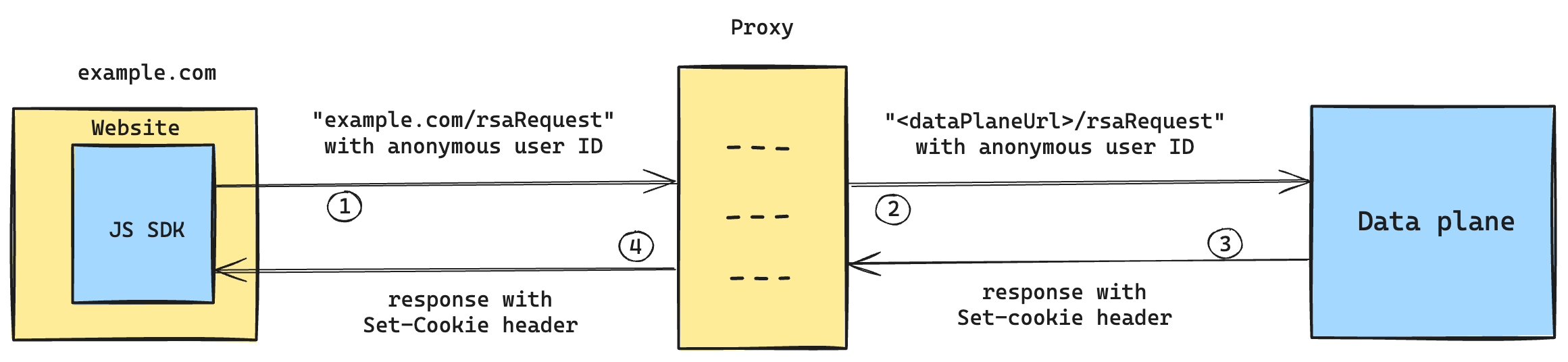
Depending on the existing setup of your website, you can implement proxy as follows:
Whichever method you use, the proxy must forward the browser’sOriginheader to the data plane. If the proxy stripsOrigin, the server-side cookie requests are rejected.
CDN
If your website is served via CDN, you can update it to support the cookie requests endpoint.
The following steps outline how to configure AWS CloudFront to proxy the requests to data plane. The configuration process is more or less similar for the other tools.
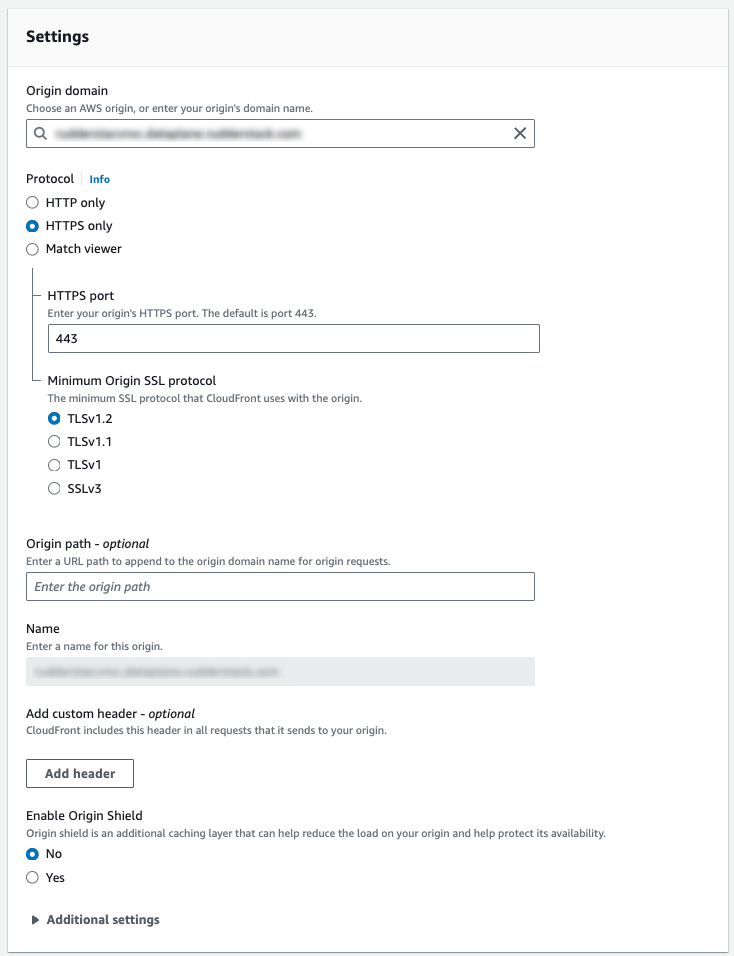
- Create a custom origin
| Setting | Description |
|---|---|
| Origin Domain | Enter the data plane URL from your RudderStack dashboard. |
| Name | Provide a unique name for this origin. |
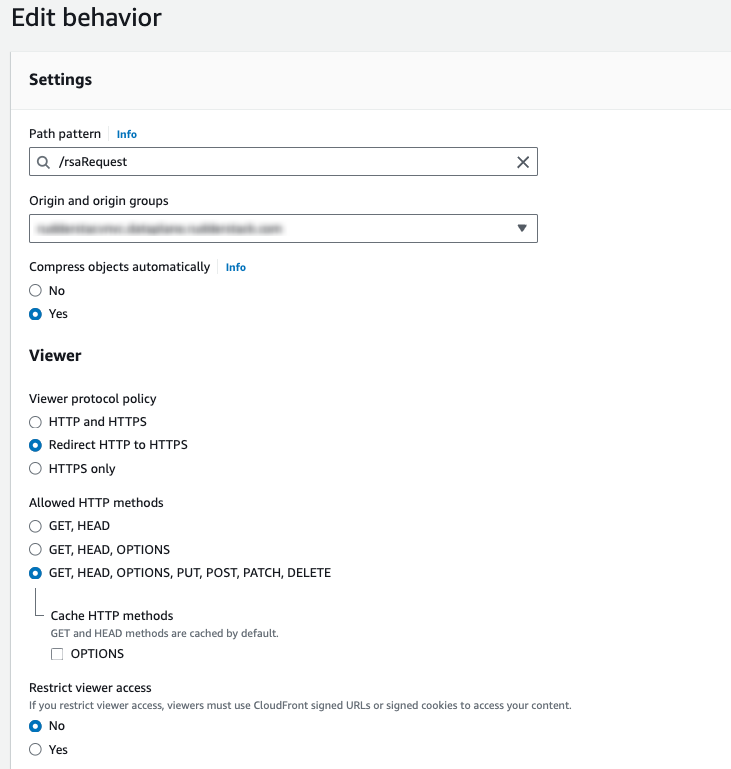
- Create behavior for
/rsaRequestendpoint
| Setting | Description |
|---|---|
| Path Pattern | Enter /rsaRequest. |
| Origin and origin groups | Select the Name created in the previous step. |
| Viewer Protocol Policy | Set to HTTPS Only or Redirect HTTP to HTTPS, as required. |
| Allowed HTTP Methods | Select GET, HEAD, OPTIONS, PUT, POST, PATCH, DELETE. |
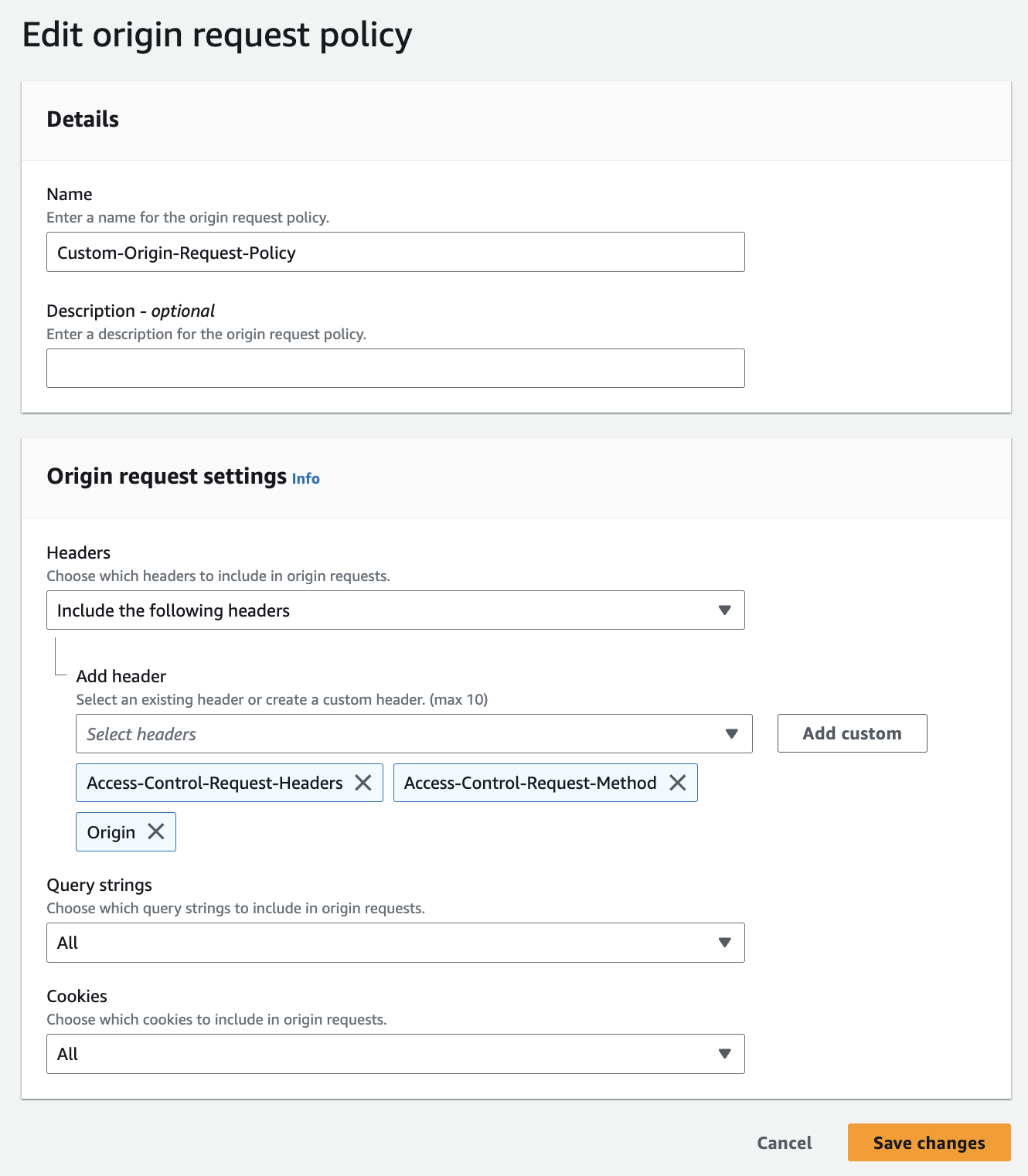
- Edit the origin request policy
| Setting | Description |
|---|---|
| Name | Enter the name of custom origin request policy, for example Custom-Origin-Request-Policy. |
| Headers | Select headers as shown below, allowing even the sub-domain sites to make cookie requests. Otherwise, you will face CORS errors for the OPTION requests.Make sure Origin is one of the forwarded headers (for the OPTIONS preflight as well as the POST request) so the data plane receives the browser’s request origin. |
| Cookies | Configure the policy to forward cookies to the origin. If cookies aren’t forwarded, CloudFront removes the Set-Cookie headers from the response before returning it to the browser, so no cookies are ever set. |
- Enter the following settings
| Setting | Description |
|---|---|
| Cache key and origin requests | Select Cache policy and origin policy (recommended) |
| Cache Policy | Select CachingDisabled as these are POST requests. |
| Origin Request Policy | Select the name of custom origin request policy created in the previous step. |
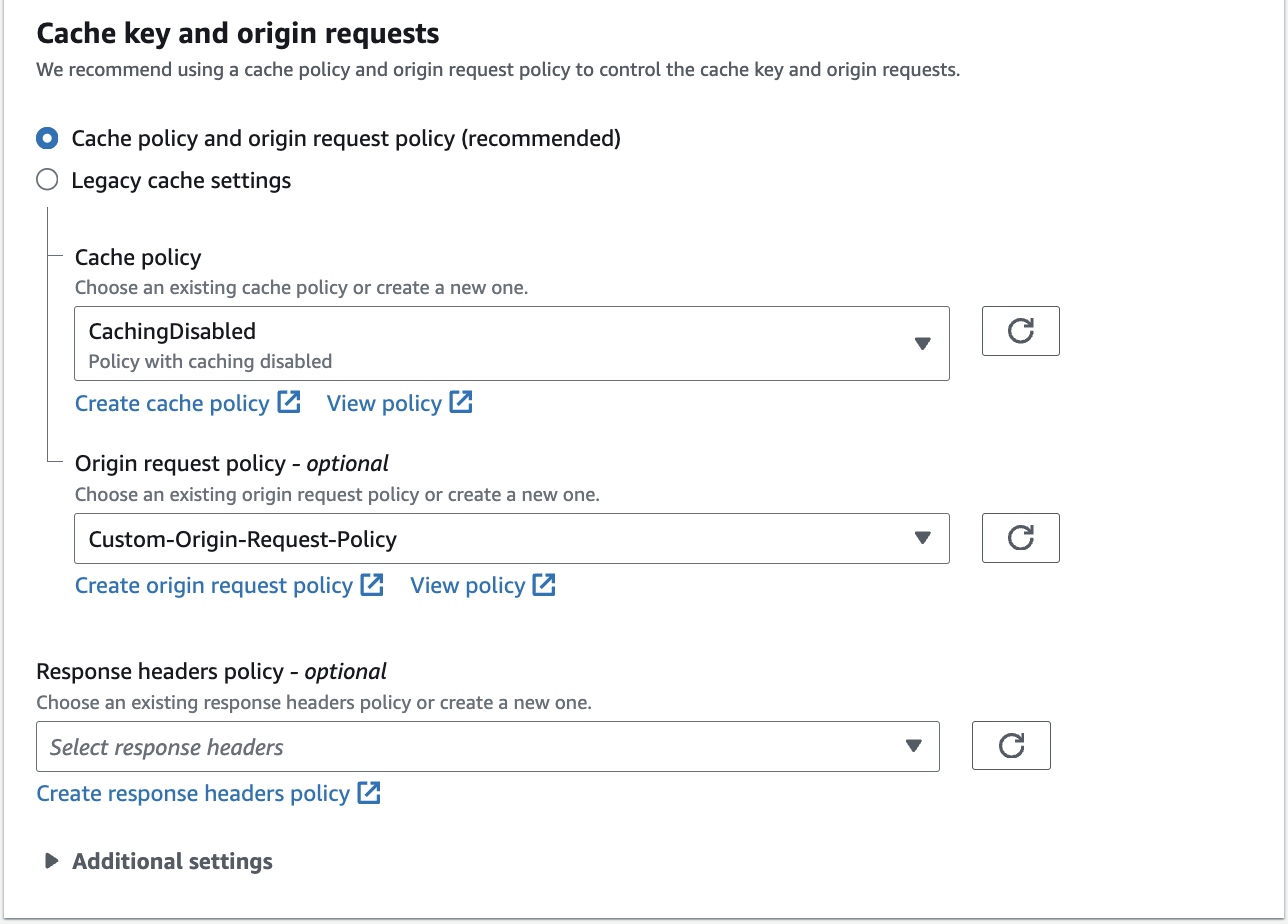
By following the above steps, you can configure CloudFront to proxy specific requests to a different origin using behaviours and custom cache policies.
A single
/rsaRequestresponse can contain multipleSet-Cookieheaders. Some CDNs and proxies merge duplicate response headers into one, which silently drops all but one cookie.Keep the cache policy set to
CachingDisabled. Otherwise, CloudFront caches theSet-Cookieheaders and replays one visitor’s cookies to another on cache hits.
After deploying, send a request with more than one cookie and verify that each one comes back as its own Set-Cookie header:
curl -i -X POST 'https://<your_domain>/rsaRequest' \
  -H 'Content-Type: application/json' \
  --data '{
    "reqType": "setCookies",
    "workspaceId": "<your_workspace_id>",
    "data": {
      "options": { "maxAge": 31536000000, "path": "/", "sameSite": "Lax", "secure": true },
      "cookies": [
        { "name": "rl_anonymous_id", "value": "test-anonymous-id" },
        { "name": "rl_user_id", "value": "test-user-id" }
      ]
    }
  }'
The response must contain two separate Set-Cookie headers. A single combined header, or only the last cookie, means your CDN, proxy, or handler merged or dropped them. The SDK sends encrypted cookie values, but plain values are sufficient for this check.
You can also enable logging in CloudFront to monitor requests and troubleshoot any issues. See AWS CloudFront documentation for more information.
Reverse proxy
This method outlines the changes to the reverse proxy configuration to handle the cookie requests from the SDK.
The following sample snippet is for Nginx but the implementation is similar for other proxies like Apache or HAProxy.
daemon off;
events {
}
http {
    server {
        listen 8080;
        location /rsaRequest/ {
            proxy_set_header Origin $http_origin;
            proxy_pass <DATA_PLANE_URL>$request_uri;
        }
    }
}
Ensure that the request and response headers are not stripped off in the Nginx proxy configuration.
Do not merge or collapse duplicate
Set-Cookieheaders. Combining them into one header silently drops all but one cookie.
Custom implementation
If you have another custom implementation of your website, contact the RudderStack team to share a sample implementation for your endpoint to handle the cookie requests from the JavaScript SDK.
Sample snippets
    type CookieData = {
      name: string;
      value: string;
    };

    type CookiesReqData = {
      options: {
        expires?: string; // ISO 8601 date string
        maxAge?: number; // In milliseconds
        path?: string;
        domain?: string;
        sameSite?: 'Lax' | 'Strict' | 'None';
        secure?: boolean;
      };
      cookies: CookieData[];
    };

    type RequestData = CookiesReqData;

    type RequestType = 'setCookies';

    // The SDK wraps the cookie payload in this envelope
    type RSARequest = {
      reqType: RequestType;
      workspaceId: string;
      data: RequestData;
    };

    const ALLOWED_COOKIES = [
      'rl_user_id',
      'rl_trait',
      'rl_anonymous_id',
      'rl_group_id',
      'rl_group_trait',
      'rl_page_init_referrer',
      'rl_page_init_referring_domain',
      'rl_session',
      'rl_auth_token'
    ];

    const encode = (value: string) => {
      try {
        return encodeURIComponent(value);
      } catch (err) {
        return undefined;
      }
    };

    const generateCookieStrings = (data: RequestData): string[] => {
      try {
        const { cookies, options } = data;
        return cookies.filter((cookie: CookieData) => ALLOWED_COOKIES.includes(cookie.name)).map((cookie: CookieData) => {
          const encodedName = encode(cookie.name);
          const encodedValue = encode(cookie.value);

          // encode returns undefined instead of throwing, so skip the cookie rather
          // than writing a literal "undefined" into the header
          if (encodedName === undefined || encodedValue === undefined) {
            return undefined;
          }

          let cookieStr = `${encodedName}=${encodedValue}`;

          // expires arrives as a string over JSON, so parse it into a Date
          let expires = options.expires ? new Date(options.expires) : undefined;

          // Calculate expires from maxAge if provided (maxAge is in milliseconds)
          if (cookie.value === '') {
            expires = new Date(Date.now() - 600 * 1000); // Set to past time to delete cookie
          } else if (options.maxAge) {
            expires = new Date(Date.now() + options.maxAge);
          }

          if (options.path) cookieStr += `; Path=${options.path}`;
          if (options.domain) cookieStr += `; Domain=${options.domain}`;
          if (expires) cookieStr += `; Expires=${expires.toUTCString()}`;
          if (options.sameSite) cookieStr += `; SameSite=${options.sameSite}`;
          if (options.secure) cookieStr += '; Secure';

          return cookieStr;
        }).filter((cookieStr?: string): cookieStr is string => cookieStr !== undefined);
      } catch (err) {
        return [];
      }
    };

    export default function cookieRequestHandler (ctx: Context) {
      const { reqType, data }: RSARequest = ctx.request.body;
      if (reqType === 'setCookies') {
        const cookieStrings = generateCookieStrings(data);
        cookieStrings.forEach(cookieStr => {
          ctx.response.append('Set-Cookie', cookieStr);
        });
      }
      ctx.status = 200;
} type CookieData = {
name: string;
value: string;
};
type CookiesReqData = {
options: {
expires?: string; // ISO 8601 date string
maxAge?: number; // In milliseconds
path?: string;
domain?: string;
sameSite?: 'Lax' | 'Strict' | 'None';
secure?: boolean;
};
cookies: CookieData[];
};
type RequestData = CookiesReqData;
type RequestType = 'setCookies';
// The SDK wraps the cookie payload in this envelope
type RSARequest = {
reqType: RequestType;
workspaceId: string;
data: RequestData;
};
const ALLOWED_COOKIES = [
'rl_user_id',
'rl_trait',
'rl_anonymous_id',
'rl_group_id',
'rl_group_trait',
'rl_page_init_referrer',
'rl_page_init_referring_domain',
'rl_session',
'rl_auth_token'
];
const encode = (value: string) => {
try {
return encodeURIComponent(value);
} catch (err) {
return undefined;
}
};
const generateCookieStrings = (data: RequestData): string[] => {
try {
const { cookies, options } = data;
return cookies.filter((cookie: CookieData) => ALLOWED_COOKIES.includes(cookie.name)).map((cookie: CookieData) => {
const encodedName = encode(cookie.name);
const encodedValue = encode(cookie.value);
// encode returns undefined instead of throwing, so skip the cookie rather
// than writing a literal "undefined" into the header
if (encodedName === undefined || encodedValue === undefined) {
return undefined;
}
let cookieStr = `${encodedName}=${encodedValue}`;
// expires arrives as a string over JSON, so parse it into a Date
let expires = options.expires ? new Date(options.expires) : undefined;
// Calculate expires from maxAge if provided (maxAge is in milliseconds)
if (cookie.value === '') {
expires = new Date(Date.now() - 600 * 1000); // Set to past time to delete cookie
} else if (options.maxAge) {
expires = new Date(Date.now() + options.maxAge);
}
if (options.path) cookieStr += `; Path=${options.path}`;
if (options.domain) cookieStr += `; Domain=${options.domain}`;
if (expires) cookieStr += `; Expires=${expires.toUTCString()}`;
if (options.sameSite) cookieStr += `; SameSite=${options.sameSite}`;
if (options.secure) cookieStr += '; Secure';
return cookieStr;
}).filter((cookieStr?: string): cookieStr is string => cookieStr !== undefined);
} catch (err) {
return [];
}
};
export default function cookieRequestHandler(
req: NextApiRequest,
res: NextApiResponse
) {
const { reqType, data }: RSARequest = req.body;
if (reqType === 'setCookies') {
const cookieStrings = generateCookieStrings(data);
cookieStrings.forEach(cookieStr => {
res.append('Set-Cookie', cookieStr);
});
}
res.status(200);
} $allowedCookies = [
'rl_user_id', 'rl_trait', 'rl_anonymous_id', 'rl_group_id',
'rl_group_trait', 'rl_page_init_referrer', 'rl_page_init_referring_domain',
'rl_session', 'rl_auth_token'
];
function isAllowedCookie($name) {
return in_array($name, $GLOBALS['allowedCookies']);
}
function setCookiesFromRequest($data) {
$cookies = $data['cookies'];
$options = $data['options'];
foreach ($cookies as $cookie) {
if (!isAllowedCookie($cookie['name'])) {
continue;
}
$cookieOptions = []; // Array to hold cookie-specific options
$maxAge = isset($options['maxAge']) ? $options['maxAge'] : null; // In milliseconds
if ($cookie['value'] === '') {
$maxAge = -600 * 1000; // Set negative to ensure cookie is deleted (in milliseconds)
}
$expires = null;
if (isset($maxAge)) {
$expires = time() + (int) ($maxAge / 1000); // time() is in seconds, so convert maxAge
} elseif (isset($options['expires'])) {
$expires = strtotime($options['expires']);
}
// Set each option only if it's explicitly provided
if (isset($expires)) {
$cookieOptions['expires'] = $expires;
}
if (isset($options['path'])) {
$cookieOptions['path'] = $options['path'];
}
if (isset($options['domain'])) {
$cookieOptions['domain'] = $options['domain'];
}
if (isset($options['secure'])) {
$cookieOptions['secure'] = $options['secure'];
}
if (isset($options['sameSite'])) {
$cookieOptions['samesite'] = $options['sameSite'];
}
setcookie($cookie['name'], $cookie['value'], $cookieOptions);
}
}
function cookieRequestHandler() {
$request = json_decode(file_get_contents('php://input'), true);
// The SDK wraps the cookie payload in a reqType/workspaceId/data envelope
if (($request['reqType'] ?? null) === 'setCookies') {
setCookiesFromRequest($request['data']);
}
} ALLOWED_COOKIES = [
'rl_user_id', 'rl_trait', 'rl_anonymous_id', 'rl_group_id',
'rl_group_trait', 'rl_page_init_referrer', 'rl_page_init_referring_domain',
'rl_session', 'rl_auth_token'
].freeze
def cookie_request_handler
rsa_request = JSON.parse(request.body.read)
# The SDK wraps the cookie payload in a reqType/workspaceId/data envelope
return head :ok unless rsa_request['reqType'] == 'setCookies'
data = rsa_request['data']
cookies_data = data['cookies']
options = data['options'].symbolize_keys
cookies_data.each do |cookie|
next unless ALLOWED_COOKIES.include?(cookie['name'])
value = cookie['value']
cookie_options = {
value: value
}
# Calculate expires from maxAge if provided (maxAge is in milliseconds)
if value.blank?
cookie_options[:expires] = 600.seconds.ago # Set to past time to delete cookie
elsif options[:maxAge]
cookie_options[:expires] = Time.current + (options[:maxAge] / 1000.0).seconds
elsif options[:expires]
# expires arrives as a string over JSON, so parse it into a Time
cookie_options[:expires] = Time.zone.parse(options[:expires])
end
# Only set optional parameters if they are provided
cookie_options[:path] = options[:path] if options[:path]
cookie_options[:domain] = options[:domain] if options[:domain]
cookie_options[:secure] = options[:secure] if options[:secure]
cookie_options[:same_site] = options[:sameSite] if options[:sameSite]
cookies[cookie['name']] = cookie_options
end
head :ok
end import (
"encoding/json"
"net/http"
"time"
)
var allowedCookies = []string{
"rl_user_id", "rl_trait", "rl_anonymous_id", "rl_group_id",
"rl_group_trait", "rl_page_init_referrer", "rl_page_init_referring_domain",
"rl_session", "rl_auth_token",
}
func isAllowedCookie(name string) bool {
for _, allowed := range allowedCookies {
if allowed == name {
return true
}
}
return false
}
func parseSameSite(s string) http.SameSite {
switch s {
case "Strict":
return http.SameSiteStrictMode
case "Lax":
return http.SameSiteLaxMode
case "None":
return http.SameSiteNoneMode
default:
return http.SameSiteDefaultMode
}
}
func cookieRequestHandler(w http.ResponseWriter, r *http.Request) {
// The SDK wraps the cookie payload in a reqType/workspaceId/data envelope
var request struct {
ReqType string `json:"reqType"`
WorkspaceID string `json:"workspaceId"`
Data struct {
Cookies []struct {
Name string `json:"name"`
Value string `json:"value"`
} `json:"cookies"`
Options struct {
Expires *time.Time `json:"expires"` // Parsed from the ISO 8601 date string
MaxAge *int `json:"maxAge"` // In milliseconds
Path string `json:"path"`
Domain string `json:"domain"`
SameSite string `json:"sameSite"`
Secure bool `json:"secure"`
} `json:"options"`
} `json:"data"`
}
json.NewDecoder(r.Body).Decode(&request)
if request.ReqType != "setCookies" {
w.WriteHeader(http.StatusOK)
return
}
data := request.Data
for _, cookie := range data.Cookies {
if !isAllowedCookie(cookie.Name) {
continue
}
var expires time.Time
// Calculate expires from maxAge if provided, or use expires if provided
if cookie.Value == "" {
expires = time.Now().Add(-600 * time.Second) // Set to past time to delete cookie
} else if data.Options.MaxAge != nil {
expires = time.Now().Add(time.Duration(*data.Options.MaxAge) * time.Millisecond)
} else if data.Options.Expires != nil {
expires = *data.Options.Expires
}
http.SetCookie(w, &http.Cookie{
Name: cookie.Name,
Value: cookie.Value,
Expires: expires,
Path: data.Options.Path,
Domain: data.Options.Domain,
Secure: data.Options.Secure,
SameSite: parseSameSite(data.Options.SameSite),
})
}
w.WriteHeader(http.StatusOK)
}FAQ
Are the server-side cookies applicable for device mode integrations as well?
No, RudderStack does not control the cookies set by any integration platform.
