How to Install the JavaScript SDK
5 minute read
If you are migrating from an older version, see the Migration Guide for details.
The JavaScript SDK lets you track user events, identify users, and send this data to various analytics platforms and marketing tools. By integrating this SDK with your website, you can gain valuable insights into user behavior, optimize your marketing efforts, and make data-driven decisions to drive growth.
This guide will help you install the RudderStack JavaScript SDK on your website via CDN or using NPM.
See the RudderStack JavaScript SDK repository for sample applications using different installation methods.
Using CDN
Follow these steps to get the JavaScript SDK installation snippet and integrate it in your website.
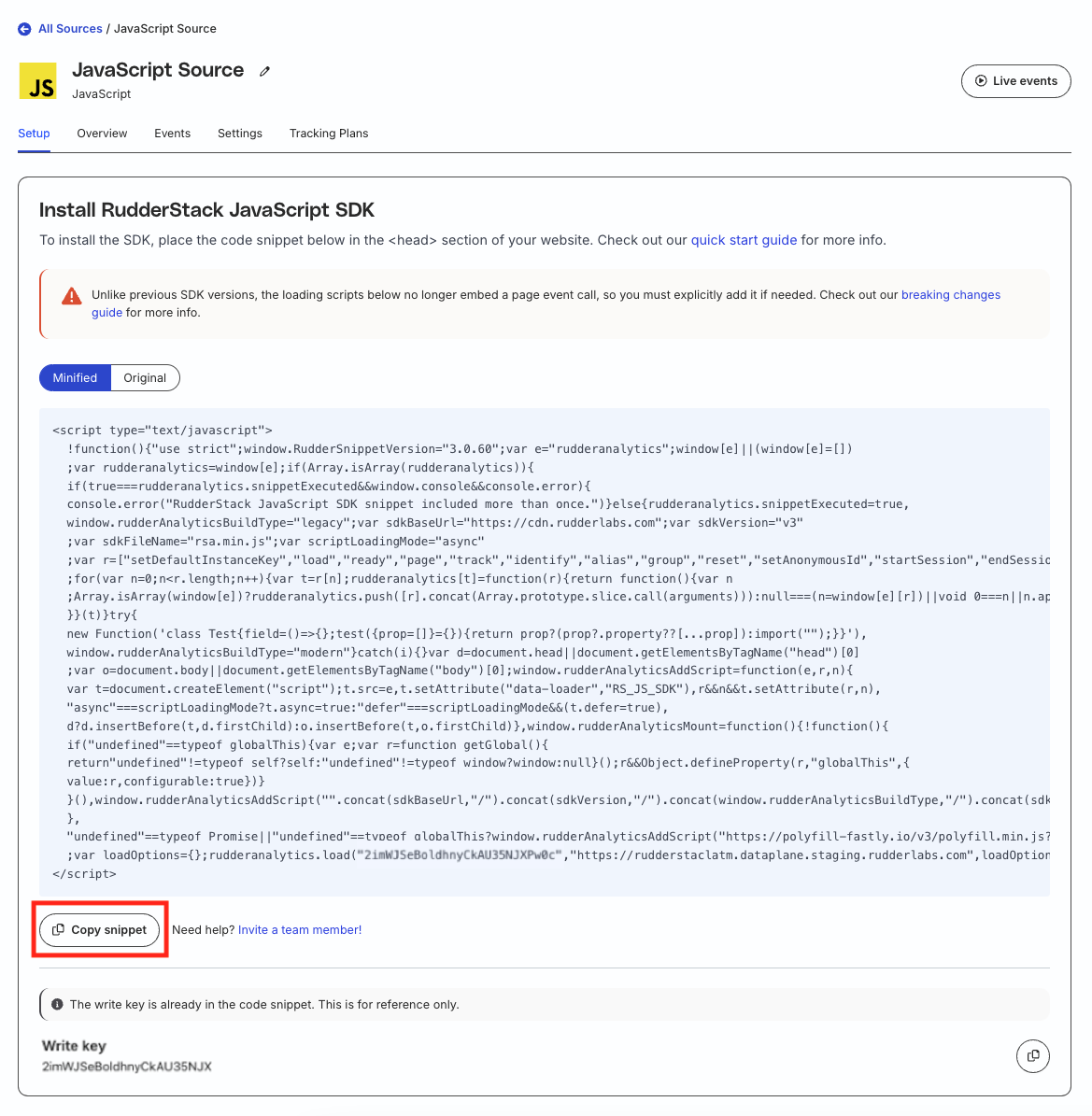
- Go to the Setup tab of your JavaScript source in the RudderStack dashboard.
- Click the Minified or Original tab followed by Copy snippet.
To integrate the SDK with your website and load it synchronously, set scriptLoadingMode (highlighted below) to "".
var scriptLoadingMode = "";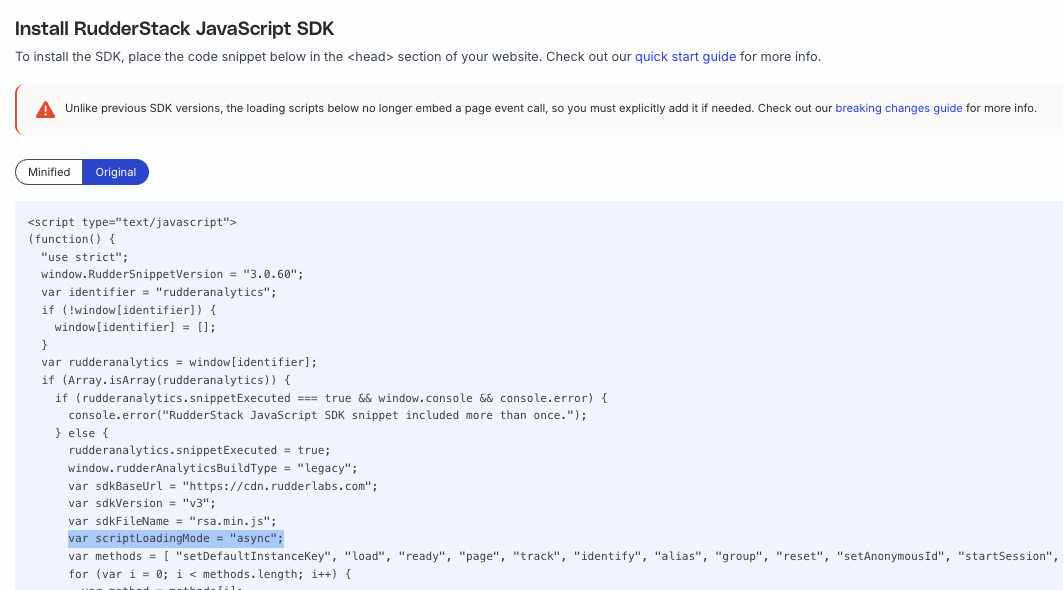
To defer the script loading to the end, set scriptLoadingMode to defer, as shown:
var scriptLoadingMode = "defer";- Paste the modified script in your website’s
<head>section.
Note the following:
- The SDK installation snippet contains both the write keyThe write key (or source write key) is a unique identifier for your source. RudderStack uses this key to send events from a source to the specified destination. and data plane URLThe data plane URL is the location where events are routed and sent to the RudderStack backend for processing. You can find this URL at the top of the Connections page in your RudderStack dashboard. by default.
- The implicit
pagecall at the end of the snippet (present in the previous JavaScript SDK versions) is removed in the latest SDK v3. If required, you need to make apagecall explicitly, as shown:
rudderanalytics.page();- Depending on the browser, the SDK loads either the legacy or modern JavaScript SDK bundle. The legacy bundle is built for ES5 while the modern bundle (with Module Federation) is built for ES6.
- You can also pass your
loadOptionsas a third argument in therudderanalytics.loadmethod. See Load JavaScript SDK for more information.
Installation workflow
The installation code snippets listed above perform the following actions:
- Based on browser capabilities, load either the
legacyormodernbundle. - Load the necessary polyfills for the SDK to load.
- Create an array to store the events until the SDK is ready.
- Store the method invocations in the below table to replay them when the SDK is ready.
- Load the SDK with the specified write key.
| Method | Description |
|---|---|
load | Loads the SDK with the specified write keyThe write key (or source write key) is a unique identifier for your source. RudderStack uses this key to send events from a source to the specified destination. . |
identify | Identifies the users, records their traits, and associates them with their actions. |
page | Records your website’s page views along with any other information about the viewed page. |
track | Tracks user events along with the associated properties. |
alias | Maps new user ID with an old ID. |
group | Links an identified user with a group like a company, organization, or an account. |
reset | Resets information related to the previously identified user. |
ready | Fired when the SDK has initialized itself and the other third-party native SDK destinations. |
setAnonymousId | Sets the anonymous user ID. |
startSession | Starts a new session. |
endSession | Resets the current session. |
Using NPM
While using the above snippets to integrate the JavaScript SDK with your website is recommended, you can alternatively use the NPM module for packaging RudderStack directly into your project.
To install the JavaScript SDK via NPM, run the following command:
npm install @rudderstack/analytics-js --saveUse this NPM module only for browser installation.
To integrate RudderStack with your Node.js apps, see Node.js SDK documentation
Since the NPM module exports the related APIs on an already-defined object combined with the Node.js module caching, run the following code snippet once and use the exported rudderAnalytics object throughout your project:
- For ECMAScript modules (ESM):
import { RudderAnalytics } from '@rudderstack/analytics-js';

const rudderAnalytics = new RudderAnalytics();
rudderAnalytics.load(WRITE_KEY, DATA_PLANE_URL, {});

export { rudderAnalytics };- For CJS using the
requiremethod:
var RudderAnalytics = require("@rudderstack/analytics-js");

const rudderAnalytics = new RudderAnalytics();
rudderAnalytics.load(WRITE_KEY, DATA_PLANE_URL, {});

exports.rudderAnalytics = rudderAnalytics;
SDK imports for bundling tools that process dynamic imports
If you are using a tool to bundle your application and it is attempting to process the dynamic runtime imports of the dependencies, update your SDK imports from @rudderstack/analytics-js to @rudderstack/analytics-js/bundled to avoid any issues with dynamic imports failing to find plugin modules.
Most common toolchains like the ones based on webpack, rollup, and vite should not face any issues. If your particular setup/toolchain is affected, contact RudderStack Support.
Usage in Chrome extension
To use the JavaScript SDK within a Chrome extension, import the content-script as shown:
import { RudderAnalytics } from '@rudderstack/analytics-js/content-script';See the Usage in Chrome Extensions guide for more details, along with a sample application.
Preload events with NPM package
If you are using a single-page application (SPA) or frameworks that load the JavaScript SDK in an async manner (lazy loading), you will need an array buffer to store the events before the SDK is loaded.
You can use this sample snippet to achieve this use case.
Supported browsers
The JavaScript SDK supports the following browsers and their corresponding versions:
| Browser | Supported Versions |
|---|---|
| Safari | v10 and above |
| IE | v11 and above |
| Edge | v80 and above |
| Mozilla Firefox | v47 and above |
| Chrome | v54 and above |
| Opera | v43 and above |
For unsupported browser versions, try adding browser polyfills to your application for the SDK to work correctly.
Integration with Chromecast
RudderStack supports integrating the JavaScript SDK with Google Chromecast. You can build the web sender app by following these instructions and adding the JavaScript SDK.
See Google Cast developer guide for more details.
