Complete reference guide to all tabs and features in Events Tracking Assistant.
7 minute read
This guide provides a reference to all tabs and features in the Events Tracking Assistant.
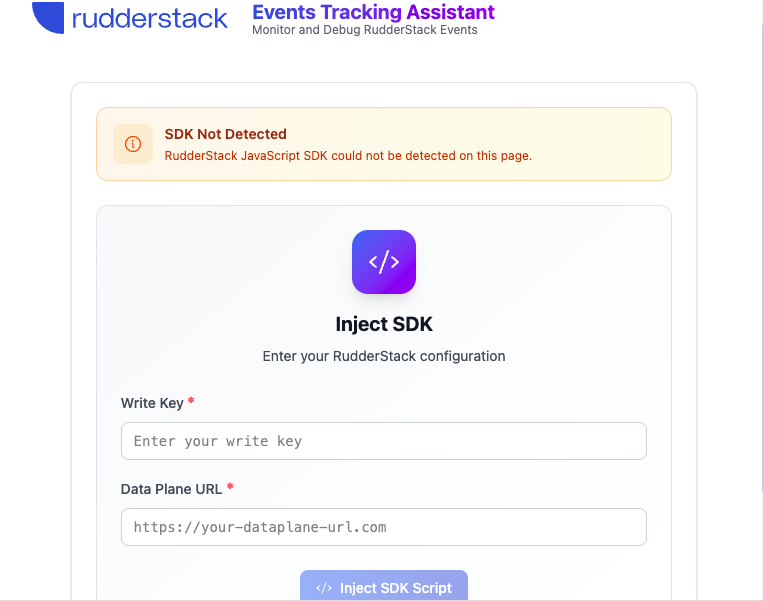
If no SDK is detected on the page, you will see the SDK injection interface instead of the below tabs.
Home tab
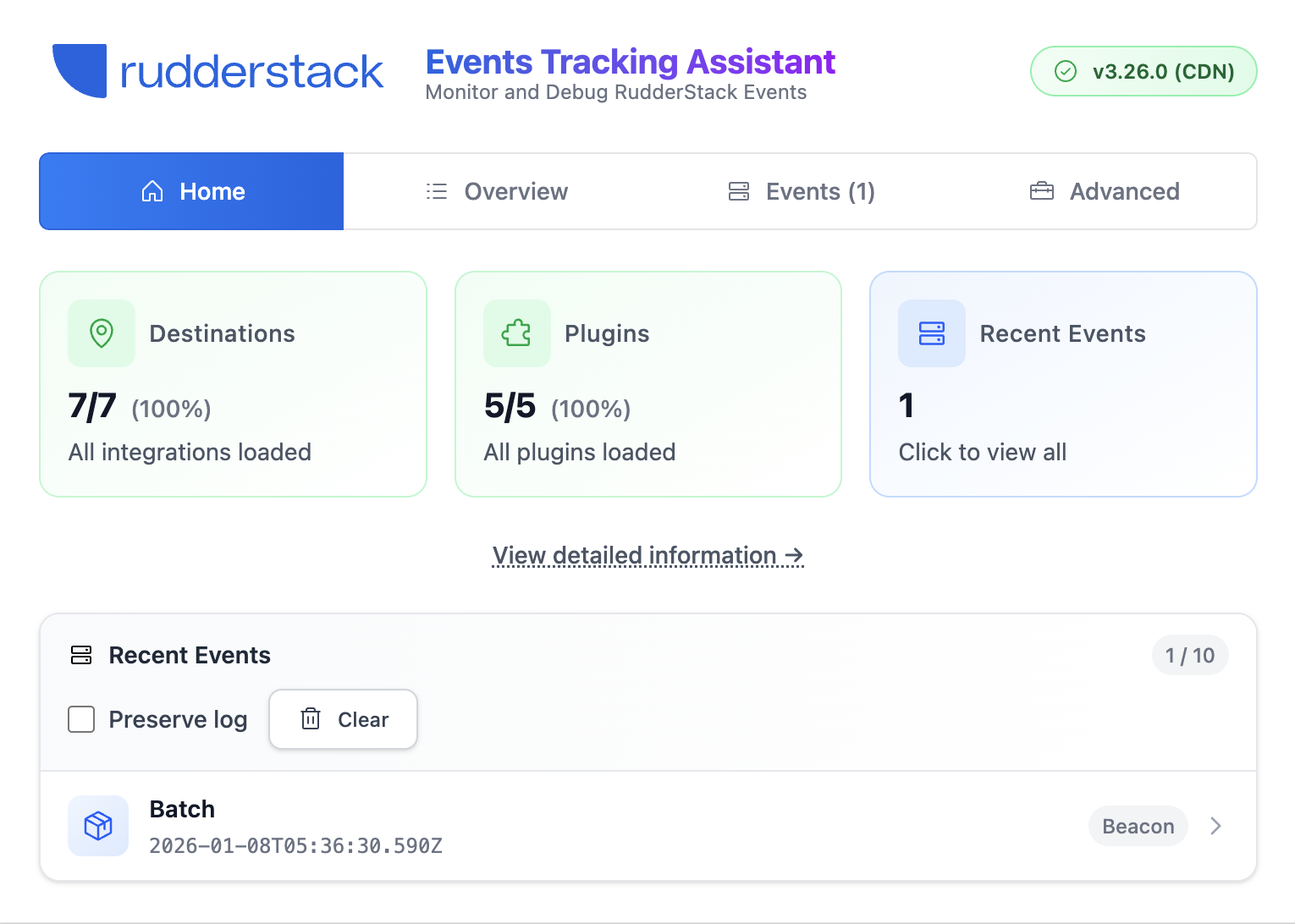
The Home tab provides a quick overview of your RudderStack implementation health. Use it to quickly identify if there are any issues with your implementation.
Health status
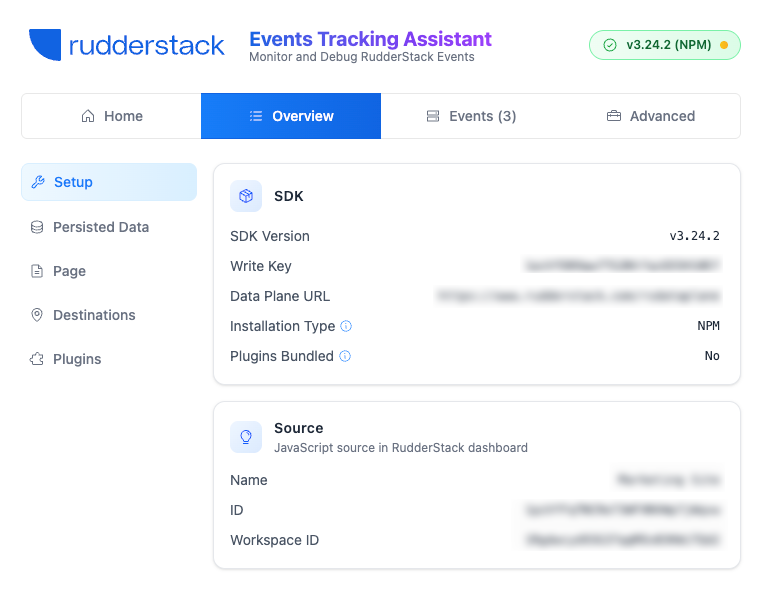
At-a-glance view of your SDK setup with visual indicators showing:
Each field shows the storage type used by the SDK to store the data (local storage, session storage, cookies, or memory)
Page
View current page information. This section helps you verify that page context is being captured correctly for your events.
Detail
Description
Page URL
Current page URL
Canonical URL
Canonical URL (if specified)
Page Title
Page title
Referrer
Referring page URL
Destinations
Monitor device-mode destination loading status. This section helps you troubleshoot why specific destinations aren’t loading or receiving data.
Detail
Description
Successfully loaded destinations
Destinations that loaded correctly
Failed destinations
Destinations that failed to load with error details
Filtered destinations
Destinations filtered due to consent, configuration, or other reasons
Device-mode transformations
Shows whether device-mode transformations are enabled and their loading status.
Device-mode transformations let you transform event data before it is sent to device-mode destinations, enabling custom data mapping and enrichment directly in the browser.
Some common reasons for destination failures include:
Destination not configured correctly
Integration SDK blocked by ad blockers
Incorrect base URL configuration
Slow CDN response
Plugins
Track plugin loading status. This section helps you troubleshoot why specific plugins aren’t loading or receiving data.
Detail
Description
Successfully loaded plugins
Plugins that loaded correctly
Failed plugins
Plugins that failed to load with error details
Events tab
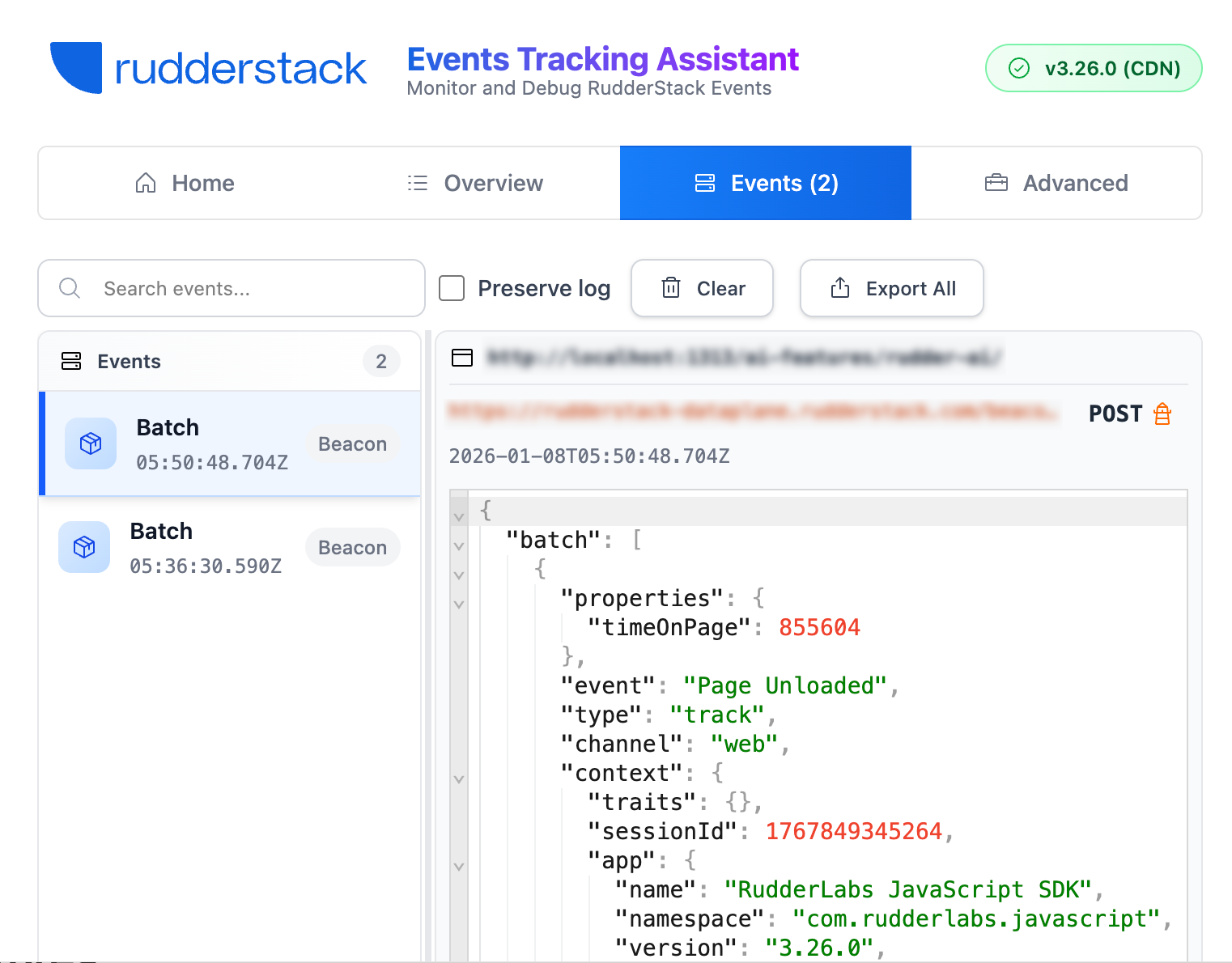
The Events tab provides real-time monitoring of all events sent through RudderStack.
Event list
View all captured events in chronological order with:
Detail
Description
Event type
Color-coded icons for identify, track, page, group, and alias events
Event name
Name of the event (for track events) or event type
HTTP status code
Status codes for successful or failed requests
Beacon indicator
Shows “Beacon” for events sent via the Beacon API — these don’t return HTTP status codes
Timestamp
Time when each event was sent (in UTC)
Tip:
Use the search and filter options to quickly find specific events (by name or type) from the events list.
Event details
Click on any event in the events list to view:
Detail
Description
Complete event payload
Formatted JSON showing all event data
Request URL
The endpoint URL where the event was sent
HTTP method
GET or POST
HTTP status
Response status code
Timestamp
Time when the event was sent (in UTC)
Transport method
XHR or Beacon API
Tip:
Keep the extension open before triggering events. The extension can only capture events sent after it is opened on the page.
Preserve logs
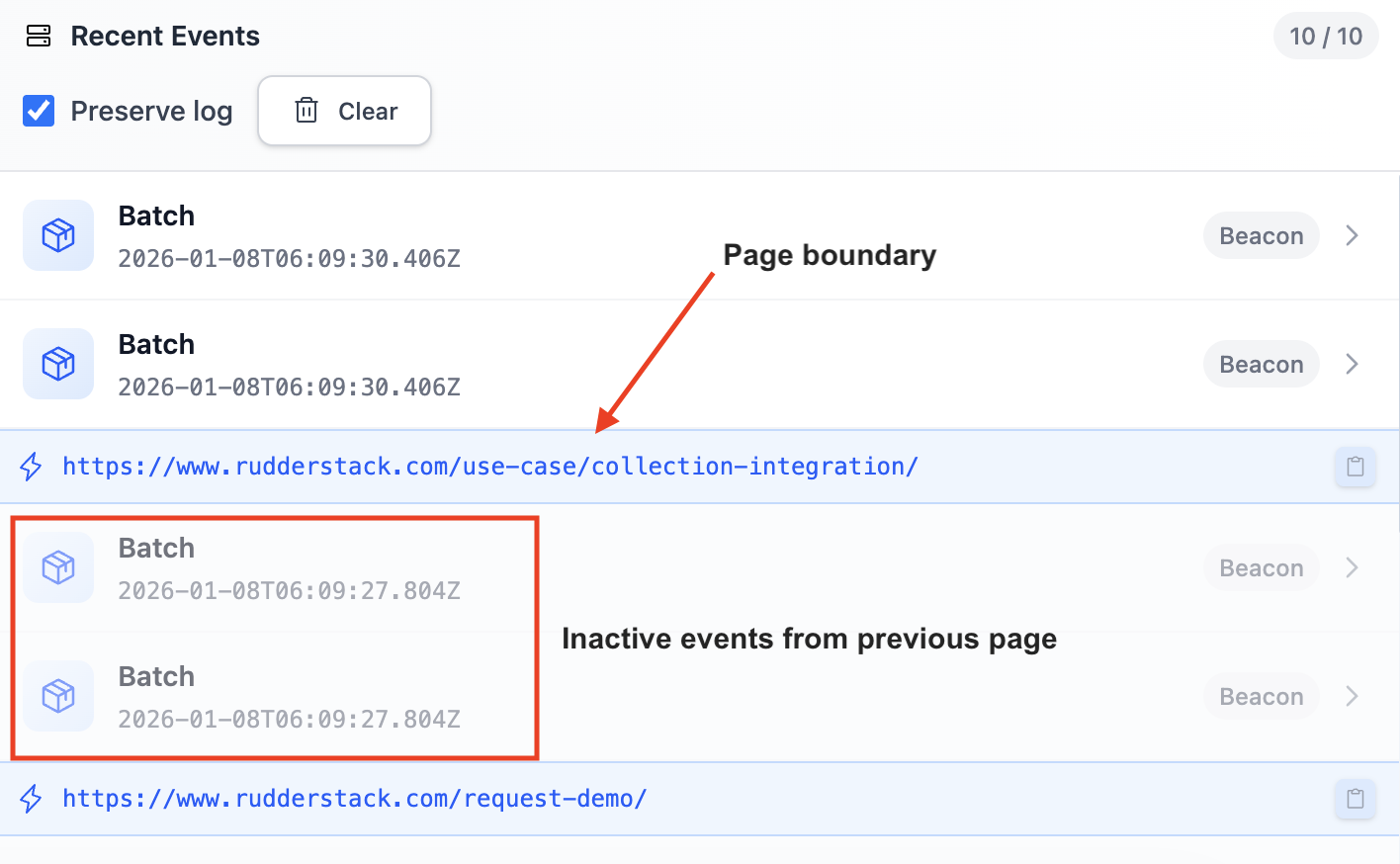
Lets you keep your event history across page navigations. This setting is helpful when you want to:
Track event flow across multi-page user journeys
Debug checkout or signup flows that span multiple pages
Analyze events before and after navigation
Retain event history when testing page transitions
Detail
Description
Preserve logs
Enable to retain events when navigating to new pages
Clear
Clears all events in the log
This feature works on a per-tab basis and remembers your preference. When enabled:
Events are marked as inactive (with reduced opacity) after page navigation
You will see page boundaries that show the URL where the navigation occurred
Events persist until you manually clear the log or close the tab
Export events
Detail
Description
Export all events
Download all captured events as a JSON file
Advanced tab
The Advanced tab contains tools for deeper debugging and configuration verification.
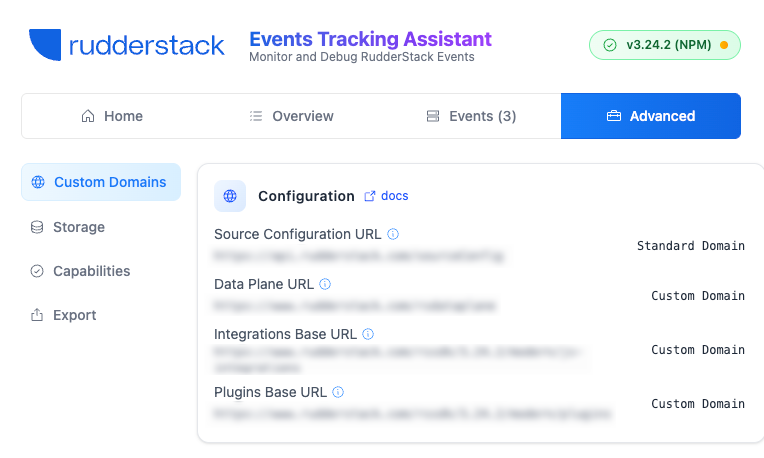
Custom Domains
Check if you’re using custom domains. This section helps you verify proxy configuration and troubleshoot CORS or loading issues.
Detail
Description
Source Configuration URL
Custom domain for loading source configuration
Data Plane URL
Custom domain for sending events to the data plane
Integrations Base URL
Custom domain for loading device-mode destination SDKs
Plugins Base URL
Custom domain for loading SDK plugins
Each field shows either Standard Domain or Custom Domain to indicate whether you’re using a proxy.
Storage
View detailed information about browser storage usage. This section helps you debug storage-related issues and verify storage configuration.
Detail
Description
Encryption Version
The version used to encrypt the data persisted in the browser storage
Data Migration Enabled
Determines if the persisted data encrypted using the legacy encryption technique is migrated to the latest format
Truly Anonymous Tracking
Determines if the cookieless tracking feature is enabled. With this feature, you can track users without storing any user data — each event has a unique anonymous ID.
Server-side Cookies Configured
Determines if server-side cookies are configured. If configured, the SDK makes requests to the analytics data server to set cookies via the response headers.
Storage Type
Storage type for each data category (user, group, session, page, etc.)
Capabilities
Check browser and SDK capabilities. This section helps you understand browser limitations that might affect SDK functionality.
Detail
Description
Online Status
Determines if the browser is online or offline
Storage support
Determines if the browser supports local storage, session storage, and cookies
Beacon API support
Determines if the browser supports the Beacon API
Legacy Browser
Determines if the browser is a legacy DOM
UA Client Hints
Determines if the browser supports User-Agent Client Hints
Ad-Blockers Detected
Determines if an ad-blocker is detected on the page
Export Debug Data
Click Export to export comprehensive SDK debug information including:
Complete SDK state
Configuration details
Source information
Session data
Loaded destinations and plugins
Optional: Include captured events
Tip:
Export debug data when contacting support or for detailed analysis. Include events if you need to share event payloads.
You can either copy the debug data to clipboard or download it as a JSON file.
SDK injection (when no SDK is detected)
Not all sites support injecting scripts due to strict Content Security Policy (CSP) headers. The extension indicates if injection is not supported. Use SDK injection for testing purposes only. For production use, install the JavaScript SDK on the website.
If no RudderStack JavaScript SDK is found on the page, the extension offers manual injection:
This site uses cookies to improve your experience while you navigate through the website. Out of
these
cookies, the cookies that are categorized as necessary are stored on your browser as they are as
essential
for the working of basic functionalities of the website. We also use third-party cookies that
help
us
analyze and understand how you use this website. These cookies will be stored in your browser
only
with
your
consent. You also have the option to opt-out of these cookies. But opting out of some of these
cookies
may
have an effect on your browsing experience.
Necessary
Always Enabled
Necessary cookies are absolutely essential for the website to function properly. This
category only includes cookies that ensures basic functionalities and security
features of the website. These cookies do not store any personal information.
This site uses cookies to improve your experience. If you want to
learn more about cookies and why we use them, visit our cookie
policy. We'll assume you're ok with this, but you can opt-out if you wish Cookie Settings.