This parameter should be changed only if you are self-hosting the control plane. Refer to the Self-hosted control plane section for more information. The SDK will add /sourceConfig along with this URL to fetch the configuration.
https://api.rudderlabs.com
mobileConfig parameters
The mobileConfig object contains the mobile-specific configuration parameters for the Flutter SDK.
Parameter
Type
Description
Default value
dbCountThreshold
int
Number of events to be saved in the SQLite database. Once this limit is reached, the older events are deleted from the database.
10000
sleepTimeOut
int
Minimum waiting time to flush the events to the server.
10 seconds
configRefreshInterval
int
Fetches the config from the dashboard after this specified time.
2
trackLifecycleEvents
bool
Determines if the SDK will capture application life cycle events automatically.
true
autoCollectAdvertId
bool
Determines if the SDK will collect the advertisement ID.
false
recordScreenViews
bool
When enabled, the SDK automatically records the screens viewed by the user.
false
dbEncryption
RudderDBEncryption
Specify whether to encrypt/decrypt the database using the specified key. See Encrypting RudderStack databases for more information.
-
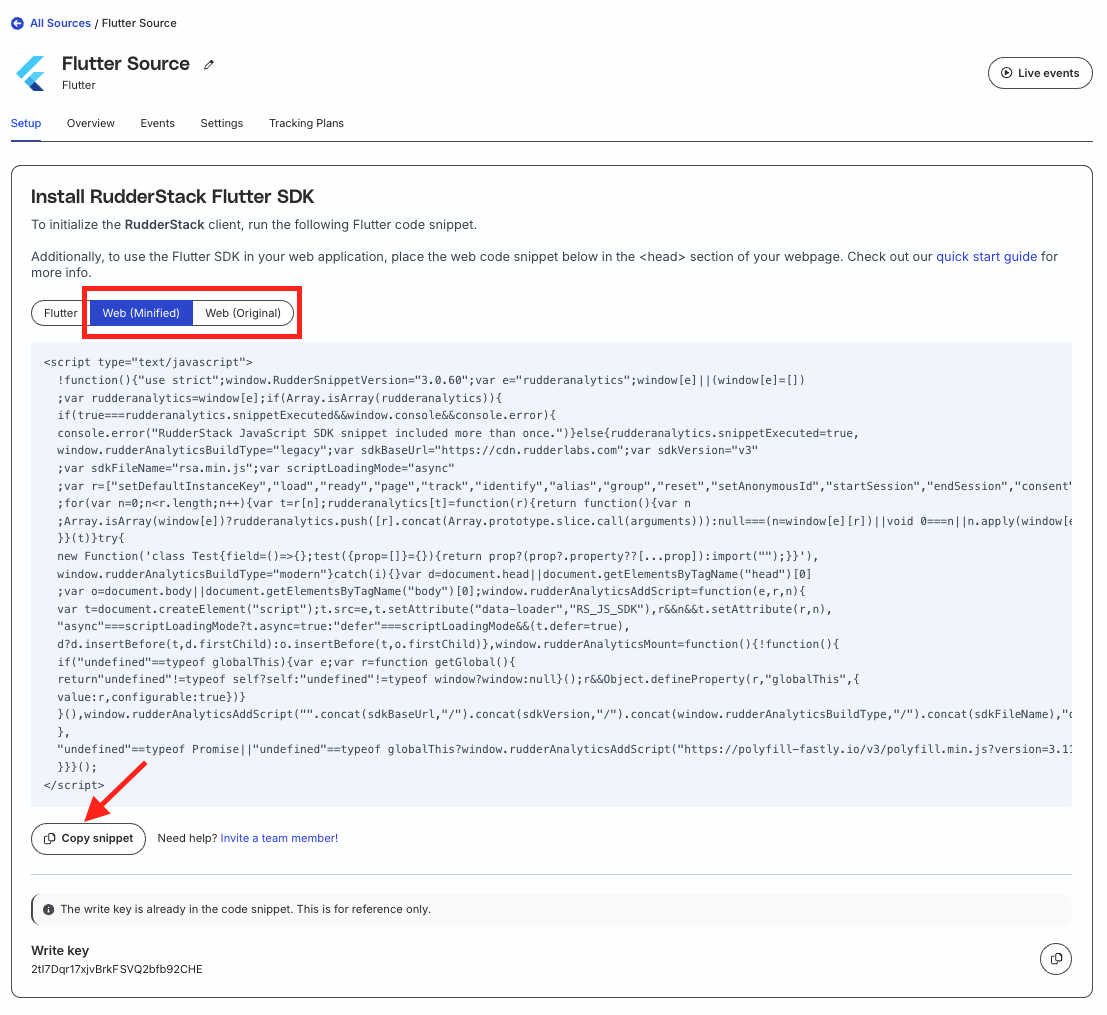
webConfig parameters
The webConfig object contains the configuration parameters for using the SDK in the Flutter web applications.
Note the following:
The webConfig object of the Flutter SDK supports all the load options currently supported by the JavaScript SDK except the following:
logLevel
integrations
configUrl
getSourceConfig
The webConfig object does not support the following parameters anymore from the Flutter SDK v3.0.0:
If you are self-hosting RudderStack and using the Control plane lite utility to host your own control plane, then follow the steps in this section and specify the controlPlaneUrl parameter in your RudderConfigBuilder that points to the hosted configuration file.
You should not pass the controlPlaneUrl parameter during SDK initialization if you are using RudderStack Cloud. This parameter is supported only if you are using the open source Control plane lite utility to set up your own control plane.
FAQ
Do I need to add anything to my Android ProGuard rules?
Add the following lines to your Android ProGuard rules if you are using Proguard full mode to optimize your app:
Add the below rules if you are using the Android (Java) SDKAndroid (Java) refers to the legacy RudderStack Android SDK. Note that it will be deprecated soon.
For new implementations, use the Android (Kotlin) SDK instead.
older than v1.20.0.
Note that the rules are bundled in the SDK itself from v1.20.0 onwards.
// Reporter Module
-keepclasscom.rudderstack.android.ruddermetricsreporterandroid.models.LabelEntity{*;}-keepclasscom.rudderstack.android.ruddermetricsreporterandroid.models.MetricEntity{*;}-keepclasscom.rudderstack.android.ruddermetricsreporterandroid.models.ErrorEntity{*;}// Required for the usage off TypeToken class in Utils.converToMap, Utils.convertToList
-keepclasscom.google.gson.reflect.TypeToken{*;}-keepclass* extendscom.google.gson.reflect.TypeToken// Required for the serialization of SourceConfig once it is downloaded.
-keepclasscom.google.gson.internal.LinkedTreeMap{*;}-keepclass* implementsjava.io.Serializable{*;}-keepclasscom.rudderstack.rudderjsonadapter.RudderTypeAdapter{*;}-keepclass* extendscom.rudderstack.rudderjsonadapter.RudderTypeAdapter// Required to ensure the DefaultPersistenceProviderFactory is not removed by Proguard
// and works as expected even when the customer is not using encryption feature.
-dontwarnnet.sqlcipher.Cursor-dontwarnnet.sqlcipher.database.SQLiteDatabase$CursorFactory-dontwarnnet.sqlcipher.database.SQLiteDatabase-dontwarnnet.sqlcipher.database.SQLiteOpenHelper-keepclasscom.rudderstack.android.sdk.core.persistence.DefaultPersistenceProviderFactory{*;}// Required for the usage of annotations across reporter and web modules
-dontwarncom.fasterxml.jackson.annotation.JsonIgnore-dontwarncom.squareup.moshi.Json-dontwarncom.fasterxml.jackson.annotation.JsonProperty// Required for Device Mode Transformations
-keepclasscom.rudderstack.android.sdk.core.TransformationResponse{*;}-keepclasscom.rudderstack.android.sdk.core.TransformationResponseDeserializer{*;}-keepclasscom.rudderstack.android.sdk.core.TransformationRequest{*;}
Questions? We're here to help.
Join the RudderStack Slack community or email us for support
This site uses cookies to improve your experience while you navigate through the website. Out of
these
cookies, the cookies that are categorized as necessary are stored on your browser as they are as
essential
for the working of basic functionalities of the website. We also use third-party cookies that
help
us
analyze and understand how you use this website. These cookies will be stored in your browser
only
with
your
consent. You also have the option to opt-out of these cookies. But opting out of some of these
cookies
may
have an effect on your browsing experience.
Necessary
Always Enabled
Necessary cookies are absolutely essential for the website to function properly. This
category only includes cookies that ensures basic functionalities and security
features of the website. These cookies do not store any personal information.
This site uses cookies to improve your experience. If you want to
learn more about cookies and why we use them, visit our cookie
policy. We'll assume you're ok with this, but you can opt-out if you wish Cookie Settings.