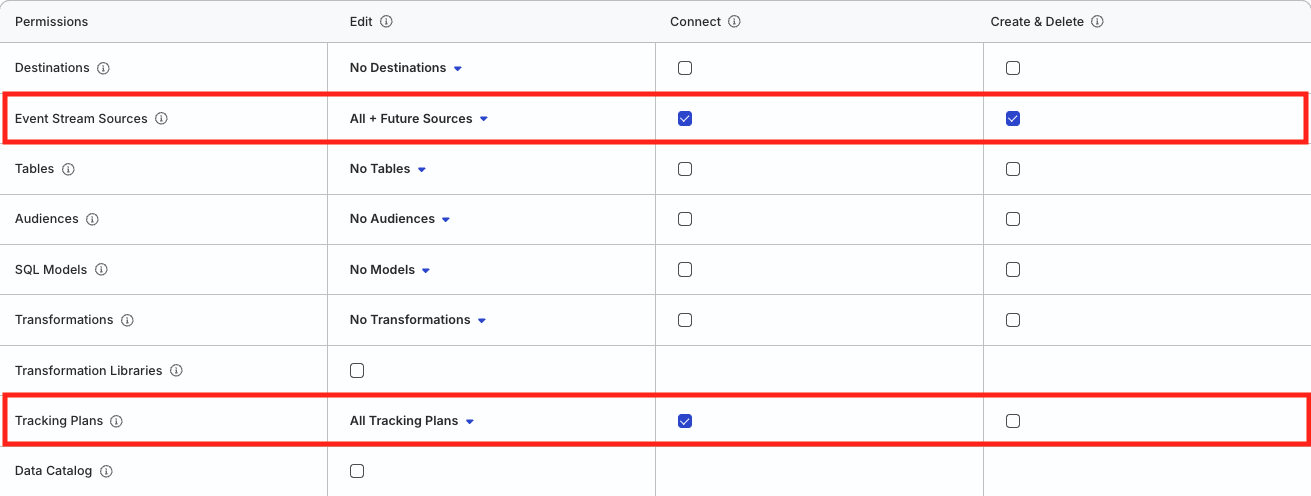
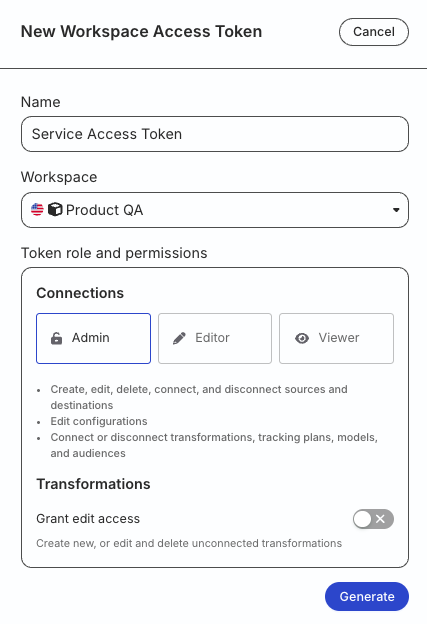
Run the following command and enter your access token when prompted:
rudder-cli auth login
2. Create a project directory
Create a project directory to store your source YAML files:
mkdir ~/tutorial-sources
If you are already managing Tracking Plans or Data Catalog resources via CLI, you can add source definitions to the same project directory. The CLI processes all YAML files in the directory recursively.
3. Review the YAML reference
Before defining your Event Stream source, review the Source YAML Reference to understand:
The complete YAML structure for Event Stream sources
Required and optional fields for source configuration
Governance validation settings and violation rules
Reference syntax for linking sources to Tracking Plans
Understanding the YAML reference will help you create properly structured files and avoid common validation errors when defining your sources.
4. Define an Event Stream source
Create a YAML file for your Event Stream source (~/tutorial-sources/ios-source.yaml):
The source is linked to a Tracking Plan referenced as #/tp/my-tracking-plan/my-tracking-plan.
For track events, violations are propagated, unplanned events are dropped, unplanned properties are dropped, and other violations are dropped.
For identify events, violations are propagated, unplanned properties are dropped, and other violations are dropped.
The Tracking Plan reference follows the format #/tp/[metadata.name]/[tracking-plan.id], where metadata.name is the metadata.name value in your Tracking Plan YAML file and tracking-plan.id is the spec.id value of the Tracking Plan.
See Source YAML Reference for detailed information about these configuration options.
6. Validate and deploy
Validate your files:
rudder-cli validate -l ~/tutorial-sources
Optional: Review changes before deploying:
rudder-cli apply -l ~/tutorial-sources --dry-run
Deploy changes to your workspace:
rudder-cli apply -l ~/tutorial-sources
Supported sources
You can define Event Stream source YAMLs only client-side and server-side SDK sources.
Rudder CLI does not support cloud apps and webhook sources currently.
Click here to view the full list of sources.
Web
JavaScript
Mobile
Android
iOS
React Native
Flutter
Cordova
Unity
Server
Java
.NET
PHP
Rust
Python
Go
Node
Ruby
Unity
Next steps
See the Source YAML Reference for detailed YAML definitions of Event Stream source resources.
This site uses cookies to improve your experience while you navigate through the website. Out of
these
cookies, the cookies that are categorized as necessary are stored on your browser as they are as
essential
for the working of basic functionalities of the website. We also use third-party cookies that
help
us
analyze and understand how you use this website. These cookies will be stored in your browser
only
with
your
consent. You also have the option to opt-out of these cookies. But opting out of some of these
cookies
may
have an effect on your browsing experience.
Necessary
Always Enabled
Necessary cookies are absolutely essential for the website to function properly. This
category only includes cookies that ensures basic functionalities and security
features of the website. These cookies do not store any personal information.
This site uses cookies to improve your experience. If you want to
learn more about cookies and why we use them, visit our cookie
policy. We'll assume you're ok with this, but you can opt-out if you wish Cookie Settings.