Session Tracking in Mobile SDKs
8 minute read
This guide covers the session tracking feature available in the RudderStack Android (Kotlin) and iOS (Swift) SDKs.
Overview
A session is a group of user interactions with your mobile application taking place within a given timeframe. For example, a single session can contain multiple screen views, events, social interactions, and ecommerce transactions.
Tracking user sessions helps you gather insights into the user journey and analyze their behaviour in detail.
The Android (Kotlin) and iOS (Swift) SDKs support two types of session tracking - Automatic and Manual.
Automatic session tracking
By default, RudderStack tracks user sessions automatically and attaches the session information to each event fired using the mobile SDKs.
When you fire an event from the SDK, RudderStack automatically attaches the sessionId field to the event’s context. It is then persisted by the SDK, so the same session ID is attached to all the events of the same session, even if the app is restarted.
Session start and end
An automatic session starts in the following scenarios:
- After the previous user session has ended, or
- No session data is present in the storage.
An automatic session ends when sessionTimoutInMillis amount of time has elapsed after the app is backgrounded or closed. This timeout is measured from the last app background/closed time to the app foreground/launch time.
Manage automatic session
As mentioned above, RudderStack enables automatic session tracking by default. To turn off this feature, set automaticSessionTracking in the sessionConfiguration parameter within Configuration to false while initializing the SDK, as shown:
analytics = Analytics(configuration = Configuration(
    writeKey = BuildConfig.WRITE_KEY,
    application = application,
    dataPlaneUrl = BuildConfig.DATA_PLANE_URL,
    sessionConfiguration = SessionConfiguration(
        automaticSessionTracking = false,   // Disables automatic session tracking
    )
))
The corresponding Java snippet is shown below:
SessionConfiguration sessionConfiguration = new SessionConfigurationBuilder()
    .setAutomaticSessionTracking(false)   // Disables automatic session tracking
    .build();
Configuration configuration = new ConfigurationBuilder(application, writeKey, dataPlaneUrl)
    .setSessionConfiguration(sessionConfiguration)
    .build();
JavaAnalytics javaAnalytics = new JavaAnalytics(configuration);analytics = Analytics(configuration: Configuration(
writeKey: "<WRITE_KEY>",
dataPlaneUrl: "<DATA_PLANE_URL>",
sessionConfiguration: SessionConfiguration(
automaticSessionTracking: false, // Set this to "false" to disable automatic session tracking
)
))The corresponding Objective-C snippet is shown below:
RSSSessionConfigurationBuilder *sessionBuilder = [RSSSessionConfigurationBuilder new];
[sessionBuilder setAutomaticSessionTracking:NO];   // Set this to "NO" to disable automatic session tracking

RSSConfigurationBuilder *builder = [[RSSConfigurationBuilder alloc]
    initWithWriteKey:@"<WRITE_KEY>"
    dataPlaneUrl:@"<DATA_PLANE_URL>"];
[builder setSessionConfiguration:[sessionBuilder build]];

analytics = [[RSSAnalytics alloc] initWithConfiguration:[builder build]];
Configuration parameters
The SessionConfiguration class provides the following parameters to customize session management:
| Parameter | Type | Description |
|---|---|---|
automaticSessionTracking | Boolean / Bool | Enables automatic session tracking. Default value: true |
sessionTimeoutInMillis | Long / UInt64 | Sets the timeout duration for automatic session tracking in milliseconds. It is the time between the app closed or backgrounded to being foregrounded or relaunched again. The SDK times out a session and starts a new session after this time has elapsed. Default value: 300000 (5 minutes) |
updateSessionOnBackgroundEvents | Boolean / Bool | When false, background events do not extend the session lifetime. Sessions expire based on foreground user interactions only.Set to true to allow background events to extend the session lifetime (restores the behavior prior to Android (Kotlin) SDK 1.7.0 and iOS (Swift) SDK 1.3.0).Default value: false |
Sample event
A sample event payload with the session information attached is shown below:
{
  "anonymousId": "19fb9683-3afe-48c5-84de-a22ac572b612",
  "channel": "mobile",
  "context": {
    "sessionId": 1740463597,
    "sessionStart": true,
    "traits": {
      "anonymousId": "19fb9683-3afe-48c5-84de-a22ac572b612"
    }
  },
  "event": "Application Opened",
  // Additional fields
  "messageId": "1b5f74c1-d324-42f2-a70b-95cbe4256614",
  "originalTimestamp": "2025-02-25T06:06:37.761Z",
  "properties": {
    "from_background": false,
    "version": "0.1.0"
  },
  "receivedAt": "2025-02-25T06:06:41.749Z",
  "rudderId": "e2c579a6-5820-459a-8100-0af86cf442a0",
  "sentAt": "2025-02-25T06:06:39.185Z",
  "type": "track"
}ThesessionStartfield is present only in the first event since the start of a new session.
Flow diagrams
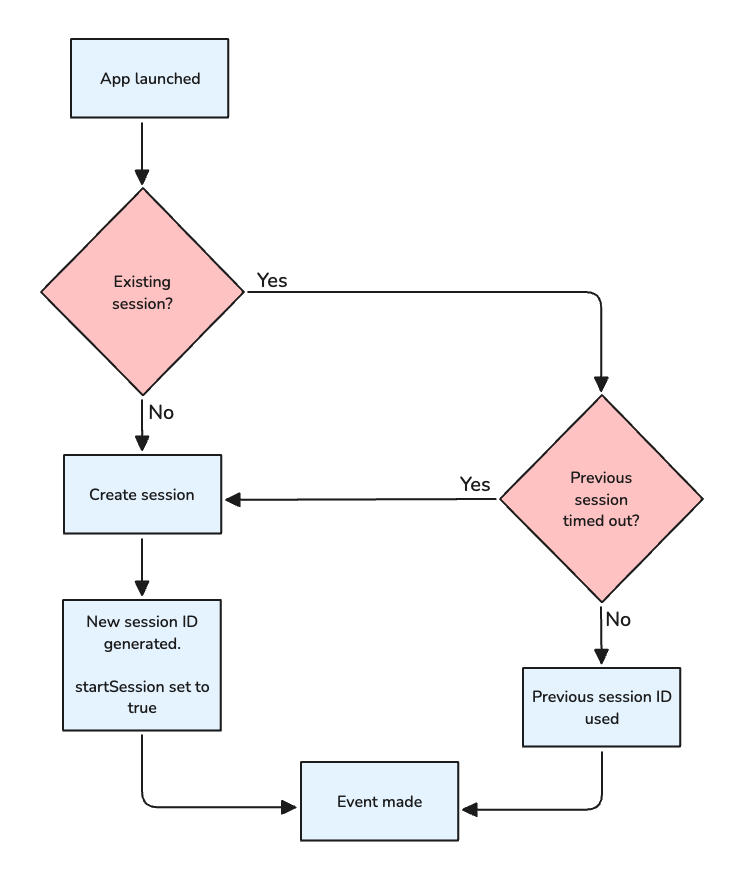
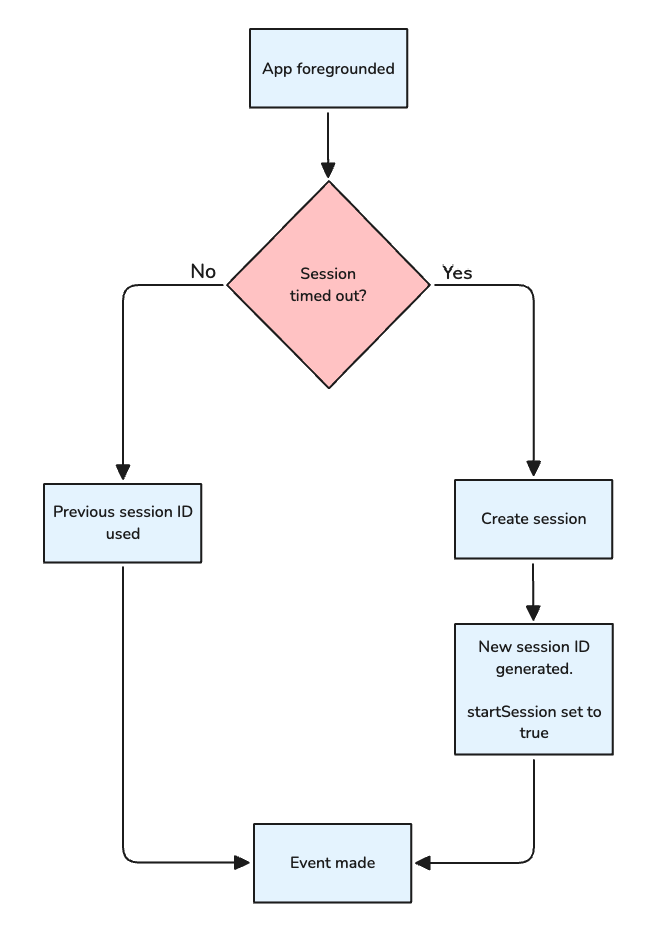
The below flow diagrams explain the automatic session workflows when the user either launches or foregrounds the app.
App launched
App foregrounded
Manual session tracking
A manual session is fully managed by the user, that is, the user is responsible for the session start and end and there is no concept of timeout. This feature also lets you provide a custom sessionId for the manual session.
Set up a manual session
To set up a manual session:
- Configure
automaticSessionTrackingtofalsewhile initializing the SDK — this disables automatic session tracking. - Use the
startSessionAPI to start a new manual session.
analytics = Analytics(configuration = Configuration(
    writeKey = BuildConfig.WRITE_KEY,
    application = application,
    dataPlaneUrl = BuildConfig.DATA_PLANE_URL,
    sessionConfiguration = SessionConfiguration(
        automaticSessionTracking = false,    // Disables automatic session tracking
    ),
))
The corresponding Java snippet is shown below:
SessionConfiguration sessionConfiguration = new SessionConfigurationBuilder()
        .setAutomaticSessionTracking(false)    // Disables automatic session tracking
        .build();

Configuration configuration = new ConfigurationBuilder(application, writeKey, dataPlaneUrl)
        .setSessionConfiguration(sessionConfiguration)
        .build();

JavaAnalytics javaAnalytics = new JavaAnalytics(configuration);let config = Configuration(
writeKey: writeKey,
dataPlaneUrl: dataPlaneUrl,
sessionConfiguration: SessionConfiguration(
automaticSessionTracking: false, // Disables automatic session tracking
),
)
self.analytics = Analytics(configuration: config)The corresponding Objective-C snippet is shown below:
RSSConfigurationBuilder *builder = [[RSSConfigurationBuilder alloc] initWithWriteKey:writeKey dataPlaneUrl:dataPlaneUrl];

RSSSessionConfigurationBuilder *sessionBuilder = [RSSSessionConfigurationBuilder new];
[sessionBuilder setAutomaticSessionTracking:NO];
[builder setSessionConfiguration: [sessionBuilder build]];

self.analytics = [[RSSAnalytics alloc] initWithConfiguration:[builder build]];
Supported APIs
RudderStack provides the following APIs for manual session tracking:
| API | Description |
|---|---|
sessionStart | Used to start a new manual session. It takes sessionId as an optional parameter. If you do not provide any sessionId, then the current timestamp is used as the sessionId instead. |
endSession | Must be called to end a session manually as there is no concept of automatic session end due to timeout. |
Persistence scope
The persistence scope of manual session tracking depends on the status of automatic session tracking:
- If automatic session tracking is enabled and you call the
startSessionAPI, then RudderStack disables automatic session tracking. Once you restart the app, the SDK resumes automatic session tracking if it is still enabled. - If automatic session tracking is enabled, calling the
endSessionAPI causes the active session to end. The automatic session tracking resumes once the app is relaunched, provided automatic session tracking is still enabled. - If automatic session tracking is disabled and you call the
startSession() API, the manual session is active until you end it by calling theendSessionAPI.
Sample snippets
// Starts a new manual session and automatically assigns a session ID.
rudderClient.startSession()

// Passes a custom session ID while creating a new session.
rudderClient.startSession(sessionId)

// Ends the user session and clears the session ID.
rudderClient.endSession()
The corresponding Java snippet is shown below:
// Starts a new manual session and automatically assigns a session ID.
rudderClient.startSession();

// Passes a custom session ID while creating a new session.
rudderClient.startSession(sessionId);

// Ends the user session and clears the session ID.
rudderClient.endSession();// Starts a new manual session and automatically assigns a session ID.
analytics.startSession()
// Passes a custom session ID while creating a new session.
analytics.startSession(sessionId)
// Ends the user session and clears the session ID.
analytics.endSession()The corresponding Objective-C snippet is shown below:
// Starts a new manual session and automatically assigns a session ID.
[analytics startSession];

// Passes a custom session ID while creating a new session.
[analytics startSession:sessionId];

// Ends the user session and clears the session ID.
[analytics endSession];
Background events and session lifetime
From Android (Kotlin) SDK 1.7.0 and iOS (Swift) SDK 1.3.0, background events no longer extend the session lifetime by default. If your use case requires background events to extend session lifetime — for example, personalized push notification flows — set updateSessionOnBackgroundEvents to true in SessionConfiguration.
// Default — background events do not extend session lifetime
val sessionConfiguration = SessionConfiguration(
    sessionTimeoutInMillis = 300_000L
)

// Opt in — background events extend the session lifetime
val sessionConfiguration = SessionConfiguration(
    sessionTimeoutInMillis = 300_000L,
    updateSessionOnBackgroundEvents = true
)
The corresponding Java snippet is shown below:
// Default — background events do not extend session lifetime
SessionConfiguration sessionConfiguration = new SessionConfigurationBuilder()
    .setSessionTimeoutInMillis(300000L)
    .build();

// Opt in — background events extend the session lifetime
SessionConfiguration sessionConfiguration = new SessionConfigurationBuilder()
    .setSessionTimeoutInMillis(300000L)
    .setUpdateSessionOnBackgroundEvents(true)
.build();// Default — background events do not extend session lifetime
let sessionConfiguration = SessionConfiguration(
sessionTimeoutInMillis: 300_000
)
// Opt in — background events extend the session lifetime
let sessionConfiguration = SessionConfiguration(
sessionTimeoutInMillis: 300_000,
updateSessionOnBackgroundEvents: true
)The corresponding Objective-C snippet is shown below:
// Default — background events do not extend session lifetime
RSSSessionConfiguration *config = [[[RSSSessionConfigurationBuilder alloc] init] build];

// Opt in — background events extend the session lifetime
RSSSessionConfiguration *config = [[[[RSSSessionConfigurationBuilder alloc] init]
    setUpdateSessionOnBackgroundEvents:YES]
    build];
Get the session ID
You can use the sessionId API to retrieve the current session ID for the manual or automatic session, as shown:
val sessionId = analytics.sessionIdThe corresponding Java snippet is shown below:
Long sessionId = analytics.getSessionId();var sessionId = analytics.sessionIdThe corresponding Objective-C snippet is shown below:
NSNumber *sessionId = analytics.sessionId;Effect of reset API on session tracking
Calling the reset API causes the session to refresh irrespective of whether it is automatic or manual — this means RudderStack restarts the session and generates a new session ID.
Note that:
- The
identifyAPI callsresetinternally when a previously identified user’suserIdchanges, for example,User A>User B. In this case, the session is refreshed along with all the other user data. - Calling
identifyon an anonymous user (no previoususerId) does not trigger a reset — the existing session continues uninterrupted.
See the reset API documentation for more information on the implicit reset behavior and how to selectively preserve specific data during a user switch.
