HTTP Source
4 minute read
The HTTP source lets you send events to RudderStack using standard HTTP REST API requests.
This guide will help you set up and use the HTTP source in RudderStack.
Overview
The HTTP source is helpful for server-to-server data ingestion, making it ideal for backend services, microservices, and serverless functions that need to send event data to RudderStack.
You can also use this source from constrained clients — for example, HTML/CSS-only UIs that cannot load the JavaScript SDK. In those cases, send events with the Pixel API via GET requests or a 1×1 tracking <img> tag.
Some key features of this source integration are listed below:
- Zero configuration: No source-specific settings required — this integration works out of the box
- Server-side processing: Events are processed by RudderStack’s cloud infrastructure
- Standard HTTP API: Uses standard REST API endpoints for event ingestion
- Universal compatibility: Works with any application that can make HTTP requests
- Full event support: Supports all standard RudderStack event types (track, identify, page, screen, group, alias)
Get started
- Go to your RudderStack dashboard and click Add Source.
- From the list of Event Streams sources, select HTTP.
- Assign a name to your source and click Continue. Your HTTP source is now configured.
The HTTP source requires no additional setup — it is ready to use immediately.
- Go to the Settings tab of the source and copy your source write keyThe write key (or source write key) is a unique identifier for your source. RudderStack uses this key to send events from a source to the specified destination. .
- Go to the Connections tab and copy the data plane URLThe data plane URL is the location where events are routed and sent to the RudderStack backend for processing. You can find this URL at the top of the Connections page in your RudderStack dashboard. .
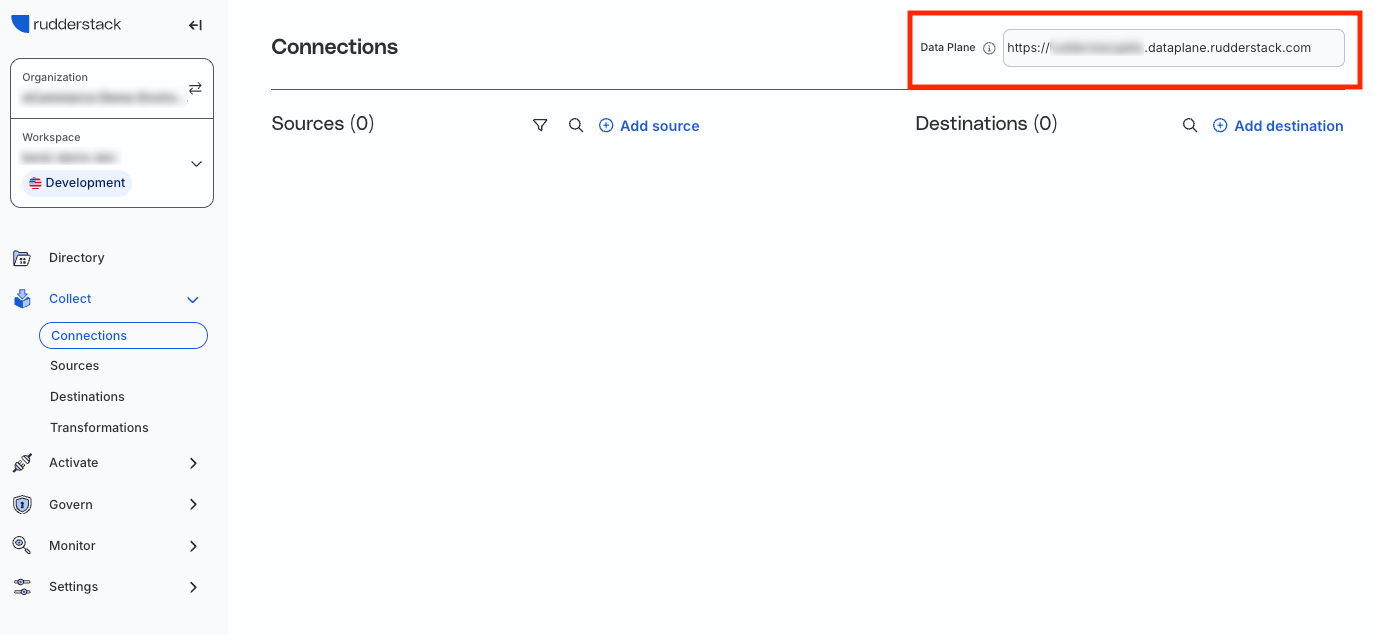
Supported events
The HTTP source supports all standard RudderStack event types.
You can send events by making HTTP POST requests to the RudderStack API endpoint:
POST https://<DATA_PLANE_URL>/v1/<EVENT_TYPE>The HTTP source supports the following endpoints:
| Endpoint | Use case |
|---|---|
/v1/track | Track user actions and events |
/v1/identify | Update user traits and attributes |
/v1/page | Track page views |
/v1/screen | Track screen views (mobile apps) |
/v1/group | Associate users with groups |
/v1/alias | Merge user identities |
/v1/batch | Send multiple events in a single request |
API reference
See the RudderStack HTTP API documentation for more information on API authentication, endpoints, request/response format, response codes, and error handling.
Pixel API (client-side GET)
When the client cannot send POST requests (for example HTML/CSS-only environments or email HTML), use the Pixel API to send page and track events via GET.
Unlike the standard HTTP API endpoints listed above, Pixel API requests use separate/pixel/v1/*endpoints and are not part of the/v1/*endpoint table.
GET https://<DATA_PLANE_URL>/pixel/v1/track?writeKey=<WRITE_KEY>&anonymousId=<ANONYMOUS_ID>&event=<EVENT_NAME>See Track with an image pixel for an HTML example.
Request size limits
RudderStack allows messages with a maximum size of 32KB per call.
The /v1/batch endpoint accepts a maximum call size of 4MB per batch and 32KB per call.
For event JSON nesting depth limits, see Maximum allowed JSON nesting depth.
Examples
This section provides examples of how to use the HTTP source to send events to RudderStack.
Track event example
curl -u <WRITE_KEY>: -X POST <DATA_PLANE_URL>/v1/track \
  -H "Content-Type: application/json" \
  -d '{
    "event": "Product Purchased",
    "userId": "user123",
    "properties": {
      "productId": "prod-456",
      "price": 29.99,
      "currency": "USD"
    }
  }'
Identify event example
curl -u <WRITE_KEY>: -X POST <DATA_PLANE_URL>/v1/identify \
  -H "Content-Type: application/json" \
  -d '{
    "userId": "user123",
    "traits": {
      "email": "user@example.com",
      "name": "John Doe",
      "plan": "premium"
    }
  }'
Batch events
You can send multiple events in a single request using the batch endpoint:
curl -u <WRITE_KEY>: -X POST <DATA_PLANE_URL>/v1/batch \
  -H "Content-Type: application/json" \
  -d '{
    "batch": [
      {
        "type": "track",
        "event": "Product Purchased",
        "userId": "user123",
        "properties": {
          "productId": "prod-456"
        }
      },
      {
        "type": "identify",
        "userId": "user123",
        "traits": {
          "email": "user@example.com"
        }
      }
    ]
  }'
FAQ
When should I use the HTTP source?
Use the HTTP source when you need to:
- Send events from server-side applications (backend services, APIs, microservices)
- Integrate with systems that do not support RudderStack SDKs
- Send events from serverless functions or cloud functions
- Build custom integrations that require direct HTTP access
- Send events from environments where SDK installation is not feasible
- Track impressions or other events from HTML/CSS-only clients using the Pixel API
Can I track events without JavaScript?
Yes. If the client can load images but cannot run JavaScript, embed a Pixel API URL in a <img> tag.
If the client can send POST requests with JSON, use the HTTP API instead — you do not need the Pixel API in that case.
See Track with an image pixel and the Pixel API reference.
What is the difference between the HTTP source and the SDK sources?
The following table highlights the key differences between the HTTP source and the SDK sources:
| Feature | HTTP Source | SDK Sources (Web, iOS, Android) |
|---|---|---|
| Installation | No installation needed | Requires SDK installation |
| Processing | Server-side (cloud) | Can be client-side or cloud |
| Use case | Backend services, APIs | Client applications, websites |
| Configuration | None required | SDK-specific settings |
