Shopify App Identity Stitching
7 minute read
RudderStack’s Shopify Source Solution includes two main components that leverage Shopify’s webhook topics - tracking events from the client and server. As these two components are separate, the identities for the tracked events will likely not align - leading to duplicate user profiles created in downstream tools and fragmented user journeys.
This guide explains how to implement identity management based on your Shopify store setup.
RudderStack’s ID stitching approach
The common factor that ties the tracked events on the client-side to the events tracked via Shopify’s webhook topics is the Shopify Cart.
By following the steps corresponding to your store setup, you can make sure RudderStack can do the following:
- Use the cart token to ensure the
anonymousIdis the same for client-side events and for the webhook events. - Map the
anonymousIdtouserId(if available) to unify anonymous activity with known user data across client-side events and webhook events.
Store fully hosted on a Shopify template
If you have installed the RudderStack Shopify Source Solution by following these instructions, then RudderStack automatically stitches the identities from the client and the server and no additional configuration is required.
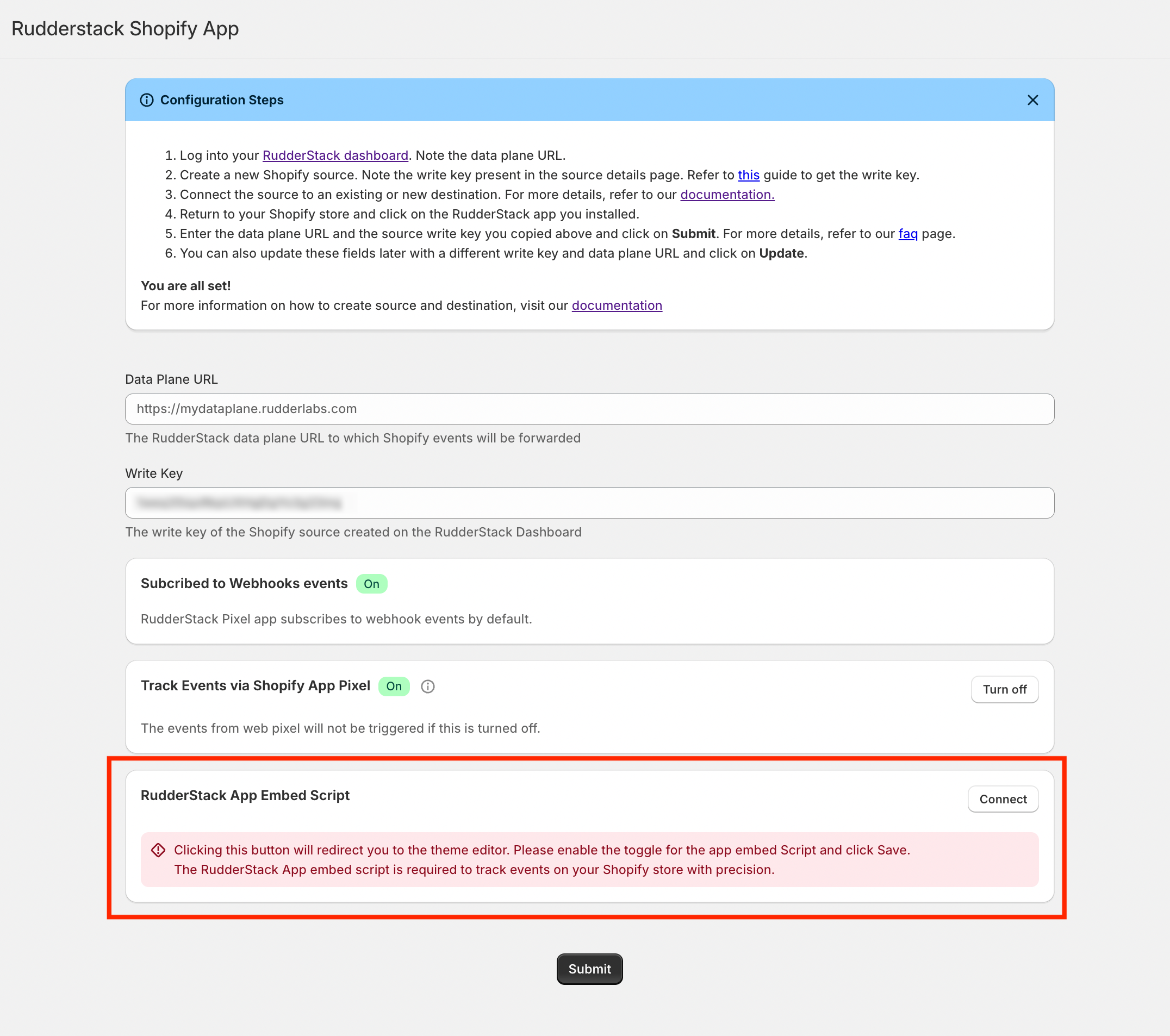
Make sure you have enabled the RudderStack App Embed Script during the RudderStack Shopify App setup as it is required for effective identity stitching.
Buy Now race condition
For Shopify stores fully hosted on a Shopify template, there is a scenario where RudderStack cannot immediately stitch identities due to a race condition that occurs when a user clicks the Buy Now button on a product page. When this happens, Shopify creates a new cart token and triggers webhook events before RudderStack can update the cache with the newly created cart token.
In this case, RudderStack hashes the cart token and provides that as the anonymous_id for those events, so they can be ingested properly. Soon after the user clicks Buy Now and the race condition is complete, RudderStack is able to update the cache with the new cart token and all subsequent events are properly stitched.
For all events coming from the webhook topics, RudderStack hashes the cart token and provides the hashed value in the traits object so that these events can be resolved in downstream tools, irrespective of whether the user identity could be stitched or not.
Headless setups
The approach for ensuring accurate identity stitching is the same regardless of whether your Shopify store has a hybrid headless setup with a Shopify-hosted checkout or a fully headless store.
In these setups, as the recommended approach is to not use the Track Events via Shopify App Pixel setting, the RudderStack App Embed Script isn’t loaded on your store. That script is what maps the cart token to the anonymousId on a Shopify-hosted template, so without it RudderStack can’t stitch the identities automatically.
Using the Shopify Custom Pixel
The Shopify Custom Pixel can map the cart token to the RudderStack anonymousId itself. This is disabled by default. To enable it, set ENABLE_IDENTITY_STITCHING to true in the pixel script.
Requirements:
- The RudderStack Shopify app is installed and connected to your Shopify source. It sends the webhook events that the pixel’s events are stitched to. Webhooks configured manually or through the legacy RudderStack app are not supported.
WRITE_KEYin the pixel script is your Shopify source write key.- The app’s Track Events via Shopify App Pixel setting is turned off, so only the custom pixel creates the mapping.
The custom pixel runs in Shopify’s sandboxed environment, so it can’t write the rudderAnonymousId cart attribute. It reads the cart token from pixel data instead, on page load, cart_viewed, and each checkout step, and re-sends a given mapping at most once an hour.
Because the mapping isn’t stored on the cart, RudderStack keeps it for 12 hours, and the pixel refreshes it each time it re-sends the mapping. Webhook events that arrive more than 12 hours after the last refresh aren’t stitched.
The custom pixel stitches the cart token only. Its events get a userId from the pixel’s own identify call during checkout.
Use only one identity stitching method per store. Don’t combine the custom pixel’s stitching with the storefront implementation below.
Using your own storefront implementation
If you track events with your own RudderStack JavaScript SDK implementation instead of the custom pixel, make the mapping requests from your storefront by following these steps:
Obtain the cart token when you create or read a Shopify cart:
- On a Shopify-hosted or hybrid storefront where the AJAX Cart API is available, read the token from the AJAX cart response.
- On a fully headless storefront, derive the token from your Storefront API cart object or application cart state. The Storefront API returns the cart
idas a GID, for examplegid://shopify/Cart/Z2NwLXVz...?key=7a1...cfa- send only the token segment after the last/and before any?, so it matches thecart_tokenShopify sends on webhook events. Do not substituteevent.data.checkout.tokenfor the cart token.
Make a request to your RudderStack Shopify source endpoint. This HTTP
POSTrequest leverages the details persisted by RudderStack and uses the cart token to ensure the RudderStackanonymousIdis the same for client-side events and for the webhook events:
curl --location --globoff 'https://{dataplane-url}/v1/webhook?writeKey={writekey}' \
--header 'Content-Type: application/json' \
--data '{
  "event": "rudderIdentifier",
  "pixelEventLabel": true,
  "anonymousId": <rudderAnonymousId-value>,
  "action": "stitchCartTokenToAnonId",
  "cartToken": <cart_token>
}'- Make the following HTTP
POSTrequest to map theanonymousIdtouserIdto unify anonymous activity with known user data across client-side events and webhook events.
curl --location --globoff 'https://{dataplane-url}/v1/webhook?writeKey={writekey}' \
--header 'Content-Type: application/json' \
--data '{
  "event": "rudderIdentifier",
  "pixelEventLabel": true,
  "anonymousId": <rudderAnonymousId-value>,
  "action": "stitchUserIdToAnonId",
  "userId": <userId>
}'
Make sure to replace the placeholders in the above requests with their actual values.
Reference implementation
The following snippet shows how to make these requests from your storefront. It follows the same pattern as the RudderStack App Embed Script on a Shopify-hosted template: it persists an identifier on the cart as a note attribute, then maps the resulting cart token to it.
Note that the app embed script uses its own rs_shopify_client_id cookie value, whereas a headless implementation should use the JavaScript SDK’s anonymousId so the mapping matches your client-side events.
const DATAPLANE_URL = "<DATA_PLANE_URL>";
const WRITE_KEY = "<SOURCE_WRITE_KEY>";
const WEBHOOK_URL = `${DATAPLANE_URL}/v1/webhook?writeKey=${WRITE_KEY}`;

// Fetch the cart and make sure it carries the RudderStack anonymousId.
// This example uses the Shopify AJAX Cart API. In a fully headless storefront,
// read the cart from your Storefront API cart object instead.
async function getCartWithAnonymousId(anonymousId) {
  const cart = await fetch(`${window.Shopify.routes.root}cart.js`).then((res) => res.json());

  if (cart.attributes && cart.attributes.rudderAnonymousId === anonymousId) {
    return cart;
  }

  return fetch(`${window.Shopify.routes.root}cart/update.js`, {
    method: "POST",
    headers: {
      "Content-Type": "application/json"
    },
    body: JSON.stringify({
      attributes: {
        rudderAnonymousId: anonymousId
      }
    })
  }).then((res) => res.json());
}

// Map the cart token to the anonymousId.
async function stitchCartTokenToAnonId(cart, anonymousId) {
  // A cart token can carry a key suffix, for example 'Z2WEX...Ug?key=7a1...cfa'.
  // Send only the part before the '?'.
  const cartToken = cart.token.split("?")[0];

  await fetch(WEBHOOK_URL, {
    method: "POST",
    headers: {
      "Content-Type": "application/json"
    },
    body: JSON.stringify({
      event: "rudderIdentifier",
      pixelEventLabel: true,
      action: "stitchCartTokenToAnonId",
      anonymousId: anonymousId,
      cartToken: cartToken
    })
  });
}

// Map the anonymousId to the userId once the user logs in.
async function stitchUserIdToAnonId(userId, anonymousId) {
  await fetch(WEBHOOK_URL, {
    method: "POST",
    headers: {
      "Content-Type": "application/json"
    },
    body: JSON.stringify({
      event: "rudderIdentifier",
      pixelEventLabel: true,
      action: "stitchUserIdToAnonId",
      anonymousId: anonymousId,
      userId: userId
    })
  });
}

rudderanalytics.ready(() => {
  const anonymousId = rudderanalytics.getAnonymousId();

  getCartWithAnonymousId(anonymousId).then((cart) =>
    stitchCartTokenToAnonId(cart, anonymousId)
  );

  // Call stitchUserIdToAnonId(userId, anonymousId) when the user logs in.
});
RudderStack caches these mappings, so you don’t need to repeat the requests on every page view. The cart token mapping expires after 12 hours and theuserIdmapping after 24 hours, so re-send them if a cart stays active longer than that. The RudderStack App Embed Script re-sends the cart token mapping at most once an hour, and sends theuserIdmapping only when the logged-in user changes. Applying a similar throttle in your implementation keeps the request volume down.
