Iterable Webhook
3 minute read
Iterable is a popular growth marketing platform that lets you maximize customer interaction and improve your customers’ overall LTV (Life Time Value).
This guide will help you set up Iterable Webhook as a source in RudderStack. You can then ingest real-time user events in Iterable and send them to your specified destinations.
Get started
- Go to your RudderStack dashboard and click Add Source. From the list of Event Streams sources, select Iterable Webhook.
- Assign a name to your source and click Continue.
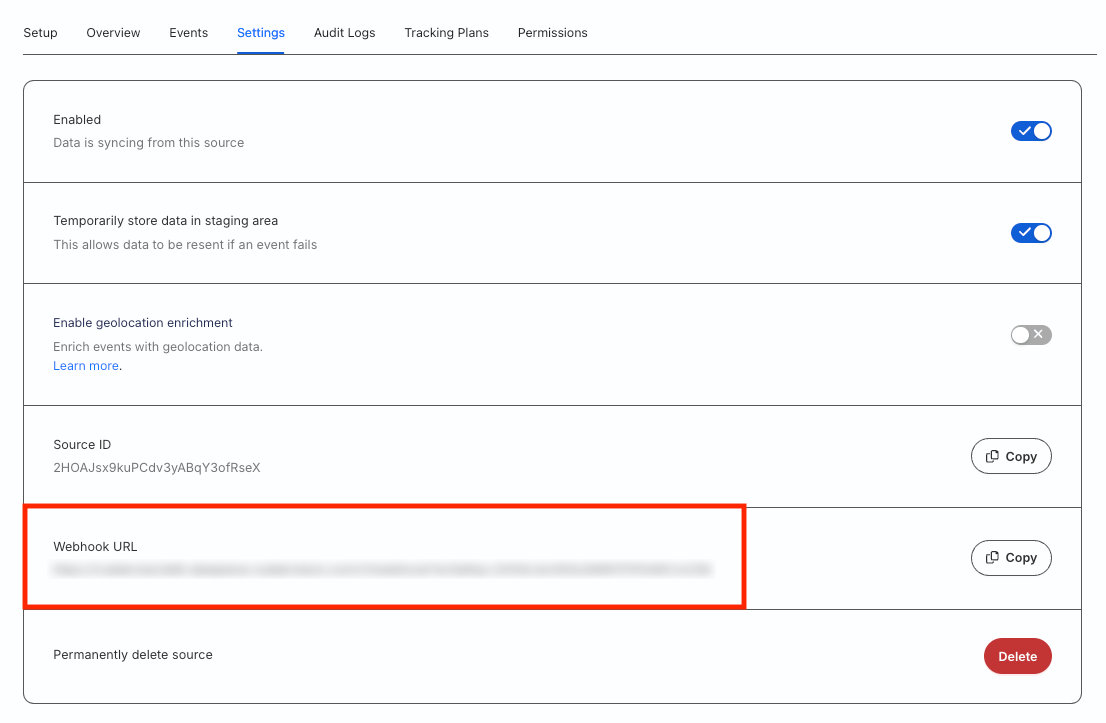
- The Iterable source is now configured. Go to the Settings tab of the source and note the Webhook URL:
- Go to your Iterable account and navigate to Integrations > System Webhooks.
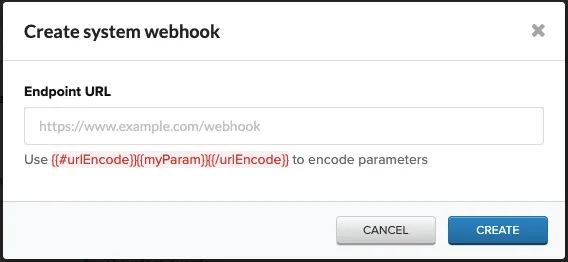
- Click Create Webhook and enter the webhook URL obtained in Step 3 in the Endpoint URL field:
- Click Create.
Event transformation
RudderStack ingests the events from Iterable after converting them into the RudderStack event format. It also populates the following properties from the Iterable event payload into the RudderStack event:
| Iterable property | RudderStack property |
|---|---|
email | context.traits.email |
userId | userId |
dataFields | properties |
eventName | event |
userIdis an unique identifier of the final event payload. If not provided, RudderStack creates a uniqueuserIdusing
Iterable supports the following events:
- Blast Send
- Email Bounce
- Email Click
- Email Complaint
- Email Open
- Email Send Skip
- Email Subscribe
- Email Unsubscribe
- Hosted Unsubscribe Click
- In-App Click
- In-App Open
- In-App Send
- In-App Send Skip
- Push Bounce
- Push Open
- Push Send
- Push Send Skip
- Push Uninstall
- SMS Bounce
- SMS Click
- SMS Send
- SMS Received
- SMS Send Skip
- Triggered Send
- Web Push Send
- Web Push Send Skip
See the complete list of the supported webhook events for more information.
How RudderStack creates the event payload
This section details how RudderStack receives the data from the Iterable source platform and creates the resulting payload.
A sample payload sent by Iterable is shown below:
{
  "email": "docs@iterable.com",
  "userId": "1",
  "eventName": "hostedUnsubscribeClick",
  "dataFields": {
    "country": "United States",
    "city": "San Jose",
    "campaignId": 1074721,
    "ip": "192.168.0.1",
    "userAgentDevice": "Mac",
    "messageId": "ceb3d4d929fc406ca93b28a0ef1efff1",
    "emailId": "c1074721:t1506266:docs@iterable.com",
    "userAgent": "Mozilla/5.0 (Macintosh; Intel Mac OS X 10_14_6) AppleWebKit/537.36 (KHTML, like Gecko) Chrome/80.0.3987.149 Safari/537.36",
    "workflowName": "My workflow",
    "locale": null,
    "templateId": 1506266,
    "emailSubject": "My email subject",
    "url": "https://iterable.com",
    "labels": [],
    "createdAt": "2020-03-21 00:24:08 +00:00",
    "templateName": "My email template",
    "messageTypeId": 13406,
    "experimentId": null,
    "region": "CA",
    "campaignName": "My email campaign",
    "workflowId": 60102,
    "email": "docs@iterable.com",
    "channelId": 12466
  }
}
RudderStack transforms the above payload into the following payload:
{
  "userId": "1",
  "context": {
    "integration": {
      "name": "Iterable",
      "version": "1.0.0"
    },
    "library": {
      "name": "unknown",
      "version": "unknown"
    },
    "traits": {
      "email": "docs@iterable.com"
    }
  },
  "event": "hostedUnsubscribeClick",
  "integrations": {
    "Iterable": false
  },
  "properties": {
    "country": "United States",
    "city": "San Jose",
    "campaignId": 1074721,
    "ip": "192.168.0.1",
    "userAgentDevice": "Mac",
    "messageId": "ceb3d4d929fc406ca93b28a0ef1efff1",
    "emailId": "c1074721:t1506266:docs@iterable.com",
    "userAgent": "Mozilla/5.0 (Macintosh; Intel Mac OS X 10_14_6) AppleWebKit/537.36 (KHTML, like Gecko) Chrome/80.0.3987.149 Safari/537.36",
    "workflowName": "My workflow",
    "locale": null,
    "templateId": 1506266,
    "emailSubject": "My email subject",
    "url": "https://iterable.com",
    "labels": [],
    "createdAt": "2020-03-21 00:24:08 +00:00",
    "templateName": "My email template",
    "messageTypeId": 13406,
    "experimentId": null,
    "region": "CA",
    "campaignName": "My email campaign",
    "workflowId": 60102,
    "channelId": 12466
  },
  "receivedAt": "2020-03-21T00:24:08.000Z",
  "timestamp": "2020-03-21T00:24:08.000Z",
  "type": "track"
}
FAQ
Why are the downstream destinations recording incorrect userId values?
In some Iterable projects that are email-based, that is, email is set as the primary user identifier, the userId field may not appear correctly in the downstream destinations unless it is explicitly configured.
To do this, you can contact Iterable support to enable a feature flag that includes the correct userId in the webhook payload sent to the destinations.
