Braze Source
Ingest your event data from Braze into RudderStack.
4 minute read
Braze is a customer engagement platform that helps you better understand your customers’ in-app behavior and use the insights to improve your users’ app experience.
You can send your Braze events to RudderStack by leveraging Braze Currents.
Currents is available as a self-serve product to any user with an entitlement or license. If you do not have a license, reach out to your Braze account team to get one.
This guide will help you set up Braze as a source in RudderStack.
Get started
- Go to your RudderStack dashboard and click Add Source. From the list of Event Streams sources, select Braze.
- Assign a name to your source and click Continue.
- Add the Braze event names and custom event names you want to map together. You can add multiple rows by clicking Add more. Then, click Continue.
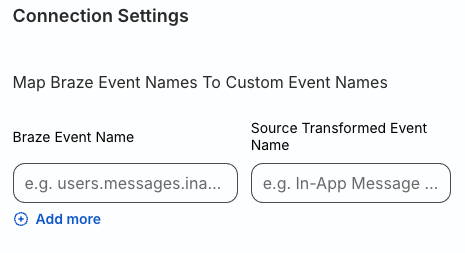
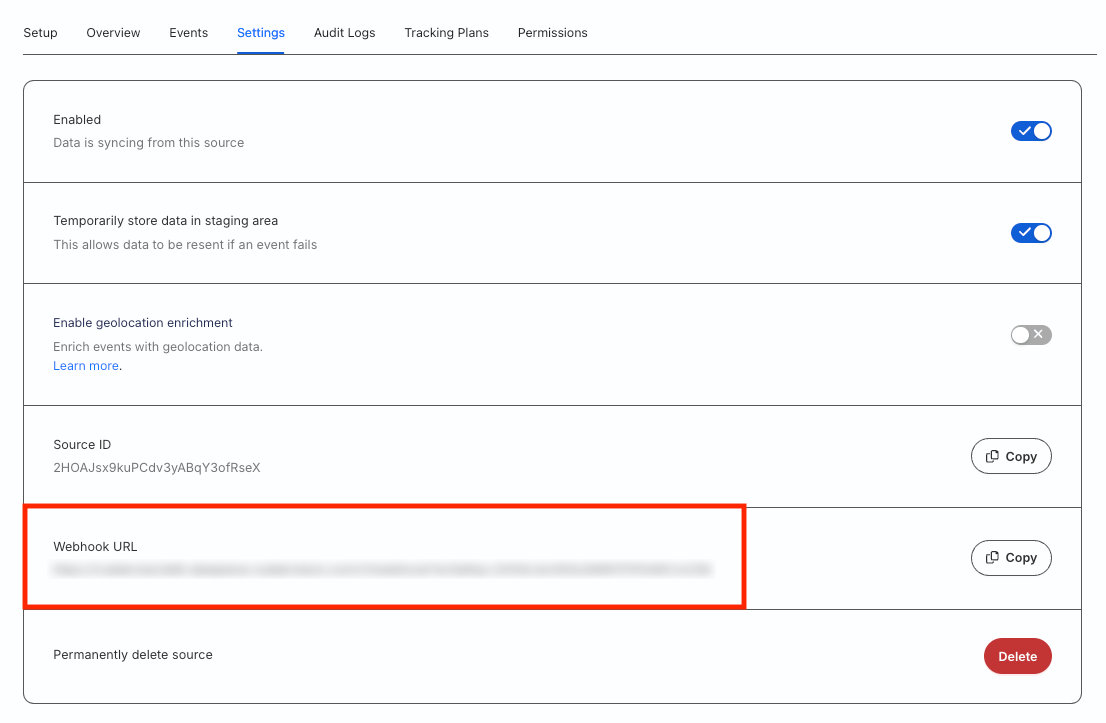
- Your Braze source is now configured. Go to the Settings tab of the source and note the Webhook URL:
- In your Braze dashboard, go to Currents > + Create Currents > RudderStack Export.
- Enter an integration name, contact email, RudderStack webhook URL (in the Key field), and your RudderStack region.
- Select the events you would like to export and click Launch Current.
Supported events and properties
Braze uses RudderStack’s Event Streams functionality to send events to RudderStack. These events can then be transformed and routed to your preferred destinations, including your data warehouse.
The following table lists all Braze events supported by RudderStack:
| Event name | Event description |
|---|---|
| Application Uninstalled | The user uninstalled the application. |
| Campaign Converted | The user performed the primary conversion events for a Campaign within its conversion window. |
| Canvas Converted | The user performed the primary conversion event for a Canvas within its conversion window. |
| Canvas Entered | The user was entered into a Canvas. |
| Campaign Control Group Entered | The user was enrolled in a Campaign control group. |
| Email Sent | An email was successfully sent to the user. |
| Email Delivered | An email was successfully delivered to the user. |
| Email Opened | The user opened an email. |
| Email Link Clicked | The user clicked a link within an email. Note that the email click tracking feature must be enabled. |
| Email Bounced | Triggered when Braze attempts to send an email but the receipient’s email server does not accept it. |
| Email Soft Bounced | Triggered when Braze attempts to send an email but the recepient’s email server bounces it temporarily because of reasons like full inbox, email server down, etc. |
| Email Marked As Spam | The user marked an email as spam. |
| Email Unsubscribed | The user clicked on the unsubscribe link within an email. |
| Subscription Group State Changed | The user’s subscription group status changed to Subscribed or Unsubscribed. |
| Push Notification Sent | A push notification was successfully sent to the user. |
| Push Notification Tapped | The user tapped on a push notification. |
| iOS Foreground Push Opened | The user received an iOS push notification while the app was open. |
| In-App Message Viewed | The user viewed an in-app message. |
| In-App Message Clicked | The user clicked an in-app message. |
| News Feed Viewed | The user viewed the Braze News Feed. |
| News Feed Card Viewed | The user viewed a card within the Braze News Feed. |
| News Feed Card Clicked | The user tapped or clicked on Braze News Feed card. |
| Webhook Sent | A webhook message was sent. |
The following table lists the properties included in the events mentioned above:
| Property name | Property type | Description |
|---|---|---|
app_id | String | The API identifier for the app on which the user receives a message/notification or performs some action. |
send_id | String | The message ID specified for a particular campaign, if applicable. |
campaign_id | String | The API identifier of the campaign associated with the event, if applicable. |
canvas_id | String | The API identifier of the Canvas associated with the event, if applicable. |
canvas_variation_id | String | The API identifier of the Canvas Variation associated with the event, if applicable. |
canvas_step_id | String | The API identifier of the Canvas Step associated with the event, if applicable. |
context.traits.email | String | The email address that the email was sent to, in case of the Email events. |
button_id | String | The ID of the button that the user clicked, in case of the In-App Message Clicked event. |
card_api_id | String | The API identifier of the News Feed Card, in case of the News Feed Card Viewed and News Feed Card Clicked events. |
