Auth0 Source
4 minute read
Auth0 is a popular solution used by many companies to add authentication and authorization services to their applications.
You can send your Auth0 authentication and user behavior-related events by adding a custom webhook that points to RudderStack.
This guide will help you set up Auth0 as a source in RudderStack.
Get started
- Go to your RudderStack dashboard and click Add Source. From the list of Event Streams sources, select Auth0.
- Assign a name to your source and click Continue.
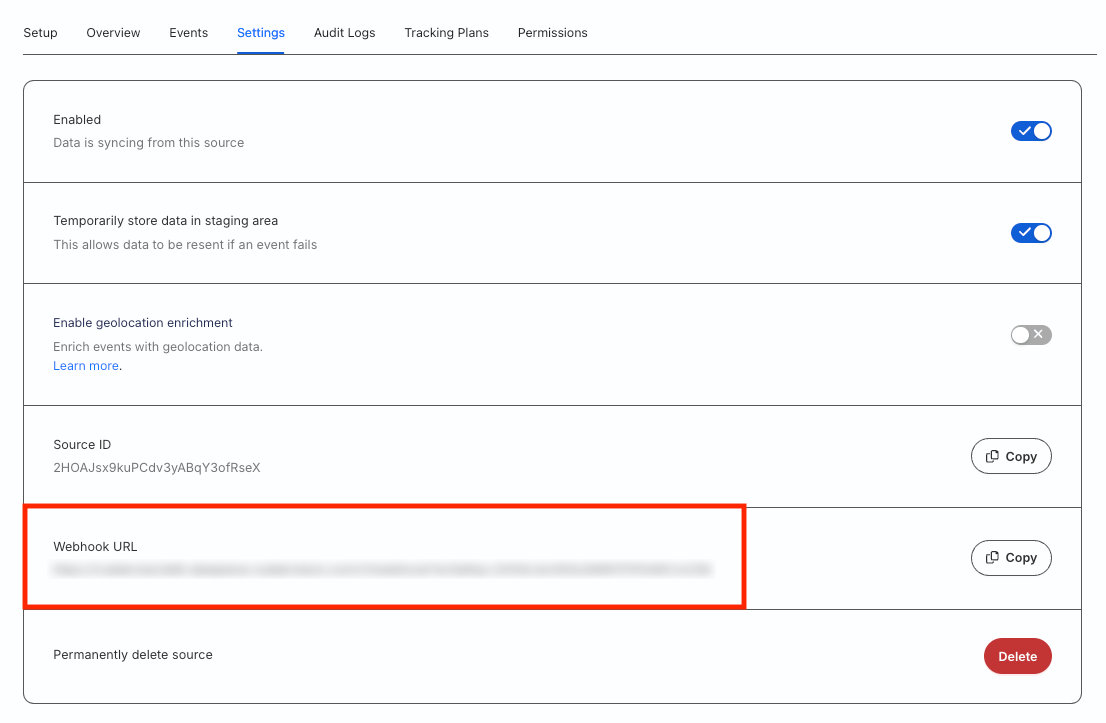
- Your Auth0 source is now configured. Go to the Settings tab of the source and note the Webhook URL:
- Log in to your Auth0 dashboard.
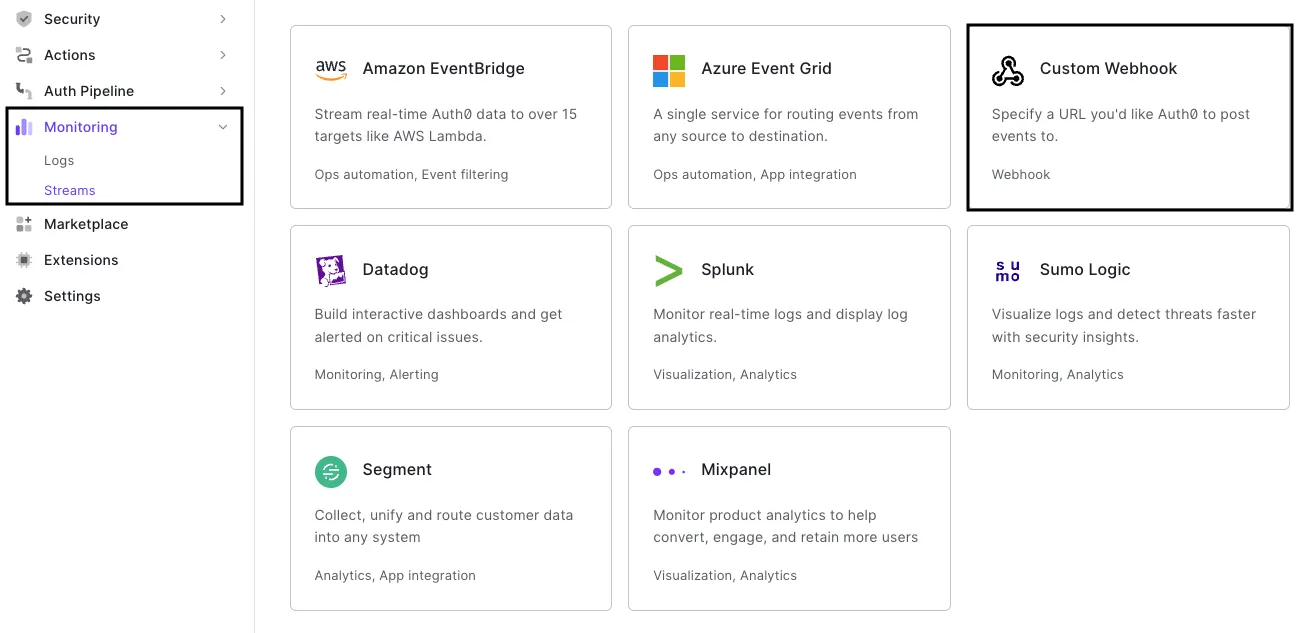
- Go to Monitoring > Streams > Create Log Stream > Custom Webhook:
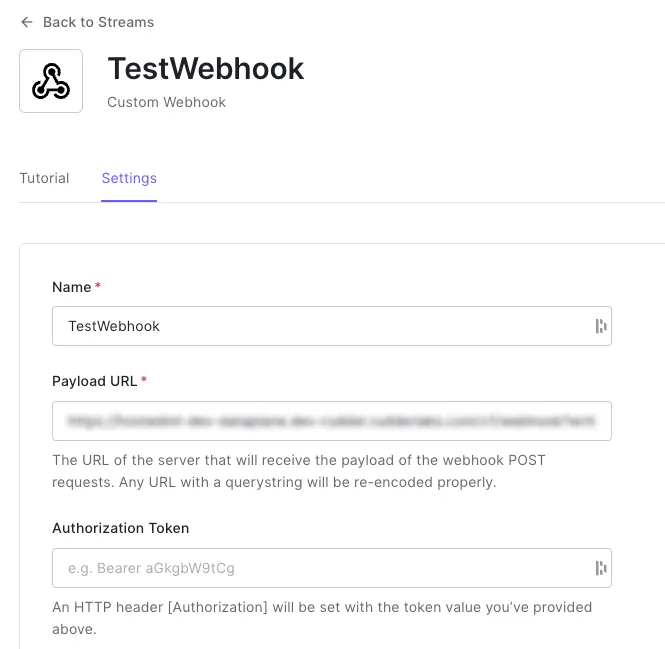
- Name your custom webhook. In the Payload URL field, enter the webhook URL obtained in Step 3.
- Configure the other webhook settings as required.
You can also filter the events sent to your custom webhook by category. See the Auth0 documentation for more information on these categories.
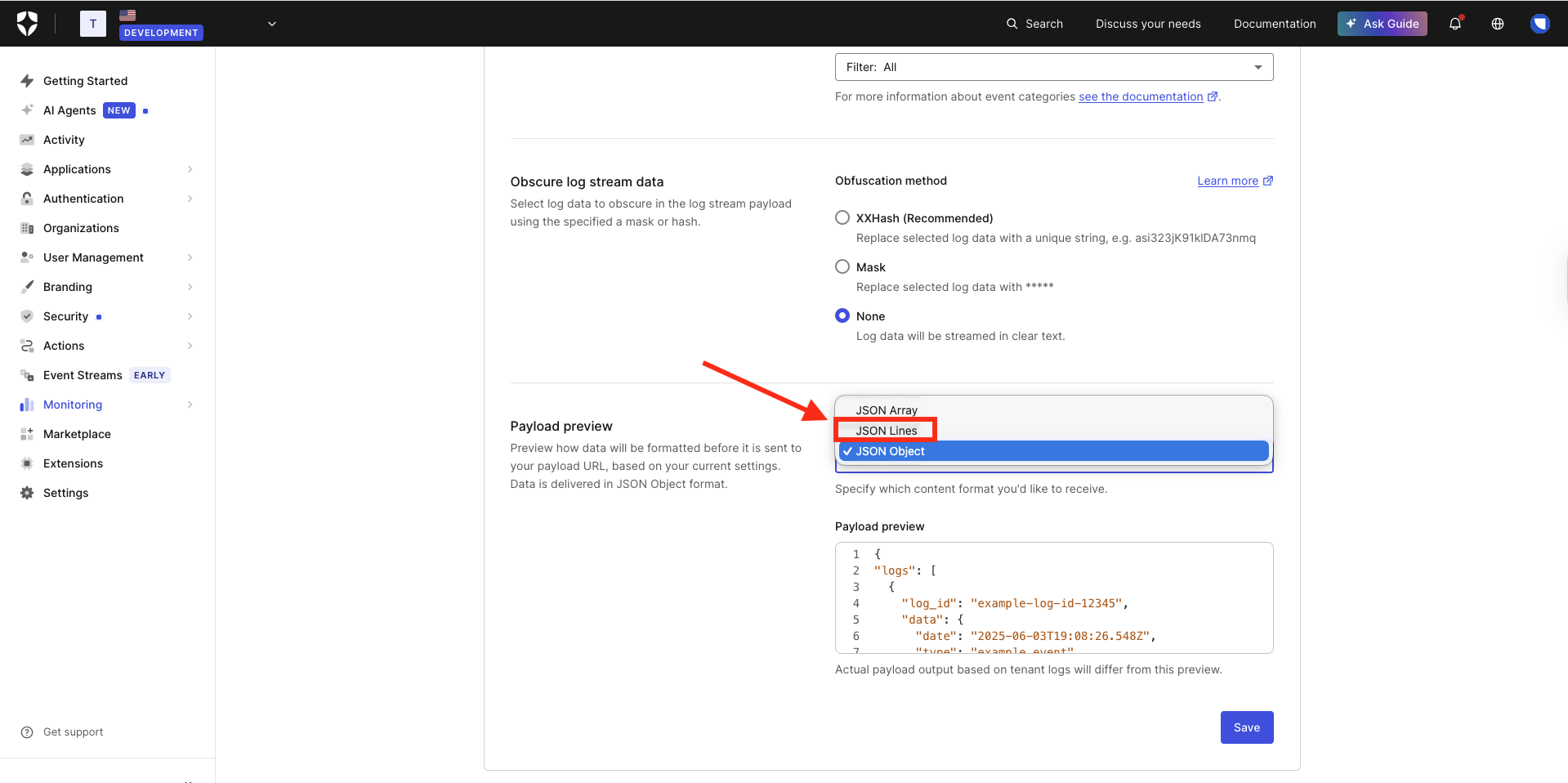
- Important: While configuring the webhook, make sure you do not select JSON Lines as the payload format, as RudderStack does not process this content type.
- Click Save to save the custom webhook.
Event transformation
RudderStack ingests Auth0 events as track, group, and identify calls.
RudderStack converts the Auth0 payload into an identify event if the Auth0 payload contains the event type as ss.
RudderStack automatically generates ananonymousIdfor all the ingested Auth0 events.
The sample payload from Auth0 containing the event type as ss:
{
  "log_id": "90020221031055712103169676686005480714681762668315934738",
  "data": {
    "date": "2022-10-31T05:57:06.859Z",
    "type": "ss",
    "description": "",
    "connection": "Username-Password-Authentication",
    "connection_id": "con_djwCjiwyID0vZy1S",
    "client_id": "vQcJNDTxsM1W72eHFonRJdzyOvawlwIt",
    "client_name": "All Applications",
    "ip": "35.166.202.113",
    "user_agent": "unknown",
    "user_id": "auth0|*****",
    "user_name": "alex@example.com",
    "strategy": "auth0",
    "strategy_type": "database",
    "log_id": "90020221031055712103169676686005480714681762668315934738"
  }
}
The sample payload after RudderStack transforms it into an identify event:
{
  "context": {
    "integration": {
      "name": "Auth0"
    },
    "library": {
      "name": "unknown",
      "version": "unknown"
    },
    "request_ip": "35.166.202.113",
    "traits": {
      "userId": "auth0|*****",
      "user_name": "alex@example.com"
    },
    "userAgent": "unknown"
  },
  "integrations": {
    "Auth0": false
  },
  "messageId": "782d2e9b-4143-4798-b9dc-8cc55e4deed9",
  "originalTimestamp": "2022-10-31T05:57:06.859Z",
  "properties": {
    "client_id": "vQcJNDTxsM1W72eHFonRJdzyOvawlwIt",
    "client_name": "All Applications",
    "description": "",
    "log_id": "90020221031055712103169676686005480714681762668315934738"
  },
  "rudderId": "d3cedaf9-dc50-4602-8ff2-85026d348f69",
  "sentAt": "2022-10-31T05:57:06.859Z",
  "traits": {
    "connection": "Username-Password-Authentication",
    "connection_id": "con_djwCjiwyID0vZy1S"
  },
  "type": "identify",
  "userId": "auth0|*****"
}
RudderStack converts the Auth0 payload into a group event if the Auth0 payload contains the description as Add members to an organization.
The sample payload from Auth0 containing the event description as Add members to an organization:
{
  "log_id": "90020221031061004280169676882609459981150114445973782546",
  "data": {
    "date": "2022-10-31T06:09:59.135Z",
    "type": "sapi",
    "description": "Add members to an organization",
    "client_id": "vQcJNDTxsM1W72eHFonRJdzyOvawlwIt",
    "client_name": "",
    "ip": "35.167.74.121",
    "user_agent": "Mozilla/5.0 (Macintosh; Intel Mac OS X 10_15_7) AppleWebKit/537.36 (KHTML, like Gecko) Chrome/105.0.0.0 Safari/537.36",
    "details": {
      "request": {
        "path": "/api/v2/organizations/org_eoe8p2atZ7furBxg/members"
      }
    },
    "user_id": "google-oauth2|123456",
    "log_id": "90020221031061004280169676882609459981150114445973782546"
  }
}
The sample payload after RudderStack transforms it into a group event:
{
  "context": {
    "integration": {
      "name": "Auth0"
    },
    "library": {
      "name": "unknown",
      "version": "unknown"
    },
    "request_ip": "35.167.74.121",
    "traits": {
      "userId": "google-oauth2|123456"
    },
    "userAgent": "Mozilla/5.0 (Macintosh; Intel Mac OS X 10_15_7) AppleWebKit/537.36 (KHTML, like Gecko) Chrome/105.0.0.0 Safari/537.36"
  },
  "groupId": "org_eoe8p2atZ7furBxg",
  "integrations": {
    "Auth0": false
  },
  "messageId": "1bc7876a-7c9d-4c0a-a1a9-179b804135f5",
  "originalTimestamp": "2022-10-31T06:09:59.135Z",
  "properties": {
    "client_id": "vQcJNDTxsM1W72eHFonRJdzyOvawlwIt",
    "client_name": "",
    "description": "Add members to an organization",
    "details": {
      "request": {
        "path": "/api/v2/organizations/org_eoe8p2atZ7furBxg/members"
      }
    },
    "log_id": "90020221031061004280169676882609459981150114445973782546"
  },
  "rudderId": "414ca53a-7f7e-4ec8-8d62-3c5cfcf15f91",
  "sentAt": "2022-10-31T06:09:59.135Z",
  "type": "group",
  "userId": "google-oauth2|123456"
}
RudderStack converts the rest of the events as track events.
The sample payload from Auth0:
{
  "log_id": "90020221031061530247169676961198100736838335677367058450",
  "data": {
    "date": "2022-10-31T06:15:25.196Z",
    "type": "gd_tenant_update",
    "description": "Guardian - Updates tenant settings",
    "ip": "35.160.3.103",
    "user_id": "google-oauth2|123456",
    "log_id": "90020221031061530247169676961198100736838335677367058450"
  }
}
The sample payload after RudderStack transforms it into a track event:
{
  "context": {
    "integration": {
      "name": "Auth0"
    },
    "library": {
      "name": "unknown",
      "version": "unknown"
    },
    "request_ip": "35.160.3.103",
    "traits": {
      "userId": "google-oauth2|123456"
    }
  },
  "event": "Guardian tenant update",
  "integrations": {
    "Auth0": false
  },
  "messageId": "b7e0134b-3cc9-418d-803c-1fb72139f572",
  "originalTimestamp": "2022-10-31T06:15:25.196Z",
  "properties": {
    "description": "Guardian - Updates tenant settings",
    "log_id": "90020221031061530247169676961198100736838335677367058450"
  },
  "rudderId": "414ca53a-7f7e-4ec8-8d62-3c5cfcf15f91",
  "sentAt": "2022-10-31T06:15:25.196Z",
  "type": "track",
  "userId": "google-oauth2|123456"
}
RudderStack ingests the events related to adding members to an organization asgroupcalls and the signup-related events asidentifycalls. All the other events are ingested astrackcalls.
RudderStack maps the following properties from the Auth0 event payload to RudderStack properties for all identify, track, and group events:
| Auth0 Property | RudderStack Property |
|---|---|
auth0_client | properties.auth0_client |
client_id | properties.client_id |
client_name | properties.client_name |
connection | traits.connection |
connection_id | traits.connection_id |
date | originalTimestampsentAt |
description | properties.description |
details | properties.details |
details.auth.user.email | context.traits.email |
details.auth.user.name | context.traits.name |
log_id | properties.log_id |
isMobile | properties.is_mobile |
ip | context.request_ip |
user_name | context.traits.user_name |
user_agent | context.userAgent |
user_id | userIdcontext.traits.userId |
type | source_type |
Debugging
Events not flowing
If you are unable to see any events flowing from the Auth0 API webhooks to RudderStack, you can troubleshoot the issue by viewing the API webhooks logs. To do so, go to your Auth0 dashboard and navigate to Monitoring > Logs.
Refer to the Auth0 documentation for more information on troubleshooting your webhook.
Update userId format
Use the Clean Auth0 userId transformation template to update your userId format.
