AppsFlyer Source
3 minute read
AppsFlyer is an industry-leading mobile attribution and marketing analytics platform. It enables you to understand your customers better through intuitive dashboards, real-time data reports, and a unique deep linking technology.
You can send your AppsFlyer events by adding an endpoint that points to RudderStack and using AppsFlyer’s Push API option. This way, you can capture all relevant AppsFlyer events related to re-engagement, reattribution, in-app install events, etc., and send them to RudderStack.
This guide will help you set up AppsFlyer as a source in RudderStack.
Get started
- Go to your RudderStack dashboard and click Add Source. From the list of Event Streams sources, select AppsFlyer.
- Assign a name to your source and click Continue*.
- Your AppsFlyer source is now configured. Note the source write keyThe write key (or source write key) is a unique identifier for your source. RudderStack uses this key to send events from a source to the specified destination. required to configure the endpoint URL.
- Go to your AppsFlyer account. From the sidebar, go to Integrations > API Access > Push API:
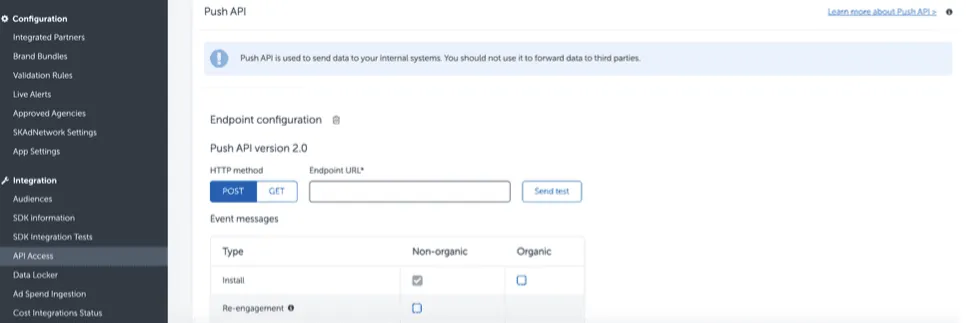
- Add the Endpoint URL pointing to RudderStack in the following format:
<DATA_PLANE_URL>/v1/webhook?writeKey=<WRITE_KEY>Make sure to:
- Replace
<DATA_PLANE_URL>with the data plane URL associated with your RudderStack workspace.- Add the source write key obtained in Step 3 as a query parameter to the URL. This is required to prevent the webhook from failing.
- Validate the endpoint before proceeding.
- Save the endpoint.
Event transformation
RudderStack converts all AppsFlyer push events into track events using the RudderStack event format. For example, RudderStack converts the customer_user_id property set by AppsFlyer into userId.
Supported mappings
The following table shows how AppsFlyer event properties map to RudderStack event properties:
| AppsFlyer property | RudderStack property |
|---|---|
android_idAndroid | context.device.advertisingId |
idfaiOS | context.device.advertisingId |
app_name | context.app.name |
app_version | context.app.version |
appsflyer_id | context.externalId[0].value |
bundle_id | context.app.namespace |
carrier | context.network.carrier |
city | traits.address.citycontext.traits.address.city |
country_code | traits.address.countrycontext.traits.address.country |
customer_user_id | userIdcontext.traits.userId |
device_type | context.device.model |
event_name | event |
event_time | timestamporiginalTimestamp |
ip | context.ip |
os_version | context.os.version |
platform | platformcontext.os.name |
postal_code | traits.address.zipcontext.traits.address.zip |
selected_timezone | context.timezone |
user_agent | context.userAgent |
wifi | context.network.wifi |
All unmapped properties from the AppsFlyer event payload are preserved in thepropertiesobject of the resultingtrackevent.
Sample payload and transformation
This section details how RudderStack receives the data from AppsFlyer and creates the resulting payload.
A sample payload sent by AppsFlyer is shown:
{
  "idfv": "868049A3-4B2F-4A11-9B00-CFFC362XXXXX",
  "device_category": "phone",
  "customer_user_id": "alex@example.com",
  "bundle_id": "com.appsflyer.AppsFlyer",
  "app_version": "1.4.1",
  "city": "New York",
  "selected_currency": "USD",
  "app_name": "AppsFlyer",
  "postal_code": "10001",
  "wifi": true,
  "country_code": "US",
  "appsflyer_id": "1234567890",
  "event_value": "{}",
  "ip": "1.1.1.1",
  "event_time": "2020-01-15 14:57:24.898",
  "device_type": "iPhone 13",
  "idfa": "A7071198-3848-40A5-B3D0-XXXXXXBZZZZ",
  "language": "en-US",
  "event_name": "My Apps",
  "os_version": "12.3.1",
  "platform": "ios",
  "selected_timezone": "UTC",
  "user_agent": "AppsFlyer/1 CFNetwork/978.0.7 Darwin/18.6.0"
}
RudderStack transforms the above payload into the following track payload:
{
  "context": {
    "library": {
      "name": "unknown",
      "version": "unknown"
    },
    "integration": {
      "name": "AF"
    },
    "ip": "1.1.1.1",
    "timezone": "UTC",
    "userAgent": "AppsFlyer/1 CFNetwork/978.0.7 Darwin/18.6.0",
    "app": {
      "namespace": "com.appsflyer.AppsFlyer",
      "version": "1.4.1",
      "name": "AppsFlyer"
    },
    "device": {
      "model": "iPhone 13",
      "advertisingId": "A7071198-3848-40A5-B3D0-XXXXXXBZZZZ",
      "adTrackingEnabled": true
    },
    "network": {
      "wifi": true
    },
    "os": {
      "name": "ios",
      "version": "12.3.1"
    },
    "traits": {
      "address": {
        "city": "New York",
        "zip": "10001",
        "country": "US"
      },
      "userId": "alex@example.com"
    },
    "externalId": [
      {
        "type": "appsflyerExternalId",
        "value": "1234567890"
      }
    ]
  },
  "integrations": {
    "AF": false
  },
  "type": "track",
  "event": "My Apps",
  "userId": "alex@example.com",
  "timestamp": "2020-01-15 14:57:24.898",
  "originalTimestamp": "2020-01-15 14:57:24.898",
  "platform": "ios",
  "traits": {
    "address": {
      "city": "New York",
      "zip": "10001",
      "country": "US"
    }
  },
  "anonymousId": "97fcd7b2-cc24-47d7-b776-057b7b199513",
  "properties": {
    "idfv": "868049A3-4B2F-4A11-9B00-CFFC362XXXXX",
    "device_category": "phone",
    "event_value": "{}",
    "selected_currency": "USD",
    "language": "en-US"
  }
}