Tracking Plan Feature Enhancements
- enterprise
less than a minute
- Date: Jul 6, 2023
Now you can create tracking plans for non-track event types, such as identify, group, page, and screen. This feature update ensures that you can maintain high-quality data across your RudderStack events. Prior to this update, RudderStack supported tracking plans only for track events.
For more information on these updates, see our Tracking Plans documentation.
Tracking plans do not support thealiasevent type.
Specify rule type
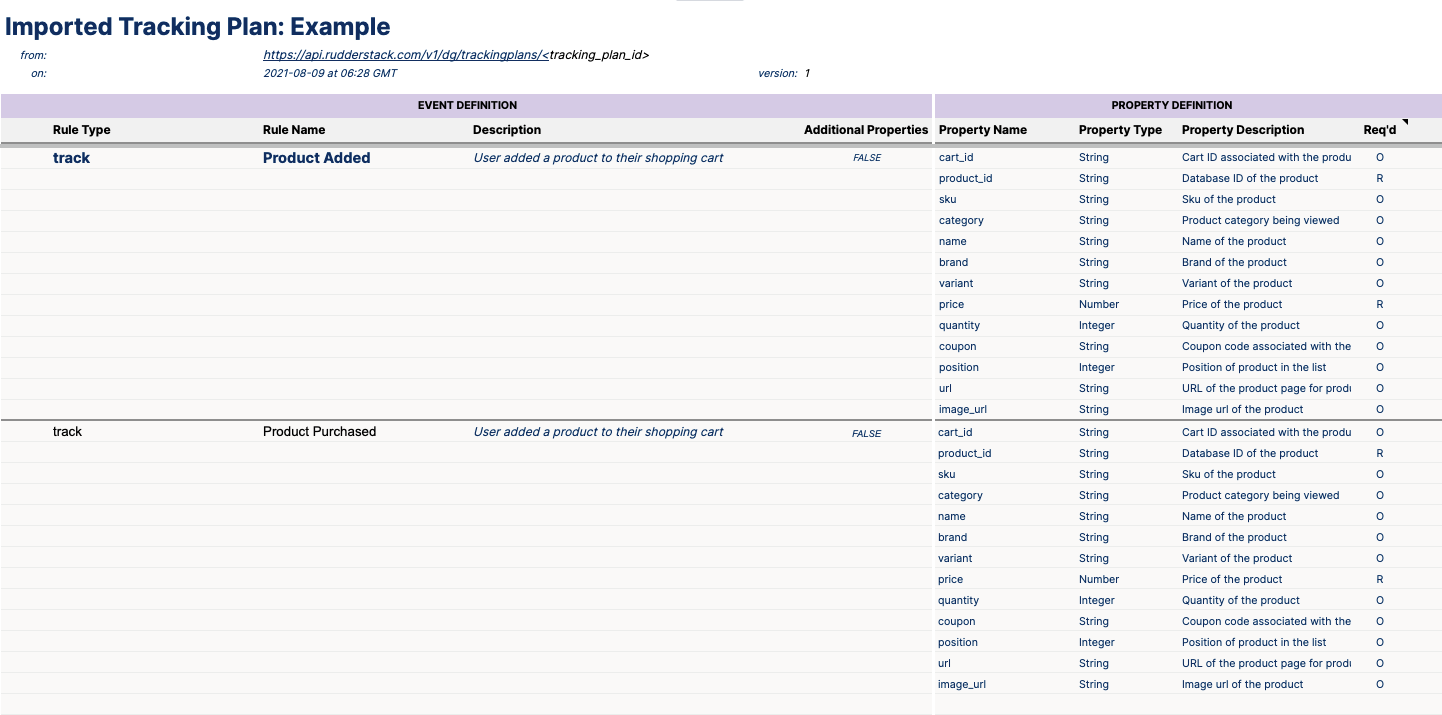
To enable tracking plans for other calls, select the event type in the Rule Type spreadsheet column. For track calls, you can provide the event name and leave the rule name empty for other calls. For all other event types, you can define the event properties in the Property name column and the property data type in the Property type column.
Setting a property as Req’d (required) enables you to capture violations for events where the property does not adhere to the tracking plan rules.
Tracking plan settings
As part of this feature update, you also configure specific settings for each event type or opt for global settings for all events. You can manage these settings either through the spreadsheet or the RudderStack dashboard. For more information, see our Tracking Plan settings documentation.
