Stream event data in real time to open Iceberg tables on your own cloud storage — powered by Snowpipe Streaming.
Available Plans
starter
growth
enterprise
3 minute read
Date: Mar 17, 2026
RudderStack’s Snowflake Streaming destination now supports Snowflake-managed Apache Iceberg tables. When enabled, your event data streams in real-time into your own cloud storage — S3, GCS, or Azure — in the Iceberg table format.
Snowflake manages the Iceberg metadata catalog and you get the speed of Snowpipe Streaming with the openness and portability of the lakehouse.
Organizations adopting lakehouse architecture want the best of both worlds: the performance and governance of Snowflake with the openness and flexibility of storing data in their own cloud storage. Until now, Snowpipe Streaming wrote exclusively to standard Snowflake tables locked in proprietary storage — forcing a choice between real-time delivery and data portability.
That trade-off disappears with Iceberg table support. Your event data lands in open Parquet format on storage you control, accessible by any engine that reads Iceberg — Spark, Trino, Databricks, Athena — while Snowflake continues to serve as the primary query engine and catalog. You reduce vendor lock-in, gain multi-engine access, and maintain full storage lifecycle control, all without sacrificing delivery speed.
Key features
Near real-time streaming to Iceberg: Events are delivered via Snowpipe Streaming with ~30 second latency directly into Snowflake-managed Iceberg tables — the same low-latency pipeline, now writing to open storage.
Open Parquet storage on your cloud: Data is stored as Parquet files in your external volume (S3, GCS, or Azure). Query it from Snowflake, Spark, Trino, Databricks, Athena, or any Iceberg-compatible engine.
Automatic table creation: RudderStack automatically creates Iceberg tables with the correct catalog, external volume, and base location configuration. No manual DDL required.
Automatic schema evolution: New event properties are detected and columns are added automatically — your Iceberg tables stay in sync with your event schemas as they evolve.
Automatic compaction: Snowflake handles compaction of the underlying Parquet files, keeping query performance optimized without manual maintenance.
All standard event types supported: Track, identify, page, screen, group, and alias events all stream to Iceberg tables.
Get started
Ensure prerequisites are in place: You need a Snowflake account with Iceberg table support and an external volume configured in Snowflake pointing to your cloud storage (S3, GCS, or Azure).
Set up RSA key-pair authentication: Iceberg table support requires key-pair authentication. Password authentication is not supported for this feature.
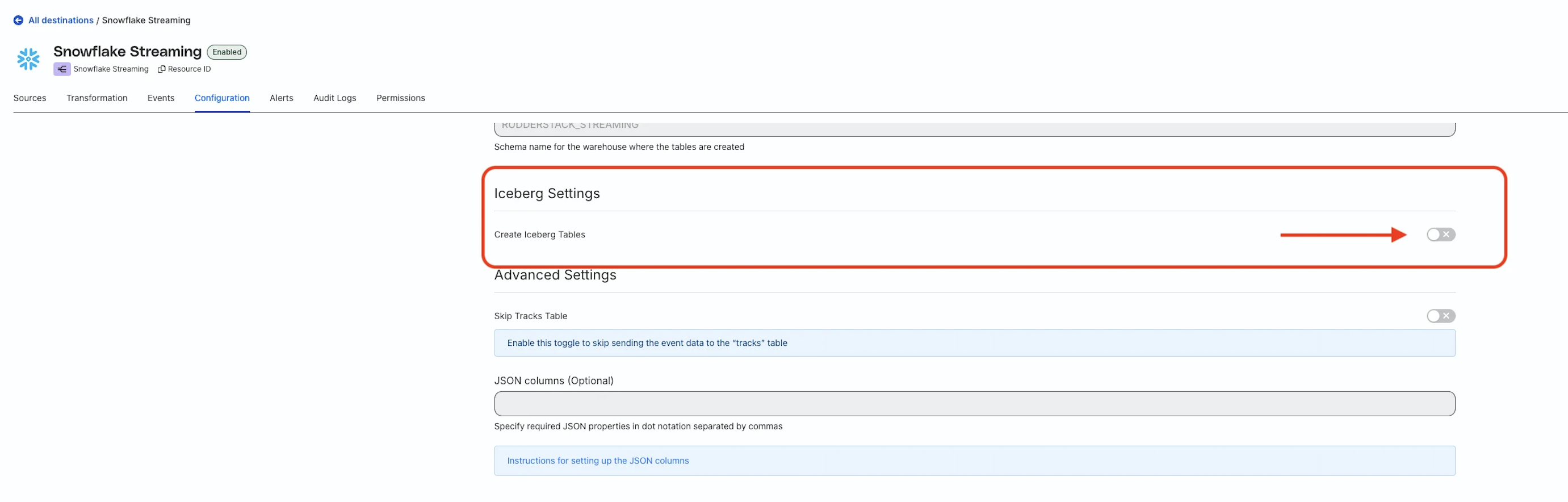
Enable Iceberg in your Snowflake Streaming destination: Toggle on the Create Iceberg Tables setting in your Snowflake destination configuration.
Specify the external volume name: Specify the name of the external volume you created by following the steps here
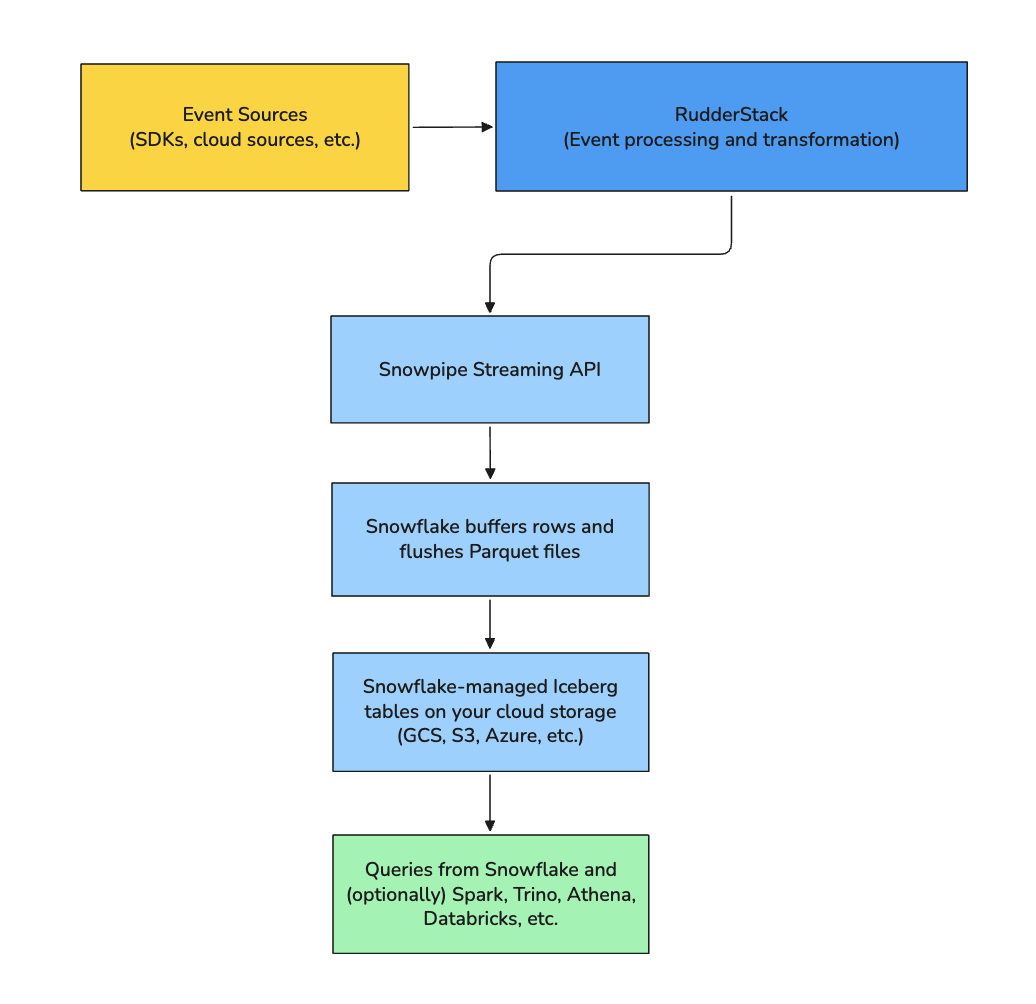
When you enable Iceberg in your Snowflake Streaming destination, RudderStack:
Sends events to Snowflake via the Snowpipe Streaming API
Lets Snowflake handle buffering and flushing rows to Parquet files
Relies on Snowflake to manage the Iceberg metadata and catalog
The following diagram illustrates the high-level data flow:
Known limitations
JSON fields stored as VARCHAR: Snowflake does not yet support the VARIANT data type for Iceberg tables. JSON data is stored as VARCHAR until Snowflake V3 adds VARIANT support.
No USERS table: Streaming mode is append-only and does not support MERGE operations, so the consolidated USERS table is not available.
~30 second minimum latency: This is a Snowflake-imposed constraint for Iceberg table writes.
TIMESTAMP_NTZ(6) instead of TIMESTAMP_TZ: Timestamps do not include timezone information in Iceberg mode.
Immutable Iceberg settings: External volume and Iceberg configuration cannot be changed after table creation.
Key-pair authentication required: Password-based authentication is not supported.
This site uses cookies to improve your experience while you navigate through the website. Out of
these
cookies, the cookies that are categorized as necessary are stored on your browser as they are as
essential
for the working of basic functionalities of the website. We also use third-party cookies that
help
us
analyze and understand how you use this website. These cookies will be stored in your browser
only
with
your
consent. You also have the option to opt-out of these cookies. But opting out of some of these
cookies
may
have an effect on your browsing experience.
Necessary
Always Enabled
Necessary cookies are absolutely essential for the website to function properly. This
category only includes cookies that ensures basic functionalities and security
features of the website. These cookies do not store any personal information.
This site uses cookies to improve your experience. If you want to
learn more about cookies and why we use them, visit our cookie
policy. We'll assume you're ok with this, but you can opt-out if you wish Cookie Settings.