Snowflake Streaming Destination: General Availability
The Snowflake Streaming destination is now generally available, delivering real-time data to Snowflake in seconds.
Available Plans
enterprise
2 minute read
Date: Dec 8, 2025
The Snowflake Streaming destination is now Generally Available. This integration delivers event data to Snowflake in seconds via continuous micro-batches using Snowflake’s Snowpipe Streaming API, enabling real-time analytics, alerting, A/B testing, and fresher data for personalization and AI/ML use cases.
Key benefits
Real-time data availability: Events appear in Snowflake within seconds, not hours, enabling immediate insights and activation
Cost-efficient streaming: Uses Snowpipe Streaming API instead of warehouse compute, maintaining the same or lower cost compared to batch integration while dramatically reducing latency
Enterprise-grade reliability: Built on RudderStack’s proven event streaming infrastructure with monitoring and alerting
Seamless migration
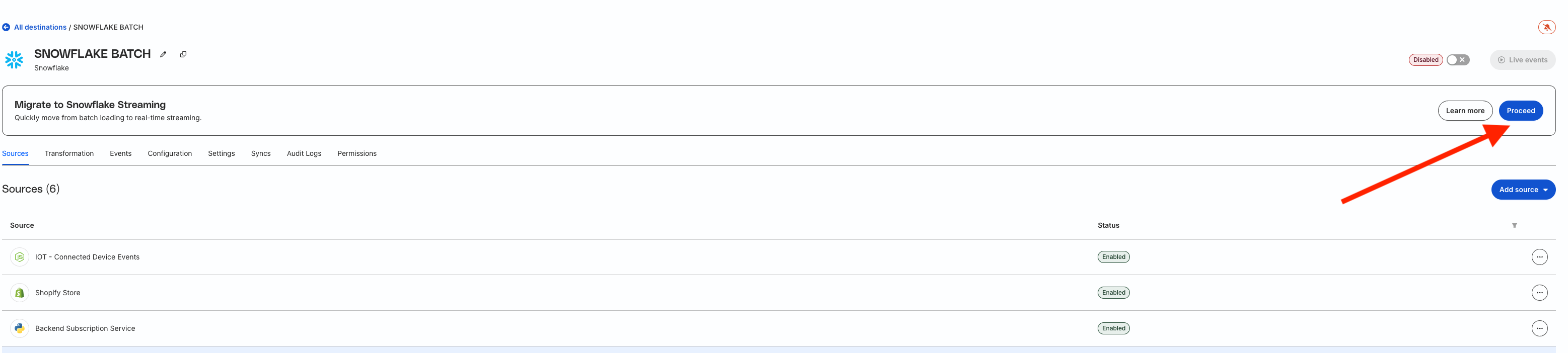
Existing Snowflake batch destination users can migrate seamlessly using the Assisted Migration feature. This guided workflow wizard creates and configures your new Snowflake Streaming destination, manages the pipeline transition, and minimizes duplicate records during migration.
To start the migration, go to your existing Snowflake batch destination in the RudderStack dashboard and look for the Migrate to Snowflake Streaming banner.
Snowflake Streaming is an Enterprise feature, but we’re offering a free trial to all paying RudderStack customers through June 8, 2026. After the trial period, Snowflake Streaming will be available as an add-on for non-Enterprise customers.
This site uses cookies to improve your experience while you navigate through the website. Out of
these
cookies, the cookies that are categorized as necessary are stored on your browser as they are as
essential
for the working of basic functionalities of the website. We also use third-party cookies that
help
us
analyze and understand how you use this website. These cookies will be stored in your browser
only
with
your
consent. You also have the option to opt-out of these cookies. But opting out of some of these
cookies
may
have an effect on your browsing experience.
Necessary
Always Enabled
Necessary cookies are absolutely essential for the website to function properly. This
category only includes cookies that ensures basic functionalities and security
features of the website. These cookies do not store any personal information.
This site uses cookies to improve your experience. If you want to
learn more about cookies and why we use them, visit our cookie
policy. We'll assume you're ok with this, but you can opt-out if you wish Cookie Settings.