Mixpanel Enhancements
- free
- growth
- enterprise
2 minute read
- Date: Aug 28, 2023
We have updated our Mixpanel destination to support Mixpanel’s Simplified ID Merge feature for enhanced user behavior stitching. You can also set your preferred persistence storage method for the Mixpanel cookie.
Simplified ID merge
RudderStack now supports Mixpanel’s Simplified ID Merge feature to track user journeys across devices and perform enhanced user behavior stitching. You can use this feature while sending events to Mixpanel via both cloud and device mode.
Learn more about the differences between Mixpanel’s Simplified and Original ID Merge functionalities in their docs.
To use this feature, set the Identity Merge setting to Simplified ID Merge while configuring your Mixpanel destination in RudderStack.
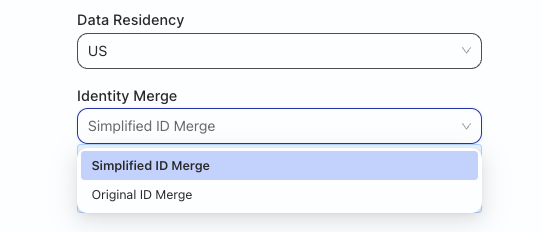
Make sure to enable the Simplified ID Merge API for your project before you start sending the events.
See our docs for more information on how to use this feature.
Cookie persistence type and name
We have also introduced new settings in the RudderStack dashboard that helps you set your preferred persistence storage method and name for the Mixpanel cookie. You can use this feature while sending events to Mixpanel via device mode.
For using persistence storage method and name for the Mixpanel cookie, make sure you are using JavaScript SDK v2.40.5 or later.
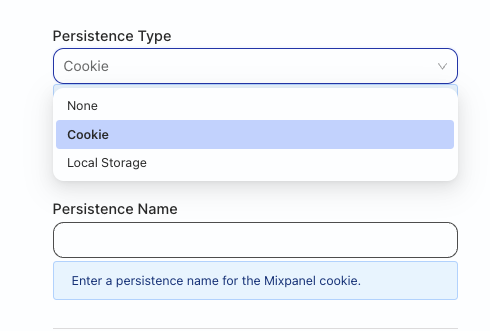
When setting up your Mixpanel destination, specify the Persistence Type setting to choose your preferred persistence storage method. RudderStack gives you the following three options:
- None: Mixpanel will not persist the cookie.
- Cookie: Mixpanel persists the cookie in the browser’s cookie storage.
- Local Storage: Mixpanel persists the cookie in local storage.
You can also specify a name for the Mixpanel cookie using the Persistence Name setting; RudderStack adds it as a suffix for the Mixpanel cookie name.
See our docs for more information on this setting.
