Custom Types: General Availability
- free
- growth
- enterprise
3 minute read
- Date: Oct 6, 2026
Custom Types are now Generally Available on the Free, Growth, and Enterprise plans. Previously in Beta for Enterprise workspaces, custom types let you define a validation rule once in a central library and apply it to any number of properties in your Data Catalog.
Custom Types are Generally Available. Free workspaces can create up to 2 custom types, Growth workspaces up to 10, and Enterprise workspaces an unlimited number. See Plan limits.
Why Custom Types?
Advanced rules apply to one property at a time. If you manage hundreds of properties, you end up copying the same enum, date format, or object shape onto each one, then editing every copy when the rule changes. A custom type holds that rule in one place, so a single edit reaches every property that uses it.
Key features
- Reusable rules: Define a custom type once and select it as the data type of any property. The property inherits every rule on the type.
- Complex types: Build an array of another custom type, such as a list of allowed enum values, or an object custom type with its own required and optional sub-properties.
- Dashboard or code: Create custom types in the dashboard, or define them as YAML and deploy them with Rudder CLI. The Data Catalog API endpoints for custom types remain in Private Beta.
- Plan-based limits: Each workspace has a cap on the number of custom types it can create. See Plan limits.
Plan limits
| Plan | Custom types per workspace |
|---|---|
| Free | 2 |
| Growth | 10 |
| Enterprise | Unlimited |
When your workspace reaches its limit, you can still edit existing custom types but cannot create new ones. See RudderStack pricing to compare plans.
If your workspace goes over its limit, for example after a downgrade to a plan with a lower cap:
- Existing custom types become read-only.
- You cannot create new custom types, or create or update properties that use a custom type.
- You can still delete custom types to get back under the limit.
If you manage custom types with Rudder CLI, rudder-cli apply returns the limit error from the server when your workspace is at or over its limit.
Get started
- Go to Govern > Data Catalog, open the Properties tab, then click the Custom Data Types tab.
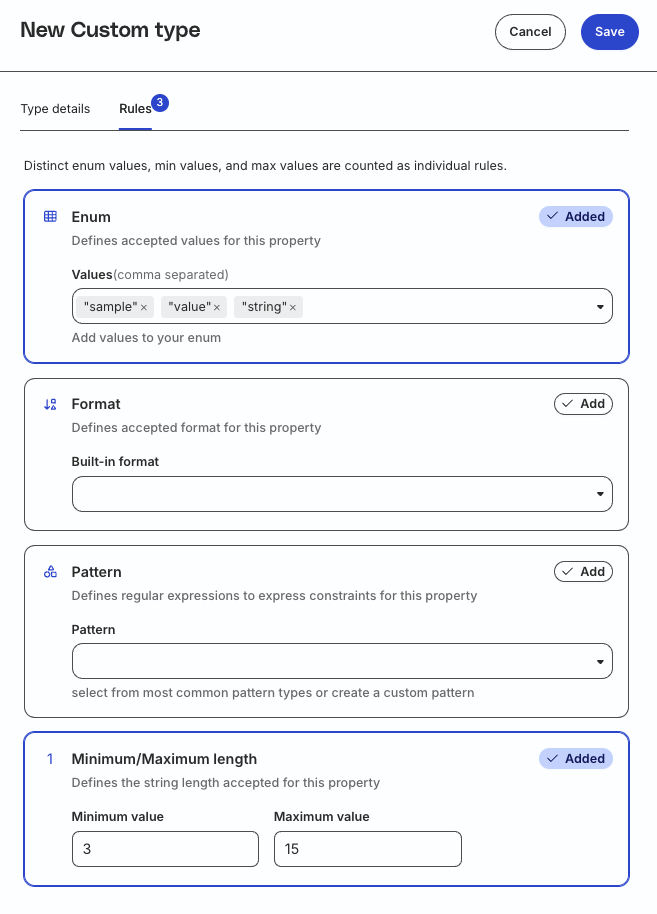
- Click Add custom type, then set a name, data type, and rules.
- Create or edit a property, set its data type to Custom data type, and select your custom type.
- Add the property to a tracking plan to validate events against it.
See Custom Data Types for the full setup guide, including array and object examples.
Resources
- Custom Data Types: Create custom types and use them in properties
- Use Custom Data Types in Rudder CLI: Define custom types in YAML and deploy them as code
- Data Catalog API: Manage custom types programmatically (Private Beta)
Screenshots
Rules tab for a new string custom type