If an integration for the tool you need isn’t already available in RudderStack’s integration catalog, you can build the connection yourself without waiting for RudderStack to add it. You handle the “last mile” delivery code (loading the third-party SDK and mapping events), while RudderStack continues to manage event collection, consent enforcement, event filtering, device mode transformations, and error isolation automatically.
Custom Web Device Mode Integration is included in every RudderStack plan — Free, Starter, Growth, and Enterprise — with no limits on the number of custom destinations you can create.
If you work with niche analytics tools, newly-launched marketing platforms, or proprietary in-house systems that run in the browser, you’ve likely hit a wall: RudderStack doesn’t have a pre-built integration for every tool. Until now, your options were to wait for RudderStack to build it, cobble together a workaround outside the platform, or look at other vendors entirely. None of those options are great when you’re trying to move fast.
Custom Web Device Mode Integration removes that bottleneck. With basic JavaScript knowledge, your frontend developers or data engineers can build a working client-side integration in hours, not weeks. The integration plugs directly into RudderStack’s event pipeline, so you keep all the platform features you already rely on (consent management, event filtering, transformations) without giving up control over which tools you connect to.
Key features
Simple JavaScript interface: Register your integration with a single API call (addCustomIntegration) and implement familiar methods — init, track, page, identify, group, and alias — to map RudderStack events to any destination’s API.
Full platform features preserved: Consent management (OneTrust, Ketch, iubenda, custom), client-side event filtering (allowlist/denylist), and device mode transformations all work automatically with your custom integration — no extra configuration required.
Error isolation and timeout enforcement: RudderStack sandboxes your custom code so that errors in your integration never affect other destinations or the SDK itself. A built-in readiness check polls every 100ms with a 30-second timeout to prevent stalled integrations from blocking event delivery.
Dashboard visibility and control: Set up and manage your custom destination directly in the RudderStack dashboard, just like any pre-built integration. Connect it to a JavaScript source, configure consent and filtering rules, and monitor it alongside your other destinations.
Get started
Follow these steps to set up and use a custom web device mode integration:
Step 1: Add the destination
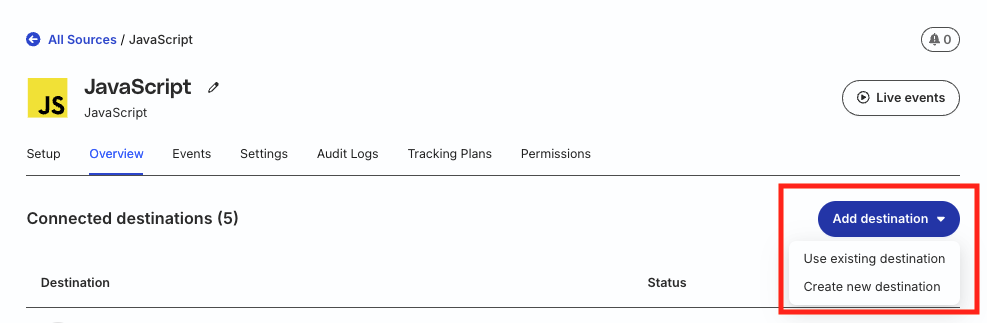
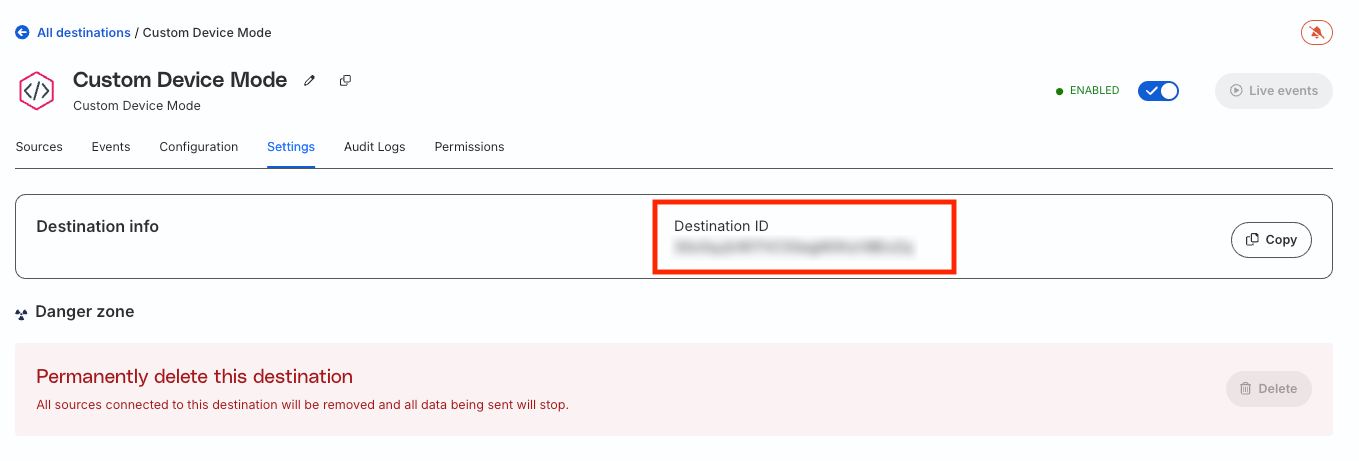
In the RudderStack dashboard, add a new Custom Device Mode destination and connect it to your JavaScript (web) source. Optionally configure consent management and event filtering. Finally, copy the Destination ID — it is required for registering your integration (see Step 4).
(Optional) Step 2: Write and connect a transformation
If you need to transform events before they reach your custom integration, connect a transformation to the Custom Device Mode destination in the RudderStack dashboard. Then, enable the Device Mode toggle and configure the Propagate errors setting based on your requirements.
If you’ve connected a device mode transformation to the destination in Step 2 and are explicitly specifying the SDK plugins, make sure to include the DeviceModeTransformation plugin in your plugins list.
This site uses cookies to improve your experience while you navigate through the website. Out of
these
cookies, the cookies that are categorized as necessary are stored on your browser as they are as
essential
for the working of basic functionalities of the website. We also use third-party cookies that
help
us
analyze and understand how you use this website. These cookies will be stored in your browser
only
with
your
consent. You also have the option to opt-out of these cookies. But opting out of some of these
cookies
may
have an effect on your browsing experience.
Necessary
Always Enabled
Necessary cookies are absolutely essential for the website to function properly. This
category only includes cookies that ensures basic functionalities and security
features of the website. These cookies do not store any personal information.
This site uses cookies to improve your experience. If you want to
learn more about cookies and why we use them, visit our cookie
policy. We'll assume you're ok with this, but you can opt-out if you wish Cookie Settings.