RudderStack Dagster Integration
4 minute read
Dagster is a popular orchestrator designed for data pipeline and management.
RudderStack’s Dagster library lets you integrate your Profiles runs and Reverse ETL syncs programmatically, enabling automated scheduling and orchestration of the jobs.
Prerequisites
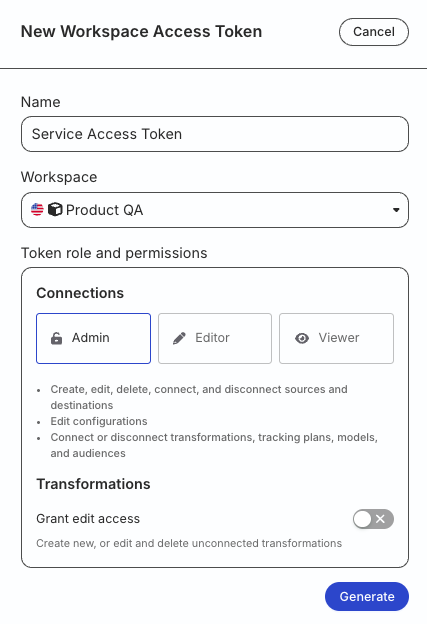
- Generate a workspace-level Service Access Token in the RudderStack dashboard with the following permissions:
| Resource | Permissions |
|---|---|
| Tables / SQL Models / Audiences | Edit, Connect |
| Destinations | Edit, Connect |
| Profiles | Edit, Connect |
- For testing or development purposes only: Generate a Personal Access Token with Read-Write role
RudderStack recommends using a workspace-level Service Access Token for authentication.
Any action authenticated by a Personal Access Token will break if the user is removed from the organization or a breaking change is made to their permissions.
Token permissions for legacy RBAC system
If you are on the legacy Permissions Management (RBAC) system, your workspace-level Service Access Token should have minimum Admin permissions.
See this documentation for more information on generating the token.
Install Dagster library
Install the dagster-rudderstack package to use Dagster with RudderStack:
pip install dagster-rudderstackSet up resources
You can define resources like your RudderStack connection details (for example, access token) in Dagster - this establishes the context for running the operations.
A sample code defining a resource for Reverse ETL and Profiles is shown:
#resources.py
from dagster_rudderstack.resources.rudderstack import RudderStackRETLResource, RudderStackProfilesResource

rudderstack_retl_resource = RudderStackRETLResource(
            access_token="<service_access_token>")

rudderstack_profiles_resource = RudderStackProfilesResource(
            access_token="<service_access_token>")
The RudderStackRETLResource and RudderStackProfilesResource parameters are described below:
| Parameter | Description | Default value |
|---|---|---|
access_tokenRequired | The Service Access Token mentioned in the Prerequisites section. | - |
rs_cloud_url | The RudderStack API URL depending on your region.
| https://api.rudderstack.com |
request_max_retries | Maximum number of times requests to the RudderStack API should be retried before failing. | 3 |
request_retry_delay | Time (in seconds) to wait between each request retry. | 1 |
request_timeout | Time (in seconds) after which the requests to RudderStack are declared timed out. | 30 |
poll_timeout | Time (in seconds) after which the polling for a triggered job is declared timed out. | None (keeps polling till the job completes or fails) |
Define jobs
Ops are RudderStack-specific operations that let you define a Dagster job for your Profiles or Reverse ETL syncs that run on a defined schedule. You can also define a job with a dependency on Profiles runs followed by Reverse ETL syncs.
Make sure to set the schedule type to Manual in the RudderStack dashboard for both Reverse ETL syncs and Profiles jobs.
This way, the sync jobs can be triggered only via Dagster.
Schedule Reverse ETL syncs
Once you have defined the Reverse ETL resource, use the below sample code to schedule Reverse ETL sync jobs:
# jobs.py
from dagster import job, ScheduleDefinition, ScheduleDefinition
from dagster_rudderstack.ops.retl import rudderstack_sync_op, RudderStackRETLOpConfig
from .resources import rudderstack_retl_resource

@job(
    resource_defs={
        "retl_resource": rudderstack_retl_resource
    }
)
def rs_retl_sync():
        rudderstack_sync_op()

rudderstack_sync_schedule = ScheduleDefinition(
    job=rs_retl_sync_job,
    cron_schedule="0 * * * *",  # Runs every hour.
    run_config={"ops": {"rudderstack_sync_op": RudderStackRETLOpConfig(connection_id="<retl_connection_id>")}},
    default_status=DefaultScheduleStatus.RUNNING
)
Make sure to provide the Reverse ETL connection ID for the sync job in RudderStackRETLOpConfig.
Schedule Profiles runs
Once you have defined the Profiles resource, use the below sample code to schedule Profiles runs:
# jobs.py
from dagster import job, ScheduleDefinition, ScheduleDefinition
from dagster_rudderstack.ops.profiles import rudderstack_profiles_op, RudderStackProfilesOpConfig
from .resources import rudderstack_profiles_resource

@job(
    resource_defs={
        "profiles_resource": rudderstack_profiles_resource
    }
)
def rs_profiles_run():
        rudderstack_profiles_op()

rudderstack_profile_schedule = ScheduleDefinition(
    job=rs_profiles_run,
    cron_schedule="0 0 * * *",  # Runs every day at midnight.
    run_config={"ops": {"rudderstack_profiles_op": RudderStackProfilesOpConfig(profile_id="<profiles_project_id")}},
    default_status=DefaultScheduleStatus.RUNNING
)
Make sure to provide the Profiles project ID in RudderStackProfilesOpConfig.
Define job sequence
This section is helpful in cases where you want to run your Profiles project first and then trigger one or multiple Reverse ETL syncs to update the downstream tools.
The following code highlights how you can create a DAG of multiple Reverse ETL syncs that are triggered after a successful Profiles run.
# jobs.py

from dagster import job, ScheduleDefinition, ScheduleDefinition
from dagster_rudderstack.ops.retl import rudderstack_sync_op, RudderStackRETLOpConfig
from dagster_rudderstack.ops.profiles import rudderstack_profiles_op, RudderStackProfilesOpConfig
from .resources import rudderstack_retl_resource, rudderstack_profiles_resource

@job(
    resource_defs={
        "profiles_resource": rudderstack_profiles_resource,
        "retl_resource": rudderstack_retl_resource
    }
)
def rs_profiles_then_retl_run():
    profiles_op = rudderstack_profiles_op()
    rudderstack_sync_op(start_after=profiles_op)

rudderstack_sync_schedule = ScheduleDefinition(
    job=rs_profiles_then_retl_run,
    cron_schedule="0 0 * * *",  # Runs every day at midnight.
    run_config=RunConfig(
                ops={
                    "rudderstack_profiles_op": RudderStackProfilesOpConfig(profile_id="<profiles_project_id>"),
                    "rudderstack_sync_op": RudderStackRETLOpConfig(connection_id="<retl_connection_id>"),
                }
        )
    default_status=DefaultScheduleStatus.RUNNING
)
Make sure to provide:
- The Profiles project ID in
RudderStackProfilesOpConfig. - The Reverse ETL connection ID for the sync job in
RudderStackRETLOpConfig.
If one of the operation fails, the job raises an exception without running the next operation.
However, you can configure the job as per your requirement to ignore any failure and run the subsequent operations by using
try/catchexceptions.
FAQ
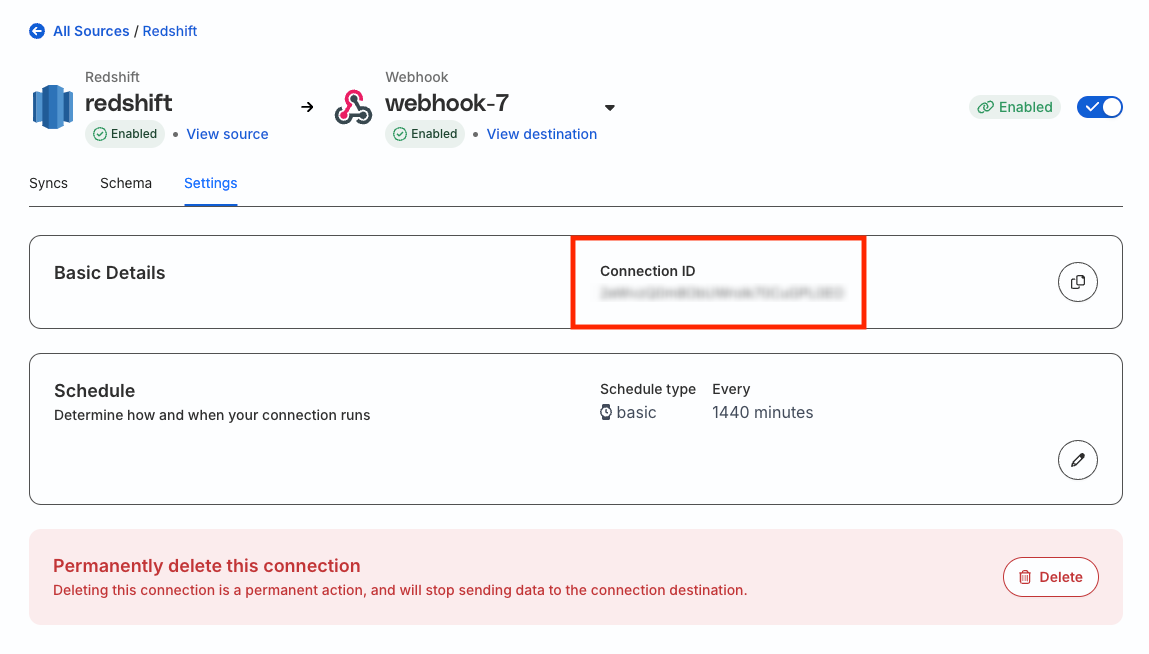
Where can I find the connection ID for my Reverse ETL connection?
The connection ID is a unique identifier for any Reverse ETL connection set up in RudderStack.
To obtain the connection ID, click the destination connected to your Reverse ETL source and go to the Settings tab.
Where can I find my Profiles project ID?
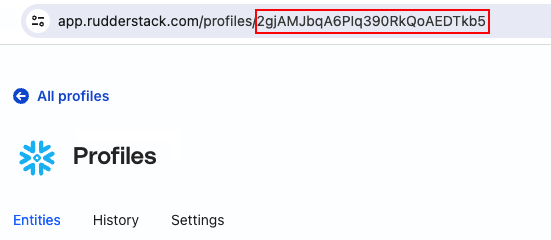
To obtain the Profiles project ID, go to your project in the RudderStack dashboard and note it down from the URL: