RudderStack Airflow Integration
6 minute read
Apache Airflow is an open source platform to schedule, manage, and monitor workflows for data engineering pipelines.
RudderStack provides an Airflow operator for triggering your Profiles runs and Reverse ETL syncs programmatically via Airflow.
See the GitHub Repository for more information on the codebase with sample DAGs.
Prerequisites
- A working Apache Airflow setup in place. See the Airflow documentation for more information.
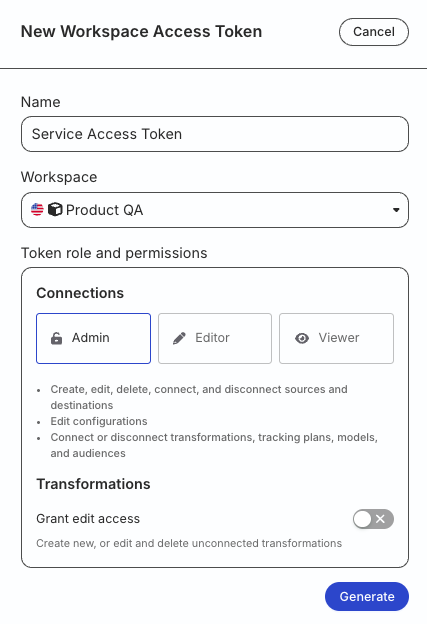
- Generate a workspace-level Service Access Token in the RudderStack dashboard with the following permissions:
| Resource | Permissions |
|---|---|
| Tables / SQL Models / Audiences | Edit, Connect |
| Destinations | Edit, Connect |
| Profiles | Edit, Connect |
- For testing or development purposes only: Generate a Personal Access Token with Read-Write role
RudderStack recommends using a workspace-level Service Access Token for authentication.
Any action authenticated by a Personal Access Token will break if the user is removed from the organization or a breaking change is made to their permissions.
Token permissions for legacy RBAC system
If you are on the legacy Permissions Management (RBAC) system, your workspace-level Service Access Token should have minimum Admin permissions.
See this documentation for more information on generating the token.
Run Airflow
Initialize all dependencies by running Apache Airflow via the following command:
airflow standaloneThe Airflow standalone server is not meant for use in production. It is highly recommended using alternate methods to install and run Airflow in a production environment.
Install Airflow operator
Install the RudderStack Airflow Provider by running the following command:
pip install rudderstack-airflow-providerCreate Airflow connection
To create a new Airflow connection, follow these steps:
- In your Airflow dashboard, go to Admin > Connections:

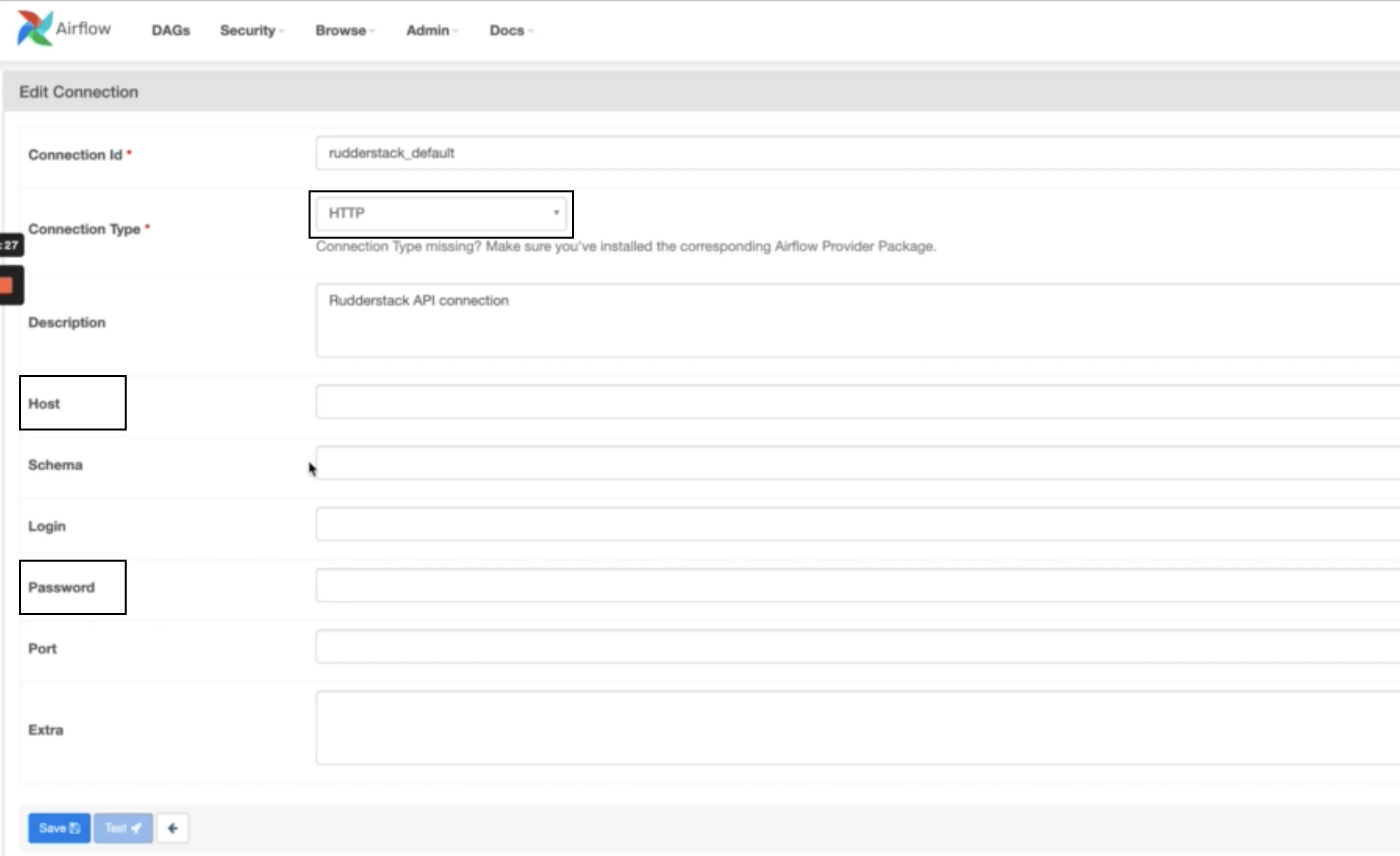
- Add a new connection by configuring the below settings:
| Setting | Description |
|---|---|
| Connection ID | Specify a unique connection name. By default, RudderstackRETLOperator / RudderstackProfilesOperator uses the connection name rudderstack_default.Note: If you have created a connection with a different name, make sure that name is passed as a parameter to the above operators. |
| Connection Type | Set this to HTTP. |
| Host | Set the value depending on your region.
|
| Password | Enter your workspace-level Service Access Token. |
RudderStack operators
Use the below operators to create DAGs and schedule them via Airflow.
Make sure to set the schedule type to Manual in the RudderStack dashboard for both Reverse ETL syncs and Profiles jobs.
This way, the sync jobs can be triggered only via Airflow.
RudderStackRETLOperator
Use RudderStackRETLOperator to schedule and trigger your Reverse ETL syncs via Airflow.
A simple DAG for triggering syncs for a Reverse ETL source is shown below. See this example for the complete code.
with DAG(
    "rudderstack-retl-sample",
    default_args=default_args,
    description="A simple tutorial DAG for Reverse ETL",
    schedule_interval=timedelta(days=1),
    start_date=datetime(2021, 1, 1),
    catchup=False,
    tags=["rs-retl"],
) as dag:
    # retl_connection_id, sync_type are template fields
    rs_operator = RudderstackRETLOperator(
        retl_connection_id="<retl_connection_id>",
        task_id="<airflow_task_id>",
        connection_id="<connection_id>"
    )
The RudderstackRETLOperator parameters are described below:
| Parameter | Description | Type | Default value |
|---|---|---|---|
retl_connection_idRequired | Your Reverse ETL Connection ID from the RudderStack dashboard. | String (templatable) | - |
connection_idRequired | Connection ID used while setting up the Airflow connection. | String | rudderstack_default |
task_idRequired | Unique, meaningful ID for the job. See the Airflow documentation for more information on this parameter. | String | - |
poll_interval | Time (in seconds) for the polling status of triggered job. | Float | 10 |
poll_timeout | Time (in seconds) after which the polling for a triggered job is declared timed out. | Float | None, that is, the provider keeps polling till the job completes or fails. |
sync_type | Sync type. Acceptable values are full and incremental. | String | None as RudderStack determines the sync type. |
request_max_retries | Maximum number of times requests to the RudderStack API should be retried before failing. | Integer | 3 |
request_retry_delay | Time (in seconds) to wait between each request retry. | Integer | 1 |
request_timeout | Time (in seconds) after which the requests to RudderStack are declared timed out. | Integer | 30 |
wait_for_completion | Determines if the execution run should poll and wait till sync completion. | Boolean | True |
RudderStack recommends retaining the default values for the non-mandatory parameters.
RudderStackProfilesOperator
Use RudderstackProfilesOperator to trigger a Profiles run.
A simple DAG for triggering a Profiles project run is shown:
with DAG(
    "rudderstack-profiles-sample",
    default_args=default_args,
    description="A simple tutorial DAG for Profiles run.",
    schedule_interval=timedelta(days=1),
    start_date=datetime(2021, 1, 1),
    catchup=False,
    tags=["rs-profiles"],
) as dag:
    # profile_id is template field
    rs_operator = RudderstackProfilesOperator(
        profile_id="<profiles_id>",
        task_id="<airflow_task_id>",
        connection_id="<connection_id>",
    )
The RudderstackRETLOperator parameters are described below:
| Parameter | Description | Type | Default value |
|---|---|---|---|
profiles_idRequired | Your Profiles project ID from the RudderStack dashboard. | String (templatable) | - |
connection_idRequired | Connection ID used while setting up the Airflow connection. | String | rudderstack_default |
task_idRequired | Unique, meaningful ID for the job. See the Airflow documentation for more information on this parameter. | String | - |
parameters | Additional parameters to pass to the Profiles run command, as supported by the API endpoint. | String | None |
poll_interval | Time (in seconds) for the polling status of triggered job. | Float | 10 |
poll_timeout | Time (in seconds) after which the polling for a triggered job is declared timed out. | Float | None, that is, the provider keeps polling till the job completes or fails. |
request_max_retries | Maximum number of times requests to the RudderStack API should be retried before failing. | Integer | 3 |
request_retry_delay | Time (in seconds) to wait between each request retry. | Integer | 1 |
request_timeout | Time (in seconds) after which the requests to RudderStack are declared timed out. | Integer | 30 |
wait_for_completion | Determines if the execution run should poll and wait till sync completion. | Boolean | True |
RudderStack recommends retaining the default values for the non-mandatory parameters.
Run a DAG
Once you have defined a DAG and configured an Airflow connection, run the following commands to allow Airflow to pick up and run the DAG:
export AIRFLOW_HOME=</path/to/airflow_home>
mkdir $AIRFLOW_HOME/dags
cp rudderstack_dag.py $AIRFLOW_HOME/dags
Make sure the Airflow scheduler is running in the background. Also, you must enable the DAG in the Airflow dashboard:

You can trigger a DAG by clicking on the play button on the right as seen above and selecting Trigger DAG.
Stopping the DAG will not cancel the ongoing sync.
Sample DAG
A sample DAG for a Profiles run followed by a Reverse ETL sync is shown:
from datetime import timedelta

from airflow import DAG

from rudder_airflow_provider.operators.rudderstack import (
	RudderstackRETLOperator,
	RudderstackProfilesOperator
)

default_args = {
    'owner': 'airflow',
    'depends_on_past': False,
    'email': ['alex@example.com'],
    'email_on_failure': False,
    'email_on_retry': False,
}

with DAG('rudderstack-profiles-then-retl-sample',
    default_args=default_args,
    description='A simple tutorial DAG for Profiles run and then Reverse ETL sync.',
    catchup=False,
    tags=['rs']) as dag:
    # profile_id is a template field.
    profiles_task = RudderstackProfilesOperator(
        profile_id="{{ var.value.profile_id }}",
        task_id="<airflow_task_id>",
        connection_id="<connection_id>",
    )
    # retl_connection_id is a template field.
    retl_sync_1_task = RudderstackRETLOperator(
        retl_connection_id="{{ var.value.retl_connection_id1 }}",
        connection_id='<connection_id>',
        wait_for_completion=True,
        retry_delay=timedelta(seconds=5),
        retries=1,
    )
	# another retl sync
    retl_sync_2_task = RudderstackRETLOperator(
        retl_connection_id="{{ var.value.retl_connection_id2 }}",
        task_id="<airflow_task_id>",
        connection_id='<connection_id>'',
        wait_for_completion=True
    )

	# run profiles_task, then retl_sync_1_task and retl_sync_2_task in parallel
	profiles_task >> [retl_sync_1_task, retl_sync_2_task]
FAQ
Where can I find the connection ID for my Reverse ETL connection?
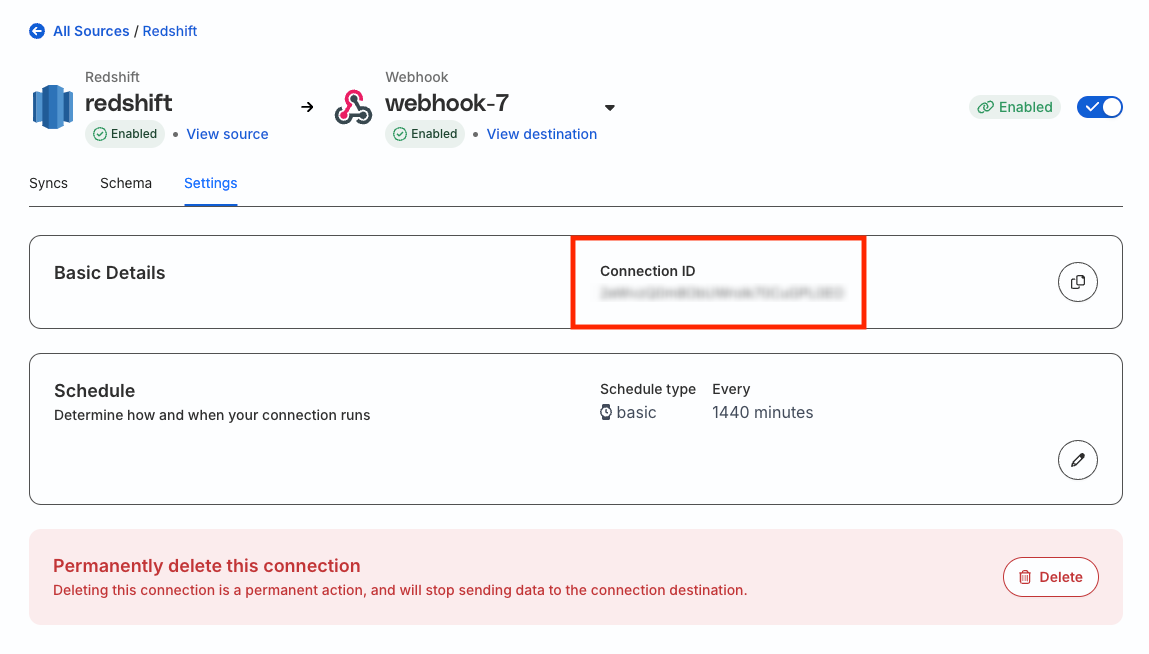
The connection ID is a unique identifier for any Reverse ETL connection set up in RudderStack.
To obtain the connection ID, click the destination connected to your Reverse ETL source and go to the Settings tab.
Where can I find my Profiles project ID?
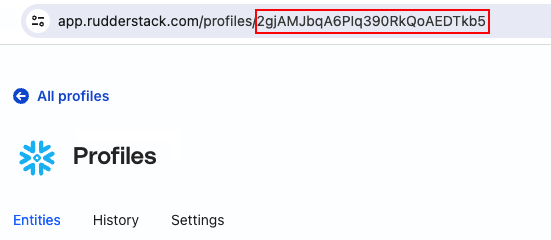
To obtain the Profiles project ID, go to your project in the RudderStack dashboard and note it down from the URL: