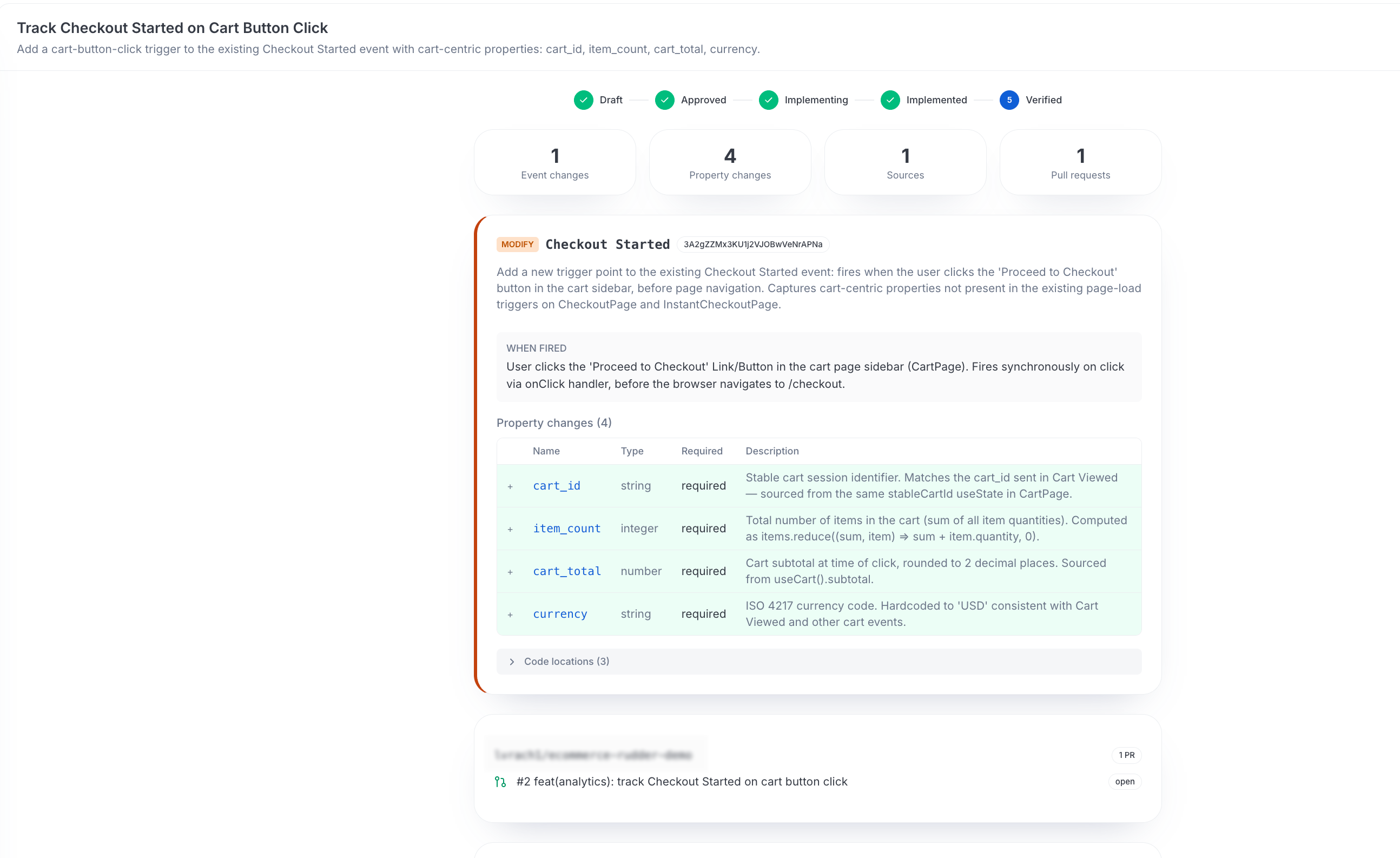
Define the tracking you want and let a background agent open pull requests that implement it.
3 minute read
A measurement plan captures what your team wants to track and carries it through a reviewed lifecycle — from a draft definition to instrumentation code proposed as pull requests. It is how you go from “we should be tracking this” to a concrete, reviewable change without writing the instrumentation by hand.
In the workspace sidebar, measurement plans appear under Plans.
Create a plan
Draft the plan: From chat, describe the tracking you want — the events and properties that should be captured. The agent saves and refines this as a measurement plan.
From chat, the agent can only save, update, and manage a plan — it can’t implement it.
Review and approve: A person reviews the plan and approves it. Nothing is implemented until this human-gated step.
Generate the pull requests: Approval alone doesn’t start implementation — a person clicks Generate PRs and confirms. This action launches the instrumentation agent and moves the plan to the implementation state.
The instrumentation agent opens pull requests: Once started, a background agent works each repository linked to the plan, writes the code changes, and opens a pull request for each one.
Review and merge: The pull requests sit in your normal code-review process. You can review and merge them like any other change.
The plan lifecycle
A measurement plan moves through clear states so you always know where it stands:
State
Meaning
Draft
The plan is being defined and refined
Approved
A person has approved the plan. It is ready to implement, but the instrumentation agent doesn’t start until someone selects Generate PRs
Implementing
Generate PRs has been triggered — the background agent is generating code and opening pull requests
Implemented
The pull requests have been opened
Partial failure
The agent implemented some repositories but couldn’t complete others
Verified
A person has marked the plan as verified after reviewing the merged pull requests. This is a manual step — merging a pull request doesn’t move the plan to verified on its own
Why it is split this way
The agent proposes, a human approves, and a background worker implements. This process keeps a person in the loop before any code reaches a repository.
From chat, the agent can only save and manage a plan — it can’t set one running.
Turning an approved plan into real code is a separate, human-gated step. Someone must explicitly select Generate PRs to start the instrumentation agent.
Every change lands as a pull request you review and merge, not a commit pushed straight to your main branch.
How Lookout finds the right repository
A measurement plan needs a connected GitHub repository for the instrumentation agent to open pull requests against, and a source-to-repository mapping so Lookout knows which repository to use.
GitLab repositories are not supported currently for measurement plan PR generation.
To open a pull request, Lookout needs to know which repository instruments a given source. That comes from your source-to-repository mappings — each RudderStack source is mapped to the GitHub or GitLab repository (and subfolder) where its events are instrumented.
When you ask to capture a new event, Lookout identifies the source the event belongs to, looks up the repository mapped to it, and targets the instrumentation pull request at the right codebase — without you having to specify where the code lives.
Questions? We're here to help.
Join the RudderStack Slack community or email us for support
This site uses cookies to improve your experience while you navigate through the website. Out of
these
cookies, the cookies that are categorized as necessary are stored on your browser as they are as
essential
for the working of basic functionalities of the website. We also use third-party cookies that
help
us
analyze and understand how you use this website. These cookies will be stored in your browser
only
with
your
consent. You also have the option to opt-out of these cookies. But opting out of some of these
cookies
may
have an effect on your browsing experience.
Necessary
Always Enabled
Necessary cookies are absolutely essential for the website to function properly. This
category only includes cookies that ensures basic functionalities and security
features of the website. These cookies do not store any personal information.
This site uses cookies to improve your experience. If you want to
learn more about cookies and why we use them, visit our cookie
policy. We'll assume you're ok with this, but you can opt-out if you wish Cookie Settings.