Lookout Context Hub Private Beta
4 minute read
Rudder Lookout is currently in Private Beta, where we work with early users and customers to test new capabilities and gather feedback before making it generally available.
Contact your Customer Success Manager if you are interested in enabling Lookout for your team.
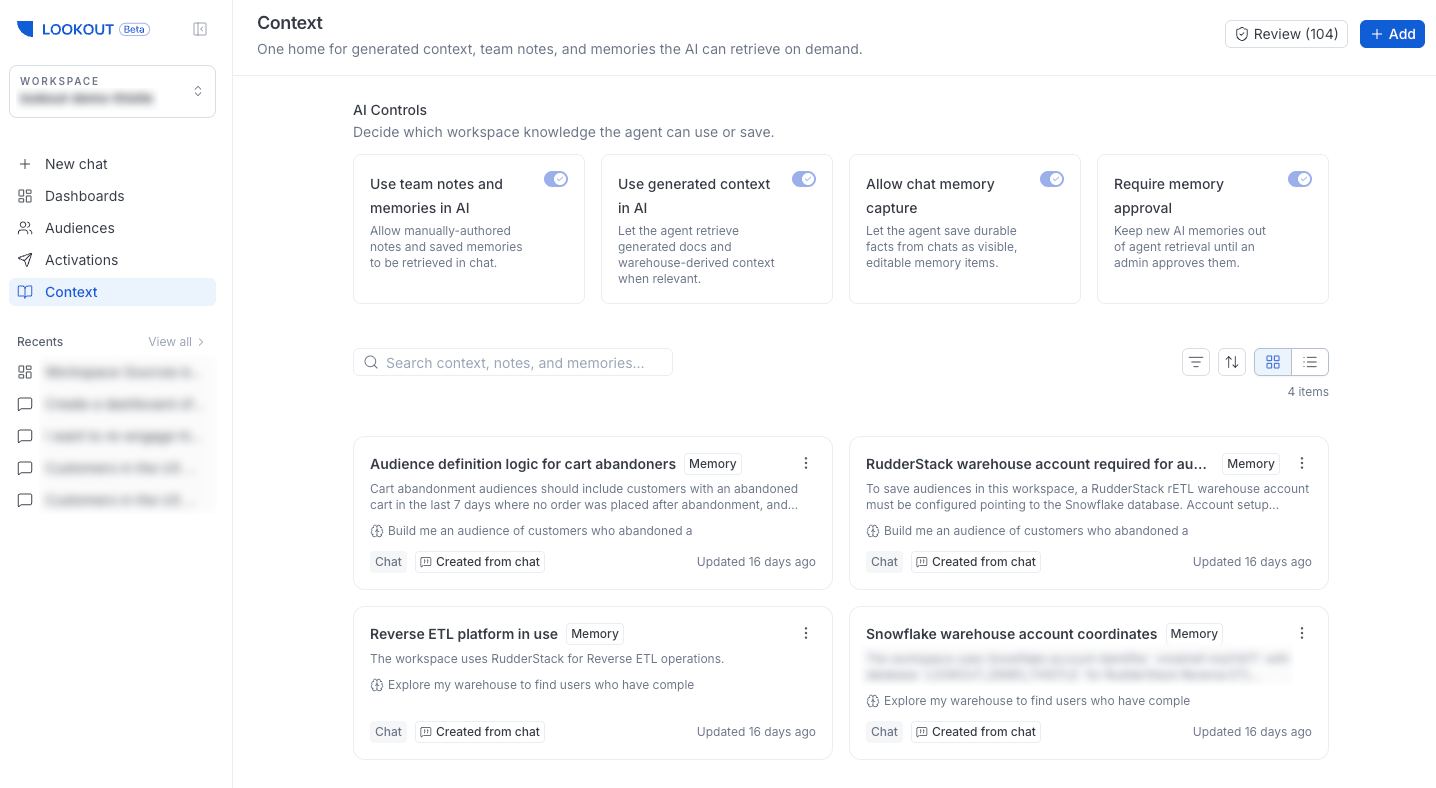
The Context Hub is your workspace’s knowledge store. It holds what your team and the agent have learned, so the agent can pull it into later conversations for grounded answers and your team can find what was figured out earlier.
In the workspace sidebar, the Context Hub appears under Context.
What it holds
The Context Hub combines three kinds of items, all searchable together:
- Generated documentation: AI-generated descriptions of the data in your warehouse and linked repositories
- Team notes: Knowledge your team shares manually
- Memories: Facts the agent captures from conversations so it can remember them later
The Context Hub page has a keyword search box for finding an item by name or text. When the agent searches the hub during a conversation, it uses a richer hybrid search that combines keyword and meaning-based matching.
Generated documentation
To understand what a codebase actually tracks, Lookout generates a structured document describing the RudderStack events and properties it finds in a linked repository. It reads the repository in an isolated sandbox and produces a document that lives in the Context Hub alongside your notes and the agent’s memories.
This documentation is generated from your source control, not from chat. It is produced when:
- You select Generate Context or regenerate an existing document in the Context Hub.
- A push lands on the default branch of a linked GitHub repository that has documentation enabled. Lookout refreshes the affected docs automatically.
In chat, the agent can read these generated docs to ground its answers, but it doesn’t generate them.
Notes and memory
This section highlights the key differentiation between notes and memories.
Notes
A note is a piece of workspace knowledge your team writes — a convention, a metric definition, a data quirk, or any context you want the agent to recall.
When a question is relevant, the agent finds matching notes automatically through a hybrid keyword and meaning-based search. You do not need to invoke them.
Use notes for facts the agent should remember across all conversations, for example:
- “Our fiscal year starts in February”
- “fct_orders only contains completed orders”
- “ARR is calculated as monthly recurring revenue × 12”
Memories
A memory is a fact the agent captures from a conversation — a correction you made, a convention it discovered, or a schema detail it learned from a tool result. Memories work the same way as notes during retrieval — they are searched automatically when relevant.
The difference is who writes them. Notes are written by your team and memories are captured by the agent. Both live in the Context Hub and are searchable together.
You control whether the agent captures memories with the Memory Capture setting, and you can review, edit, or delete any memory in the Context Hub.
Skills
A skill is a reusable instruction set for a specific task. Unlike notes and memories, which the agent finds automatically, a skill is only used when you explicitly invoke it — type / in the chat composer and pick the skill from the list.
When invoked, the skill’s instructions are added to the agent’s prompt before it responds, so it follows them for that conversation.
You can enable or disable skills from the Context Hub without deleting them.
When to use a skill vs. a note
- Use a skill when you want a consistent, repeatable procedure — a recurring analysis, a documentation format, a review checklist, or a standard way to build a particular kind of audience.
- Use a note when you want the agent to remember a fact without being told.
How the agent uses context
The agent draws on context in a specific order:
- Skills: If you invoke one, its instructions are loaded first. Skills provide general expertise for a task.
- Context Hub (notes, memories, generated docs): The agent searches these automatically to ground its answer in workspace-specific knowledge. When a skill and a note conflict, the agent follows the workspace convention in the note.
- Warehouse schema: The agent explores your warehouse directly if the Context Hub doesn’t name the exact tables or columns needed.
- GitHub repositories: For code-level context, the agent reads linked repositories when the above sources are insufficient.
Within the Context Hub, notes, memories, and generated documentation are all searchable together — a single search returns results across all three types.
Admin controls
A workspace Admin can control what knowledge the agent can use and save, from the controls at the top of the Context Hub, for example, whether the agent draws on team notes and memories, whether it uses generated context, and whether it captures new memories from chat.
All members can see these controls. However, only admins can change them.
See Chat and Ask Questions for more details on how the agent draws on this context during a conversation.
