How to Connect Tools with Rudder Lookout Private Beta
2 minute read
Rudder Lookout is currently in Private Beta, where we work with early users and customers to test new capabilities and gather feedback before making it generally available.
Contact your Customer Success Manager if you are interested in enabling Lookout for your team.
Lookout is most useful when it is connected to the systems your team already uses. Each integration plugs a real tool into the agent. Connect a warehouse and the agent can query it; connect a repository and it can read it.
The agent only touches a system that is configured for your workspace.
Where to connect tools
You connect most tools from Settings, where the integrations are spread across a few tabs. External AI tools are set up from Settings > Integrations.
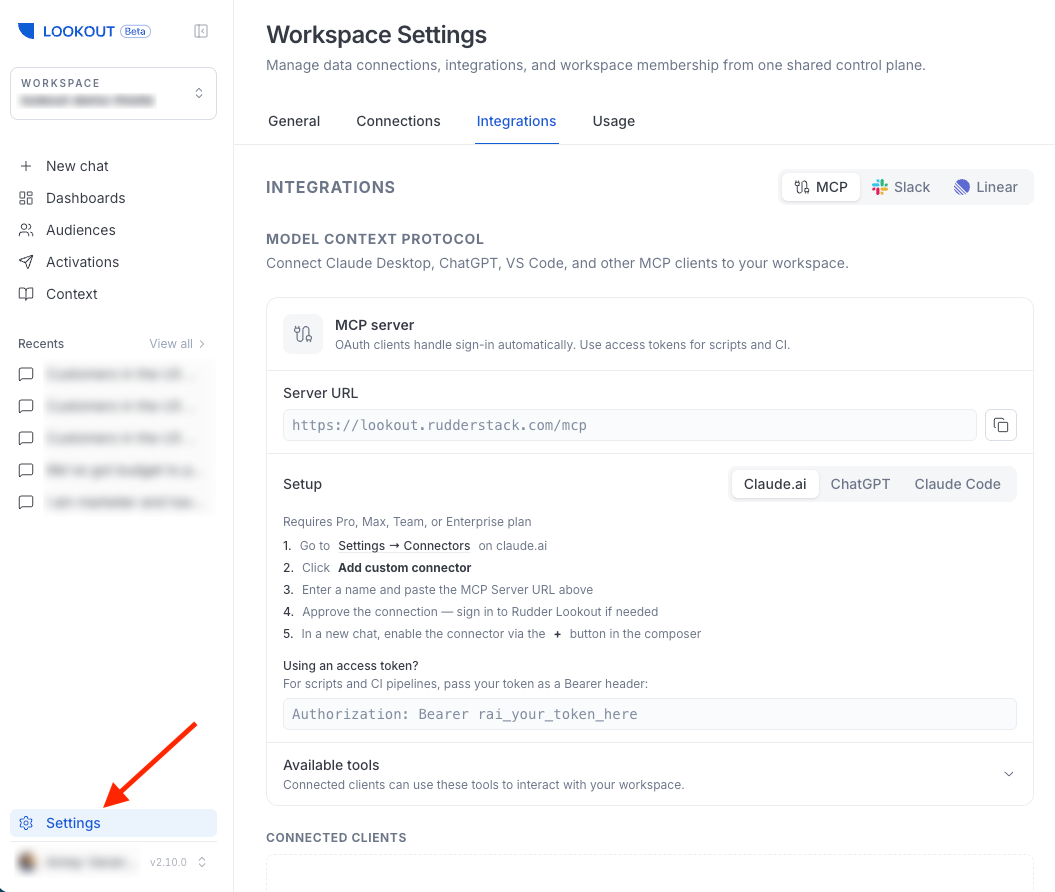
What you can connect
| Tool | What it unlocks | Where to connect | Who can connect? |
|---|---|---|---|
| RudderStack | Activate audiences to your destinations, and read sources, transformations, and Tracking Plans. | Linked when the workspace is created | Workspace creator |
| Warehouses | Ask questions of your data and build audiences from it (read-only). Link repositories to a warehouse here. | Settings > Connections > Warehouses | Admin |
| GitHub | Read repositories for context — files, commits, and pull-request diffs. | Settings > Connections > Source Control | Admin — any member uses repo tools |
| Slack | Chat with the agent from a Slack DM or a bound channel. | Settings > Integrations | Admin |
| External AI Tools | Let approved external AI tools call a curated set of Lookout’s tools. | Settings > Integrations | Any member — if enabled for your deployment |
See Integrations for full capability and setup details.
Where to start
Your RudderStack workspace is linked when you create the Lookout workspace, so the first thing to add is a warehouse — it is what lets the agent answer questions about your data and build audiences from it.
From there, add integrations as your team needs them:
- Add GitHub under Connections > Source Control if you want the agent to read code for context, then link repositories to a warehouse so the agent knows which code describes which data
- Install Slack to bring the agent into the channels where your team already works
Most connections are made by a workspace admin. Connecting a system is a workspace-level decision — once connected, the agent can use it on behalf of any member.
See Roles and Permissions for more details.
