End-to-End Walkthrough: Event Stream Sources with Rudder CLI
Beta- free
- growth
- enterprise
4 minute read
This tutorial shows you how to use Rudder CLI to:
- Authenticate against your RudderStack workspace
- Create a project directory and define an Event Stream source in YAML
- Optionally attach a Tracking Plan for data governance
- Validate and deploy the source to your workspace
For feature overview and supported source types, see Manage Event Stream Sources using Rudder CLI.
Prerequisites
- Rudder CLI tool (
rudder-cli) installed locally - An existing Tracking Plan defined in your CLI project (optional, but recommended for Data Governance)
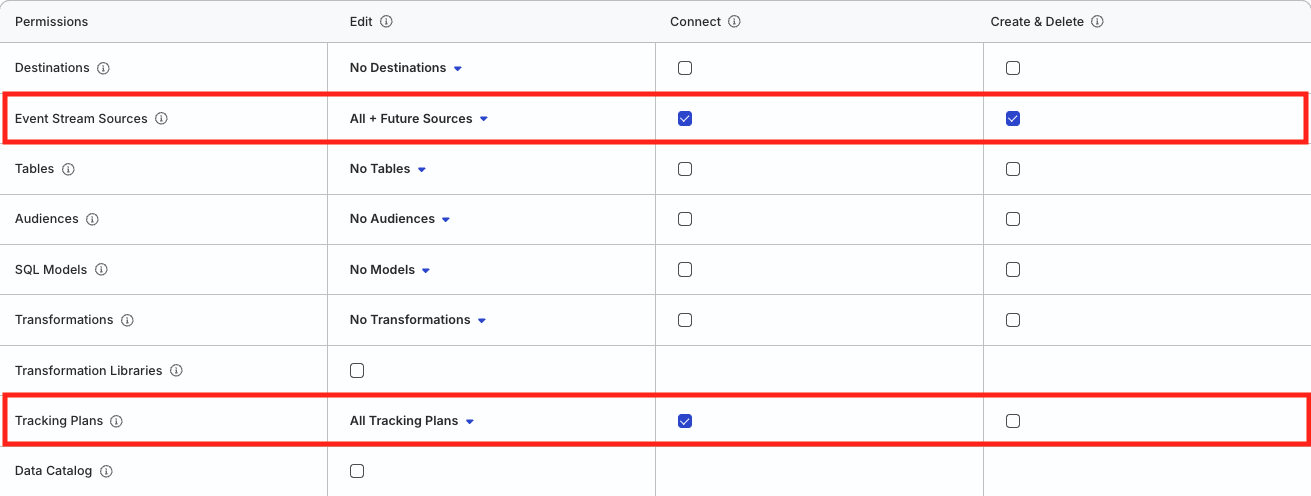
- In your RudderStack workspace, create a workspace-level Service Access Token with the following permissions to manage Event Stream sources:
| Resource | Permissions | Description |
|---|---|---|
| Event Stream Sources | Create & Delete | Create or delete Event Stream sources in the workspace |
| Event Stream Sources | Edit | Make changes to the configuration of Event Stream sources |
| Event Stream Sources | Connect | Connect an Event Stream source to a Tracking Plan |
| Tracking Plans | Edit, Connect | Connect a Tracking Plan to an Event Stream source |
Click here to see how these permissions appear in the workspace policy.
- If you’re on Free or self-hosted plan, or for testing and development only: Generate a Personal Access Token with Read-Write role
Any action authenticated by a Personal Access Token will break if the user generating the token is removed from the organization or there is a breaking change to their permissions.
Token permissions for legacy RBAC system
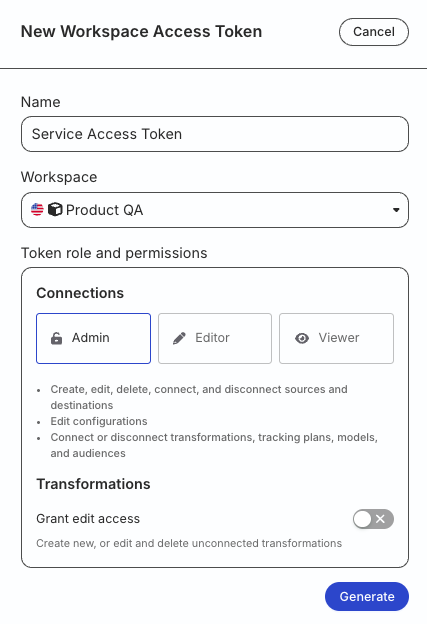
If you are on the legacy Permissions Management (RBAC) system, your workspace-level Service Access Token should have minimum Admin permissions.
See Generate a workspace-level Service Access Token for steps to create the token.
1. Authenticate the CLI tool
Run the following command and enter your access token when prompted:
rudder-cli auth login2. Create a project directory
Create a project directory to store your source YAML files:
mkdir ~/tutorial-sourcesIf you are already managing Tracking Plans or Data Catalog resources via CLI, you can add source definitions to the same project directory. The CLI processes all YAML files in the directory recursively.
3. Review the YAML reference
Before defining your Event Stream source, review the Source YAML Reference to understand:
- The complete YAML structure for Event Stream sources
- Required and optional fields for source configuration
- Governance validation settings and violation rules
- Reference syntax for linking sources to Tracking Plans
Understanding the YAML reference will help you create properly structured files and avoid common validation errors when defining your sources.
4. Define an Event Stream source
Create a YAML file for your Event Stream source (~/tutorial-sources/ios-source.yaml):
version: rudder/v1
kind: event-stream-source
metadata:
  name: ios-source
spec:
  id: "my-ios-source"
  type: "ios"
  name: "iOS Source"
  enabled: true
This example creates a basic iOS source without governance configuration. The source accepts events and is enabled by default.
5. Optional: Add governance configuration
If you want to associate a Tracking Plan with your source for data governance, update the YAML file to include governance settings:
version: rudder/v1
kind: event-stream-source
metadata:
  name: ios-source
spec:
  id: "my-ios-source"
  type: "ios"
  name: "iOS Source"
  enabled: true
  governance:
    validations:
      tracking_plan: "#tracking-plan:my-tracking-plan"
      config:
        track:
          propagate_violations: true
          drop_unplanned_events: true
          drop_unplanned_properties: true
          drop_other_violations: true
        identify:
          propagate_violations: true
          drop_unplanned_properties: true
          drop_other_violations: true
In this example:
- The source is linked to a Tracking Plan referenced as
#tracking-plan:my-tracking-plan. - For
trackevents, violations are propagated, unplanned events are dropped, unplanned properties are dropped, and other violations are dropped. - For
identifyevents, violations are propagated, unplanned properties are dropped, and other violations are dropped.
The Tracking Plan reference follows the format
#tracking-plan:[tracking-plan.id], wheretracking-plan.idis thespec.idvalue of the Tracking Plan.See Source YAML Reference for detailed information about these configuration options.
6. Validate and deploy
- Validate your files:
rudder-cli validate -l ~/tutorial-sources- Optional: Review changes before deploying:
rudder-cli apply -l ~/tutorial-sources --dry-run- Deploy changes to your workspace:
rudder-cli apply -l ~/tutorial-sources