End-to-End Walkthrough: Connections with Rudder CLI
Beta- free
- growth
- enterprise
2 minute read
This tutorial shows you how to use Rudder CLI to:
- Put an Event Stream source, a destination, and a connection in one project
- Validate the graph locally, then apply it so Rudder CLI creates resources in dependency order
For replace behavior and current limits, see Manage Connections using Rudder CLI.
Prerequisites
- Rudder CLI tool (
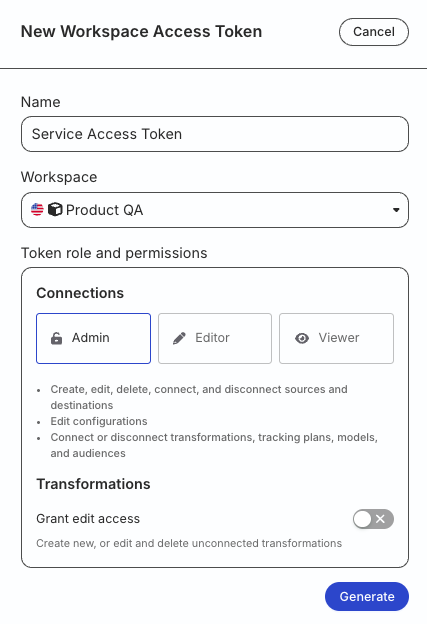
rudder-cli) installed locally, v0.25.0 or later. - A workspace-level Service Access Token with the following permissions:
| Resource | Permissions |
|---|---|
| Event Stream Sources | Create & Delete, Edit, Connect |
| Destinations | Create & Delete, Edit, Connect |
- If you’re on Free or self-hosted plan, or for testing and development only: Generate a Personal Access Token with Read-Write role
Any action authenticated by a Personal Access Token will break if the user generating the token is removed from the organization or there is a breaking change to their permissions.
Token permissions for legacy RBAC system
If you are on the legacy Permissions Management (RBAC) system, your workspace-level Service Access Token should have minimum Admin permissions.
See Generate a workspace-level Service Access Token for steps to create the token.
1. Authenticate the CLI tool
Run the following command and enter your access token when prompted:
rudder-cli auth login2. Create a project directory
mkdir ~/tutorial-connections3. Define the source and destination
Create ~/tutorial-connections/android-source.yaml:
version: rudder/v1
kind: event-stream-source
metadata:
  name: android-source
spec:
  id: my-android-source
  type: android
  name: "Android Source"
  enabled: true
Create ~/tutorial-connections/s3.yaml:
version: rudder/v1
kind: destination
metadata:
  name: s3
spec:
  id: s3
  display_name: "S3 Destination"
  type: s3
  definition_version: 1
  enabled: true
  config:
    bucket_name: "my-rudder-bucket"
    role_based_auth: true
    iam_role_arn: "arn:aws:iam::<AWS_ACCOUNT_ID>:role/<ROLE_NAME>"
See Event Stream Source YAML Reference and Destination YAML Reference for field details.
4. Define the connection
Create ~/tutorial-connections/app-connections.yaml:
version: rudder/v1
kind: event-stream-connections
metadata:
  name: app-connections
spec:
  connections:
    - id: android-to-s3
      source: "#event-stream-source:my-android-source"
      destination: "#destination:s3"
      enabled: true
The source and destination values must be valid references to resources in this project. Event Stream connections have no config field — adding one is a parse error.
5. Validate and deploy
rudder-cli validate -l ~/tutorial-connections
rudder-cli apply -l ~/tutorial-connections --dry-run
rudder-cli apply -l ~/tutorial-connections
Apply creates the source and destination first, then the connection. Removing the connection entry (or the file) and applying again disconnects the pair without deleting either endpoint.
