How to Configure Snowflake Streaming to Iceberg Tables

Configure RudderStack Snowflake Streaming to deliver events into Snowflake-managed Iceberg tables on your cloud storage.
Available Plans
  • starter
  • growth
  • enterprise

This guide lists the steps to configure your Snowflake Streaming destination so that RudderStack delivers events into Snowflake-managed Iceberg tables backed by Parquet files in your cloud storage.

Setup overview

To configure Snowflake Streaming to Iceberg tables, you will:

  1. Prepare Snowflake and your cloud storage
  2. Configure RSA key-pair authentication
  3. Create a Snowflake external volume for Iceberg data
  4. Add and configure the Snowflake Streaming destination in RudderStack
  5. Enable Iceberg and verify the integration

See Snowflake Streaming-Iceberg Integration Architecture for more information on the integration and how it works.

Prerequisites

Before you start:

  • You must have a Snowflake account that supports Iceberg tables

  • You must have an ACCOUNTADMIN or SYSADMIN, or a role with equivalent privileges to create external volumes

  • You must have access to one of the following cloud storage providers:

    • Amazon S3
    • Google Cloud Storage (GCS)
    • Azure Blob Storage
  • You must meet the core Snowflake Streaming destination prerequisites described in the Snowflake Streaming Destination guide

warning
Snowflake Streaming to Iceberg tables only supports RSA key-pair authentication — password-based authentication is not supported.

1. Create an external volume for Iceberg data

You must create a Snowflake external volume that points to your cloud storage location. Snowflake stores both the Parquet data files and Iceberg metadata files in this volume.

The following sections explain how to create an external volume (represented by the placeholder my_external_volume) for various cloud providers.

tip
Tip: Make sure to replace the placeholders with the actual values.

Verify the external volume

To verify that Snowflake can access your storage, run the following query:

SELECT SYSTEM$VERIFY_EXTERNAL_VOLUME('my_iceberg_volume');
-- Expected: {"success": true, ...}
warning
Do not proceed until this verification succeeds.

2. Configure RSA key-pair authentication

Snowflake Streaming to Iceberg tables requires RSA key-pair authentication for the Snowflake user that RudderStack uses.

success
If you have already configured key-pair authentication for the Snowflake Streaming destination, you can reuse the same user and keys.

Generate an RSA key pair

On a secure machine, generate an encrypted private key and its corresponding public key:

# Generate private key (encrypted)
openssl genrsa 2048 | openssl pkcs8 -topk8 -inform PEM -out rsa_key.p8

# Generate public key
openssl rsa -in rsa_key.p8 -pubout -out rsa_key.pub

Register the public key with your Snowflake user

In Snowflake, associate the public key with the user that RudderStack uses:

ALTER USER my_rudderstack_user
  SET RSA_PUBLIC_KEY = '<contents of rsa_key.pub without header and footer>';

Store the rsa_key.p8 file securely. You will paste its contents into the Private Key field when you configure the destination in RudderStack.

warning
If your private key is encrypted, you must also provide the Private Key Passphrase in the Snowflake Streaming destination settings. Authentication will fail if you omit the passphrase for an encrypted key.

3. Add Snowflake Streaming destination in RudderStack

  1. Create a new Snowflake Streaming destination in the RudderStack dashboard.
  2. Specify the connection settings for the Snowflake Streaming destination.
  3. Configure the Advanced settings and Consent settings as needed.

4. Enable Iceberg and specify the external volume

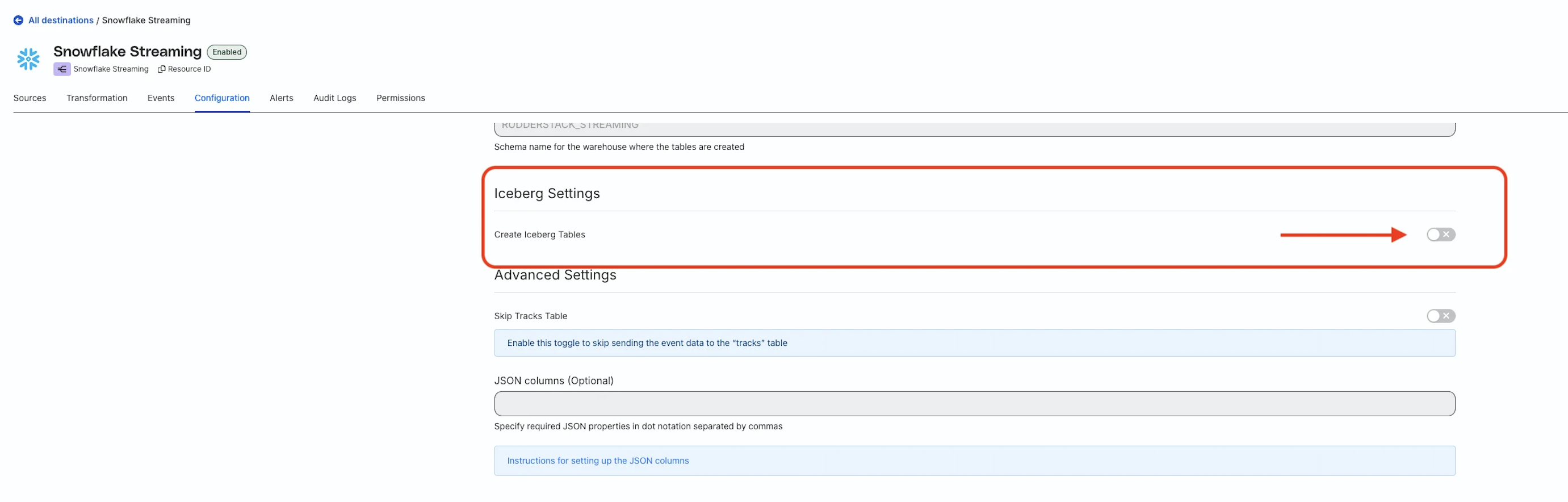
After you configure the basic connection settings, configure the following Iceberg settings:

Setting
Description
Create Iceberg TablesTurn on the toggle to enable Snowflake-managed Iceberg tables for this destination
External Volume NameSpecify the name of the external volume you created in Snowflake in Step 1
Toggle on Create Iceberg Tables in the RudderStack dashboard
warning

The Create Iceberg Tables and External Volume Name settings are immutable — you cannot change them after you create the destination.

To use a different external volume or to disable Iceberg, you will need to create a new Snowflake Streaming destination.

What happens when Iceberg is enabled

  • RudderStack sends events to Snowflake through the Snowpipe Streaming API
  • Snowflake buffers incoming rows and periodically flushes them as Parquet files into your external volume
  • Snowflake maintains the Iceberg metadata and catalog, exposing the tables as standard Snowflake-managed Iceberg tables
info

You should expect approximately 30 seconds of end-to-end latency from when RudderStack receives an event to when you can query it in Snowflake.

Snowflake uses a default flush interval (for example, through MAX_CLIENT_LAG) to balance file size and latency.

See the Snowflake Streaming-Iceberg Integration Architecture guide for more information on the integration workflow.

5. Activate and verify the integration

After completing the setup, enable the Snowflake Streaming destination to activate it and send test events from the connected source.

In Snowflake, verify that Iceberg tables are created in your target database and schema:

SHOW ICEBERG TABLES IN SCHEMA <YOUR_DATABASE>.<YOUR_SCHEMA>;

Then, run a simple query to confirm that events are present:

SELECT * FROM <YOUR_DATABASE>.<YOUR_SCHEMA>.<YOUR_TABLE>
LIMIT 10;

Finally, check your cloud storage bucket (S3, GCS, or Azure Blob) under the path configured in your external volume to confirm that Parquet data files are being written.

Review the troubleshooting section if you run into issues.

Troubleshooting

Issue
Solution
Iceberg tables are not createdIf SHOW ICEBERG TABLES returns no results:

  • Confirm that the Snowflake Streaming destination is enabled in RudderStack
  • Confirm that you sent events from the connected source after enabling the destination
  • Verify that the Database, Namespace, and Role settings point to the schema where you expect the tables to be created
  • Make sure the role has USAGE and CREATE SCHEMA privileges on the database
External volume verification failsIf SYSTEM$VERIFY_EXTERNAL_VOLUME does not return "success": true:

  • Double-check the bucket or container path you set in STORAGE_BASE_URL
  • For AWS S3:

    • Confirm that the IAM role’s trust policy uses the correct STORAGE_AWS_IAM_USER_ARN and STORAGE_AWS_EXTERNAL_ID
    • Make sure the role has the necessary S3 permissions (for example, s3:GetObject, s3:PutObject, s3:ListBucket)
  • For GCS:

    • Confirm that the Snowflake service account has the storage.objectAdmin role
  • For Azure:

    • Confirm that you granted consent using the URL from DESCRIBE EXTERNAL VOLUME
    • Make sure the Snowflake service principal has the Storage Blob Data Contributor role
Authentication errorsIf the Snowflake Streaming destination fails to connect:

  • Verify that the Account, User, and Role values match your Snowflake configuration
  • Confirm that the public key in Snowflake matches the private key you pasted into RudderStack
  • If your private key is encrypted, make sure you provided the correct Private Key Passphrase
No data appears in cloud storageIf you see tables in Snowflake but no Parquet files in your bucket:

  • Check that you are looking under the correct path in cloud storage (the path from STORAGE_BASE_URL)
  • Wait at least 30–60 seconds. Snowflake buffers rows before flushing them to Parquet files
  • Run queries in Snowflake to confirm that new rows are being written

If the issue persists, contact RudderStack Support with details of your configuration, any error messages, and the output of DESCRIBE EXTERNAL VOLUME.

Questions? We're here to help.

Join the RudderStack Slack community or email us for support