Learn how Apache Iceberg and Snowflake-managed Iceberg tables work with RudderStack Snowflake Streaming.
Available Plans
starter
growth
enterprise
5 minute read
This guide explains the architecture and working principles of the Snowflake Streaming to Iceberg tables feature.
Architecture overview
The Snowflake Streaming to Iceberg tables feature combines:
Apache Iceberg as an open table format that stores data in Parquet files on your cloud storage
Snowflake-managed Iceberg tables as the catalog and writer for those tables
RudderStack Snowflake Streaming as the real-time ingestion layer that delivers events into those tables
This architecture lets you keep your data in open formats on storage you own while still using Snowflake for low-latency ingestion and analytics.
What is Apache Iceberg?
Apache Iceberg is an open-source table format that sits between your query engines and your data files. It organizes data files (like Parquet) into queryable tables that support ACID transactions, schema and partition evolution, and time travel, while remaining engine-agnostic.
Snowflake supports different modes for Iceberg tables — RudderStack uses Snowflake-managed Iceberg tables for integrating Snowflake Streaming with Iceberg tables.
With Snowflake-managed Iceberg tables:
Snowflake acts as the Iceberg catalog and controls the metadata pointer that tracks the current table state
Data and metadata files (Parquet and manifest files) are stored in your cloud storage using a Snowflake external volume
Snowflake is the single writer — all writes go through Snowflake. Other engines get read-only access to the same data
You can use the full Snowflake feature set, including DML (INSERT, UPDATE, DELETE, MERGE), clustering, time travel (up to 90 days), replication, role-based access control, and row-level security
Automatic compaction prevents small-file buildup for streaming workloads — Snowflake merges small Parquet files into optimally sized files over time
You can optionally configure Snowflake Open Catalog to expose the tables to external engines like Spark, Trino, Athena, or Databricks for read access
What this means for you
You use Snowflake as your main query and write engine, while your underlying data is stored as open Parquet files.
Also, note that this data:
Resides in buckets that you manage in your cloud account
Can be read by other Iceberg-compatible engines without exporting or duplicating data
If you later need to plug this data into another engine, or you want direct S3/Blob access for ML pipelines, your data is already in a standard format and location.
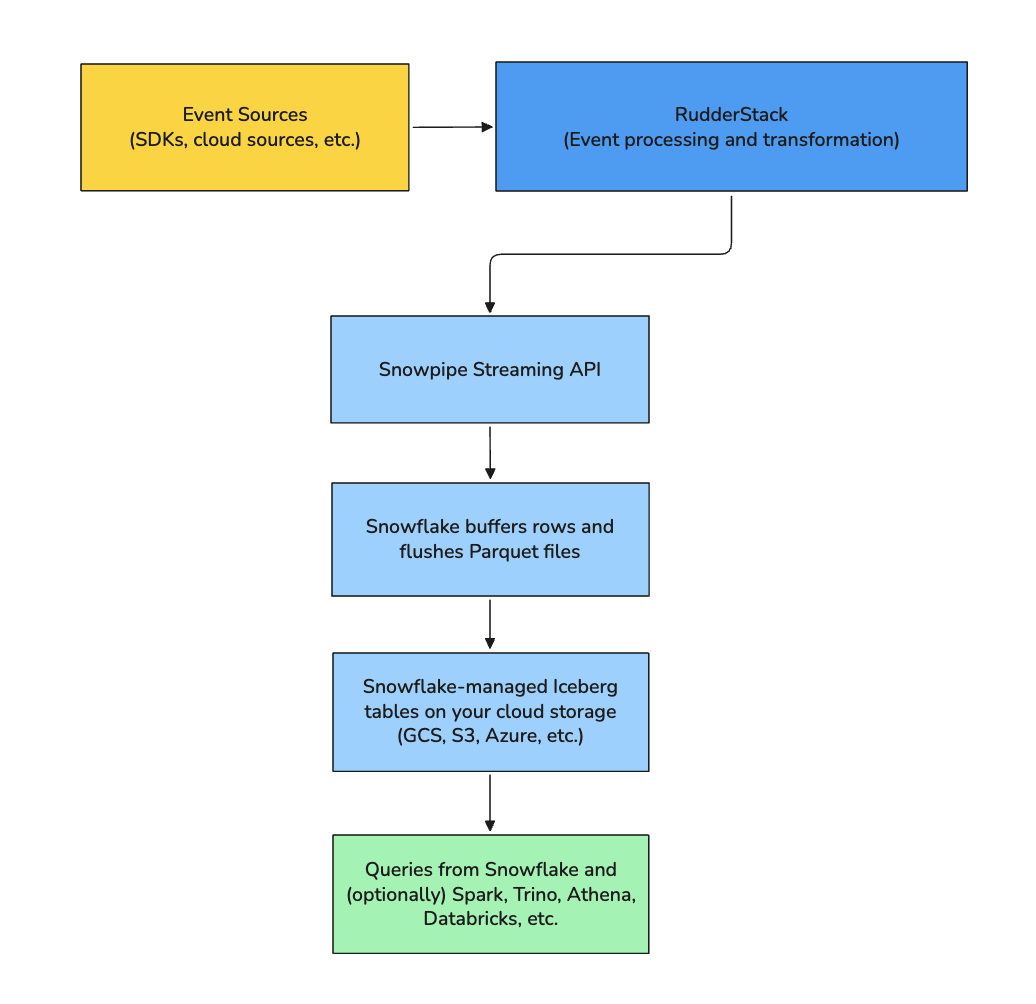
Sends events to Snowflake via the Snowpipe Streaming API
Lets Snowflake handle buffering and flushing rows to Parquet files
Relies on Snowflake to manage the Iceberg metadata and catalog
The following diagram illustrates the high-level data flow:
What RudderStack manages for you
RudderStack automates the following when you use Snowflake Streaming with Iceberg:
Table creation: RudderStack creates Iceberg tables automatically based on your event types. You do not need to pre-create tables in Snowflake.
Schema evolution: When you add new event properties, RudderStack evolves the schema and adds columns to the Iceberg tables.
Base location isolation: Each table uses its own directory path within your external volume so that table data does not collide.
Streaming-friendly layout: Snowflake manages file sizes and compaction. You do not need to manually tune file sizes for streaming ingestion.
Latency
Snowflake Streaming to Iceberg tables has an approximate 30-second latency from when RudderStack receives an event to when you can query it in Snowflake.
Snowflake controls the flush behavior using the default flush interval (for example, through MAX_CLIENT_LAG) to balance latency and Parquet file size. This interval keeps files from becoming too small while still delivering near real-time data.
Key considerations
Before using Snowflake Streaming with Iceberg, keep the following in mind:
Append-only model for some tables: Streaming into Iceberg is optimized for append-only workloads. RudderStack does not create the USERS table for this destination because it relies on MERGE operations for deduplication
Immutable Iceberg settings: The Create Iceberg Tables toggle in the destination settings and the external volume name are permanent for a destination. To change these settings, you will need to create a new Snowflake Streaming destination
Key-pair authentication only: Snowflake Streaming to Iceberg tables requires RSA key-pair authentication. Password-based authentication is not supported for this integration
Timestamp semantics: Snowflake-managed Iceberg tables use TIMESTAMP_NTZ, which does not store timezone information. If you depend on timezone-aware timestamps, you must handle conversions in your queries
JSON as strings: Current Snowflake-managed Iceberg tables do not support the VARIANT data type. RudderStack stores JSON and nested objects as VARCHAR columns that contain JSON strings. You can use PARSE_JSON in Snowflake to work with nested fields
When to use Snowflake Streaming to Iceberg tables
The Snowflake Streaming to Iceberg tables feature is a good fit in the following scenarios:
You want real-time ingestion into Snowflake but also want your data in open formats on cloud storage that you control
You plan to use multiple engines (for example, Snowflake for BI and Spark for ML) against the same underlying data
You want to avoid vendor lock-in on storage formats and keep the option to evolve your analytics stack over time
You can work with an append-only event model (without a USERS table) for this destination
This site uses cookies to improve your experience while you navigate through the website. Out of
these
cookies, the cookies that are categorized as necessary are stored on your browser as they are as
essential
for the working of basic functionalities of the website. We also use third-party cookies that
help
us
analyze and understand how you use this website. These cookies will be stored in your browser
only
with
your
consent. You also have the option to opt-out of these cookies. But opting out of some of these
cookies
may
have an effect on your browsing experience.
Necessary
Always Enabled
Necessary cookies are absolutely essential for the website to function properly. This
category only includes cookies that ensures basic functionalities and security
features of the website. These cookies do not store any personal information.
This site uses cookies to improve your experience. If you want to
learn more about cookies and why we use them, visit our cookie
policy. We'll assume you're ok with this, but you can opt-out if you wish Cookie Settings.