JSON Column Support
8 minute read
This guide shows you how to use the JSON column feature while sending events to your warehouse destinations.
Overview
With RudderStack’s JSON column feature, you can:
- Ingest semi-structured event data not defined by a fixed schema.
- Directly store a nested event payload in your warehouse columns without worrying about the length limit.
This JSON column feature is supported for all event types (identify, track, page, screen, group, alias) and their associated attributes/properties (context, traits, properties, etc.). You can use it to define JSON columns in any of the following scenarios:
JSON column support is only applicable for new columns — you cannot alter or convert existing warehouse columns to JSON columns using this feature.
Supported destinations
RudderStack supports the JSON column feature for the below destinations:
| Destination | Name in the integrations object |
|---|---|
| Amazon Redshift | RS |
| BigQuery Stream (All Events) | BQSTREAM_ALL_EVENTS |
| Google BigQuery | BQ |
| Google Cloud Storage Data Lake | GCS_DATALAKE |
| PostgreSQL | POSTGRES |
| Snowflake | SNOWFLAKE |
| ClickHouse | CLICKHOUSE |
| Snowflake Streaming | SNOWPIPE_STREAMING |
For the Google Cloud Storage Data Lake destination, properties declared injsonPathsare stored as strings in the resulting Parquet files. Any nested property you do not declare injsonPathsis flattened into individual columns.
How to use the JSON column feature
You can use the JSON column feature in any of the following scenarios:
1. At the event level
Include the exact path from the event payload in your event code using the SDK’s integrations parameter.
Note that your SDK must be configured to load the integration object. See the following guides for more information:
- JavaScript SDK (
integrationsobject) - Android (Kotlin)
- Android (Java) — Legacy
- iOS (Swift)
- iOS (Obj-C) — Legacy
An example that defines JSON columns for the Snowflake warehouse using the JavaScript SDK is shown:
"integrations": {
  "SNOWFLAKE": { // Use RS, BQ, or POSTGRES for other warehouses
    "options": {
      "jsonPaths": ["track.properties.testMap.nestedMap", "track.context.ctestMap.cnestedMap"]
    }
  }
}
See Important rules for the jsonPaths parameter section for more information on specifying paths for properties to be set as JSON columns.
2. In transformations
You can apply JSON columns through transformations that override event-level declarations:
For example, the following transformation applies the JSON column to the product_clicked type of track events coming from a particular source:
export function transformEvent(event, metadata) {
  const meta = metadata(event);
  if (event.event === 'product_clicked' && meta.sourceId === "source_id" && meta.destinationType === "SNOWFLAKE") { // ex: BQ, POSTGRES, RS
    if (!event.integrations) event.integrations = {};
    event.integrations["SNOWFLAKE"] = {
      options: {
        jsonPaths: ["track.properties.testMap.nestedMap", "track.context.ctestMap.cnestedMap"]
      }
    }
  }
  return event;
}
In the above transformation, nestedMap and cnestedMap are defined as JSON columns by adding track.properties.testMap.nestedMap and track.context.ctestMap.cnestedMap in the jsonPaths list.
See Important rules for the jsonPaths parameter section for more information on specifying paths for properties to be set as JSON columns.
3. While configuring a warehouse destination
You can also configure JSON columns in the RudderStack dashboard by entering comma-separated paths in the JSON columns dashboard setting.
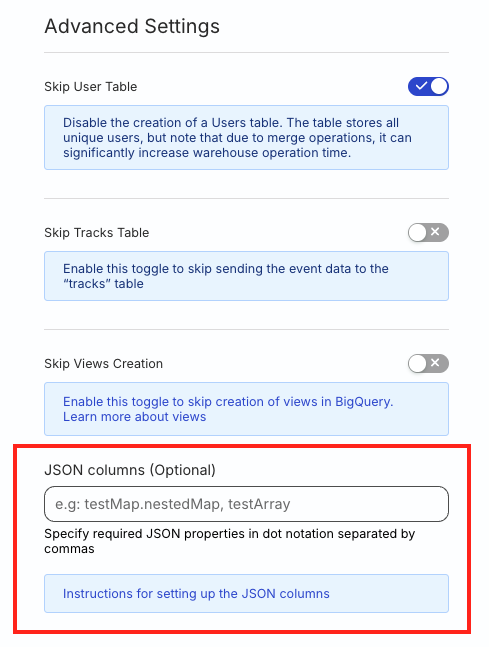
Note the following:
- Make sure to specify the full path of the JSON properties in this setting, including the event’s type.
- This setting applies to all the events (of the specified event type) sent to the warehouse destination.
Examples
Click the below examples for more information on how to declare the JSON paths for different event types.
Track events
If your track event payload looks as follows:
{
  "type": "track",
  "properties": {
    "testMap": {
      "nestedMap": {
          "dynamic_property_1": "value_1",
          "dynamic_property_2": "value_2"
      }
    }
  }
}
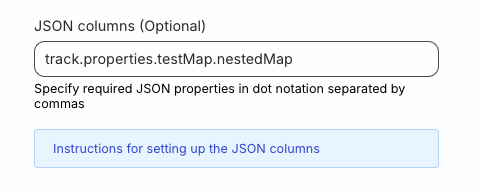
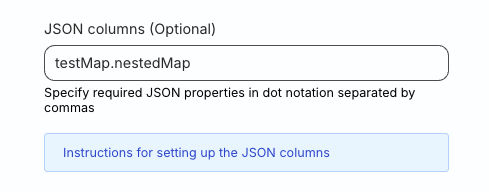
Then, specify the JSON path for the nestedMap property in the dashboard setting as:
Option 1: Specify with event type, as track.properties.testMap.nestedMap:
Option 2: Shorthand (applies to track.properties object only), as testMap.nestedMap:
Other events
Consider the following identify event payload:
{
  "type": "identify",
  "context": {
    "testMap": {
      "nestedMap": {
          "dynamic_property_1": "value_1",
          "dynamic_property_2": "value_2"
      }
    }
  }
}
Then, specify the JSON path as identify.context.testMap.nestedMap, as shown:
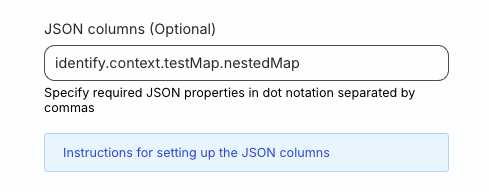
Specifying justtestMap.nestedMapwould fail here because it would only apply totrackevents by default and not theidentifyevents.
Important rules for jsonPaths
Note the following critical requirements for using the JSON column feature correctly:
Default behavior without event type
If you do not specify the full property path that includes the event type, for example, if you specify just testMap.nestedMap, then RudderStack applies the setting only to the properties object of track events.
Specifying event type
- When you include the full path including the event type, for example,
identify.context.testMap.nestedMap, RudderStack applies the setting to the specified event object (contextin this case). - The objects must be present within the event—not at the top level.
Minimum path depth
A jsonPaths entry must name a property nested inside one of the event’s top-level objects (properties, traits, context, or userProperties). You cannot declare one of those objects itself as a JSON column.
A path that includes the event type needs at least three parts: <event type>.<object>.<property>.
| Path | Result |
|---|---|
identify.traits | No effect. Names the traits object itself. |
track.properties | No effect. Names the properties object itself. |
identify.traits.address | Stores traits.address as a JSON column. |
identify.context.traits | Stores context.traits as a JSON column, as traits is nested inside context. |
A path that does not meet this requirement is ignored silently — no error is returned, and the properties are flattened into individual columns as usual. If a JSON column does not appear in your warehouse, check the path depth first.
This feature applies to nested objects only. A property holding a simple value, for example traits.firstname, has nothing to flatten, so declaring it in jsonPaths does not change the resulting column.
Exact path matching
The property paths specified in the jsonPaths parameter must exist in the event in the exact format.
See the Examples section for more information.
Examples
Click the below examples for more information on how to declare the JSON paths for different event types.
Track events
For the following track event payload:
{
  "type": "track",
  "properties": {
    "testMap": {
      "nestedMap": {
          "dynamic_property_1": "value_1",
          "dynamic_property_2": "value_2"
      }
    }
  }
}
Option 1: Specify with event type:
"integrations": {
  "All": true,
  "SNOWFLAKE": { // RS for Redshift, BQ for BigQuery, POSTGRES for PostgreSQL.
    "options": {
      "jsonPaths": ["track.properties.testMap.nestedMap"]
    }
  }
}
Option 2: Shorthand (applies to track.properties object only)
"integrations": {
  "All": true,
  "SNOWFLAKE": { // RS for Redshift, BQ for BigQuery, POSTGRES for PostgreSQL.
    "options": {
      "jsonPaths": ["testMap.nestedMap"]
    }
  }
}
Other events
Consider the following identify event payload:
{
  "type": "identify",
  "context": {
    "testMap": {
      "nestedMap": {
          "dynamic_property_1": "value_1",
          "dynamic_property_2": "value_2"
      }
    }
  }
}
The jsonPath declaration must be as follows:
"integrations": {
  "All": true,
  "SNOWFLAKE": { // RS for Redshift, BQ for BigQuery, POSTGRES for PostgreSQL.
    "options": {
      "jsonPaths": ["identify.context.testMap.nestedMap"]
    }
  }
}
Using justtestMap.nestedMapwould fail here because it would only apply totrackevents by default and not theidentifyevents.
Warehouse-specific data types
See the following guides for more information on working with semi-structured data in different warehouses and their limitations:
Warehouse | Data type | Reference |
|---|---|---|
| Redshift | SUPER | Documentation |
| BigQuery | STRING See more information on how RudderStack treats the JSON columns as strings in this FAQ. | Documentation |
| PostgreSQL | JSONB | Documentation |
| Snowflake | VARIANT | Documentation |
| ClickHouse | JSON Requires ClickHouse version 25.3 or later. See the ClickHouse Destination guide. | Documentation |
FAQ
Which events are supported in the JSON column feature?
The JSON column feature supports the following event types:
Which data types are supported in the JSON column feature?
The JSON data type includes String, Integers, Float, Arrays, Booleans, and Maps.
How can I use the JSON column feature in BigQuery?
BigQuery stores JSON as strings. You can query this data using BigQuery’s JSON functions.
See the BigQuery documentation for more information.
How does RudderStack determine a column’s data type?
RudderStack determines a column’s data type based on the first event value during the first sync.
Why aren’t my existing columns converted to JSON after enabling this feature?
The JSON column feature only applies to new columns. It does not alter or convert columns that already exist in your warehouse schema. RudderStack treats the warehouse schema as the source of truth and does not modify existing column types automatically to avoid any unintended impact on your data pipeline.
For example, if a column like cart_viewed already exists in your table, enabling the JSON column feature does not change its data type — it remains as-is.
Can I use the JSON column feature to add event properties to the tracks table?
No — the tracks table only stores contextual information (contextual fields, IDs, timestamps, etc.). Event-specific properties set via the properties key are stored in their dedicated event name tables (for example, if your track event is called button_clicked, the properties are stored in the button_clicked table). The JSON column feature does not change this behavior.
If you need specific event properties available in the tracks table for cross-event analysis, consider the following alternatives:
- Use a transformation to move the required properties into the
contextobject of your events - Create a SQL view in your warehouse that joins the
trackstable with your event-specific tables on the relevant keys.
