Spotify Pixel
8 minute read
Spotify Pixel is a powerful ad tracking and analytics tool. It is a piece of JavaScript code that you can integrate in your website and analyze the actions the users take after hearing your ads.
Setup
- In your RudderStack dashboard, go to Directory > Destinations > Cloud Destinations and search for Spotify Pixel.
- Connect your source and click Continue.
Connection settings
Configure the following settings to set up Spotify Pixel as a destination in RudderStack:
- Name: Assign a name to uniquely identify the destination.
- Pixel ID: Enter your Spotify Pixel ID. To obtain this ID, log in to your Spotify Pixel dashboard and go to Manage > Your Pixels.
Connection mode
| Destination Information | |||
|---|---|---|---|
| |||


Configuration settings
After completing the initial setup, configure the following settings to correctly receive your data in Spotify Pixel:
- Spotify Pixel Alias Event Setting: Turn on this setting to enhance attribution by passing a Spotify Pixel
aliasevent along with every conversion event. - Client-side Events Filtering: This setting lets you specify which events should be blocked or allowed to flow through to Spotify Pixel. For more information on this setting, see Client-side Events Filtering.
- Consent management settings: Configure the consent management settings for the specified source by choosing the Consent management provider from the dropdown and entering the relevant consent category IDs. See Consent Management in RudderStack for more information on this feature.
Mappings
- RudderStack to Spotify Pixel Event Mappings: Use this setting to map your RudderStack events to the standard Spotify Pixel events. You can map multiple Spotify Pixel events to a single RudderStack event and vice versa.
Track
You can use the RudderStack track event to track user events along with any associated properties and send this information to Spotify Pixel.
RudderStack supports the following standard Spotify Pixel events:
| Spotify Pixel event | Event name | Description |
|---|---|---|
| Lead | lead | User completed an action like form submission, free trial signup, button click, etc. |
| Product | product | User viewed a product. |
| Add to cart | addtocart | User added a product to cart. |
| Check out | checkout | User initiated a checkout. |
| Purchase | purchase | User purchased a product. |
You can map your RudderStack events to the above Spotify Pixel events in the dashboard using the RudderStack to Spotify Pixel Event Mappings setting:
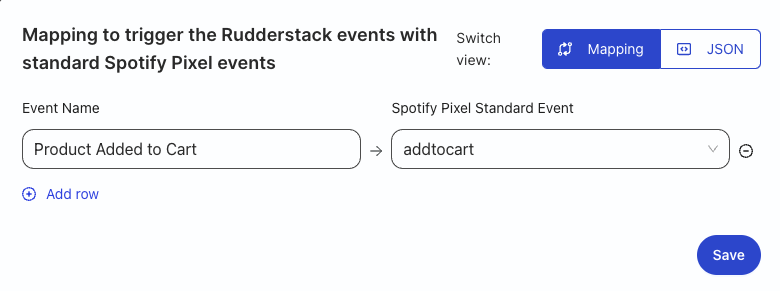
In the above example, RudderStack maps the event Product Added to Cart with the Spotify Pixel event addtocart.
By default, RudderStack maps the following events to the Spotify Pixel events:
| RudderStack event | Spotify Pixel event name |
|---|---|
Signed Up | lead |
Product Viewed | product |
Product Added | addtocart |
Checkout Started | checkout |
Order Completed | purchase |
RudderStack prioritizes the custom event mappings you set in the dashboard over the above standard mappings.
Lead
A sample track call mapped to a Spotify Pixel lead event is shown below:
rudderanalytics.track("Signed Up", {
  price: 500,
  currency: "USD",
  type: "paper",
  category: "Clothes",
});
The following table lists the mapping between the optional RudderStack event properties and the Spotify Pixel attributes:
| RudderStack property | Spotify Pixel property |
|---|---|
properties.price | value |
properties.currency | currency |
properties.type | type |
properties.category | category |
Product
A sample track call mapped to a Spotify Pixel product event is shown below:
rudderanalytics.track("product", {
  price: 1300,
  currency: "USD",
  product_id: "1234000",
  name: "goldenTest",
  product_type: "Card",
  brand: "testVendor",
});
The following table lists the mapping between the optional RudderStack event properties and the Spotify Pixel attributes:
| RudderStack property | Spotify Pixel property |
|---|---|
properties.price | value |
properties.currency | currency |
properties.product_id | product_id |
properties.name | product_name |
properties.product_type | product_type |
properties.brand | product_vendor |
Sending multiple product details
If you send the product details as an array in the track event, RudderStack fetches the details from each product item and calls the Spotify Pixel product event for each item. For example, consider the following track event:
rudderanalytics.track("Product", {
  name: 10.0,
  currency: "INR",
  quantity: 2,
  products: [{
      product_id: "S1100",
      name: "Product 1",
      product_type: "Card",
      brand: "Some Vendor",
    },
    {
      product_id: "S1200",
      name: "Product 2",
      product_type: "Card",
      brand: "Some Vendor 2",
    },
  ],
});
In this case, RudderStack makes two track calls to Spotify Pixel with the individual product details:
// Call 1

rudderanalytics.track("Product", {
  price: 10.0,
  quantity: 2,
  currency: "INR",
  product_id: "S1100",
  name: "Product 1",
  product_type: "Card",
  brand: "Some Vendor",
});

// Call 2

rudderanalytics.track("Product", {
  price: 10.0,
  quantity: 2,
  currency: "INR",
  product_id: "S1200",
  name: "Product 2",
  product_type: "Card",
  brand: "Some Vendor 2",
});
Add to Cart
A sample track call mapped to the Spotify Pixel addtocart event is shown below:
rudderanalytics.track("Add to Cart", {
  price: 23.2,
  currency: "USD",
  product_id: "1234000",
  name: "goldenTest",
  product_type: "Card",
  brand: "testVendor",
});
The following table lists the mapping between the optional RudderStack event properties and the Spotify Pixel attributes:
| RudderStack property | Spotify Pixel property |
|---|---|
properties.price | value |
properties.currency | currency |
properties.product_id | product_id |
properties.name | product_name |
properties.product_type | product_type |
properties.brand | product_vendor |
properties.quantity | quantity |
properties.variant_id | variant_id |
properties.variant_name | variant_name |
Similar to the Product event, if you send the product details as an array in the track event, RudderStack fetches the details from each product item and calls the Spotify Pixel addtocart event for each item.
Check out
A sample track call mapped to a Spotify Pixel checkout event is shown below:
rudderanalytics.track("checkout", {
  price: 30.0,
  currency: "USD",
  discount_code: "PODCAST_CODE_TEST",
  quantity: 3,
  line_items: [{
    price: 21.2,
    quantity: 1,
    product_id: "1234000",
    product_name: "goldenTest",
    product_type: "Card",
    product_vendor: "testVendor",
    variant_id: "11112",
    variant_name: "Test",
  }],
});
The following table lists the mapping between the optional RudderStack event properties and the Spotify Pixel attributes:
| RudderStack property | Spotify Pixel property |
|---|---|
properties.price | value |
properties.currency | currency |
properties.quantity | quantity |
properties.variant_id | variant_id |
properties.discount_code | discount_code |
properties.line_items | line_items |
If you do not pass theline_itemsobject, then RudderStack fetches theline_itemsfrom the event’s properties and maps them to Spotify Pixel’sline_itemsfield.
Passing multiple product items
If you pass multiple product items as an array, then RudderStack fetches the individual product details and internally builds the line_items object before passing it on to Spotify Pixel via the checkout event, as demonstrated in the following example:
Consider the following track event:
rudderanalytics.track("Checkout", {
  price: 10.0,
  currency: "USD",
  quantity: 2,
  discount_code: 'POD_CODE',
  products: [{
      price: 21.6,
      quantity: 12,
      product_id: "SKU123",
      name: "Card Game",
      product_type: "Card",
      brand: "Some Vendor",
      variant_id: 'test123',
      variant_name: 'Test 123',
    },
    {
      price: 42.4,
      quantity: 2,
      product_id: "SKU124",
      name: "Floppy Disk",
      product_type: "Card123",
      brand: "Some Vendor",
      variant_id: 'test124',
      variant_name: 'Test 124',
    },
  ],
});
RudderStack internally collates all product information and builds the line_items array before sending it to Spotify Pixel:
pdst('checkout', {
  price: 10.0,
  currency: 'USD',
  discount_code: 'POD_CODE',
  quantity: 2,
  line_items: [{
      price: 21.6,
      quantity: 12,
      product_id: 'SKU123',
      product_name: 'Card Game',
      product_type: 'Card',
      product_vendor: 'Some Vendor',
      variant_id: 'test123',
      variant_name: 'Test 123',
    },
    {
      price: 42.4,
      quantity: 2,
      product_id: 'SKU124',
      product_name: 'Floppy Disk',
      product_type: 'Card123',
      product_vendor: 'Some Vendor',
      variant_id: 'test124',
      variant_name: 'Test 124',
    },
  ],
});
Purchase
A sample track call mapped to a Spotify Pixel purchase event is shown below:
rudderanalytics.track("purchase", {
  price: 1000,
  currency: "rupee",
  discount_code: "PODCAST_CODE",
  order_id: "12322323232",
  is_new_customer: true,
  quantity: 3,
  line_items: [{
    price: 21.2,
    quantity: 1,
    product_id: "1234000",
    product_name: "goldenTest",
    product_type: "Card",
    product_vendor: "testVendor",
    variant_id: "11112222",
    variant_name: "testTest",
  }],
});
The following table lists the mapping between the optional RudderStack event properties and the Spotify Pixel attributes:
| RudderStack property | Spotify Pixel property |
|---|---|
properties.totalproperties.revenue | value |
properties.currency | currency |
properties.discount_code | discount_code |
properties.line_items | line_items |
properties.order_id | order_id |
properties.is_new_customer | is_new_customer |
properties.quantity | quantity |
Similar to the Check out event, if you pass multiple product items as an array, then RudderStack fetches the individual product details and internally builds the line_items object before passing it on to Spotify Pixel via the purchase event.
Passing hashed internal ID to Spotify Pixel
If you turn on Spotify Pixel Alias Event Setting in the RudderStack dashboard and Alias events are configured for your Spotify Pixel, then RudderStack triggers a Spotify Pixel alias event capturing the hashed internal user ID along with every conversion event.
Note that:
- The Spotify Pixel
aliasevent matches the Spotify Pixel internal cookie ID with your hashed internal user IDs.- RudderStack uses SHA-256 encryption for hashing your
userId.
To enable this feature, follow these steps:
- Activate Alias Events for Spotify Pixel from your dashboard:
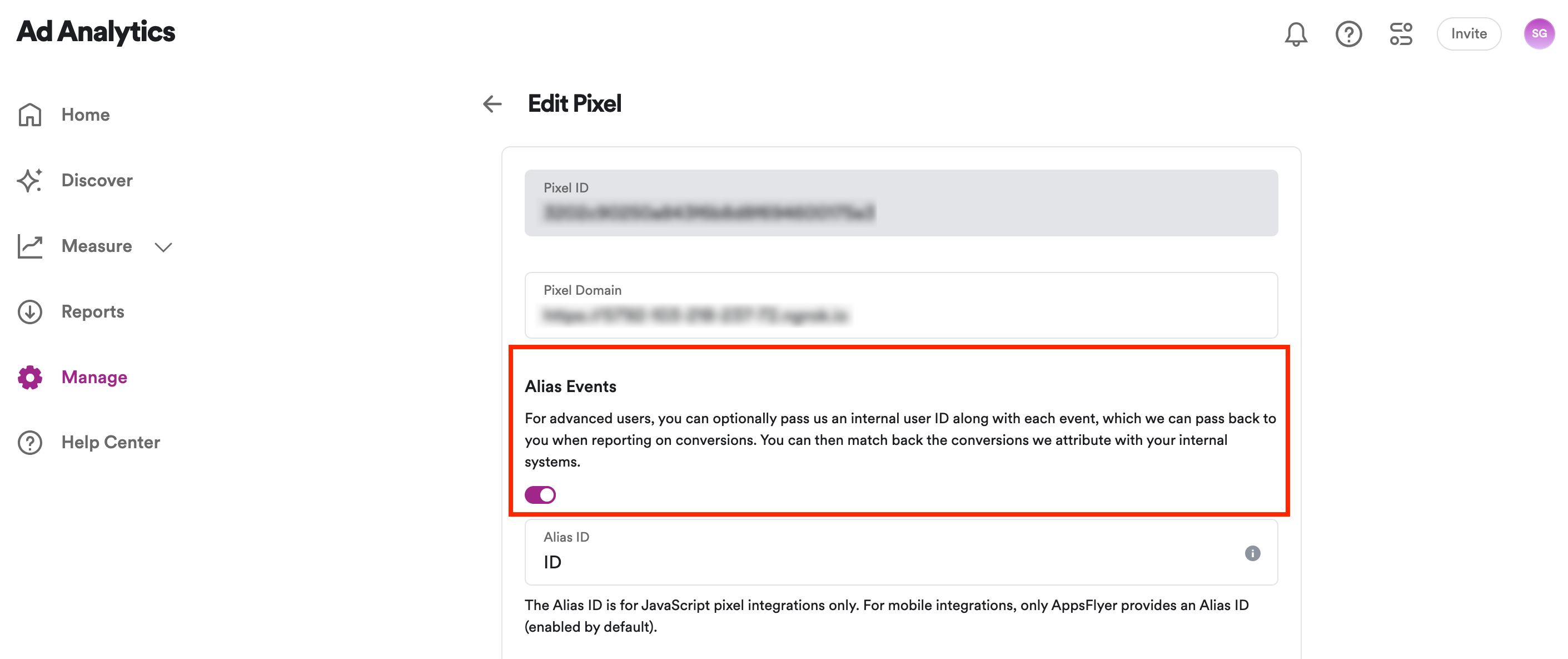
- Enable the Spotify Pixel Alias Event Setting setting in the RudderStack dashboard.
RudderStack automatically calls the Spotify Pixel alias event by mapping the following internal RudderStack IDs to Spotify Pixel:
| RudderStack attribute | Spotify Pixel attribute |
|---|---|
userIdcontext.traits.userIdcontext.traits.id | id |
Suppose you send the following track call named testEvent (mapped to Spotify Pixel’s lead event) with the Pass Internal ID enabled:
rudderanalytics.track("testEvent", {
  price: 100,
  currency: "euro",
  type: "paper",
});
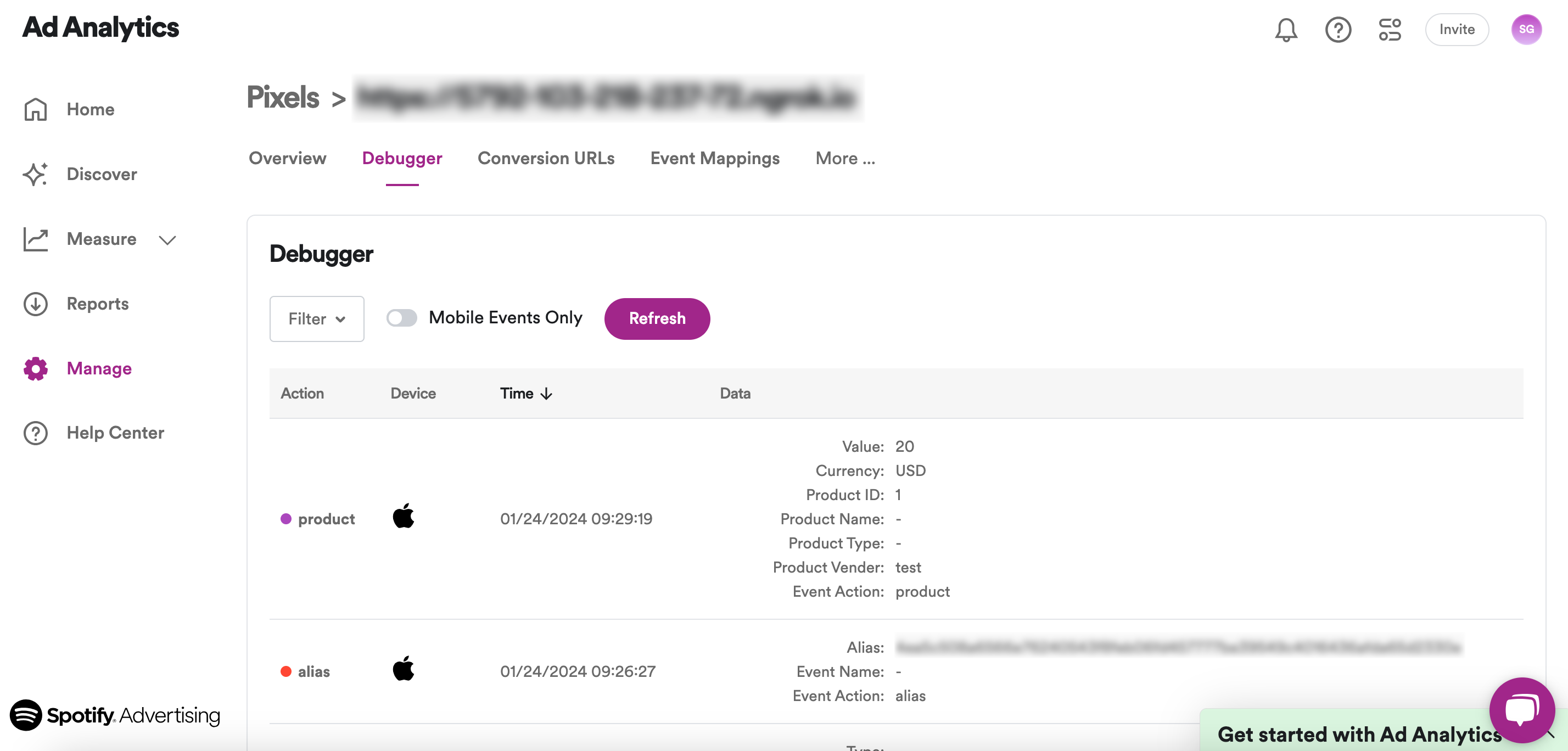
RudderStack then makes the following two calls to Spotify Pixel:
Page
You can use the page call to record your website’s page views with any additional information about the viewed page.
You can also set custom attributes inside thepageevent properties.
RudderStack sends the page calls to Spotify Pixel as a view event.
A sample page call is as shown:
rudderanalytics.page("Home", "Clothes", {
  path: "/best-seller/1",
  referrer: "https://www.google.com/search?q=estore+bestseller",
  url: "https://www.estore.com/best-seller/1"
});
Supported property mappings
RudderStack maps the following optional properties with the Spotify Pixel properties:
| RudderStack property | Spotify Pixel property |
|---|---|
context.page.referrer | referrer |
context.page.url | url |
FAQ
Where can I find the Spotify Pixel ID?
- Log in to your Spotify Pixel dashboard.
- From the left sidebar, go to Manage > Your Pixels. You can find your Pixel ID under Your Pixels.
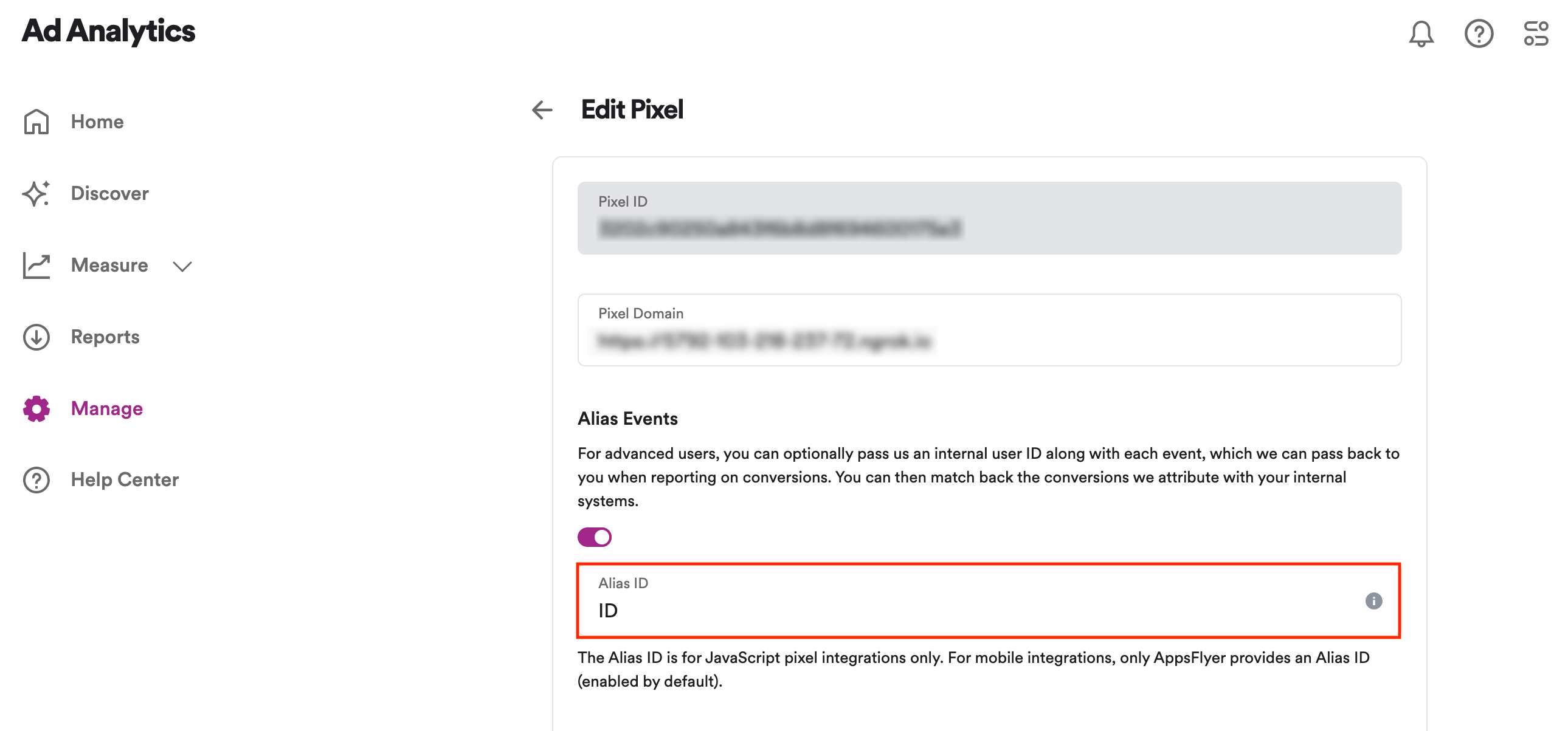
Where can I find the Spotify Pixel alias ID for alias events?
- Log in to your Spotify Pixel dashboard.
- From the left sidebar, go to Manage > Your Pixels. Then, click the edit button next to your Spotify pixel.
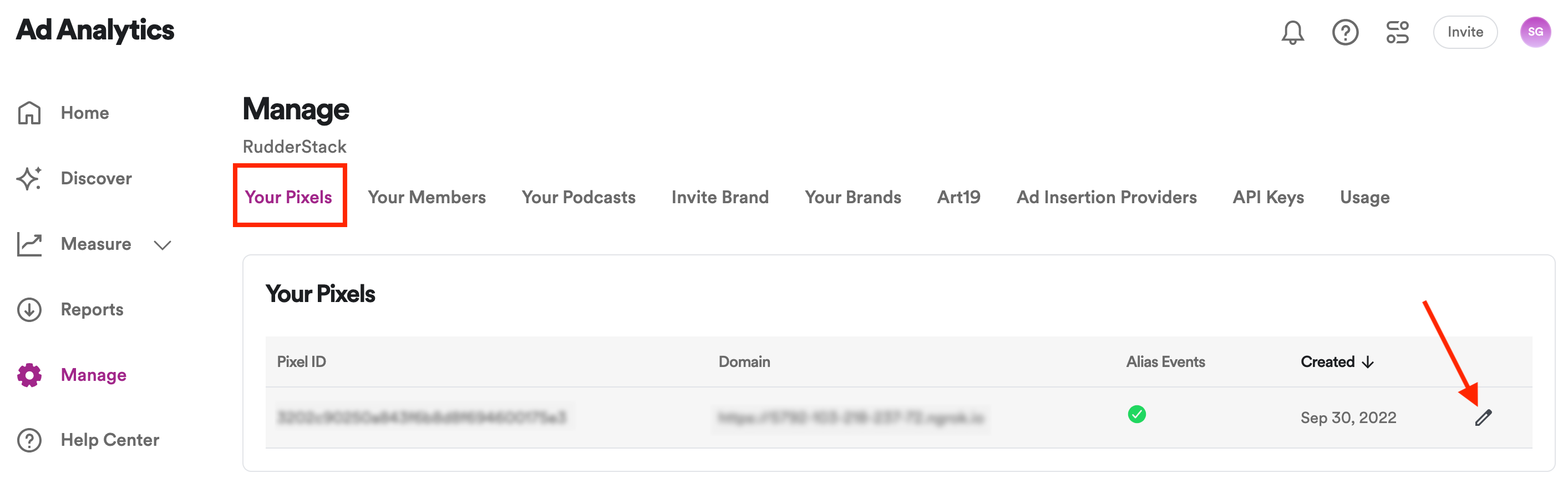
The Alias ID is listed under Alias Events:
Where can I view the events sent to Spotify Pixel?
- Log in to your Spotify Pixel dashboard.
- From the left sidebar, go to Manage > Your Pixels.
- Click your pixel and go to the Debugger tab.
You can filter the events by name or platform as per your requirement.
