RudderStack-Singular Integration Setup Approaches
3 minute read
This guide explains the different approaches for setting up the Singular integration with RudderStack. It also provides recommendations to help you select the most suitable configuration.
Setup overview
The following table summarizes the available integration setup approaches to help you identify the right one for your use case:
| Aspect | Singular SDK + cloud mode | RudderStack cloud mode only | RudderStack device mode |
|---|---|---|---|
| Singular SDK usage | Initialized separately, outside of RudderStack | Not used | Wrapped and initialized by RudderStack |
| Session management | Singular SDK (automatic) — you must NOT configure the Session Event Name connection setting | Self-managed — you must configure the Session Event Name connection setting | Singular SDK (automatic) |
| Identifier used | Singular device ID (SDID), if available in the events. Otherwise, platform-specific identifiers | Singular device ID (SDID), if available in the events. Otherwise, platform-specific identifiers | Singular SDK manages this internally |
| Best for | Using Singular SDK for session tracking while sending events via RudderStack | Sending all events (including sessions) through RudderStack | Letting the Singular SDK handle all event tracking automatically |
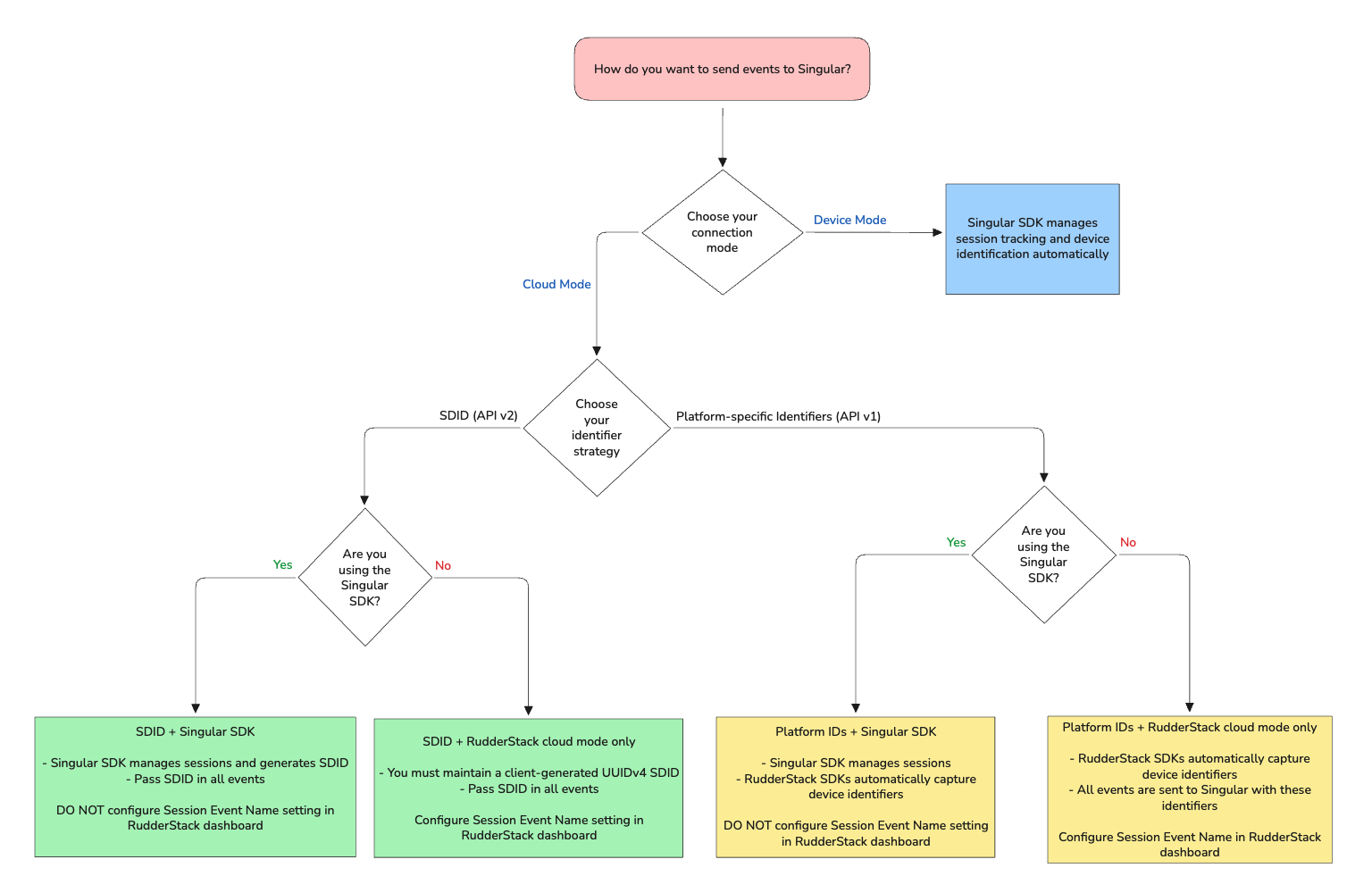
The following flowchart summarizes all the integration setup approaches covered in this guide and helps you choose the most suitable approach for your use case:
1. Singular SDK with RudderStack cloud mode
In this approach, you initialize the Singular SDK separately (outside of RudderStack) in your app. The Singular SDK manages session tracking automatically.
Important consideration
Do not configure the Session Event Name in the connection settings while setting up the Singular destination in RudderStack. As the Singular SDK already manages session events, configuring this setting will result in duplicate session events.
Do not explicitly send the following events via RudderStack:
Application InstalledApplication OpenedApplication Updated
You then send all other events to Singular via RudderStack in cloud mode (either from the client-side or the server-side SDKs). The identifier you choose determines which Singular API version RudderStack uses:
Singular device ID (SDID)
- The Singular SDK generates the Singular Device ID (SDID)
- Pass the Singular device ID (SDID) in all custom events instrumented with RudderStack
- RudderStack uses Singular’s API v2 and ignores any platform-specific identifiers like
idfa,andi,idfv, andaifapresent in the event properties
Platform-specific identifiers
- RudderStack’s SDKs automatically retrieve platform-specific device identifiers (like
idfa,andi,idfv, andaifa) and pass them in all events - RudderStack uses Singular’s API v1 to send the events
2. RudderStack cloud mode only (no Singular SDK)
In this approach, you don’t use the Singular SDK at all. All events (including session events) are sent to Singular via RudderStack in cloud mode.
Important consideration
Since the Singular SDK is not managing sessions, you must configure the Session Event Name in the connection settings so RudderStack can send session events to Singular on your behalf.
The identifier you choose determines which Singular API version RudderStack uses:
Singular device ID (SDID)
- It is your responsibility to maintain a Singular device ID (SDID)(client-generated UUIDv4) for the lifetime of the app install
- Pass the Singular device ID (SDID) in all custom events instrumented via RudderStack
- RudderStack uses Singular’s API v2 and ignores any platform-specific identifiers like
idfa,andi,idfv, andaifapresent in the event properties
Platform-specific identifiers
- RudderStack’s SDKs automatically retrieve platform-specific device identifiers (like
idfa,andi,idfv, andaifa) - All events (including session events) are sent to Singular with these identifiers
- RudderStack uses Singular’s API v1 to send the events
3. RudderStack device mode
When sending events to Singular in device mode, RudderStack automatically wraps and initializes the Singular SDK.
The Singular SDK manages device identification and event tracking internally — so no session events are sent via RudderStack.
Next steps
See the Singular Destination Setup Guide for more information on setting up the Singular destination in RudderStack
