The different integration approaches available for the RudderStack-Singular integration.
3 minute read
This guide explains the different approaches for setting up the Singular integration with RudderStack. It also provides recommendations to help you select the most suitable configuration.
Setup overview
The following table summarizes the available integration setup approaches to help you identify the right one for your use case:
Singular SDK (automatic) — you must NOT configure the Session Event Nameconnection setting
Self-managed — you must configure the Session Event Nameconnection setting
Singular SDK (automatic)
Identifier used
Singular device ID (SDID), if available in the events. Otherwise, platform-specific identifiers
Singular device ID (SDID), if available in the events. Otherwise, platform-specific identifiers
Singular SDK manages this internally
Best for
Using Singular SDK for session tracking while sending events via RudderStack
Sending all events (including sessions) through RudderStack
Letting the Singular SDK handle all event tracking automatically
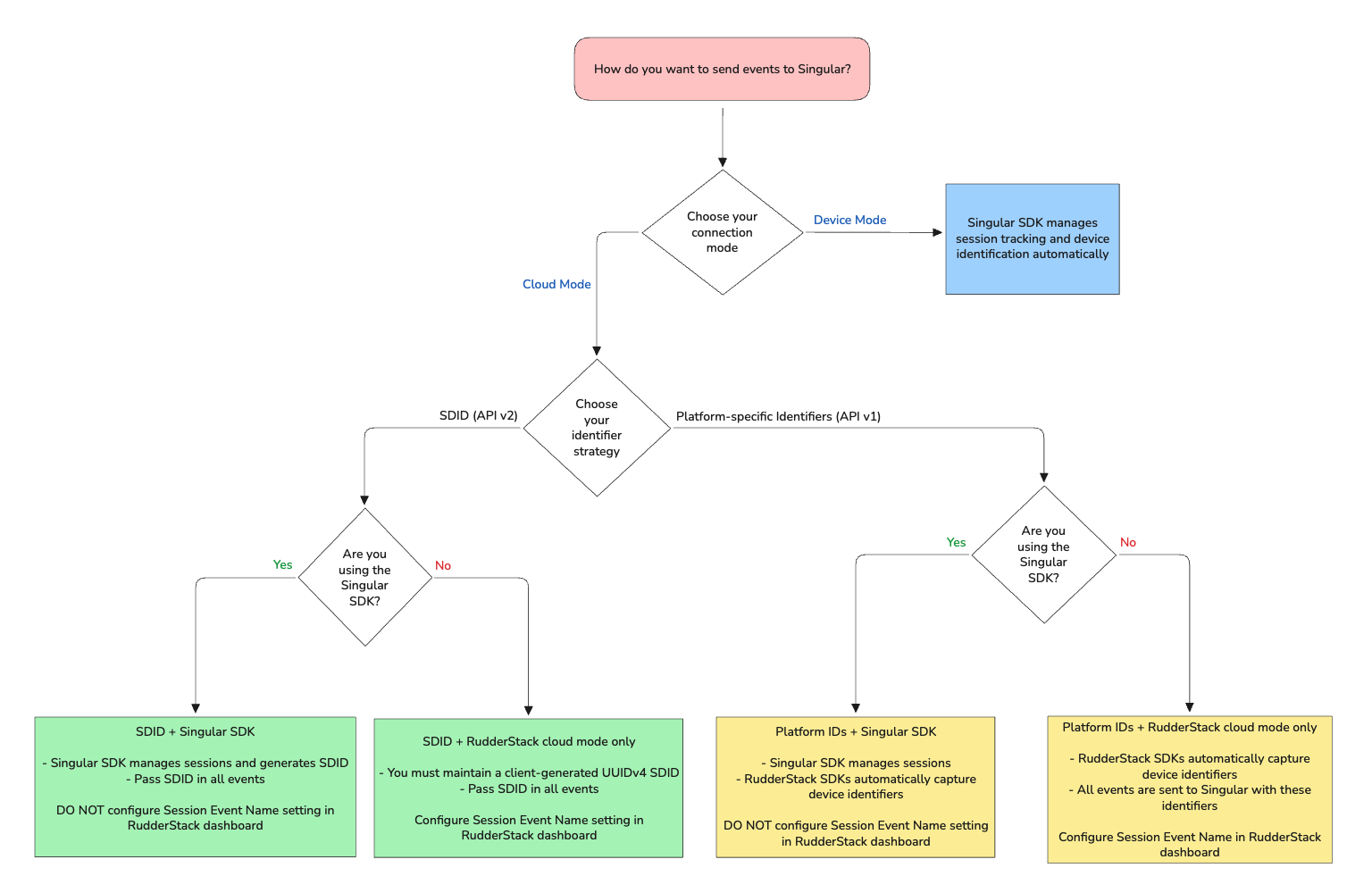
The following flowchart summarizes all the integration setup approaches covered in this guide and helps you choose the most suitable approach for your use case:
1. Singular SDK with RudderStack cloud mode
In this approach, you initialize the Singular SDK separately (outside of RudderStack) in your app. The Singular SDK manages session tracking automatically.
Important consideration
Do not configure the Session Event Name in the connection settings while setting up the Singular destination in RudderStack. As the Singular SDK already manages session events, configuring this setting will result in duplicate session events.
Do not explicitly send the following events via RudderStack:
Application Installed
Application Opened
Application Updated
You then send all other events to Singular via RudderStack in cloud mode (either from the client-side or the server-side SDKs). The identifier you choose determines which Singular API version RudderStack uses:
In this approach, you don’t use the Singular SDK at all. All events (including session events) are sent to Singular via RudderStack in cloud mode.
Important consideration
Since the Singular SDK is not managing sessions, you must configure the Session Event Name in the connection settings so RudderStack can send session events to Singular on your behalf.
The identifier you choose determines which Singular API version RudderStack uses:
Singular device ID (SDID)
It is your responsibility to maintain a Singular device ID (SDID)(client-generated UUIDv4) for the lifetime of the app install
This site uses cookies to improve your experience while you navigate through the website. Out of
these
cookies, the cookies that are categorized as necessary are stored on your browser as they are as
essential
for the working of basic functionalities of the website. We also use third-party cookies that
help
us
analyze and understand how you use this website. These cookies will be stored in your browser
only
with
your
consent. You also have the option to opt-out of these cookies. But opting out of some of these
cookies
may
have an effect on your browsing experience.
Necessary
Always Enabled
Necessary cookies are absolutely essential for the website to function properly. This
category only includes cookies that ensures basic functionalities and security
features of the website. These cookies do not store any personal information.
This site uses cookies to improve your experience. If you want to
learn more about cookies and why we use them, visit our cookie
policy. We'll assume you're ok with this, but you can opt-out if you wish Cookie Settings.