PostScript Destination Setup Guide Beta
3 minute read
This guide will help you set up PostScript as a destination in the RudderStack dashboard. It also lists the configuration settings required to correctly send data from the supported sources to PostScript.
Connection compatibility
| Destination Information | |||
|---|---|---|---|
| |||


Setup
- In your RudderStack dashboard, set up a source.
- Go to the Overview tab of your source and select Add Destination > Create new destination.
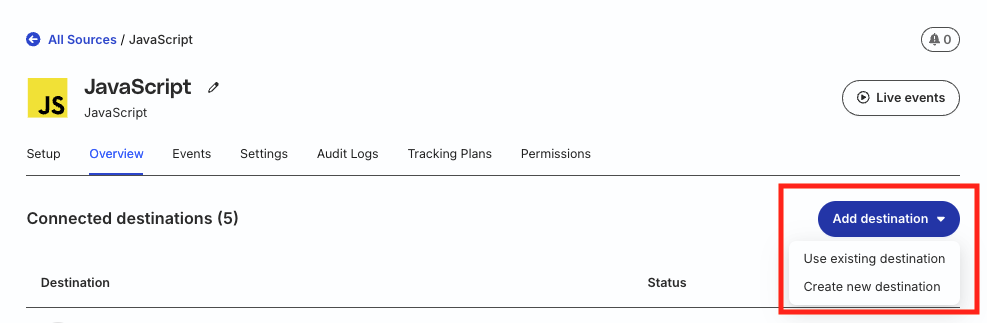
- Select PostScript from the list of destinations. Then, click Continue.
Connection settings
| Setting | Description |
|---|---|
| Name | Assign a name to uniquely identify the destination in RudderStack. |
| API key Required | Your PostScript API key used for authentication. |
Note that:
Your PostScript API key must have the following permissions:
- Subscriber management: Create and update subscriber profiles
- Custom events: Send behavioral events for automation triggers
Make sure to secure your API key — anyone with access to this key can modify your PostScript subscribers and send events.
Configuration settings
| Setting | Description |
|---|---|
| Consent management settings | Configure the consent management settings for the specified source by choosing the Consent management provider from the dropdown and entering the relevant consent category IDs. See Consent Management in RudderStack for more information on this feature. |
When consent management is enabled, RudderStack only sends events to PostScript when the user has provided appropriate consent.
Next steps
After setting up your PostScript destination:
- See the PostScript Cloud Mode Integration guide to understand how RudderStack maps and sends events to PostScript.
- Send test events to verify your setup is working correctly
- Create SMS flows in PostScript that trigger based on the events you’re sending
FAQ
Can I use PostScript with mobile SDKs?
Yes, PostScript works with all RudderStack SDKs through cloud mode. Events from mobile, web, and server sources are sent server-to-server to PostScript.
How do I handle subscriber consent?
Use RudderStack’s consent management features with OneTrust or Ketch to ensure you only send events for users who have provided appropriate consent.
Where can I find my PostScript API key?
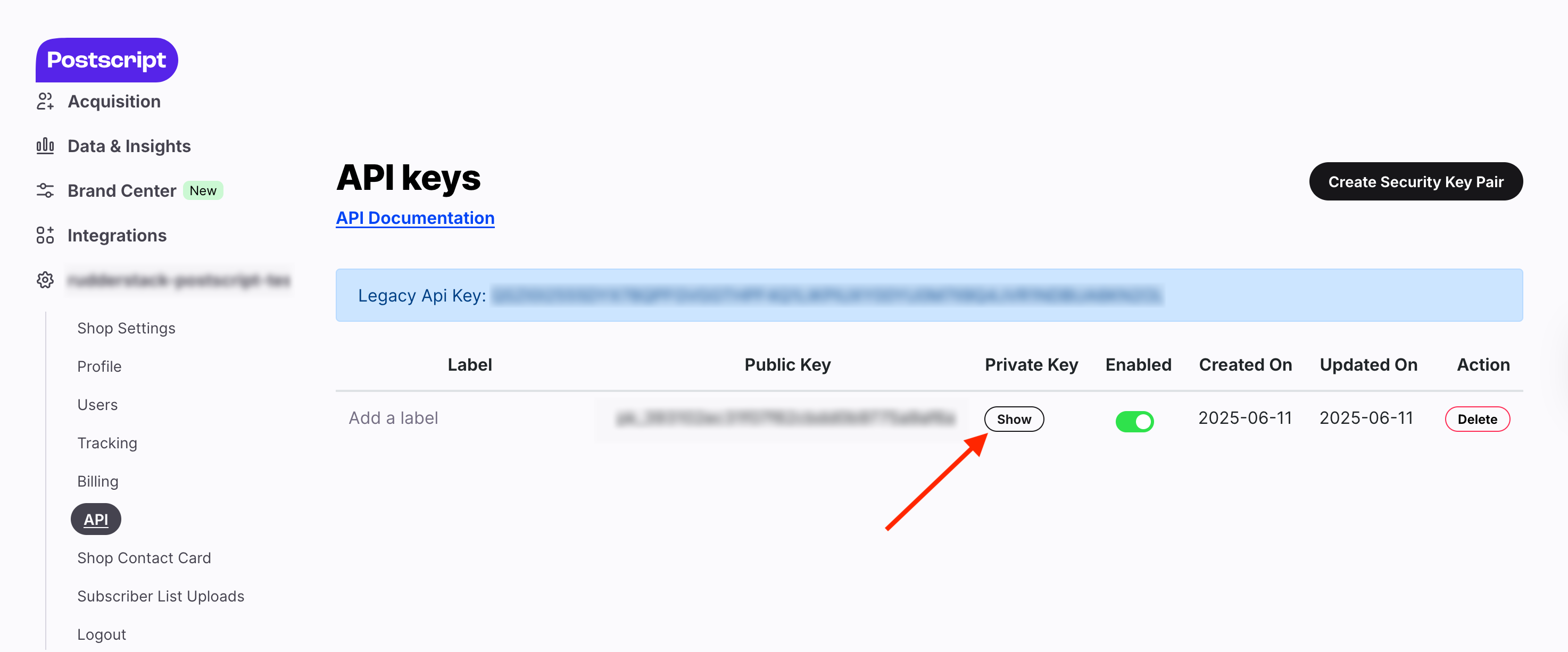
- Log in to your PostScript dashboard.
- In your project, navigate to API.
- Click Show under Private Key to get your API key.
What permissions are required for my PostScript API key?
Your PostScript API key needs permissions for:
- Subscriber management (create/update subscribers)
- Custom events (send behavioral events)
