Marketo Lead Import
3 minute read
Marketo is a leading marketing automation platform. It lets you identify the right audiences and deliver enhanced user experiences through effective marketing campaigns and behavioral tracking.
RudderStack supports Marketo Lead Import as a destination to which you can send large amounts of lead records asynchronously via Marketo’s bulk API.
Find the open source transformer code for this destination in the GitHub repository.
Connection compatibility
| Destination Information | |||
|---|---|---|---|
| |||


Get started
Once you have confirmed that the source platform supports sending events to Marketo Lead Import, follow these steps:
- From your RudderStack dashboard, add the source. Then, from the list of destinations, select Marketo Lead Import.
- Assign a name to your destination and then click Next.
Connection settings
To successfully configure Marketo Lead Import as a destination, you will need to configure the following settings:
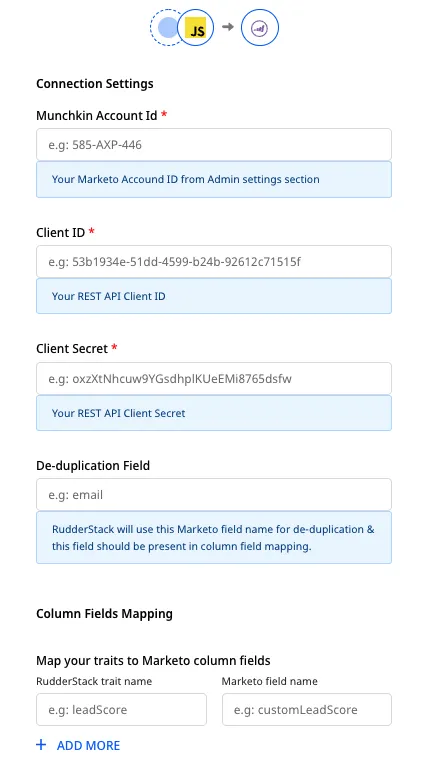
- Munchkin Account ID: Enter your Munchkin ID, which is a unique identifier for your Marketo instance. To obtain this ID, log into your Marketo instance and navigate to the Admin section. In the left menu, go to Integration > Munchkin. Your Munchkin Account ID will be listed in the Tracking Code section on the main screen.
For more information on finding your Munchkin Account ID, refer to the Marketo knowledge base.
- Client ID: To get your Client ID, go to the the Admin section of your Marketo instance. In the left menu, go to Integration > LaunchPoint. Finally, select the API service and click View Details to get your client ID.
For more information on finding your Client ID, refer to the Marketo knowledge base.
- Client Secret: You can find your Marketo client secret next to the Client ID obtained in the previous step.
- De-duplication Field: Marketo uses this field to de-duplicate user information. Make sure it is also present in the Column Fields Mapping setting below.
This field should be present in all events sent to Marketo Lead Import for proper de-duplication.
While calling the Bulk Lead Import API, RudderStack uses this field for lookup. Marketo then uses it to de-duplicate user information. Generally,
- Column Fields Mapping: This option lets you map your incoming events’ traits to the Leads table columns’ API names.
For example, to send the data from the event traits firstName and email to the Marketo columns with the API names name and Email, set the mapping as shown:
| RudderStack traits | Marketo API name |
|---|---|
firstName | name |
email | Email |
You can find your columns’ API names by following the Marketo documentation.
Identify
RudderStack supports onlyidentifyevent type for this destination.
The identify call lets you identify a visiting user and associate them to their actions. It also lets you record the traits about them like their name, email address, etc.
A sample identify call is as shown:
rudderanalytics.identify("name123", {
  name: "Name Surname",
  firstName: "Name",
  lastName: "Surname",
  email: "name@surname.com",
  createdAt: "Thu Mar 24 2020 17:46:45 GMT+0000 (UTC)",
});
The corresponding mapping to the Marketo traits for the above event is as shown:
| Marketo field name | Traits |
|---|---|
name | firstName |
Email | email |
birthday | birthday |
phone | phone_number |
timestamp | createdAt |
RudderStack then sends the following values to Marketo:
Name, name@surname.com, , , Thu Mar 24 2020 17:46:45 GMT+0000 (UTC)