Mailmodo Destination
3 minute read
Mailmodo is an interactive email marketing tool. It provides several useful features like sending transactional campaigns, email automation, and drip emails with customer journeys, WYSIWYG email editor, and many other tool integrations.
RudderStack also supports Mailmodo as a data source. For more information, refer to the RudderStack Connection Modes.
Connection compatibility
| Destination Information | |||
|---|---|---|---|
| |||


Get started
Once you have confirmed that the source platform supports sending events to Mailmodo, follow these steps:
- From your RudderStack dashboard, add a source. Then, from the list of destinations, select Mailmodo.
- Assign a name to the destination and click Continue.
Connection settings
To successfully configure Mailmodo as a destination, you will need to configure the following settings:
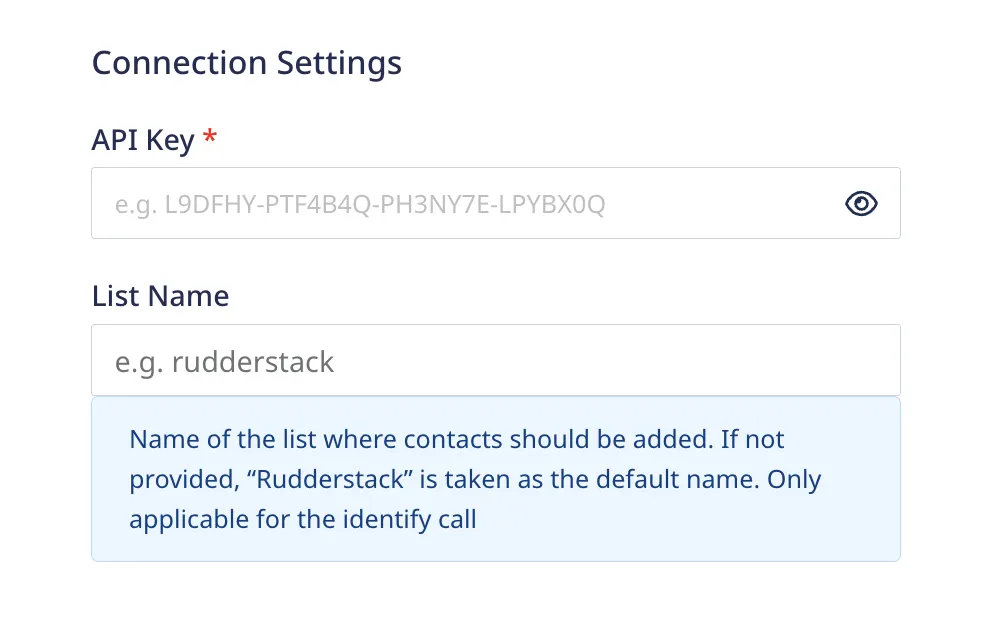
- API Key: Enter your Mailmodo API key.
For more information on obtaining your Mailmodo API key, refer to the FAQ section below.
- List Name: This field is only applicable for the
identifycall. Enter the name of the Mailmodo list where the contacts should be added. If not provided,RudderStackis taken as the default list name.
Identify
You can use the identify call to add contacts to your Mailmodo list. If a contact already exists, RudderStack updates the contact details.
You cannot add more than 100 contacts in a singleidentifycall.
A sample identify call is shown below:
{
  "userId": "1hKOmRA4el9Z",
  "anonymousId": "78c53c15-32a1-4b65-adac-bec2d7bb8",
  "context": {
    "traits": {
      "trait1": "new-val"
    },
    "ip": "14.5.67.21",
    "library": {
      "name": "http"
    }
  },
  "traits": {
    "email": "alex@example.com",
    "name": "Alex Keener",
    "firstName": "Alex",
    "lastName": "Keener",
    "age": 40,
    "phone": "+1-202-555-0146",
    "lastClick": "2020-02-02T00:23:09.544Z",
    "lastOpen": "2020-02-02T00:23:09.544Z"
  },
  "timestamp": "2020-02-02T00:23:09.544Z"
}
Supported mappings
The following table lists the mappings between the RudderStack and Mailmodo properties:
| RudderStack property | Mailmodo property | Presence |
|---|---|---|
traits.email/context.traits.email/properties.email | values.email | Required |
traits.firstName/context.traits.firstName | values.data.first_name | Optional |
traits.lastName/context.traits.lastName | values.data.last_name | Optional |
traits.name/context.traits.name | values.data.name | Optional |
traits.gender/context.traits.gender | values.data.gender | Optional |
traits.age/context.traits.age | values.data.age | Optional (Integer format) |
traits.birthday/context.traits.birthday | values.data.birthday | Optional (ISO format/UNIX timestamp) |
traits.phone/context.traits.phone | values.data.phone | Optional |
traits.city/context.traits.city/traits.address.city/context.traits.address.city | values.data.city | Optional |
traits.address/context.traits.address | address1 + address2 | Optional |
traits.state/context.traits.state/traits.address.state/context.traits.address.state | values.data.state | Optional |
traits.country/context.traits.country/traits.address.country/context.traits.address.country | values.data.country | Optional |
traits.zipcode/context.traits.zipcode/traits.postalcode/context.traits.postalcode/traits.postal_code/context.traits.postal_code | values.data.postal_code | Optional |
traits.designation/context.traits.designation | values.data.designation | Optional |
traits.company/context.traits.company | values.data.company | Optional |
traits.industry/context.traits.industry | values.data.industry | Optional |
traits.description/context.traits.description | values.data.description | Optional |
traits.anniversaryDate/context.traits.anniversaryDate/traits.anniversary_date/context.traits.anniversary_date | values.data.anniversary_date | Optional (ISO format/UNIX timestamp) |
RudderStack sends any property apart from the ones mentioned above as a custom property insidetraits/context.traitsand maps it tovalues.databefore sending it to Mailmodo.
Track
You can use the track call to add custom events for a contact.
A sample track call is shown below:
{
  "userId": "1hKOmRA4el9Z",
  "anonymousId": "78c53c15-32a1-4b65-adac-bec2d7bb8",
  "event": "Product Purchased",
  "properties": {
    "name": "Shirt",
    "email": "alex@example.com",
    "revenue": 4.99
  },
  "context": {
    "ip": "14.5.67.21",
    "library": {
      "name": "http"
    }
  },
  "timestamp": "2020-02-02T00:23:09.544Z"
}
Supported mappings
The following table lists the mappings between the RudderStack and Mailmodo properties:
| RudderStack property | Mailmodo property | Presence |
|---|---|---|
event | event_name | Required |
traits.email/context.traits.email/properties.email | email | Required |
timestamp | ts | Optional (UNIX epoch in seconds) |
properties | event_properties | Optional |
FAQ
Where can I find the Mailmodo API key?
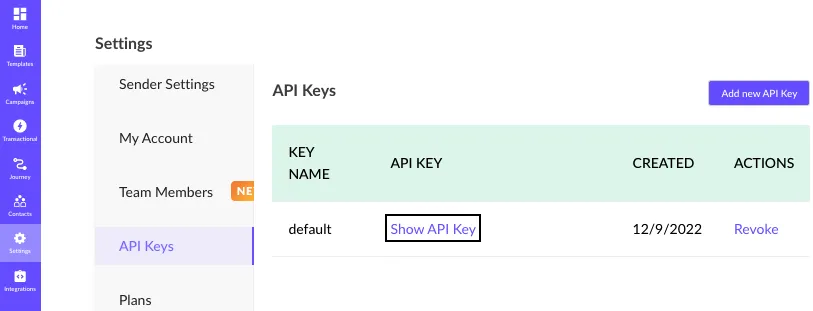
To obtain your Mailmodo API key, follow these steps:
- Log into your Mailmodo dashboard.
- Go to Settings > API Keys as shown: